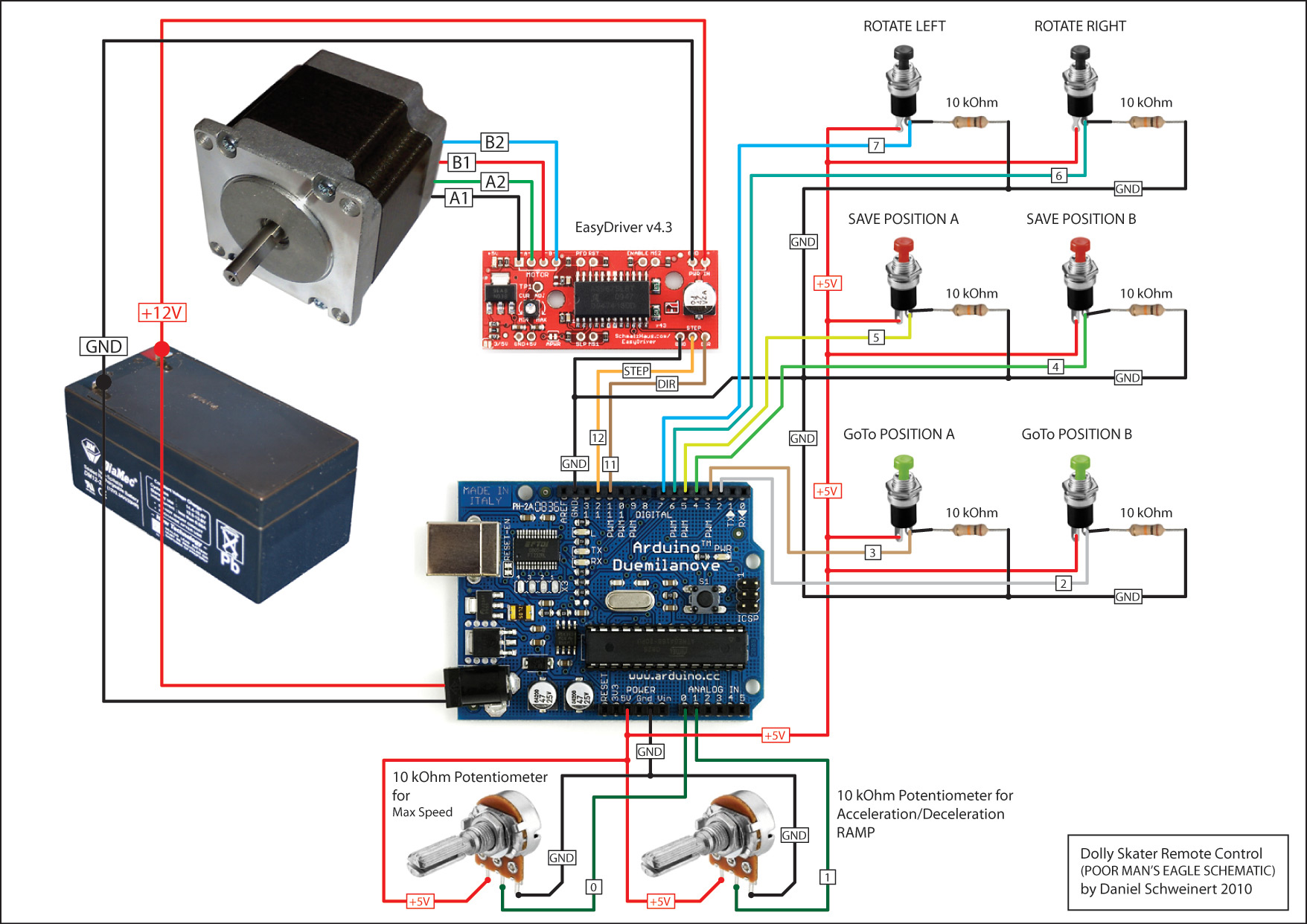
Potentiometer value is updated only before pressing button gotoPositionAPin or gotoPositionBPin can't change value of speed and aceleration during go to position.
/*
 Stepper Motor Single Channel Manual Controller
 language: Wiring/Arduino

 This program drives a single bi-polar stepper motor using an EasyDriver
 stepper motor controller from SparkFun.
 It takes input from a set of switches and potentiometers.

 The goal is to create smooth motion of the steppper motor without having a
 PC attached to the Arduino.

 The motor moves 1600 steps in one rotation. (8th step microstepping on a 200 s/r motor)

 Created 08/18/2010
 by Brian Schmalz

 Version 0.2  01/30/2011  Added accel/decl
 Version 0.3  10/09/2011  Fixed two bugs found by Daniel Schweinert:
                           1) Speed Pot not working during Rotate Left or Rotate Right moves
                           2) When Goto A or Goto B is pressed after using Rotate Left or Right, motor moves in the
                           wrong directly for a little bit before moving in the right direction.
*/
#include <Adafruit_GFX.h>
#include <Adafruit_SSD1306.h>
#include <AccelStepper.h>

#define OLED_Address 0x3C
Adafruit_SSD1306 oled(1);

AccelStepper stepper1(1, 12, 11);

#define stepsPerRev      5000
#define stepPin          12
#define dirPin           11
#define ledPin           13
#define rotateLeftPin    7
#define rotateRightPin   6
#define savePositionAPin 5
#define savePositionBPin 4
#define gotoPositionAPin 3
#define gotoPositionBPin 2
#define maxSpeedPin      0
#define accelPin         1

// Set this to zero if you don't want debug messages printed
#define printDebug       1

// These are the constants that define the speed associated with the MaxSpeed pot
#define MAX_STEPS_PER_SECOND  1000    // At 200 s/r and 1/8th microstepping, this will be 333 rev/minute
#define MIN_STEPS_PER_SECOND  27      // At 200 steps/rev and 1/8th microstepping, this will be 1 rev/minute

// Change this value to scale the acceleration pot's scaling factor
#define ACCEL_RATIO           1

int buttonState = 0;
int stepNumber = 0;
int curSpeed = 100;
int dir = 0;
int maxSpeed = 0;
int accel = 0;
long savedPosA = 0;
long savedPosB = 0;

int loopCtr = 0;

float fMaxSpeed = 0.0;
float fStepsPerSecond = 0.0;

void setup()
{
  oled.begin(SSD1306_SWITCHCAPVCC, OLED_Address);
  pinMode(stepPin, OUTPUT);
  pinMode(dirPin, OUTPUT);
  pinMode(ledPin, OUTPUT);
  pinMode(rotateLeftPin, INPUT);
  pinMode(rotateRightPin, INPUT);
  pinMode(savePositionAPin, INPUT);
  pinMode(savePositionBPin, INPUT);
  pinMode(gotoPositionAPin, INPUT);
  pinMode(gotoPositionBPin, INPUT);

  if (printDebug)
  {
    // Initialize the Serial port
    Serial.begin(9600);
  }

  // blink the LED:
  blink(2);

  stepper1.setMaxSpeed(800.0);
  stepper1.setAcceleration(600.0);

  // Grab both speed and accel before we start
  maxSpeed = analogRead(maxSpeedPin);
  // Do the math to scale the 0-1023 value (maxSpeed) to
  // a range of MIN_STEPS_PER_SECOND to MAX_STEPS_PER_SECOND
  fMaxSpeed = maxSpeed / 1023.0;
  fStepsPerSecond = MIN_STEPS_PER_SECOND + (fMaxSpeed * (MAX_STEPS_PER_SECOND - MIN_STEPS_PER_SECOND));
  if (fStepsPerSecond > 1000)
  {
    fStepsPerSecond = 1000;
  }
  accel = analogRead(accelPin)/ACCEL_RATIO;
}

void loop()
{
  oled.clearDisplay();
  oled.setTextSize(1);             // Normal 1:1 pixel scale
  oled.setTextColor(WHITE);

  // First, we need to see if either rotate button is down. They always take precidence.
  if(digitalRead(rotateLeftPin))
  {
    stepper1.setSpeed(-fStepsPerSecond);
    while(digitalRead(rotateLeftPin))
    {
      CheckPots();
      stepper1.runSpeed();
      stepper1.setSpeed(-fStepsPerSecond);

    }
  }
  else if (digitalRead(rotateRightPin))
  {
    stepper1.setSpeed(fStepsPerSecond);
    while(digitalRead(rotateRightPin))
    {
      CheckPots();
      stepper1.runSpeed();
      stepper1.setSpeed(fStepsPerSecond);
    }
  }

  // Go see if we need to update our analog conversions
  CheckPots();

  // Check to see if user is trying to save position A or B
  if(digitalRead(savePositionAPin))
  {
    savedPosA = stepper1.currentPosition();
    if (printDebug)
    {
      oled.setCursor(1, 10);
      oled.print("Saved A at : ");
      oled.println(savedPosA);
      oled.display();

    }
    while(digitalRead(savePositionAPin));
  }
  if(digitalRead(savePositionBPin))
  {
    savedPosB = stepper1.currentPosition();
    if (printDebug)
    {
      oled.setCursor(10, 10);
      oled.print("Saved B at : ");
      oled.println(savedPosB);
      oled.display();
    }
    while(digitalRead(savePositionBPin));
  }

  // Check to see if the user wants to go to position A or B
  if (digitalRead(gotoPositionAPin))
  {
    if (printDebug)
    {
      // Yup, let's go to position A
      oled.setCursor(10, 0);
      oled.print("cur pos = ");
      oled.println(stepper1.currentPosition());
      oled.print("Going to A = ");
      oled.println(savedPosA);
      oled.print("Speed = ");
      oled.println(fStepsPerSecond);
      oled.print("Accel = ");
      oled.println(accel);
      oled.display();
    }

    stepper1.setAcceleration(0);
    stepper1.runToNewPosition(stepper1.currentPosition());

    stepper1.setMaxSpeed(fStepsPerSecond);
    stepper1.setAcceleration(accel);
    stepper1.runToNewPosition(savedPosA);

    if (printDebug)
    {
      oled.clearDisplay();
       oled.setTextSize(2);             // Normal 1:1 pixel scale
      oled.setTextColor(WHITE);
      oled.setCursor(10, 0);
      oled.print("new pos = ");
      oled.println(stepper1.currentPosition());
      oled.display();
    }
    while(digitalRead(gotoPositionAPin));
  }
  else if (digitalRead(gotoPositionBPin))
  {
    // Yup, let's go to position B
    if (printDebug)
    {
      oled.setCursor(0, 0);
      oled.print("cur pos = ");
      oled.println(stepper1.currentPosition());
      oled.print("Going to B = ");
      oled.println(savedPosB);
      oled.print("Speed = ");
      oled.println(fStepsPerSecond);
      oled.print("Accel = ");
      oled.println(accel);
      oled.display();
    }

    stepper1.setAcceleration(0);
    stepper1.runToNewPosition(stepper1.currentPosition());

    stepper1.setMaxSpeed(fStepsPerSecond);
    stepper1.setAcceleration(accel);
    stepper1.runToNewPosition(savedPosB);

    if (printDebug)
    {
      oled.clearDisplay();
      oled.setTextSize(2);             // Normal 1:1 pixel scale
      oled.setTextColor(WHITE);
      oled.setCursor(0, 0);
      oled.print("new pos = ");
      oled.println(stepper1.currentPosition());
      oled.display();
    }
    while(digitalRead(gotoPositionBPin));
  }
}

// Blink the reset LED:
void blink(int howManyTimes)
{
  int i;
  for (i=0; i < howManyTimes; i++)
  {
    digitalWrite(ledPin, HIGH);
    delay(200);
    digitalWrite(ledPin, LOW);
    delay(200);
  }
}

void CheckPots(void)
{
  loopCtr++;

  // Only read these once in a while because they take a LONG time
  if (loopCtr == 100)
  {
    maxSpeed = analogRead(maxSpeedPin);

    // Do the math to scale the 0-1023 value (maxSpeed) to
    // a range of MIN_STEPS_PER_SECOND to MAX_STEPS_PER_SECOND
    fMaxSpeed = maxSpeed / 1023.0;
    fStepsPerSecond = MIN_STEPS_PER_SECOND + (fMaxSpeed * (MAX_STEPS_PER_SECOND - MIN_STEPS_PER_SECOND));
    if (fStepsPerSecond > 1000)
    {
      fStepsPerSecond = 1000;
    }
  }

  // Read in the acceleration analog value
  // This needs to be scaled too, but to what?
  if (loopCtr >= 200)
  {
    accel = analogRead(accelPin)/ACCEL_RATIO;
    loopCtr = 0;
  }
}