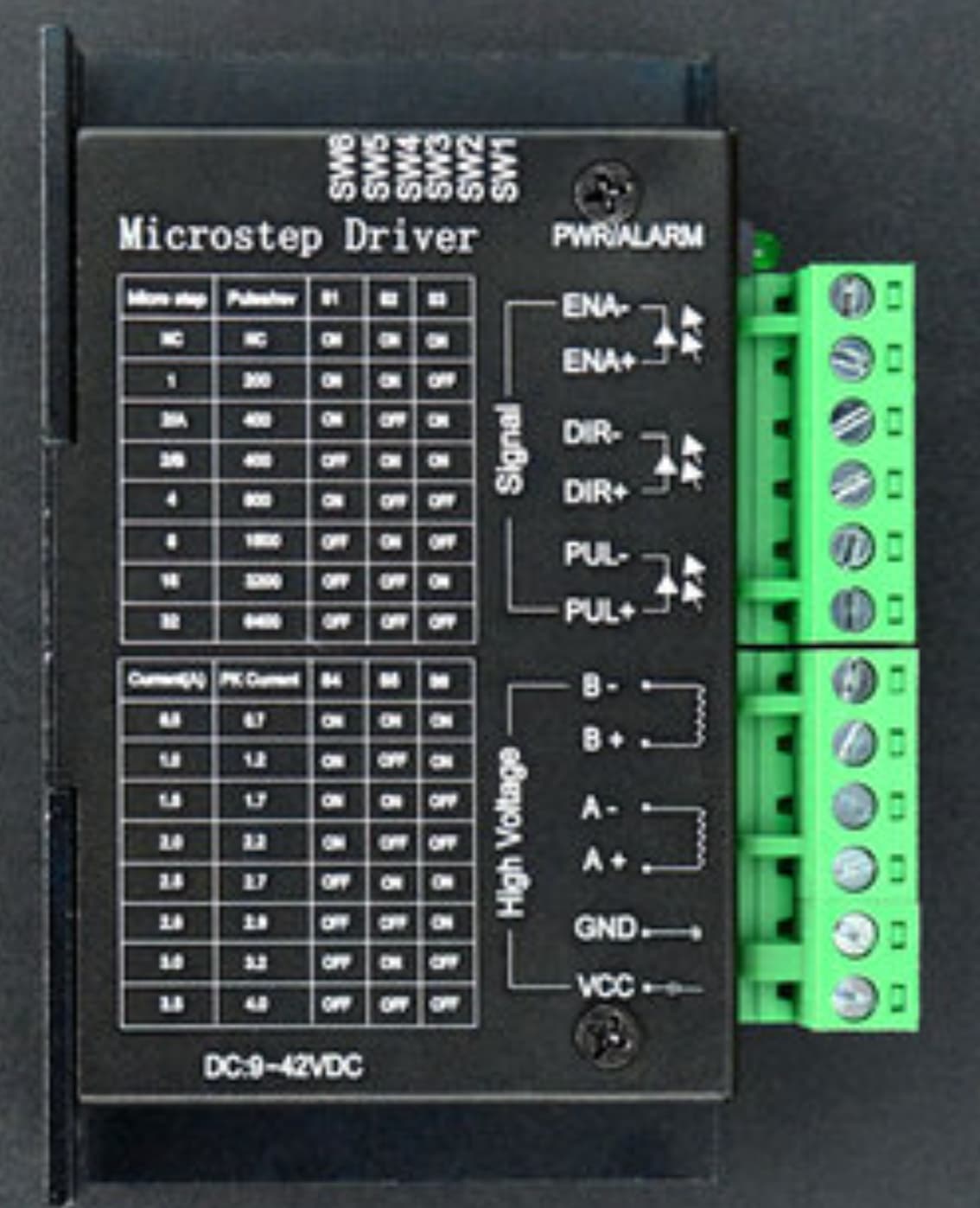
Then use AccelStepper::DRIVER!!!
Out!!!
Then use AccelStepper::DRIVER!!!
Out!!!
@m3vuv ,
Your two or more topics on the same or similar subject have been merged.
Please do not duplicate your questions as doing so wastes the time and effort of the volunteers trying to help you as they are then answering the same thing in different places.
Please create one topic only for your question and choose the forum category carefully. If you have multiple questions about the same project then please ask your questions in the one topic as the answers to one question provide useful context for the others, and also you won’t have to keep explaining your project repeatedly.
Repeated duplicate posting could result in a temporary or permanent ban from the forum.
Could you take a few moments to Learn How To Use The Forum
It will help you get the best out of the forum in the future.
Thank you.
Hi,i am running a nima23 bipolar motor using a tb6600 driver powered by a nano and running the bounce sketch but modded to include a speed control pot,my issue is that it moves fowards the correct number of steps then goes in reverse and back to the start position,Thats all fine but after tthe cycle is finished it takes about 30 ish seconds before it will repeat,is there any way to stop the delay between cycles so it moves back and fourth repeatedly without any pauses?.#include <AccelStepper.h>
// Define a stepper and the pins it will use
AccelStepper stepper(3, 6, 7); // mode, dir, pul
void setup()
{
// Change these to suit your stepper if you want
stepper.setMaxSpeed(16600);
stepper.setAcceleration(1450);
stepper.moveTo(100000);
}
void loop()
{
int speedVal = map(analogRead(A0),0,1023,10,10000);
stepper.setMaxSpeed(speedVal);
// If at the end of travel go to the other end
if (stepper.distanceToGo() == 0)
  stepper.moveTo(-stepper.currentPosition());

stepper.run();
}
I hope the code tags worked!.
Again creating a new topic about the same question!
And we told you already what is wrong, but you are ignoring any advices.
as per ushual here yet another reply that anwers nothing,if you told me what is wrong then do you mind repeating it as i must of missed it!,regards.
With the 3 in the accelstepper line, Accelstepper will generate a 3-phase signal on pins 6,7, and, because the third pin is unspecified, the default third pin '5' which, in your other thread, you were using as enable. Is anything connected to pin 5? If so, maybe putting a three-phase signal on the enable pin might be interfering with the normal operaration during parts of the cycle.
Your two or more topics on the same or similar subject have been merged.
Please do not duplicate your questions as doing so wastes the time and effort of the volunteers trying to help you as they are then answering the same thing in different places.
Please create one topic only for your question and choose the forum category carefully. If you have multiple questions about the same project then please ask your questions in the one topic as the answers to one question provide useful context for the others, and also you won’t have to keep explaining your project repeatedly.
Repeated duplicate posting could result in a temporary or permanent ban from the forum.
Could you take a few moments to Learn How To Use The Forum
It will help you get the best out of the forum in the future.
Thank you.
Stop creating new topics on the same subject or risk being suspended from the forum
You will get that every time you decide to not follow "How to get the best..." If you want help, present the required information.
Try to gather the information you need to respond to the questions you have been asked.
I find the best way to learn on my own is to use the Examples in the Library. I like to start with the most simple example and learn what it does. Then I read the .H and .CPP to see if I can do different things (different arguments, commands, settings). You will find learning on your own is much more productive than telling people to write your code and not ask you for information.
What is the best program to open/edit .h and .cpp files then?.
What does the mode setting do?,ie pin 3 .,are there other mode options,if yes please explain them ok.
When you use an #include file, for example:
#include <AccelStepper.h>
... search for the name of the library "AccelStepper.h" and go to the repository, for example:
https://github.com/waspinator/AccelStepper
When you are in the library's repository, you should see an examples folder, for example:
https://github.com/waspinator/AccelStepper/tree/master/examples
The folders inside the examples folder will be sketches that you can use for learning and testing.
Back in the home directory where you see the examples folder, you will also see a "source" folder labeled /src... for example...
https://github.com/waspinator/AccelStepper/tree/master/src
This is where you will see the .H and .CPP (and maybe .HPP) that are the files used to make your sketch work with your hardware.
There is no need to modify the .H or .CPP, but you can use the examples' .INO files in any way you need to learn about the hardware and the software.
that is not what i asked tho is it,i asked what programs are used to open/edit .h and .cpp files!.
It is in the docs:
or
interface Number of pins to interface to. Integer values are supported, but it is preferred to use the MotorInterfaceType symbolic names. AccelStepper::DRIVER (1) means a stepper driver (with Step and Direction pins). If an enable line is also needed, call setEnablePin() after construction. You may also invert the pins using setPinsInverted(). Caution: DRIVER implements a blocking delay of minPulseWidth microseconds (default 1us) for each step. You can change this with setMinPulseWidth(). AccelStepper::FULL2WIRE (2) means a 2 wire stepper (2 pins required). AccelStepper::FULL3WIRE (3) means a 3 wire stepper, such as HDD spindle (3 pins required). AccelStepper::FULL4WIRE (4) means a 4 wire stepper (4 pins required). AccelStepper::HALF3WIRE (6) means a 3 wire half stepper, such as HDD spindle (3 pins required) AccelStepper::HALF4WIRE (8) means a 4 wire half stepper (4 pins required) Defaults to AccelStepper::FULL4WIRE (4) pins.
Use AccelStepper::DRIVER for your driver with STEP+DIRECTION pins (or bypass that enum and use 1 for your driver has one pin for STEP pulses.)
so do i need
FULL2WIRE |
2 wire stepper, 2 motor pins required
|
- | - |
if so what lines do i need to alter in the bounce example?.
You do not have the capacity.
Never, ever, will you dictate what I do. Got that?
ok then what needs pins etc in bounce to make it work as intended with a tb6600?,lots of noise being made but no usefull answers as normal!.
No, you aren't driving two stepper coils with the pins, you are driving 1 TB6600 stepper driver.
Instead of
use:
AccelStepper stepper(AccelStepper::DRIVER, stepPin, directionPin);
I think you may also have pulse and step backwards. Do you have a schematic or some pictures?
Hook your STEP pin to TB6600:PUL+ and DIR to TB6600:DIR+
too save all this grief,i have attached the bounce file i am using,can someone mod it for the tb6600 and post it,this will save everyone time as i dont know what i am doing.
bounce_modded_387.ino (576 Bytes)
The Bounce simulation with the A4988 STEP/DIR driver works:
If I feed it a "mode 3" and hook up pin 4 to EN, then thengs get crazy, exactly as the pause you describe in:
I think you were also misled by the dronebots text you quoted:
...in that it has identifies the direction and pulse pins backwards. It would be better as:
AccelStepper stepper(1,7,6) // AccelStepper:DRIVER, PUL, DIR