Newbie - Building a Surf Comp Timer. Does my Code look ok?

Hi Larry,

The hooter is a 12VDC air Horn 15A, the mini relay in the schematic will act as an interposing relay. I will be using a 12VDC 20A automative relay for the Air Horn. the LED lights are 12VDC 3W 140mA .

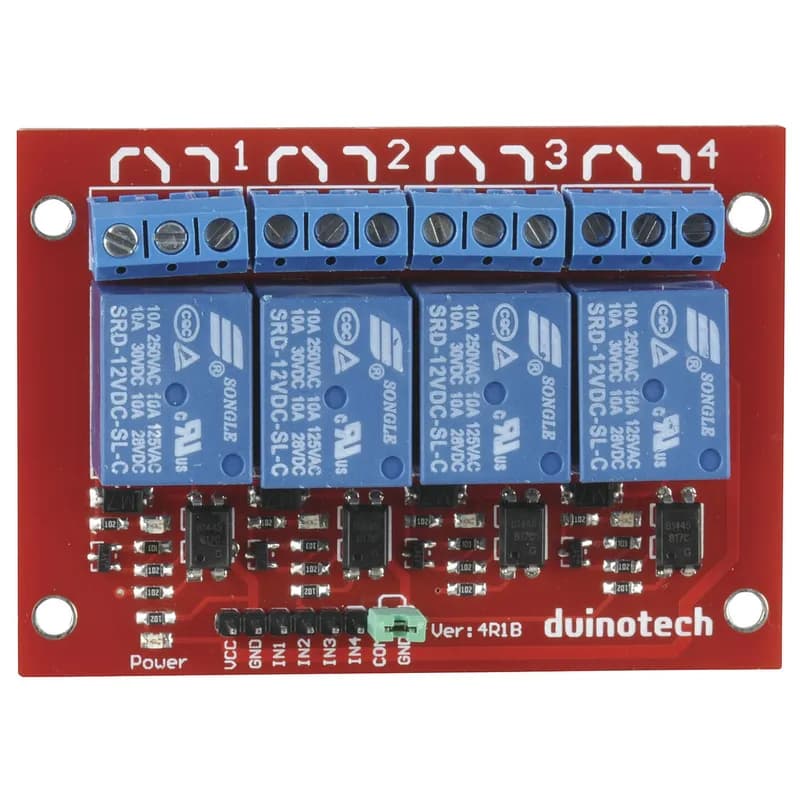
image of the relay board i am using below.
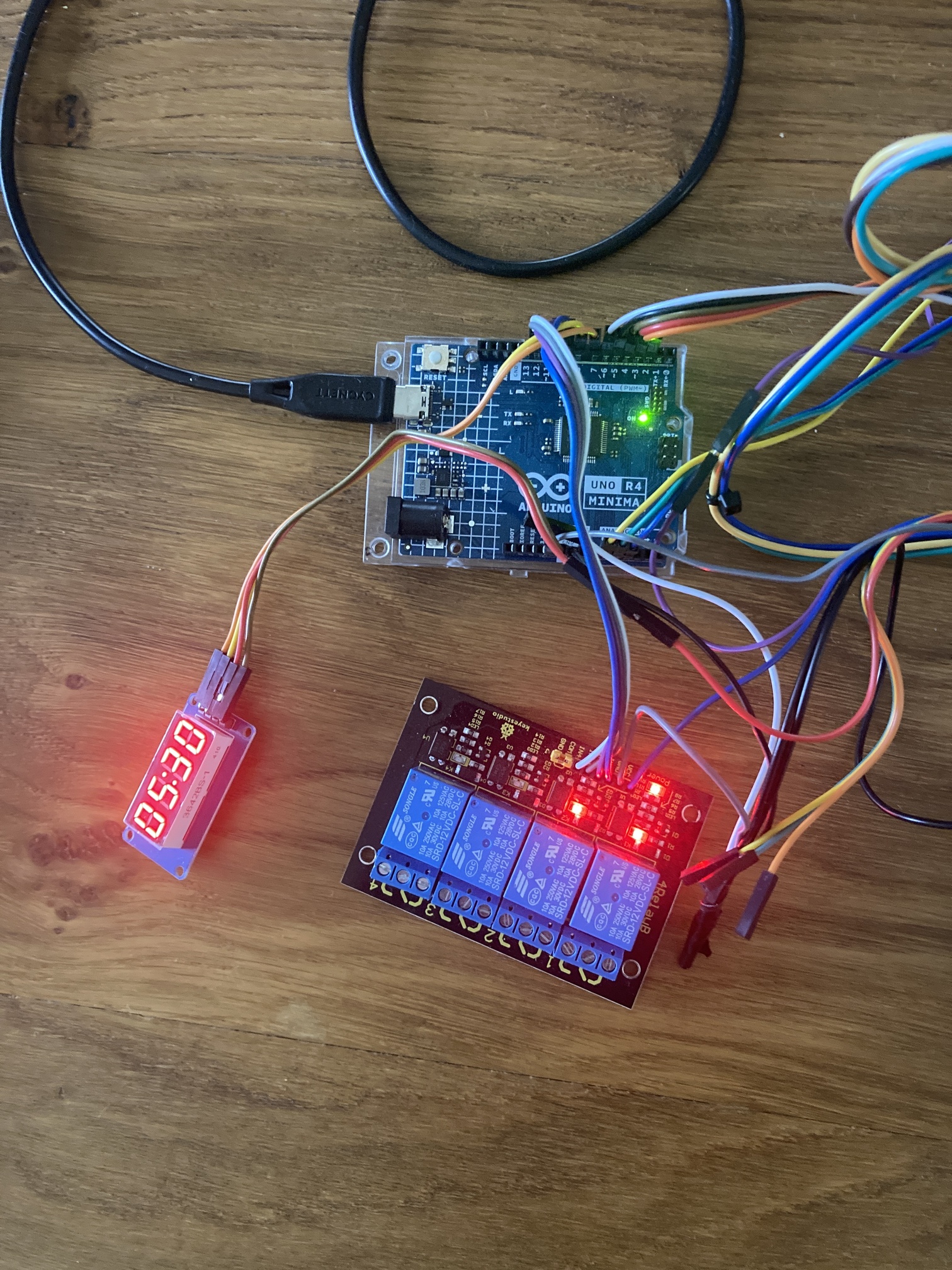
Also is a picture of my crude test bench with arduino wiring. Note, the black item at the top left is my circuit board i made with the pull up resistors.

  • Lets see the bottom of the relay module too.

  • Is this schematic close to what you envision ?

I will take a picture of the bottom of the relay board tonight and post it up.

this schematic is correct, however the 12V battery will be the common power source for both Arduino and the Hooter / lights. I planned to install 3A resettable fuse for the 12V to protect the Arduino.

what you have produced is what i had sketched in my head.
you have literally read my mind. Hats off.
you are one very clever person. thankyou for your time, patience and assistance.

  • Always start a project by creating a schematic.

  • Go back over the last few postings and answer the questions and try the examples.

Hi Larry,
I just got home and uploaded the code.

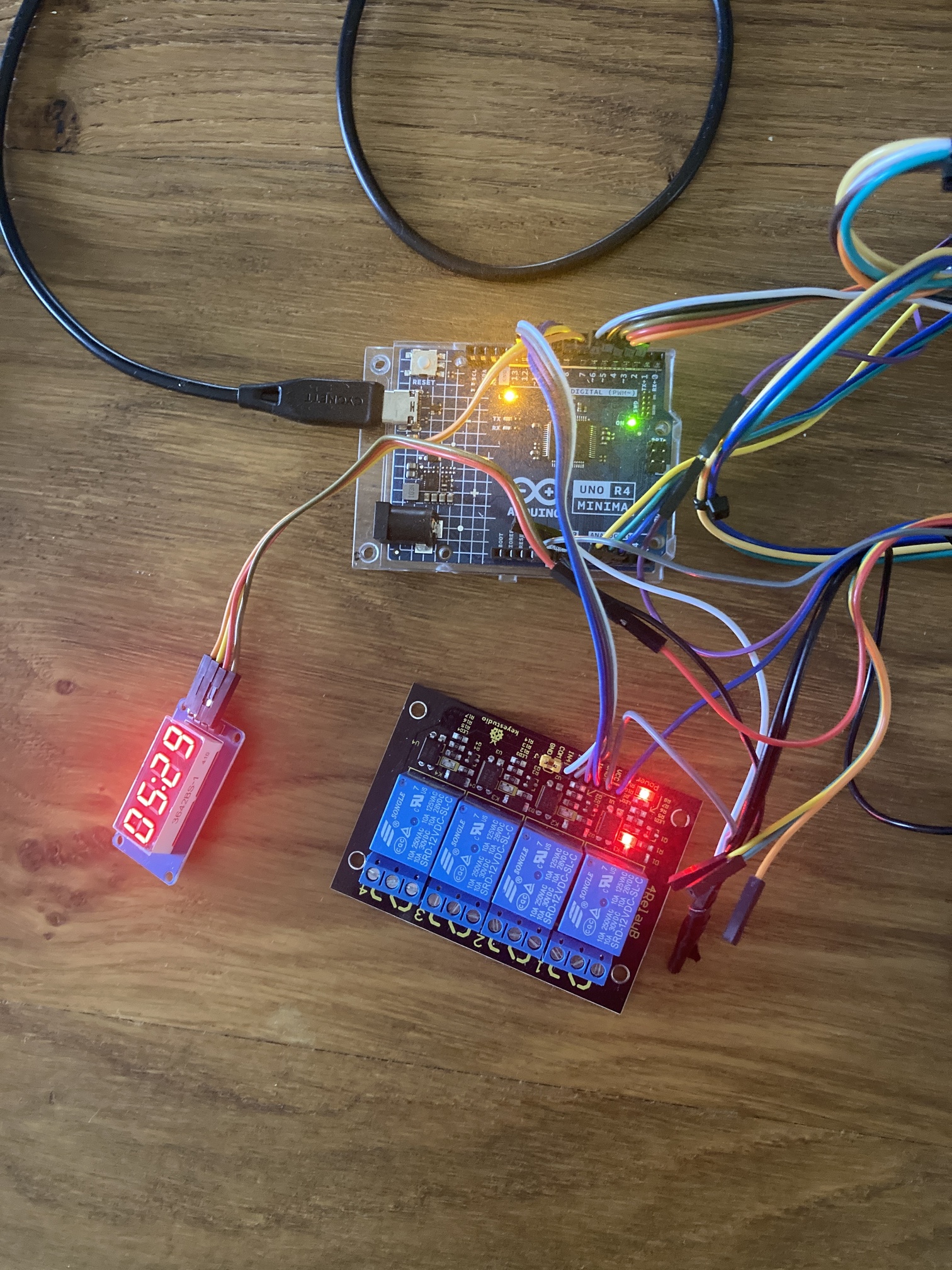
The tm1637 counts up in mm:as
The relay module lights go in a sequence and off in a sequence.
The heart beat does as you advised.

Hopefully these photos come up and pictures of the relay board


  • Good

  • I dislike Black PCBs

  • Since the relay module is working, we will not need to use driver transistors between the Arduino and the relay module.

  • When you write sketches, always write them in a non-blocking fashion.
    i.e. we never use delay( ) as it stops normal program execution for the delay period.
    When delay( ) is used the sketch becomes unresponsive and appears to stutter.
    Suggest you not use while( ) either unless you are sure it will quickly execute.

  • This sketch uses the millis( ) / micros( ) functions to create non-blocking delays or TIMERs.
    We call this technique Blink Without Delay.

  • This sketch goes one step further, we create a structure makeTIMER to automate TIMER creation.

  • A structure or a class is used to define a object.
    Objects contain built-in variables and functions.

  • We will not cover writing of a structure or class, however, we will use them to create TIMERs for our sketches.

  • In this sketch we can define all the TIMERs we need as seen in the example below.
    Below we make a TIMER called heartbeatTIMER.
    - It times in milliseconds
    - It expires in 500ms
    - At power up time it is ENABLED
    - It will reset and run again and again.

//========================
makeTIMER heartbeatTIMER =
{
  MILLIS, 0, 500ul, ENABLED, YES       //.TimerType, .Time, .Interval, .TimerFlag, .Restart
};
  • We have access to several TIMER functions.
    In our makeTIMER structure, where XXX is the name of our TIMER, we can use:
XXX.checkTIMER();             Checks to see if the TIMER has expired
XXX.enableRestartTIMER();     Enables and restarts our TIMER 
XXX.disableTIMER();           Disables our TIMER
XXX.expireTimer();            Makes our TIMER expire before it should
XXX.setInterval(????);        Allows us to set a new TIMER interval
  • See the code section below.
    - Here we ask the question “has this TIMER expired”.
    - If it has expired, we toggle the heartbeat LED, then continue to execute our code.
    - When the TIMER does expire, the TIMER automatically restarts as that’s the way we defined it to operate.
    Hence the operation repeats again and again.
    - If the TIMER has not expired, we do not toggle the LED.
//========================================================================  T I M E R  heartbeatLED
  //is it time to toggle the heartbeat LED ?
  if (heartbeatTIMER.checkTIMER() == EXPIRED)
  {
    //toggle the heartbeat LED
    digitalWrite(heartbeatLED, digitalRead(heartbeatLED) == HIGH ? LOW : HIGH);
  }
  • In the sketch below, modify the heartbeat TIMER definition so the heartbeat LED toggles every 1 second.

  • Does the heartbeat LED now toggle every 1 second ?

  • As we progress, ask questions about things you do not understand.

//
//================================================^================================================
//                            S u r f   C o m p e t i t i o n   T i m e r
//
//  https://forum.arduino.cc/t/newbie-building-a-surf-comp-timer-does-my-code-look-ok/1358758/1
//
//  Name
//
//  Version    YY/MM/DD    Comments
//  =======    ========    ========================================================================
//  1.00       25/03/01    Running code
//
//
//
//
//  For wiring connections, see the     T i m e r S u r f      S c h e m a t i c
//
//

// Sketch Notes:
// Surf Competition Timer
// - 2 rotary switches control the timer function (off/Run/Pause) and (timer set 20,25,30,35,40 minutes)
// - when timer starts, hooter sounds for 3 seconds, green light ON and timer counts down (no delays)
// - when timer reaches 5 minute mark - Green light OFF and Amber light ON
// - when timer reaches 0 - amber light OFF, red light ON, hooter sounds (high 3 seconds, low 1 second, high 3 Seconds, Low)
// - when timer reaches 0 a 30 second reset time starts ( time frame between Heats)
//   a 30 second countdown is seen on the TM1637
// - when 30 second reset timer reaches 0, red light OFF, the main timer restarts - hooter, green light etc.
//
// - once timers starts the selected time can not change unless timer is turned Off/Reset.
// - if pause is selected - count down time paused, hooter sounds twice and red light on.
// - if un paused, timer resumes from current state, red light goes OFF, hooter sounds for 3 seconds


#include <TM1637Display.h>
//TM1637 Notes:
//reference: https://github.com/avishorp/TM1637/blob/master/TM1637Display.h
// showNumberDecEx(int num, uint8_t dots = 0, bool leading_zero = false, uint8_t length = 4, uint8_t pos = 0);


//================================================
#define colon              0b01000000

#define LEDon              HIGH   //PIN---[220R]---A[LED]K---GND
#define LEDoff             LOW

#define PRESSED            LOW    //+5V---[Internal 50k]---PIN---[Switch]---GND
#define RELEASED           HIGH

#define CLOSED             LOW    //+5V---[Internal 50k]---PIN---[Switch]---GND
#define OPENED             HIGH

#define relayON            HIGH
#define relayOFF           LOW

#define ENABLED            true
#define DISABLED           false

#define MAXIMUM            180
#define MINIMUM            0


//                          millis() / micros()   B a s e d   T I M E R S
//================================================^================================================
//To keep the sketch tidy, you can put this structure in a different tab in the IDE
//
//These TIMER objects are non-blocking
struct makeTIMER
{
#define MILLIS             0
#define MICROS             1

#define ENABLED            true
#define DISABLED           false

#define YES                true
#define NO                 false

#define STILLtiming        0
#define EXPIRED            1
#define TIMERdisabled      2

  //these are the bare minimum "members" needed when defining a TIMER
  byte                     TimerType;      //what kind of TIMER is this? MILLIS/MICROS
  unsigned long            Time;           //when the TIMER started
  unsigned long            Interval;       //delay time which we are looking for
  bool                     TimerFlag;      //is the TIMER enabled ? ENABLED/DISABLED
  bool                     Restart;        //do we restart this TIMER   ? YES/NO

  //================================================
  //condition returned: STILLtiming (0), EXPIRED (1) or TIMERdisabled (2)
  //function to check the state of our TIMER  ex: if(myTimer.checkTIMER() == EXPIRED);
  byte checkTIMER()
  {
    //========================
    //is this TIMER enabled ?
    if (TimerFlag == ENABLED)
    {
      //========================
      //has this TIMER expired ?
      if (getTime() - Time >= Interval)
      {
        //========================
        //should this TIMER restart again?
        if (Restart == YES)
        {
          //restart this TIMER
          Time = getTime();
        }

        //this TIMER has expired
        return EXPIRED;
      }

      //========================
      else
      {
        //this TIMER has not expired
        return STILLtiming;
      }

    } //END of   if (TimerFlag == ENABLED)

    //========================
    else
    {
      //this TIMER is disabled
      return TIMERdisabled;
    }

  } //END of   checkTime()

  //================================================
  //function to enable and restart this TIMER  ex: myTimer.enableRestartTIMER();
  void enableRestartTIMER()
  {
    TimerFlag = ENABLED;

    //restart this TIMER
    Time = getTime();

  } //END of   enableRestartTIMER()

  //================================================
  //function to disable this TIMER  ex: myTimer.disableTIMER();
  void disableTIMER()
  {
    TimerFlag = DISABLED;

  } //END of    disableTIMER()

  //================================================
  //function to restart this TIMER  ex: myTimer.restartTIMER();
  void restartTIMER()
  {
    Time = getTime();

  } //END of    restartTIMER()

  //================================================
  //function to force this TIMER to expire ex: myTimer.expireTimer();
  void expireTimer()
  {
    //force this TIMER to expire
    Time = getTime() - Interval;

  } //END of   expireTimer()

  //================================================
  //function to set the Interval for this TIMER ex: myTimer.setInterval(100);
  void setInterval(unsigned long value)
  {
    //set the Interval
    Interval = value;

  } //END of   setInterval()

  //================================================
  //function to return the current time
  unsigned long getTime()
  {
    //return the time             i.e. millis() or micros()
    //========================
    if (TimerType == MILLIS)
    {
      return millis();
    }

    //========================
    else
    {
      return micros();
    }

  } //END of   getTime()

}; //END of   struct makeTIMER


//                             D e f i n e   a l l   o u r   T I M E R S
//================================================^================================================
/*example
  //========================
  makeTIMER toggleLED =
  {
     MILLIS/MICROS, 0, 500ul, ENABLED/DISABLED, YES/NO  //.TimerType, .Time, .Interval, .TimerFlag, .Restart
  };

  TIMER functions we can access:
  toggleLED.checkTIMER();
  toggleLED.enableRestartTIMER();
  toggleLED.disableTIMER();
  toggleLED.expireTimer();
  toggleLED.setInterval(100ul);
*/

//========================
makeTIMER heartbeatTIMER =
{
  MILLIS, 0, 500ul, ENABLED, YES       //.TimerType, .Time, .Interval, .TimerFlag, .Restart
};

//========================
makeTIMER switchesTIMER =
{
  MILLIS, 0, 50ul, ENABLED, YES        //.TimerType, .Time, .Interval, .TimerFlag, .Restart
};

//========================
makeTIMER machineTIMER =
{
  MICROS, 0, 1000ul, ENABLED, YES      //.TimerType, .Time, .Interval, .TimerFlag, .Restart
};

//========================
makeTIMER countDownTIMER =
{
  MILLIS, 0, 1000ul, DISABLED, YES      //.TimerType, .Time, .Interval, .TimerFlag, .Restart
};

//========================
makeTIMER hooterTIMER =
{
  MILLIS, 0, 1000ul, DISABLED, YES     //.TimerType, .Time, .Interval, .TimerFlag, .Restart
};

//========================
makeTIMER heatTIMER =
{
  MILLIS, 0, 1000ul, DISABLED, YES     //.TimerType, .Time, .Interval, .TimerFlag, .Restart
};


//                                   S t a t e   M a c h i n e s
//================================================^================================================
//

//========================
//states in our countdown machine
enum STATES : byte
{
  POWERUP, RESET, START, RUNNING, RESTARTtiming, HOOTERsequence, WAITING, PAUSED, FINISHED
};
STATES mState = POWERUP;  //mState is machine state

//========================
//states in our hooter sequence machine
enum {sequenceStart = 0, sequence1, sequence2, sequence3, sequence4, sequenceTiming};

byte sequenceState                = 0;
byte lastSequenceState            = 0;


//                              G P I O s   A n d   V a r i a b l e s
//================================================^================================================
//

//GPIOs
//================================================
//
//5 position switch
const byte switch1                = 2;
const byte switch2                = 3;
const byte switch3                = 4;
const byte switch4                = 5;
const byte switch5                = 6;

//TM1637 display module
const byte CLK_PIN                = 7;
const byte DIO_PIN                = 8;

//relays
const byte RedLight               = 9;
const byte AmberLight             = 10;
const byte GreenLight             = 11;
const byte Hooter                 = 12;

const byte heartbeatLED           = 13;

//3 position switch
const byte RESET_PIN              = 14;  //A0
const byte START_PIN              = 15;  //A1
const byte PAUSE_PIN              = 16;  //A2

//create display object
TM1637Display display(CLK_PIN, DIO_PIN);


//VARIABLES
//================================================
//
bool restartFlag                  = DISABLED; //when ENABLED, the next "Heat" will start in 30 seconds

//const byte Time1                = 20 * 60;  //seconds
const unsigned int Time1          = 40;       //40 seconds for testing                                 <---------------<<<<<<
const unsigned int Time2          = 25 * 60;  //seconds
const unsigned int Time3          = 30 * 60;  //seconds
const unsigned int Time4          = 35 * 60;  //seconds
const unsigned int Time5          = 40 * 60;  //seconds

unsigned int  timeSelected;

byte lastSwitch1                  = OPENED;
byte lastSwitch2                  = OPENED;
byte lastSwitch3                  = OPENED;
byte lastSwitch4                  = OPENED;
byte lastSwitch5                  = OPENED;

byte lastRESET_PIN                = OPENED;
byte lastSTART_PIN                = OPENED;
byte lastPAUSE_PIN                = OPENED;

//timing stuff
const unsigned int GreenOffTime   = 5 * 60;    //seconds
const unsigned int nextHeatTime   = 30;        //seconds

const unsigned int hooterOnTime   = 3 * 1000;  //3000 milliseconds

unsigned int heatRestartCounter;
unsigned int heatCounter ;


//                                           s e t u p ( )
//================================================^================================================
//
void setup()
{
  Serial.begin(115200);
  //wait for the serial
  while (!Serial);

  //========================
  //internal pull-ups are turned on
  pinMode(switch1, INPUT_PULLUP);
  pinMode(switch2, INPUT_PULLUP);
  pinMode(switch3, INPUT_PULLUP);
  pinMode(switch4, INPUT_PULLUP);
  pinMode(switch5, INPUT_PULLUP);

  pinMode(RESET_PIN, INPUT_PULLUP);
  pinMode(START_PIN, INPUT_PULLUP);
  pinMode(PAUSE_PIN, INPUT_PULLUP);

  //========================
  //relays are off at power up time
  digitalWrite(RedLight, relayOFF);
  pinMode(RedLight, OUTPUT);

  digitalWrite(AmberLight, relayOFF);
  pinMode(AmberLight, OUTPUT);

  digitalWrite(GreenLight, relayOFF);
  pinMode(GreenLight, OUTPUT);

  digitalWrite(Hooter, relayOFF);
  pinMode(Hooter, OUTPUT);

  digitalWrite(heartbeatLED, LEDoff);
  pinMode(heartbeatLED, OUTPUT);

  //========================
  display.setBrightness(7);         //display brightness (0-7)
  display.clear();
  updateTM1637(0);

} //END of   setup()


//                                            l o o p ( )
//================================================^================================================
//
void loop()
{
  //========================================================================  T I M E R  heartbeatLED
  //is it time to toggle the heartbeat LED ?
  if (heartbeatTIMER.checkTIMER() == EXPIRED)
  {
    //toggle the heartbeat LED
    digitalWrite(heartbeatLED, digitalRead(heartbeatLED) == HIGH ? LOW : HIGH);
  }

  //========================================================================  T I M E R  switches
  //is it time to check our switches ?
  if (switchesTIMER.checkTIMER() == EXPIRED)
  {
    checkSwitches();
  }

  //========================================================================  T I M E R  machine
  //is it time to service our State Machine ?
  if (machineTIMER.checkTIMER() == EXPIRED)
  {
    checkMachine();
  }


  //================================================
  //other non blocking code goes here
  //================================================


} //END of   loop()


//                                    c h e c k M a c h i n e ( )
//================================================^================================================
//
void checkMachine()
{

} //END of   checkMachine()


//                                   c h e c k S w i t c h e s ( )
//================================================^================================================
//
void checkSwitches()
{

} //END of   checkSwitches()


//                                    u p d a t e T M 1 6 3 7 ( )
//================================================^================================================
//
void updateTM1637(unsigned int counter)
{
  unsigned int minutes = counter / 60;
  unsigned int seconds = counter % 60;
  unsigned int num = minutes * 100 + seconds;

  //update TM1637
  //                      num,  dots, leading 0s, digits, LSD position
  display.showNumberDecEx(num, colon,       true,      4,    0);

} //END of   updateTM1637()


//================================================^================================================
  • In the future, when you make changes to the Surf Timer sketch, please use the same formatting style that you see being used.


  • For our INPUT pins we can use the 50k internal pull-up resistors instead of external pull-up resistors.
    External resistors might be better for electrically noisy situations.
//========================
  //internal pull-ups are turned on
  pinMode(switch1, INPUT_PULLUP);
  pinMode(switch2, INPUT_PULLUP);
  pinMode(switch3, INPUT_PULLUP);
  pinMode(switch4, INPUT_PULLUP);
  pinMode(switch5, INPUT_PULLUP);

  pinMode(RESET_PIN, INPUT_PULLUP);
  pinMode(START_PIN, INPUT_PULLUP);
  pinMode(PAUSE_PIN, INPUT_PULLUP);

  • In the sketch below, when does the machineTIMER TIMER expire ?
  • In the sketch below, when does the switchesTIMER TIMER expire ?
    When it does expire, what code is executed ?

  • In the following code block, we can speed debugging up by changing our timing constants.
    We change the 20 second line of code from 20 * 60 to 40.
    The countdown on the TM1637 now runs for 40 seconds.
  • When we are finished debugging, we change the line of code back to 20 * 60.
    The countdown on the TM1637 now runs for 1200 seconds.
//const unsigned int Time1          = 20 * 60;  //seconds
const unsigned int Time1          = 40;  //seconds
const unsigned int Time2          = 25 * 60;  //seconds
const unsigned int Time3          = 30 * 60;  //seconds
const unsigned int Time4          = 35 * 60;  //seconds
const unsigned int Time5          = 40 * 60;  //seconds
//
//================================================^================================================
//                            S u r f   C o m p e t i t i o n   T i m e r
//
//  https://forum.arduino.cc/t/newbie-building-a-surf-comp-timer-does-my-code-look-ok/1358758/1
//
//  Name
//
//  Version    YY/MM/DD    Comments
//  =======    ========    ========================================================================
//  1.00       25/03/01    Running code
//
//
//
//
//  For wiring connections, see the     T i m e r S u r f      S c h e m a t i c
//
//

// Sketch Notes:
// Surf Competition Timer
// - 2 rotary switches control the timer function (off/Run/Pause) and (timer set 20,25,30,35,40 minutes)
// - when timer starts, hooter sounds for 3 seconds, green light ON and timer counts down (no delays)
// - when timer reaches 5 minute mark - Green light OFF and Amber light ON
// - when timer reaches 0 - amber light OFF, red light ON, hooter sounds (high 3 seconds, low 1 second, high 3 Seconds, Low)
// - when timer reaches 0 a 30 second reset time starts ( time frame between Heats)
//   a 30 second countdown is seen on the TM1637
// - when 30 second reset timer reaches 0, red light OFF, the main timer restarts - hooter, green light etc.
//
// - once timers starts the selected time can not change unless timer is turned Off/Reset.
// - if pause is selected - count down time paused, hooter sounds twice and red light on.
// - if un paused, timer resumes from current state, red light goes OFF, hooter sounds for 3 seconds


#include <TM1637Display.h>
//TM1637 Notes:
//reference: https://github.com/avishorp/TM1637/blob/master/TM1637Display.h
// showNumberDecEx(int num, uint8_t dots = 0, bool leading_zero = false, uint8_t length = 4, uint8_t pos = 0);


//================================================
#define colon              0b01000000

#define LEDon              HIGH   //PIN---[220R]---A[LED]K---GND
#define LEDoff             LOW

#define PRESSED            LOW    //+5V---[Internal 50k]---PIN---[Switch]---GND
#define RELEASED           HIGH

#define CLOSED             LOW    //+5V---[Internal 50k]---PIN---[Switch]---GND
#define OPENED             HIGH

#define relayON            HIGH
#define relayOFF           LOW

#define ENABLED            true
#define DISABLED           false

#define MAXIMUM            180
#define MINIMUM            0


//                          millis() / micros()   B a s e d   T I M E R S
//================================================^================================================
//To keep the sketch tidy, you can put this structure in a different tab in the IDE
//
//These TIMER objects are non-blocking
struct makeTIMER
{
#define MILLIS             0
#define MICROS             1

#define ENABLED            true
#define DISABLED           false

#define YES                true
#define NO                 false

#define STILLtiming        0
#define EXPIRED            1
#define TIMERdisabled      2

  //these are the bare minimum "members" needed when defining a TIMER
  byte                     TimerType;      //what kind of TIMER is this? MILLIS/MICROS
  unsigned long            Time;           //when the TIMER started
  unsigned long            Interval;       //delay time which we are looking for
  bool                     TimerFlag;      //is the TIMER enabled ? ENABLED/DISABLED
  bool                     Restart;        //do we restart this TIMER   ? YES/NO

  //================================================
  //condition returned: STILLtiming (0), EXPIRED (1) or TIMERdisabled (2)
  //function to check the state of our TIMER  ex: if(myTimer.checkTIMER() == EXPIRED);
  byte checkTIMER()
  {
    //========================
    //is this TIMER enabled ?
    if (TimerFlag == ENABLED)
    {
      //========================
      //has this TIMER expired ?
      if (getTime() - Time >= Interval)
      {
        //========================
        //should this TIMER restart again?
        if (Restart == YES)
        {
          //restart this TIMER
          Time = getTime();
        }

        //this TIMER has expired
        return EXPIRED;
      }

      //========================
      else
      {
        //this TIMER has not expired
        return STILLtiming;
      }

    } //END of   if (TimerFlag == ENABLED)

    //========================
    else
    {
      //this TIMER is disabled
      return TIMERdisabled;
    }

  } //END of   checkTime()

  //================================================
  //function to enable and restart this TIMER  ex: myTimer.enableRestartTIMER();
  void enableRestartTIMER()
  {
    TimerFlag = ENABLED;

    //restart this TIMER
    Time = getTime();

  } //END of   enableRestartTIMER()

  //================================================
  //function to disable this TIMER  ex: myTimer.disableTIMER();
  void disableTIMER()
  {
    TimerFlag = DISABLED;

  } //END of    disableTIMER()

  //================================================
  //function to restart this TIMER  ex: myTimer.restartTIMER();
  void restartTIMER()
  {
    Time = getTime();

  } //END of    restartTIMER()

  //================================================
  //function to force this TIMER to expire ex: myTimer.expireTimer();
  void expireTimer()
  {
    //force this TIMER to expire
    Time = getTime() - Interval;

  } //END of   expireTimer()

  //================================================
  //function to set the Interval for this TIMER ex: myTimer.setInterval(100);
  void setInterval(unsigned long value)
  {
    //set the Interval
    Interval = value;

  } //END of   setInterval()

  //================================================
  //function to return the current time
  unsigned long getTime()
  {
    //return the time             i.e. millis() or micros()
    //========================
    if (TimerType == MILLIS)
    {
      return millis();
    }

    //========================
    else
    {
      return micros();
    }

  } //END of   getTime()

}; //END of   struct makeTIMER


//                             D e f i n e   a l l   o u r   T I M E R S
//================================================^================================================
/*example
  //========================
  makeTIMER toggleLED =
  {
     MILLIS/MICROS, 0, 500ul, ENABLED/DISABLED, YES/NO  //.TimerType, .Time, .Interval, .TimerFlag, .Restart
  };

  TIMER functions we can access:
  toggleLED.checkTIMER();
  toggleLED.enableRestartTIMER();
  toggleLED.disableTIMER();
  toggleLED.expireTimer();
  toggleLED.setInterval(100ul);
*/

//========================
makeTIMER heartbeatTIMER =
{
  MILLIS, 0, 500ul, ENABLED, YES       //.TimerType, .Time, .Interval, .TimerFlag, .Restart
};

//========================
makeTIMER switchesTIMER =
{
  MILLIS, 0, 50ul, ENABLED, YES        //.TimerType, .Time, .Interval, .TimerFlag, .Restart
};

//========================
makeTIMER machineTIMER =
{
  MICROS, 0, 1000ul, ENABLED, YES      //.TimerType, .Time, .Interval, .TimerFlag, .Restart
};

//========================
makeTIMER countDownTIMER =
{
  MILLIS, 0, 1000ul, DISABLED, YES      //.TimerType, .Time, .Interval, .TimerFlag, .Restart
};

//========================
makeTIMER hooterTIMER =
{
  MILLIS, 0, 1000ul, DISABLED, YES     //.TimerType, .Time, .Interval, .TimerFlag, .Restart
};

//========================
makeTIMER heatTIMER =
{
  MILLIS, 0, 1000ul, DISABLED, YES     //.TimerType, .Time, .Interval, .TimerFlag, .Restart
};


//                                   S t a t e   M a c h i n e s
//================================================^================================================
//

//========================
//states in our countdown machine
enum STATES : byte
{
  POWERUP, RESET, START, RUNNING, RESTARTtiming, HOOTERsequence, WAITING, PAUSED, FINISHED
};
STATES mState = POWERUP;  //mState is machine state

//========================
//states in our hooter sequence machine
enum {sequenceStart = 0, sequence1, sequence2, sequence3, sequence4, sequenceTiming};

byte sequenceState                = 0;
byte lastSequenceState            = 0;


//                              G P I O s   A n d   V a r i a b l e s
//================================================^================================================
//

//GPIOs
//================================================
//
//5 position switch
const byte switch1                = 2;
const byte switch2                = 3;
const byte switch3                = 4;
const byte switch4                = 5;
const byte switch5                = 6;

//TM1637 display module
const byte CLK_PIN                = 7;
const byte DIO_PIN                = 8;

//relays
const byte RedLight               = 9;
const byte AmberLight             = 10;
const byte GreenLight             = 11;
const byte Hooter                 = 12;

const byte heartbeatLED           = 13;

//3 position switch
const byte RESET_PIN              = 14;  //A0
const byte START_PIN              = 15;  //A1
const byte PAUSE_PIN              = 16;  //A2

//create display object
TM1637Display display(CLK_PIN, DIO_PIN);


//VARIABLES
//================================================
//
bool restartFlag                  = DISABLED; //when ENABLED, the next "Heat" will start in 30 seconds

const unsigned int Time1          = 20 * 60;  //seconds
const unsigned int Time2          = 25 * 60;  //seconds
const unsigned int Time3          = 30 * 60;  //seconds
const unsigned int Time4          = 35 * 60;  //seconds
const unsigned int Time5          = 40 * 60;  //seconds

unsigned int  timeSelected;

byte lastSwitch1                  = OPENED;
byte lastSwitch2                  = OPENED;
byte lastSwitch3                  = OPENED;
byte lastSwitch4                  = OPENED;
byte lastSwitch5                  = OPENED;

byte lastRESET_PIN                = OPENED;
byte lastSTART_PIN                = OPENED;
byte lastPAUSE_PIN                = OPENED;

//timing stuff
const unsigned int GreenOffTime   = 5 * 60;    //seconds
const unsigned int nextHeatTime   = 30;        //seconds

const unsigned int hooterOnTime   = 3 * 1000;  //3000 milliseconds

unsigned int heatRestartCounter;
unsigned int heatCounter ;


//                                           s e t u p ( )
//================================================^================================================
//
void setup()
{
  Serial.begin(115200);
  //wait for the serial
  while (!Serial);

  //========================
  //internal pull-ups are turned on
  pinMode(switch1, INPUT_PULLUP);
  pinMode(switch2, INPUT_PULLUP);
  pinMode(switch3, INPUT_PULLUP);
  pinMode(switch4, INPUT_PULLUP);
  pinMode(switch5, INPUT_PULLUP);

  pinMode(RESET_PIN, INPUT_PULLUP);
  pinMode(START_PIN, INPUT_PULLUP);
  pinMode(PAUSE_PIN, INPUT_PULLUP);

  //========================
  //relays are off at power up time
  digitalWrite(RedLight, relayOFF);
  pinMode(RedLight, OUTPUT);

  digitalWrite(AmberLight, relayOFF);
  pinMode(AmberLight, OUTPUT);

  digitalWrite(GreenLight, relayOFF);
  pinMode(GreenLight, OUTPUT);

  digitalWrite(Hooter, relayOFF);
  pinMode(Hooter, OUTPUT);

  digitalWrite(heartbeatLED, LEDoff);
  pinMode(heartbeatLED, OUTPUT);

  //========================
  display.setBrightness(7);         //display brightness (0-7)
  display.clear();
  updateTM1637(0);

} //END of   setup()


//                                            l o o p ( )
//================================================^================================================
//
void loop()
{
  //========================================================================  T I M E R  heartbeatLED
  //is it time to toggle the heartbeat LED ?
  if (heartbeatTIMER.checkTIMER() == EXPIRED)
  {
    //toggle the heartbeat LED
    digitalWrite(heartbeatLED, digitalRead(heartbeatLED) == HIGH ? LOW : HIGH);
  }

  //========================================================================  T I M E R  switches
  //is it time to check our switches ?
  if (switchesTIMER.checkTIMER() == EXPIRED)
  {
    checkSwitches();
  }

  //========================================================================  T I M E R  machine
  //is it time to service our State Machine ?
  if (machineTIMER.checkTIMER() == EXPIRED)
  {
    checkMachine();
  }


  //================================================
  //other non blocking code goes here
  //================================================


} //END of   loop()


//                                    c h e c k M a c h i n e ( )
//================================================^================================================
//
void checkMachine()
{

} //END of   checkMachine()


//                                   c h e c k S w i t c h e s ( )
//================================================^================================================
//
void checkSwitches()
{
  byte pinState;

  //========================================================================  switch1
  //get the current state of this switch
  pinState = digitalRead(switch1);

  //===================================
  //has this switch changed state ?
  if (lastSwitch1 != pinState)
  {
    //update to this new state
    lastSwitch1 = pinState;

    //========================
    //did this switch go closed ?
    if (pinState == CLOSED)
    {
      timeSelected = Time1;
    }

  } //END of switch1

  //========================================================================  switch2
  //get the current state of this switch
  pinState = digitalRead(switch2);

  //===================================
  //has this switch changed state ?
  if (lastSwitch2 != pinState)
  {
    //update to this new state
    lastSwitch2 = pinState;

    //========================
    //did this switch go closed ?
    if (pinState == CLOSED)
    {
      timeSelected = Time2;
    }

  } //END of switch2

  //========================================================================  switch3
  //get the current state of this switch
  pinState = digitalRead(switch3);

  //===================================
  //has this switch changed state ?
  if (lastSwitch3 != pinState)
  {
    //update to this new state
    lastSwitch3 = pinState;

    //========================
    //did this switch go closed ?
    if (pinState == CLOSED)
    {
      timeSelected = Time3;
    }

  } //END of switch3

  //========================================================================  switch4
  //get the current state of this switch
  pinState = digitalRead(switch4);

  //===================================
  //has this switch changed state ?
  if (lastSwitch4 != pinState)
  {
    //update to this new state
    lastSwitch4 = pinState;

    //========================
    //did this switch go closed ?
    if (pinState == CLOSED)
    {
      timeSelected = Time4;
    }

  } //END of switch4

  //========================================================================  switch5
  //get the current state of this switch
  pinState = digitalRead(switch5);

  //===================================
  //has this switch changed state ?
  if (lastSwitch5 != pinState)
  {
    //update to this new state
    lastSwitch5 = pinState;

    //========================
    //did this switch go closed ?
    if (pinState == CLOSED)
    {
      timeSelected = Time5;
    }

  } //END of switch5

  //========================================================================  RESET_PIN
  //get the current state of this switch
  pinState = digitalRead(RESET_PIN);

  //===================================
  //has this switch changed state ?
  if (lastRESET_PIN != pinState)
  {
    //update to this new state
    lastRESET_PIN = pinState;

    //========================
    //did this switch go closed ?
    if (pinState == CLOSED)
    {
    }

  } //END of RESET_PIN

  //========================================================================  START_PIN
  //get the current state of this switch
  pinState = digitalRead(START_PIN);

  //===================================
  //has this switch changed state ?
  if (lastSTART_PIN != pinState)
  {
    //update to this new state
    lastSTART_PIN = pinState;

    //========================
    //did this switch go closed ?
    if (pinState == CLOSED)
    {
    }

  }//END of START_PIN

  //========================================================================  PAUSE_PIN
  //get the current state of this switch
  pinState = digitalRead(PAUSE_PIN);

  //===================================
  //has this switch changed state ?
  if (lastPAUSE_PIN != pinState)
  {
    //update to this new state
    lastPAUSE_PIN = pinState;

    //========================
    //did this switch go closed ?
    if (pinState == CLOSED)
    {
    }

  } //END of PAUSE_PIN

} //END of   checkSwitches()


//                                    u p d a t e T M 1 6 3 7 ( )
//================================================^================================================
//
void updateTM1637(unsigned int counter)
{
  unsigned int minutes = counter / 60;
  unsigned int seconds = counter % 60;
  unsigned int num = minutes * 100 + seconds;

  //update TM1637
  //                      num,  dots, leading 0s, digits, LSD position
  display.showNumberDecEx(num, colon,       true,      4,    0);

} //END of   updateTM1637()


//================================================^================================================
  • Go through the above sketch as it is now, familiarize yourself with its layout and structure.
  • Ask questions, if you don’t we assume you are comfortable with the sketch so far.

:sleeping:
It is midnight now (Canada) so I be going, we can continue tomorrow.

Hi LarryD,
Thankyou, a lot for me to process.

yes I have learnt now that delay() is not ideal, i did not know about while() so i will stay away.

I like the term "blinking without delay" thats clever.

is the structure makeTimer like creating a function block?

i beleive i have updated the correct section as the led now blinks every 1 second.

//========================
makeTIMER heartbeatTIMER =
{
  MILLIS, 0, 1000ul, ENABLED, YES       //.TimerType, .Time, .Interval, .TimerFlag, .Restart
};
  • You can think that way.
    Structures are a way to group several related variables into one place.
    Each variable in the structure is known as a member of the structure.
    It's a way we can organize a set of variables/functions.
    As you have seen we can automate the process of making things like TIMERs.
    Also reduces code size.

  • BTW 1000ul, the ul stands for unsigned long which is a data type in C++

  • Look at Post #28 as homework.

Hi LarryD,

Thanks for the home work :smile:

its alot to get my head around but i think i understand it.

the machineTimer Timer expires in 1 millisecond & the switchesTimer Timer expires in 50 milliseconds, once complete it runs the checkswitches portion of the code

void checkSwitches()
{
  byte pinState;

  //========================================================================  switch1
  //get the current state of this switch
  pinState = digitalRead(switch1);

  //===================================
  //has this switch changed state ?
  if (lastSwitch1 != pinState)
  {
    //update to this new state
    lastSwitch1 = pinState;

    //========================
    //did this switch go closed ?
    if (pinState == CLOSED)
    {
      timeSelected = Time1;
    }

  } //END of switch1

one thing i wasn't sure about was the below comments, i understand speeding up for debugging, in this code the TM1637 is not counting so when i changed to run at 40 seconds i could not see any change? so i wasn't sure on that part sorry.

i will print out the code at work tomorrow so i can read it on pages as i find that easier at the moment. :slight_smile:

thanks again for your patience and help.

my brother lives in canada (Airdrie) with his wife and family. :+1:

  • How is this possible ?
    We live 36kM south of Airdrie :scream:


  • For your documentation, print out the attached PDF of the current schematic.

Root_1.pdf (16.6 KB)

  • Correct
  • In the last sketch example, there is not yet any coding updating the TM1637, hence we do not see any changes on the display.
    If, however, there was coding that displayed the surf countdown, we would see it start at time = 00:40 seconds then it would countdown to zero.

  • If we then changed the Time1 back to 20 * 60 (1200) the surf countdown would start at 20:00 and decrement to zero seconds . . .

  • Let’s say we have a project wired as seen in the schematic below.

  • We have 3 (three) TM1637 displays showing the time in 3 cities.

  • We use the external library TM1637Display.h to control the displays.
    This is why at the top of the sketch, we tell the compiler we need to include this library in our sketch.

#include <TM1637Display.h>
  • Further down our sketch we must make a TMS1637 object (Instantiation, making an instance) for our Sidney display.
//create Sidney display object TM1637Display display(CLK_PIN, DIO_PIN);

TM1637Display Sidney(2, 3);
  • We then need to create the New York object.
//create New York display object

TM1637Display NewYork(4, 5);

- How would we make the London object ?


  • We have seen a structure can be used to define a TIMER object.

  • When we want to use this same structure in our other sketches, we can put the structure code into a text file called makeTimer.h and then save it in our libraries folder.

  • To access this makeTimer.h library in other sketches, we would put the following at the top of our new sketch.

#include <makeTimer.h>
  • To make a new TIMER object we would:
makeTIMER heartbeatTIMER = {MILLIS, 0, 500ul, ENABLED, YES};

makeTIMER switchesTIMER = {MILLIS, 0, 50ul, ENABLED, YES};

etc.
  • Does this make sense to you ?
//========================================================================  T I M E R  switches
  //is it time to check our switches ?
  if (switchesTIMER.checkTIMER() == EXPIRED)
  {
    checkSwitches();
  }
  • As you said the above TIMER expires every 50ms.

  • When it does expire, we execute the code inside the checkSwitches( ); Function.
    Hence, we check all our switches every 50ms.
    When mechanical switches operate, they can bounce multiple times before they settle down.
    This bouncing can last up to 15ms, since we are only checking for switch changes in state every 50ms, switch bounce does not interfere with our sketch.

  • Notice also that we look for changes in switch state, i.e. going from HIGH to LOW or LOW to HIGH.
    We never look at the current switch level to do things.

  //========================================================================  switch1
  //get the current state of this switch
  pinState = digitalRead(switch1);
 //===================================
  //has this switch changed state ?
  if (lastSwitch1 != pinState)      //looking for a change in state !
  {
. . . 
  • When we write a sketch that controls a sequence of events, we use what’s called a State Machine technique.
  • A State Machine is made up of several unique states where in each State we have code to accomplish what is needed.
  • In the code below, we define the State Machines in the Surf Competition Timer sketch.
//========================
//define states in our “countdown machine”
enum STATES : byte
{
  POWERUP, RESET, START, RUNNING, RESTARTtiming, HOOTERsequence, WAITING, PAUSED
};
STATES mState = POWERUP;  //mState is machine state

//========================
//define states in our “hooter sequence machine”
enum {sequenceStart = 0, sequence1, sequence2, sequence3, sequence4, sequenceTiming};
  • Google C++ enum
    C++ Enumeration (enum)
  • There are 8 States in the countdown machine.
    There are 6 States in the hooter sequence machine.


  • Below is a partial Flow Chart for the Surf Timer sketch.
  • On Page 4 we see the chart components in our count down State Machine.


  • We can enable different blocks of code to run in the Machine by setting a variable equal to the State we want to run.
    Example mState = RUNNING; where mState is the variable that contains the next State we want to execute i.e. RUNNING.
  • When we service the State machine, we execute the line of code switch (mState).
    Since we made mState equal to RUNNING we jump down to the RUNNING section of the code and execute the code therein.
  • Google C++ switch
    C++ Switch
  • We use switch/case to advance through our State Machine code.


  • When an event happens we can trigger a State Machine block of code to be executed.
  //========================================================================  RESET_PIN
  //get the current state of this switch
  pinState = digitalRead(RESET_PIN);

  //===================================
  //has this switch changed state ?
  if (lastRESET_PIN != pinState)
  {
    //update to this new state
    lastRESET_PIN = pinState;

    //========================
    //did this switch go closed ?
    if (pinState == CLOSED)
    {
      digitalWrite(Hooter, relayOFF);
      digitalWrite(GreenLight, relayOFF);
      digitalWrite(AmberLight, relayOFF);
      digitalWrite(RedLight, relayOFF);

      //reset the counter to time selected
      heatCounter  = timeSelected;
      updateTM1637(heatCounter );

      //next machine state
      mState = RESET;
    } 

  • In the above code, when we close the RESET Switch, we enable the RESET section of code in our State Machine to run.
      //next machine state
      mState = RESET;

Does the above make sense ?

  • The Arduino IDE has some negatives when using it to write sketches.

  • Use the following hints to make things a bit more convenient.

  • If you look at the way the Surf Timer sketch is written, you will see the header line below:


//================================================^================================================

  • We can use this unique header to quickly move around our sketch.
    First we press <CTRL> <F>.
    This opens the Find window.
    Type ===^=== in the top search text box, next click the Find or Previous buttons.
    We are taken to the next major header line; repeat until you arrive at the spot in the sketch you want to go to.

  • Notice on the left side of the IDE window you can find the Line numbers
    When you see a + or – icon click on it.
    The code section will Fold or Expand as you click on these icons.
    This Code Folding collapses or hides the section of code so you do not need to see it while strolling through your sketch.

  • When you see the Silcrow character § to the right of the IDE Tab Name, this means the code has been modified but not saved.
    Saving the sketch makes the Silcrow character disappear.

2024-06-04_11-38-20


  • Use white space throughout your sketch to make things stand out and easier to read.
  • Place { and } on lines by themselves so they don't get lost in your code and easy to identify.
  • Add these 3 (three) lines of code to print the time it takes to get back to this same spot in the code.
  //===================================
  //Print the time it takes to return to this same spot.
  //comment the next 3 lines when no longer needed
  static unsigned long startTime;
  Serial.println(micros() - startTime);
  startTime = micros();
  //===================================
Should say 49.9 ms

Hi LarryD,
sorry i have been offline

London would be
TM1637Display London (11, 12);

i see what you mean you are creating the code once, saving is as a .h library and as long as it is installed in our library it can be called upon? is that right?

i did see it looks for pin changes in switch state.

i will review these ones tonight as i have to get the kids to sports training right now.

thanks again.

  • Yes

  • For myself, I have made the makeTIMER.h file, placed it in a folder called makeTIMER which is put in the library folder.
    I include it at the top of my sketches so I can automate making TIMERs.