Nextion Display Progress Bar going up, but never down.ion

Hello people, I am working on a project to replace the existing warning indicator lights on my John Deere 322 tractor with a Nextion Display that will provide lots more info on the Dashboard, basically going from this:


to this:

I got most of it working, the only thing I am having a problem is with the Progress Bars for the Engine Temperature and Gas Level. They will go up as values rise, but will not go down. Even if I reset the arduino with reset button, the Nextion Display will be stuck at the same image. The Nextion display seems to keep the last values and doesn't reset with new values. All text fields, however, are working like they should but if I click on the Arduino Reset button, All values on the display are still active.
However, the values printed on the Arduino IDE serial are all updating normally as sensor values changes. The only way to reset the Progress bars is to cut power to the Nextion Display.

Can anyone help me with this problem?
Here is my current code:

#include <Wire.h>
#include <GyverINA.h>
#include <SPI.h>
#include <OneWire.h>
#include <DallasTemperature.h>
#include "MAX6675.h"             // Include the Tillard MAX6675 library
#include "EasyNextionLibrary.h"  // Include EasyNextionLibrary

// Pin assignments for MAX6675 (Thermocouple for engine temperature)
const int dataPin = 12;
const int clockPin = 13;
const int selectPin = 10;
MAX6675 thermoCouple(selectPin, dataPin, clockPin);

uint32_t start, stop;

// Fuel sender unit voltage divider
#define FUEL_PIN A0

// Hall Effect Sensor (RPM)
#define HALL_SENSOR_PIN 2

// OneWire for DS18B20 sensors
#define ONE_WIRE_BUS 4
OneWire oneWire(ONE_WIRE_BUS);
DallasTemperature sensors(&oneWire);
DeviceAddress insideSensor, outsideSensor;

// RPM Calculation Variables
volatile int pulseCount = 0;
unsigned long previousMillis = 0;
const unsigned long pulseInterval = 100;  // Update RPM every 100 ms
int rpm = 0;

// EasyNextionLibrary object
EasyNex myNex(Serial2);

const int REFRESH_TIME = 100;  // Refresh interval in milliseconds
unsigned long refresh_timer = millis();

// INA226 for battery voltage measurement
INA226 batteryMonitor(0x40);  // Default I2C address for INA226

void hallInterrupt() {
  pulseCount++;
}

void setup() {
  Serial.begin(115200);
  myNex.begin(115200);
  sensors.begin();
  SPI.begin();
  thermoCouple.begin();
  thermoCouple.setSPIspeed(4000000);

  // Assign DS18B20 addresses if detected
  if (sensors.getDeviceCount() >= 2) {
    sensors.getAddress(insideSensor, 0);
    sensors.getAddress(outsideSensor, 1);
  }

  pinMode(HALL_SENSOR_PIN, INPUT_PULLUP);
  attachInterrupt(digitalPinToInterrupt(HALL_SENSOR_PIN), hallInterrupt, FALLING);

  // Initialize INA226
  if (batteryMonitor.begin()) {
    Serial.println(F("INA226 initialized successfully."));
  } else {
    Serial.println(F("Failed to initialize INA226."));
    while (1)
      ;
  }
}

void loop() {
  unsigned long currentMillis = millis();
  myNex.NextionListen();  // This function must be called repeatedly to response touch events
  delay(100);

  // unsigned long currentMillis = millis();
  // Read DS18B20 temperatures
  float insideTemp = NAN;
  float outsideTemp = NAN;

  // Read DS18B20 temperatures
  if (sensors.getDeviceCount() >= 2) {
    sensors.requestTemperatures();
    insideTemp = sensors.getTempC(insideSensor);
    outsideTemp = sensors.getTempC(outsideSensor);
    myNex.writeStr("Tin.txt", String(insideTemp, 0));
    myNex.writeStr("Tout.txt", String(outsideTemp, 0));
  } else {
    myNex.writeStr("Tin.txt", "-");
    myNex.writeStr("Tout.txt", "-");
  }


  // Read MAX6675 (engine temperature)
  int status = thermoCouple.read();
  float engineTemp = thermoCouple.getTemperature();
  myNex.writeStr("EngineT.txt", String(engineTemp, 0));

  int scaledTemp = map(engineTemp, 0, 110, 0, 100);
  scaledTemp = constrain(scaledTemp, 0, 100);
  myNex.writeNum("TempGauge.val", scaledTemp);

  // **Fuel Level Mapping**
  int fuelADC = analogRead(FUEL_PIN);
  float fuelPercent = map(fuelADC, 0, 292, 0, 100);
  fuelPercent = constrain(fuelPercent, 0, 100);
  myNex.writeNum("FuelGauge.val", fuelPercent);

  // **Battery Voltage**
  float batteryVoltage = NAN;                    // Declare batteryVoltage here
  batteryVoltage = batteryMonitor.getVoltage();  // In volts
  myNex.writeStr("BattV.txt", String(batteryVoltage, 1));

  // **RPM Calculation**
  if (currentMillis - previousMillis >= pulseInterval) {
    previousMillis = currentMillis;
    rpm = pulseCount * 600;
    pulseCount = 0;
  }

  int needlePosition = map(rpm, 0, 4000, 310, 230);
  myNex.writeStr("RPM.txt", String(rpm));
  myNex.writeNum("Needle.val", needlePosition);

  if ((millis() - refresh_timer) > REFRESH_TIME) {  //IMPORTANT do not have serial print commands in the loop without a delay
                                                    // or an if statement with a timer condition like this one.
    // Update display elements
    myNex.writeNum("TempGauge.val", scaledTemp);
    myNex.writeNum("FuelGauge.val", fuelPercent);
    myNex.writeNum("Needle.val", needlePosition);
    refresh_timer = millis();  // Set the timer equal to millis, create a time stamp to start over the "delay"
  }

  // **Serial Debug Output**
  Serial.print("Fuel Level: ");
  Serial.println(fuelPercent);
  Serial.print("Battery Voltage: ");
  Serial.println(batteryVoltage);
  Serial.print("RPM: ");
  Serial.println(rpm);
  Serial.print("Engine Temp: ");
  Serial.println(engineTemp);
  Serial.print("Inside Cab Temp: ");
  Serial.println(insideTemp);
  Serial.print("Outside Temp: ");
  Serial.println(outsideTemp);

  delay(100);
}

Any help would be appreciated...
Cheers,
What signals are the sources for the calculations? What are their meaning?
Techical manuals covering those signals would help.
Having experience of simple LCD displays I make a guess.
Try and erase the area for those bars before writing the new value! The ghost bars might be "old" bars from higher values!

How do I do this, do I do it on the Nextion Editor side?
Progress Bar receive values from 0 to 100 from sensors on the Arduino..

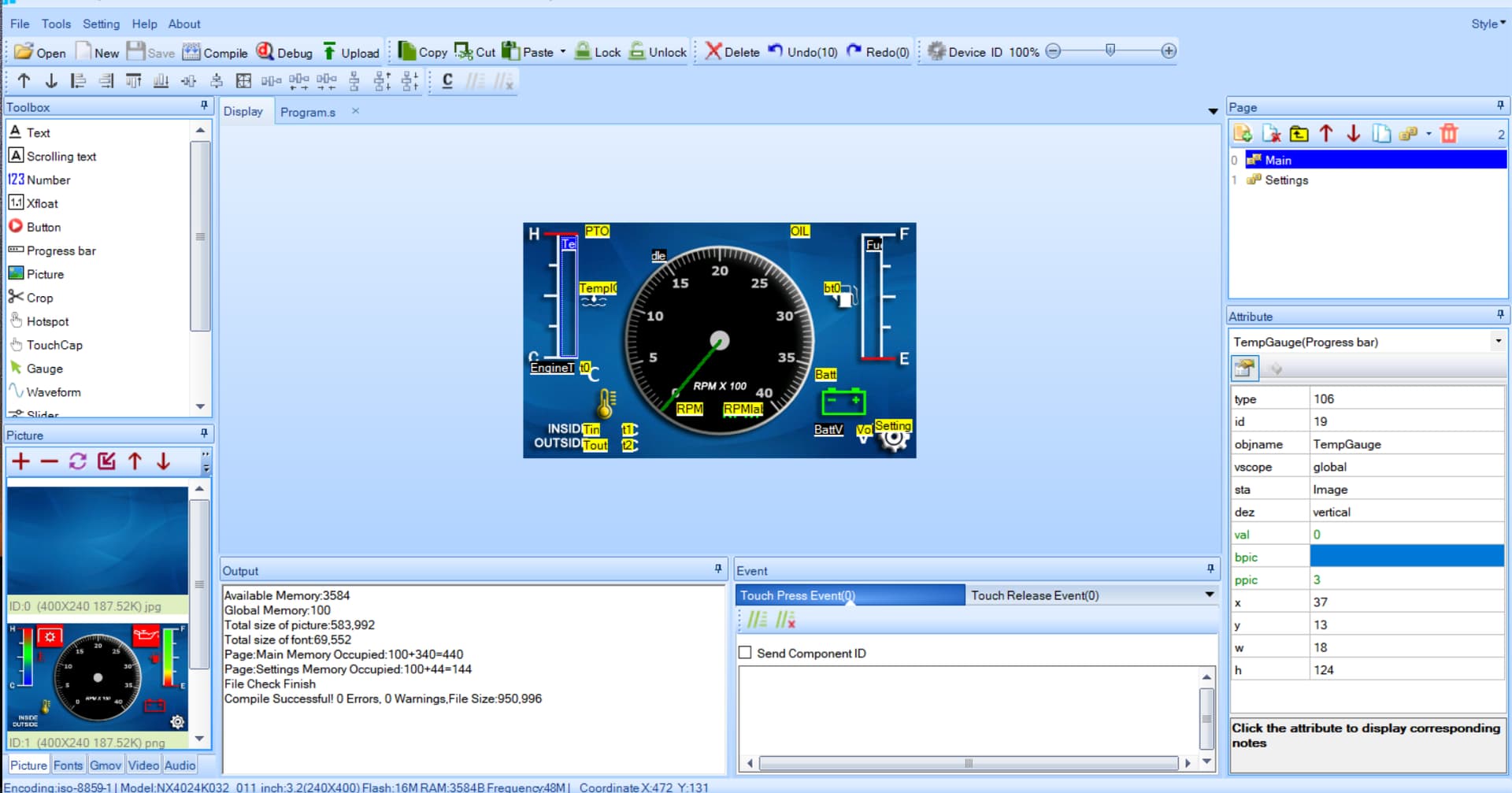
Screenshot of Nextion Editor for the TempGaugeProgress Bar:

Does anyone have experience with Nextion Displays???

There is an example in the Easy Nextion Library for a progress bar. Are you following that model? I takes a number written from the Arduino to the Nextion and then manages the progress bar on the Nextion with a timer event to update the values.

Ok I see the timer, this section:

n0.val=Nvoltage.val      // write Nvoltage.val to n0.val
sys0=Nvoltage.val*100/5000 // use sys0 to make the calculations
j0.val=sys0                    // add the value to the Progress bar
//
//Reverse direction progress bar
j1.val=100-sys0
//
// Vertical allign
j2.val=sys0
//
// Progress bar can take values from 0-100
// we map the value from arduino 0-5000 :
// the math type for map the range is:
// return = (value - low1) * (high2 - low2) / (high1 - low1) + low2
// as both ranges start from zero low1 and low2 = 0
// the type becomes
// return = value*hight2/hight1
// return=value*100/5000
//
// And some graphic effects
if(n0.val>3300)
{
  n0.bco=RED
  j0.pco=RED
  j1.bco=RED //bco for the reversed
  j2.pco=RED
}else
{
  n0.bco=YELLOW
  j0.pco=1024
  j1.bco=1024
  j2.pco=1024
}

I will try to implement this to my Nextion elements...
Thanks

Don't cast to float, neither the library nor Nextion are expecting a float value.
This should work fine...

int fuelPercent = map(fuelADC, 0, 292, 0, 100);

No need for these lines as you have effectively already constrained with the map() function

scaledTemp = constrain(scaledTemp, 0, 100);

fuelPercent = constrain(fuelPercent, 0, 100);

This should be working fine, you may not be noticing slight variation in engine temp.

myNex.writeNum("TempGauge.val", scaledTemp);

Ok I updated my code to implement variables and a timer event to update the values on the Nextion. I have the same problem with the progress bars being stuck at the highest values.
Here is my current code with commented sections for the RPM/hall effect sensor section to try to debug what is wrong...:

#include <Wire.h>
#include <GyverINA.h>
#include <SPI.h>
#include <OneWire.h>
#include <DallasTemperature.h>
#include "MAX6675.h"             // Include the Tillard MAX6675 library
#include "EasyNextionLibrary.h"  // Include EasyNextionLibrary

// Pin assignments for MAX6675 (Thermocouple for engine temperature)
const int dataPin = 12;
const int clockPin = 13;
const int selectPin = 10;
MAX6675 thermoCouple(selectPin, dataPin, clockPin);

// Fuel sender unit voltage divider
#define FUEL_PIN A0
/*
// Hall Effect Sensor (RPM)
#define HALL_SENSOR_PIN 2
*/

// OneWire for DS18B20 sensors
#define ONE_WIRE_BUS 4
OneWire oneWire(ONE_WIRE_BUS);
DallasTemperature sensors(&oneWire);
DeviceAddress insideSensor, outsideSensor;

/*
// RPM Calculation Variables
volatile int pulseCount = 0;
unsigned long previousMillis = 0;
const unsigned long pulseInterval = 200;  // Update RPM every 100 ms
int rpm = 0;
*/
// EasyNextionLibrary object
EasyNex myNex(Serial2);

// Variables for Engine Temp & Gas Level Progress Bars and for RPM Needle
uint16_t scaledTemp = 0;      // a variable to store the engineTemp reading and scaled from 0 to 100 for the Progress Bar
uint16_t fuelGauge = 0;       // a variable to store the fuelPercent reading
uint16_t needlePosition = 0;  // a variable to store the RPM Needle position

const int REFRESH_TIME = 100;            // time to refresh the Nextion page every 100 ms
unsigned long refresh_timer = millis();  // timer for refreshing Nextion's page

// INA226 for battery voltage measurement
INA226 batteryMonitor(0x40);  // Default I2C address for INA226

/*
void hallInterrupt() {
  pulseCount++;
}
*/
void setup() {
  Serial.begin(115200);
  myNex.begin(115200);
  delay(200);  // Wait for Nextion display to initialize
  sensors.begin();
  SPI.begin();
  thermoCouple.begin();
  thermoCouple.setSPIspeed(4000000);

  // Assign DS18B20 addresses if detected
  if (sensors.getDeviceCount() >= 2) {
    sensors.getAddress(insideSensor, 0);
    sensors.getAddress(outsideSensor, 1);
  }
/*
  pinMode(HALL_SENSOR_PIN, INPUT_PULLUP);
  attachInterrupt(digitalPinToInterrupt(HALL_SENSOR_PIN), hallInterrupt, FALLING);
*/
  // Initialize INA226
  if (batteryMonitor.begin()) {
    Serial.println(F("INA226 initialized successfully."));
  } else {
    Serial.println(F("Failed to initialize INA226."));
    while (1)
      ;
  }
}

void loop() {
  unsigned long currentMillis = millis();
  // myNex.NextionListen();  // This function must be called repeatedly to respond to touch events

  // Read DS18B20 temperatures
  float insideTemp = NAN;
  float outsideTemp = NAN;

  if (sensors.getDeviceCount() >= 2) {
    sensors.requestTemperatures();
    insideTemp = sensors.getTempC(insideSensor);
    outsideTemp = sensors.getTempC(outsideSensor);
    myNex.writeStr("Tin.txt", String(insideTemp, 0));
    myNex.writeStr("Tout.txt", String(outsideTemp, 0));
  } else {
    myNex.writeStr("Tin.txt", "-");
    myNex.writeStr("Tout.txt", "-");
  }

  if ((millis() - refresh_timer) > REFRESH_TIME) {  //IMPORTANT do not have serial print commands in the loop without a delay
                                                    // or an if statement with a timer condition like this one.

    // Read MAX6675 (engine temperature)
    int status = thermoCouple.read();
    float engineTemp = thermoCouple.getTemperature();
    myNex.writeStr("EngineT.txt", String(engineTemp, 0));

    scaledTemp = map(engineTemp, 0, 110, 0, 100);
    scaledTemp = constrain(scaledTemp, 0, 100);
    myNex.writeNum("NTempGauge.val", scaledTemp);

    // Fuel Level Mapping
    int fuelADC = analogRead(FUEL_PIN);
    float fuelPercent = map(fuelADC, 0, 292, 0, 100);
    fuelGauge = constrain(fuelPercent, 0, 100);
    myNex.writeNum("NFuelGauge.val", fuelGauge);
/*
    // RPM Calculation
    if (currentMillis - previousMillis >= pulseInterval) {
      previousMillis = currentMillis;
      rpm = pulseCount * 600;
      pulseCount = 0;
    }

    needlePosition = map(rpm, 0, 4000, 310, 230);
    myNex.writeStr("RPM.txt", String(rpm));
    myNex.writeNum("NNeedle.val", needlePosition);
    */
  }


  // Battery Voltage
  float batteryVoltage = batteryMonitor.getVoltage();  // In volts
  myNex.writeStr("BattV.txt", String(batteryVoltage, 1));

  // Serial Debug Output
  Serial.print("Fuel Level: ");
  Serial.println(fuelGauge);
  Serial.print("Battery Voltage: ");
  Serial.println(batteryVoltage);
 // Serial.print("RPM: ");
  //Serial.println(needlePosition);
  Serial.print("Engine Temp: ");
  Serial.println(scaledTemp);
  Serial.print("Inside Cab Temp: ");
  Serial.println(insideTemp);
  Serial.print("Outside Temp: ");
  Serial.println(outsideTemp);
}

Also, the values printed on serials are as expected for the Progress Bars for Fuel Gauge values (0 to 100) and Temperature Gauge (0 to 100).

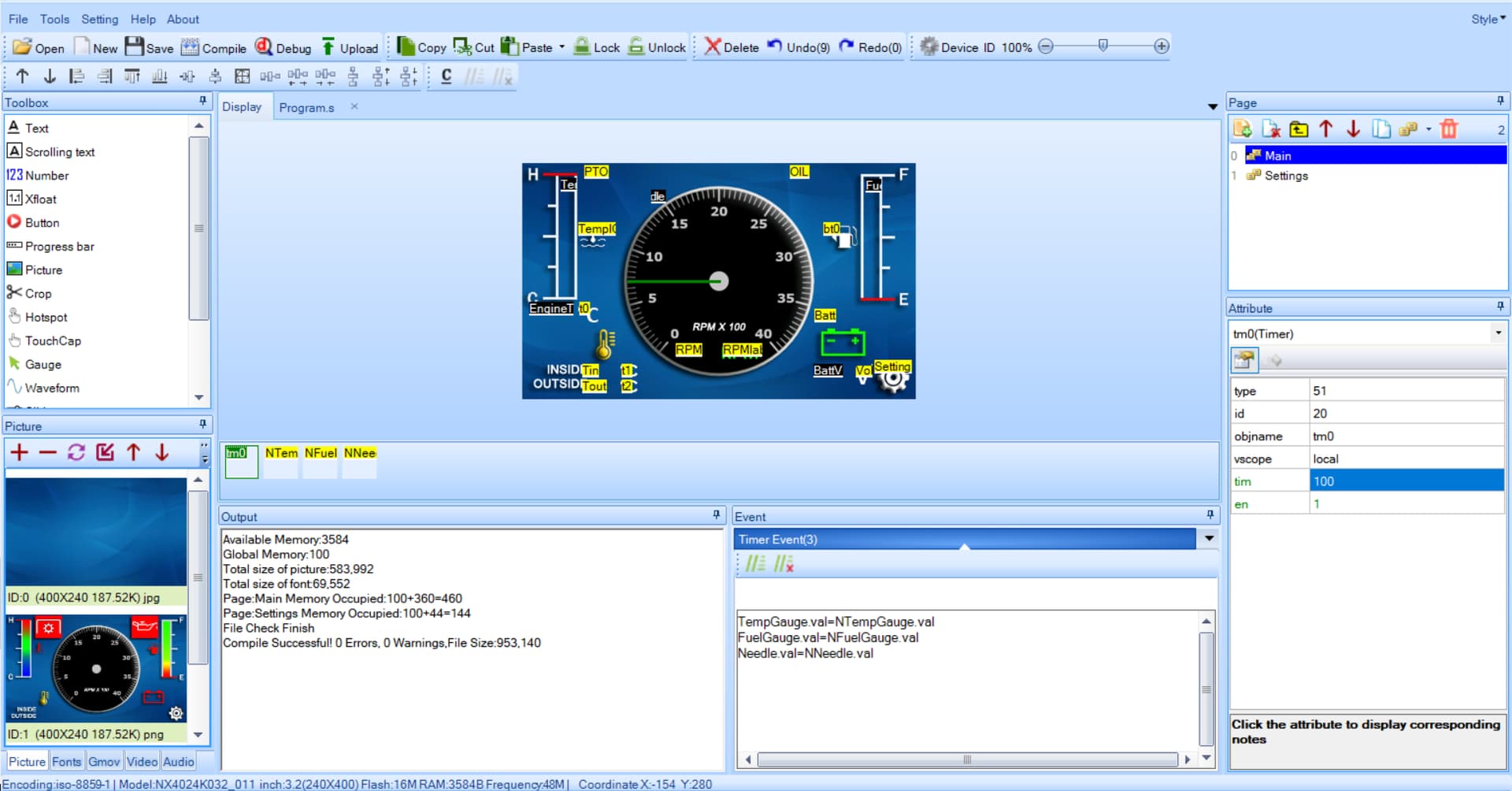
Here is a screenshot of the timer in Nextion Editor:

Here is the Serial Monitor values I get printed:
Engine Temp: 34
Inside Cab Temp: 21.12
Outside Temp: 20.62
Fuel Level: 43
Battery Voltage: 12.13

Also, I just noticed that the example have a "Preinitialize Event" with "bkcmd=0", do I need this?

Not sure what I doing wrong... maybe problems with timers interference...
Any help would be much appreciated.
Cheers,

I'm not certain what is going with your code, but the progress bar in the Easy Nextion Library example certainly moves up and down with the varying analogRead value sent from the Arduino to the Nextion.

One difference I see in your Nextion code to that of the example is that the example timer event uses a sys variable between what is sent from the Arduino and what is sent to the progress bar by the timer.

n0.val=Nvoltage.val      // write Nvoltage.val to n0.val
sys0=Nvoltage.val*100/5000 // use sys0 to make the calculations
j0.val=sys0

I haven't really investigated, but you may want to more closely follow the library example with the progress bar variables using sys variables even if you don't use them for the scaling math.

EDIT: Indeed I can send scaled values 0-100 directly to the progress bar and it moves both ways

n0.val=Nvoltage.val      // write Nvoltage.val  scaled 0-100 in the Arduino
j0.val=n0.val

I don't understand why your code does not do the same.

Are you progress bars images or progress bar components?

Progress bars are cropped images, but when I enter values in Nextion Editor for it, they performed like it should...

Definitely the problem is with the time event.
This is what I tried for the timer:

sys0=NTempGauge.val
TempGauge.val=sys0
sys0=NFuelGauge.val
FuelGauge.val=sys0
sys0=NNeedle.val
Needle.val=sys0

Ok, I create the Progress bars using Nextion default, and it works, I think I know why it doesn't work with cropped image, I didn't specify the bpic value for the Progress Bar attribute...

I was about to ask for your HMI file, but I guess you found the issue.

Yes, the problem was on the Nextion Editor side, all seems good now.

Thanks for asking if I was using images for the Progress bars, this help me found the problem.

Cheers

This topic was automatically closed 180 days after the last reply. New replies are no longer allowed.