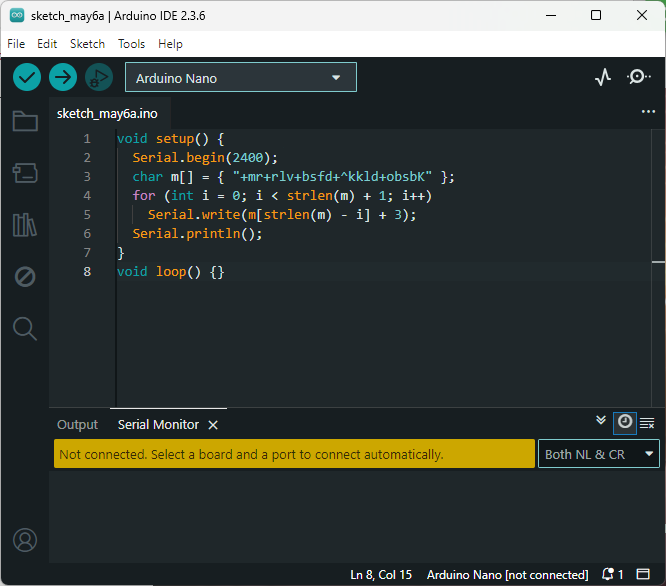
I'm using the Arduino IDE and successfully uploading my code to an Arduino Uno. However, nothing shows up on the Serial Monitor after uploading. I've double-checked that the baud rate in the Serial Monitor matches the one in my code (Serial.begin(...)), and I'm sure the correct COM port and board are selected.
Does anyone have an idea why nothing is showing up? Any suggestions would be appreciated.
Yes, I’ve tried a simple Serial.println("Hello"), and I can see output on the Serial Monitor now. However, the problem is that sometimes it works and sometimes it doesn't — even without changing anything in the code or setup.
Has anyone experienced this kind of inconsistent behavior? Could it be a timing issue, hardware problem, or something else?
Please post your full sketch, using code tags when you do
Posting your code using code tags prevents parts of it being interpreted as HTML coding and makes it easier to copy for examination
In my experience the easiest way to tidy up the code and add the code tags is as follows
Start by tidying up your code by using Tools/Auto Format in the IDE to make it easier to read. Then use Edit/Copy for Forum and paste what was copied in a new reply. Code tags will have been added to the code to make it easy to read in the forum thus making it easier to provide help.
It is also helpful to post error messages in code tags as it makes it easier to scroll through them and copy them for examination
In such case I would first check my wires. A faulty jumper or iffy breadboard connections can really send you on a ghost hunt. One check is to lower the serial speed to see if it then works more reliable. At higher speeds the connections are more sensitive.
Second thing to check is the voltage. When power is too low things become instable too...
But as asked by Bob: what kind of board are you using?
I’ve tried the suggestion to "grab" the top line of the Serial Monitor window and "drag up," but unfortunately, it didn’t resolve the issue. However, I’ve noticed that when I close and reopen the Arduino IDE, or when I upload a different sketch before uploading my actual code, the Serial Monitor starts working as expected.
I can say with some confidence that your code will never produce any output on the Serial monitor and that you will kick yourself when you realise the problem