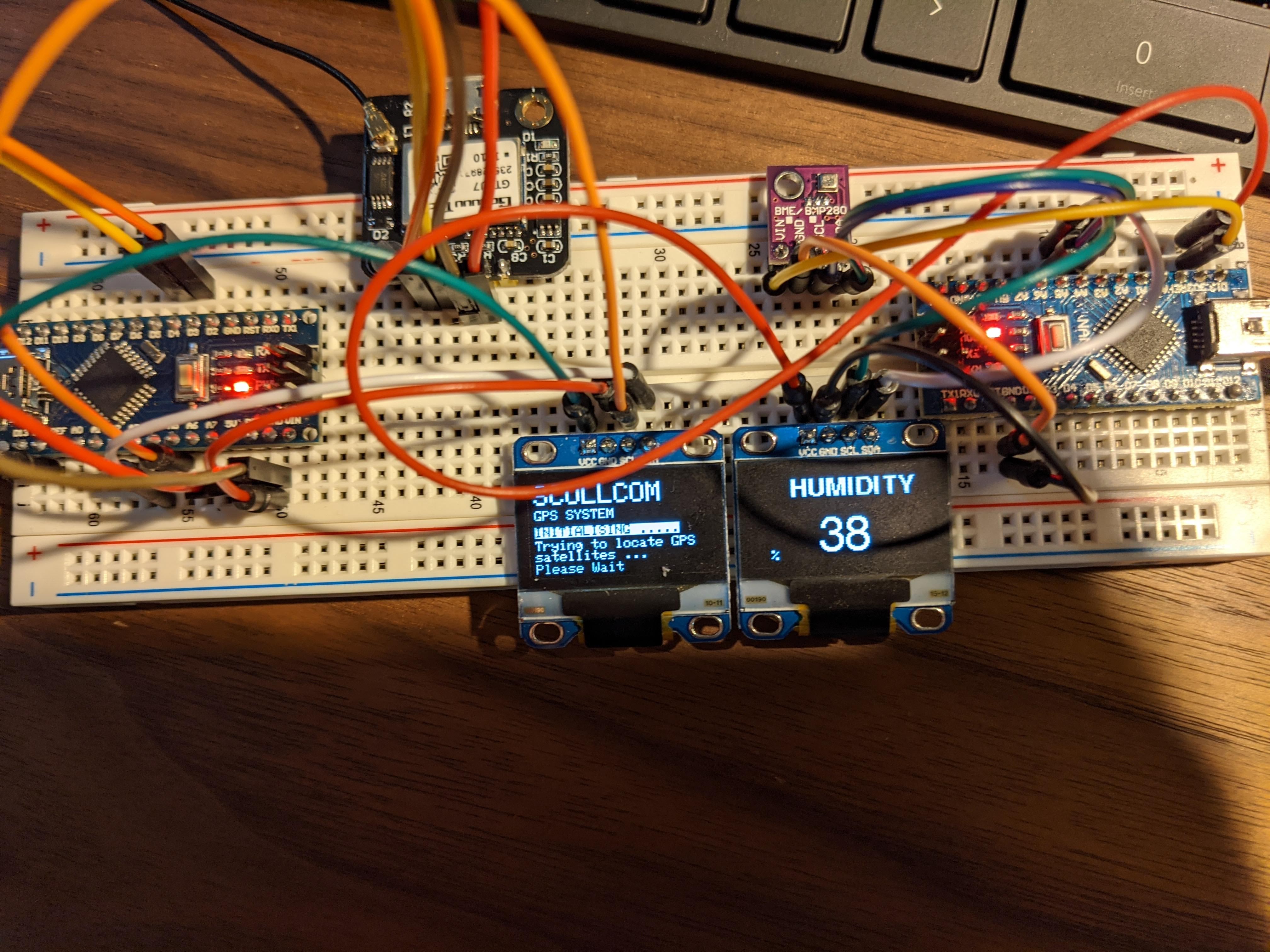
I'm working on creating a readout that shows GPS information as well as Temperature and Humidity. For reasons I can't figure out every time I add the BME Libraries into the sketch, it causes the OLED display not to work. Just remains black. Without these libraries, the GPS Code works great.
Any thoughts on why this is would be much appreciated.
/*********************************************************************
SCULLCOM Hobby Electronics
Simple GPS System
Using Arduino Pro Mini + OLED 128x64 display + GPS Module
*********************************************************************/

#include <SPI.h>                      //Serial Peripheral Interface (SPI) library for synchronous serial data protocol
#include <Wire.h>                     //Wire library used for I2C communication: Arduino Pro Mini pins used = A4 (SDA) and A5 (SCL)
#include <Adafruit_Sensor.h>
#include <Adafruit_BME280.h>
#include <Adafruit_GFX.h>             //Adafruit graphic display library used for the OLED display
#include <Adafruit_SSD1306.h>         //Adafruit driver for OLED


#include <SoftwareSerial.h>           //SoftwareSerial library used to allow serial communication on other digital pins (i.e. Pins 3 & 4 for the this GPS project)
#include <TinyGPS.h>                  //GPS Library used to read the data from GPS Module

#include <Fonts/FreeSansBold9pt7b.h>
#include <Fonts/FreeSans18pt7b.h>

#define SEALEVELPRESSURE_HPA (1013.25)

Adafruit_BME280 bme; // I2C
unsigned long delayTime;

#define SCREEN_WIDTH 128 // OLED display width, in pixels
#define SCREEN_HEIGHT 64 // OLED display height, in pixels
#define OLED_RESET    -1 // Reset pin # (or -1 if sharing Arduino reset pin)
#define HOUR_OFFSET   -4

#define OLED_RESET 5
Adafruit_SSD1306 display(OLED_RESET);


TinyGPS gps;                          //Create the TinyGPS object, giving it a name of your choice (here we use the name gps)
SoftwareSerial nss(3, 4);             //set sotfware serial communications to arduino ports 3 and 4 (TX = 3 and RX = 4)


#if (SSD1306_LCDHEIGHT !=64)

#endif


void setup()   {
   nss.begin(9600);

  unsigned long age, date, time, chars = 0;

  display.begin(SSD1306_SWITCHCAPVCC, 0x3C);  // initialize the OLED and set the I2C address to 0x3C (for the 128x64 OLED)
  //dht.begin();//Start the dht

  display.clearDisplay();             //Clear display buffer.

  display.setTextSize(2);             //set text size to 2 (large)
  display.setTextColor(WHITE);
  display.setCursor(0,0);             //set text start position to column=0 and row=0
  display.print("SCULLCOM");          //print "SCULLCOM" to display

  display.setTextSize(1);             //set text size to 1 (small)
  display.setCursor(0,18);            //set text start position to column=0 and row=18
  display.print("GPS SYSTEM");        //print "GPS SYSTEM" to display

  display.setCursor(0,30);            //set text start position to column=0 and row=30
  display.setTextColor(BLACK, WHITE); // 'inverted' text
  display.print("INITIALISING .....");//print "INITIALISING ....." to display
  display.setCursor(0,40);            //set text start position to column=0 and row=40
  display.setTextColor(WHITE);        //
  display.print("Trying to locate GPS satellites ...");  //print "Trying to locate GPS satellites ..." to display

  display.setCursor(0,57);            //set text start position to column=0 and row=57
  display.print("Please Wait");       //print "Please Wait" to display

  display.display();                  //update OLED with new display data
  delay(1000);                        //short delay
  display.clearDisplay();             //clear display
}


//MAIN PROGRAMME LOOP
void loop() {

bool newdata = false;
  unsigned long start = millis();
  while(millis() - start < 1000){    // Every 1 seconds we print an update
    if (feedgps())
      newdata = true;
  }
  if (newdata)
  {
    gpsdump(gps);
  }
}


//PRINT GPS DATA TO OLED DISPLAY
void gpsdump(TinyGPS &gps)
{
  print_date(gps);                  //print date and time at top of OLED display

  float flat, flon, falt;


  display.clearDisplay();

  display.setTextSize(1);           //set text size to 1
  display.setTextColor(WHITE);      //
  display.setCursor(0,0);           //set text start position for date and time (row = 0, column =0)
  print_date(gps);                  //prints date and time on top line to OLED

  gps.f_get_position(&flat, &flon); //retrieves latitude and longditude data
  display.setCursor(0,20);          //set text start position to column=0 and row=20
  display.print("Altitude : ");     //print "Altitude" : to display
  display.println(gps.f_altitude()*3.28084);//print altitude data to display
  display.setCursor(110,20);        //set text start position to column=100 and row=20
  display.println("F");             //print "m" to display

  display.setCursor(0,30);          //set text start position to column=0 and row=30
  display.print("Sats     : ");     //print "Sats    :" to display
  display.println(gps.satellites());//print number of satellites detected to display

  display.setCursor(0,40);          //set text start position to column=0 and row=40
  display.print("latitude : ");     //print "latitude :" to display
  display.println(flat,6);          //print latitude data to display up to 6 decimal places

  display.setCursor(0,50);          //set text start position to column=0 and row=50
  display.print("longitude: ");     //print "longitude:" to display
  display.println(flon,6);          //print longitude data to display up to 6 decimal places

  display.display();                //update OLED display
}


//TEST FOR NEW DATA FROM THE GPS MODULE
bool feedgps()
{
  while (nss.available())
  {
    if (gps.encode(nss.read()))    //Each byte of NEMA data must be giving to TinyGPS by using encode(). True is returned when new data has been fully decoded and can be used
      return true;
  }
  return false;
}


//GET DATE AND TIME FOR DISPLAY
static void print_date(TinyGPS &gps)
{
  int year;
  byte month, day, hour, minute, second, hundredths;
  unsigned long age;
  gps.crack_datetime(&year, &month, &day, &hour, &minute, &second);
  {
    char sz[32];
    sprintf(sz, "%02d/%02d/%02d  %02d:%02d:%02d",
        month, day, year, hour, minute, second);
    display.print(sz);                      //Print date and time to OLED
  }

}