After days of struggle the partition method above finally allowed me to connect to the Opta.
dscialabba's instructions worked for me after wasting an entire day. Thanks so much!
You are the best. It finaly works.
THIS safed me, after a half day of beeing depressed working on it, it FINALLY WORKS!! Dear Arduino team please work on that!
This is 100% the solution! Key steps NOT included in Arduino's PLC IDE Setup doc are the memory partitioning, using Automatic (Bootloader) port for first setup download, then using the HIGHER port for connecting.
Thanks a million @dscialabba!
after struggling for 3 days this work for me
Ich habe auch schon Tage damit verbracht. Es hat schon einmal für etwa drei Tage funktioniert. Es ist eine Katastrophe.
Thank-you for your comprehensive solution. I was expecting better from the Opta...

Thank you. This worked for me
Hi. This did not work for me. I have an Opta RS485. Which version did this work on?
Hello @dscialabba
I'm using an Arduino Opta AFX00002, and I'm still having issues with license activation and connection in the Arduino PLC IDE.
I followed all the steps shared in the setup guide and forum (including memory partitioning and QSPI flash formatting). The device reaches the message:
QSPI Flash formatted! It's now safe to reboot or disconnect your board.
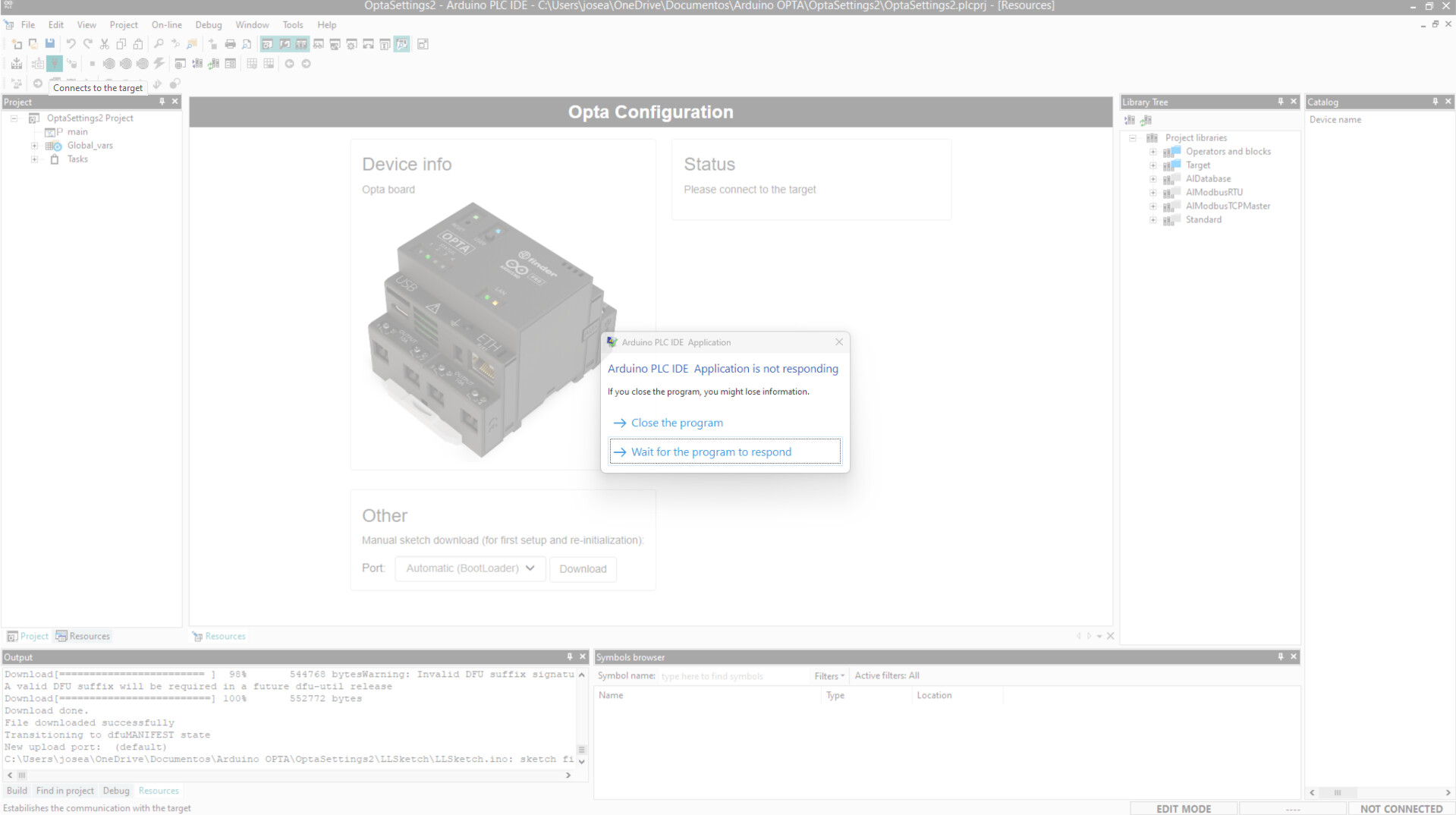
After that, I restarted the Opta (tried both pressing the reset button and reconnecting the USB). However, when I try to connect in the Arduino PLC IDE, the IDE freezes, and after some time I just get an "ERROR" message without much detail.
Here’s what I’ve done:
- Used COM12 for both the Arduino IDE and Arduino PLC IDE.
- Tried uploading the memory partition example from Arduino IDE successfully.
- double-pressed reset when necessary.
- Reinstalled the IDE.
Here is a screenshot of the error (when it totally freezes):
these are the ports I have (I used COM12 for the configuration on arduino IDE and arduino PLC IDE):

Any advice, workaround, or fix would be PERFECT.
Thanks in advance!
Hey guys! I finally could make it work on my AFX00002 (for those that couldn't make it with the instructions posted above):
-
I contacted support, and they sent me a
.zipfile . It includes:- A sketch to reformat the memory partition.
- A certificate file, required during the process.
opta_memory_partitioning.zip (62.8 KB)
-
Unzip the contents and place both files (the sketch and the certificate) in the same folder.
-
Open the
.inosketch using Arduino IDE version 2.3.5 (or compatible). -
If multiple COM ports appear (due to previous attempts using PLC IDE),
Select the port with the lower number (e.g., COM11) to upload the sketch. -
Upload the sketch without making any changes.
-
Once uploaded, open the Serial Monitor.
-
Do not type anything. Wait until the following message is displayed:
It's now safe to reboot or disconnect your board.
- Open Arduino PLC IDE (v1.0.8 in my case) and go to the Other section.
- Select the COM port available, then click Download — if the download fails, continue to the next step.
- Double-tap the reset button on the Opta using a clip or pen tip.
- The green LED above the reset button should start blinking slowly.
- A new COM port (e.g., COM12) will become available.
As per the official documentation:
“If the following message appears during the download procedure, double-tap the reset button using the tip of a pen or a similar pointed object. The LED above the reset button for Opta™ or the Digital Outputs LEDs for Portenta Machine Control will start blinking, indicating that the device is ready to be flashed with new firmware. Click the Download button to begin the process again.”
- In PLC IDE, go to Project > Refresh Current Target to update the available ports list.
- Select the new COM port (e.g., COM12) and click Download Runtime again.
- Once the runtime is successfully installed, go to Online > Setup Communication.
- Select the COM port with the HIGHER number (e.g., COM13) and click OK.
- Click the Connect button
Keep following:
https://docs.arduino.cc/software/plc-ide/tutorials/plc-ide-setup-license/

I hope this helps others struggling with the same issue. Let me know if any step is unclear!
After much frustration... This is what solved the issue for me. I can finally connect to the Opta!
What I find odd though, is that the IDE is saying my Opta 485 has WiFi...
This works, why is this opta_memory_partitioning.zip in the documentation. Standard mechatronics experience  .
.
Thank you, using this zip file did it!
I have tried the steps mentioned but I cannot make any progress when entering in PLC-IDE. I follow the steps expecting to see again green status on the target device however click on downloading does nothing. When trying to force connection I see there is info mismatch and i get the error message at the right corner bottom. Any ideas? Thanks!
Before this, I had almost tried all other methods, but they all failed. However, this time I finally succeeded. Thank you very much; you are really great.
I'm currently having the same issues. I've tried all of the listed solutions to no avail. The std. IDE can't seem to upload the memory partition sketch to the OPTA. Serial monitor can't connect either.
jose you saved the day!!! I can't thank you enough!!!