Iam a newbie and tried compiling p6 rgb led module with esp8266. But my module is not having D and E pin out... I tried severals codes but nothing worked seems like pin D Nd E is necessary... Any help regarding this wud b appriciated. Iam trying morphing clock and other allied things which can be done with the display.
D and E are not mandatory, depends on panel type.
Please show link to your panel, the letters "p6" means nothing more than pixel pitch in mm
|R1|B1|
|
|G1|GND|
|R2|B2|
|G2|GND|
|A|B|
|C|NC|
|CLK|LAT|
|OE|GND|
these are the connectors input pins
So it is a standart HUB75 connector.
It also says nothing about the panel.
Please show a clear photo of the reverse side of the panel or at least an ID - the text like "p6-16x32-2121-s8-v1.4"
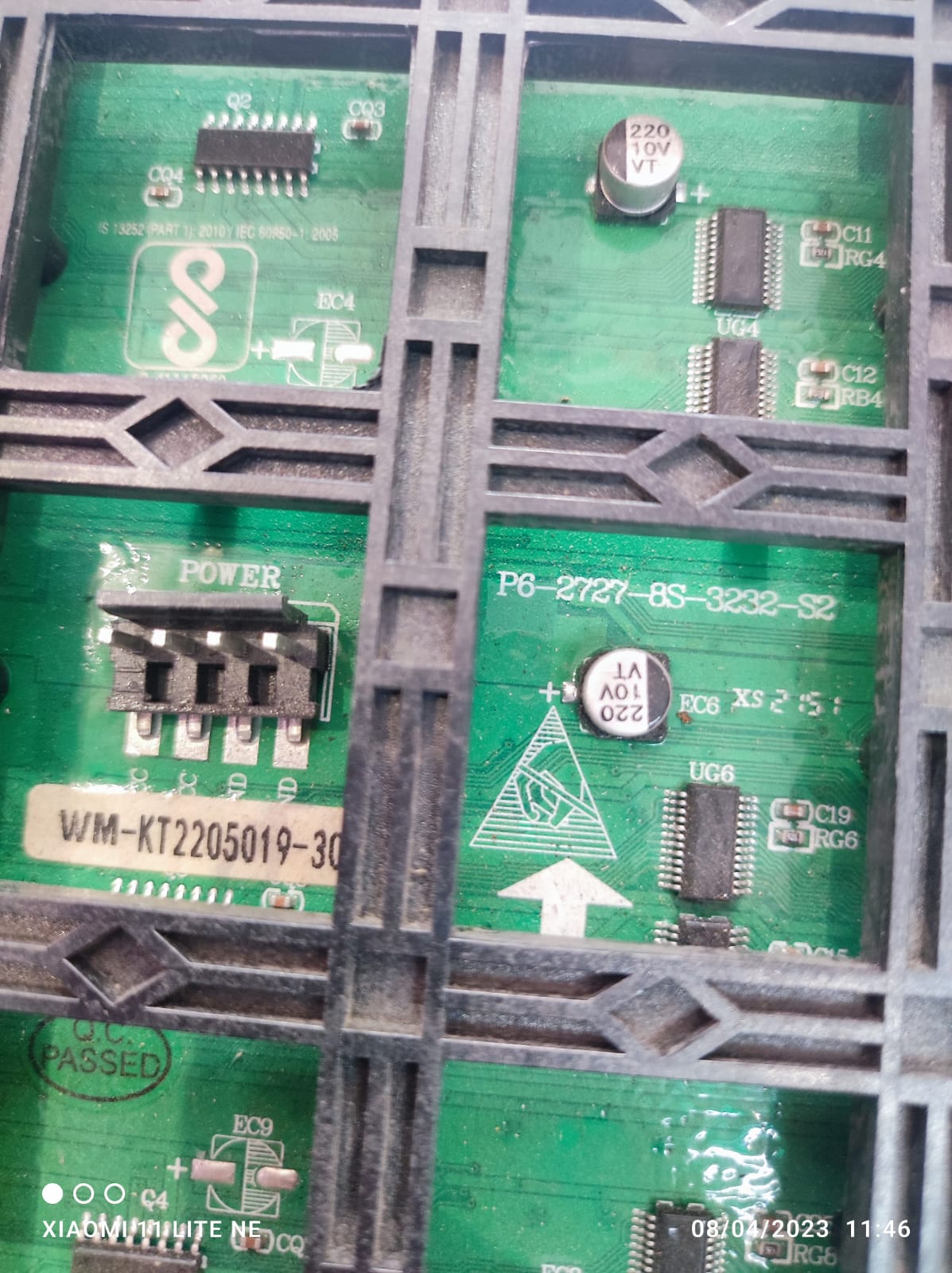
Thank you. It is what I asked:
P6-2727-32x32-s8
You have "8scan" panel, it doesn't need a D and E pins. What the library did you used?
type or paste code here
// REQUIRES the following Arduino libraries:
// - RGB matrix Panel Library: https://github.com/2dom/PxMatrix
// - Adafruit_GFX Library: https://github.com/adafruit/Adafruit-GFX-Library
// - Adafruit_BusIO Library: https://github.com/adafruit/Adafruit_BusIO
// - esp8266 library (nodemcu) found at https://github.com/esp8266/Arduino
// - package_esp8266com_index.json found at http://arduino.esp8266.com/stable/package_esp8266com_index.json

#include <ESP8266WiFi.h>
#include <time.h>
#include <Adafruit_GFX.h>
#include <FreeMonoBold12pt7b.h>
#include <kongtext4pt7b.h>
#include <PxMatrix.h>
#include <Ticker.h>
#include <WiFiUdp.h>
#include <WiFiClientSecure.h>
#include <NTPClient.h>

Ticker display_ticker;
#define P_LAT 16
#define P_A 5
#define P_B 4
#define P_C 15
#define P_D 12
#define P_OE 2
// Pins for LED MATRIX
#define matrix_width 32
#define matrix_height 32

char ssid[]     = "TECHLOGICS_7598111110";  // your network SSID (name)
char password[] = "9487100100";  // your network key

// Define NTP Client to get time
WiFiUDP ntpUDP;
NTPClient timeClient(ntpUDP, "pool.ntp.org");

static uint32_t lastTime = 0; // millis() memory
static bool flasher = false;  // seconds passing flasher
uint8_t frameDelay = 15;  // default frame delay value

int h, m, s, d;
uint8_t dow;
int  day;
uint8_t month;
String date;
String text;
String Message1 = "Please Subscribe to my YouTube channel : www.youtube.com/techlogicsindia";
String MessageDate =  "";
uint8_t r = 0, g = 0, b = 0;
unsigned int NewRTCh = 24;
unsigned int NewRTCm = 60;
unsigned int NewRTCs = 10;
char szTime[4];

// This defines the 'on' time of the display is us. The larger this number,
// the brighter the display. If too large the ESP will crash
uint8_t display_draw_time = 10; //10-50 is usually fine
PxMATRIX display(32, 32, P_LAT, P_OE, P_A, P_B, P_C, P_D);

//PxMATRIX display(matrix_width,matrix_height,P_LAT, P_OE,P_A,P_B,P_C);
//PxMATRIX display(64,64,P_LAT, P_OE,P_A,P_B,P_C,P_D,P_E);

// Some standard colors
uint16_t myRED = display.color565(255, 0, 0);
uint16_t myGREEN = display.color565(0, 255, 0);
uint16_t myBLUE = display.color565(0, 0, 255);
uint16_t myWHITE = display.color565(255, 255, 255);
uint16_t myYELLOW = display.color565(255, 255, 0);
uint16_t myCYAN = display.color565(0, 255, 255);
uint16_t myMAGENTA = display.color565(255, 0, 255);
uint16_t myShadow = display.color565(255, 0, 0);
uint16_t myROSE = display.color565(253, 18, 111);
uint16_t myBLACK = display.color565(0, 0, 0);

uint16_t myCOLORS[90] = {myRED, myGREEN, myWHITE, myMAGENTA, myBLUE, myYELLOW, myCYAN, myRED, myGREEN, myMAGENTA,
                         myBLUE, myWHITE, myCYAN, myRED, myGREEN, myYELLOW, myMAGENTA, myBLUE, myRED, myYELLOW,
                         myCYAN, myRED, myGREEN, myMAGENTA, myBLUE, myWHITE, myYELLOW, myCYAN, myBLUE, myWHITE,
                         myBLUE, myWHITE, myYELLOW, myCYAN, myRED, myGREEN, myMAGENTA, myBLUE, myRED, myYELLOW,
                         myCYAN, myRED, myGREEN, myMAGENTA, myBLUE, myGREEN, myYELLOW, myCYAN, myBLUE, myWHITE,
                         myRED, myGREEN, myMAGENTA, myBLUE, myWHITE, myYELLOW, myCYAN, myRED, myGREEN, myMAGENTA,
                         myBLUE, myWHITE, myYELLOW, myCYAN, myRED, myGREEN, myMAGENTA, myBLUE, myGREEN, myYELLOW,
                         myBLUE, myWHITE, myYELLOW, myCYAN, myRED, myGREEN, myMAGENTA, myBLUE, myShadow, myYELLOW,
                         myCYAN, myRED, myGREEN, myMAGENTA, myBLUE, myWHITE, myYELLOW, myCYAN, myBLUE, myShadow};


// ISR for display refresh
void display_updater()
{
  display.display(display_draw_time);
}
void display_update_enable(bool is_enable)
{
  if (is_enable)
    display_ticker.attach(0.002, display_updater);
  else
    display_ticker.detach();
}

const char* months []=
{"Jan", "Feb", "Mar", "Apr", "May", "Jun","Jul", "Aug", "Sep", "Oct", "Nov", "Dec"};

const char* dofw []=
{"Sunday", "Monday", "Tuesday", "Wednesday","Thursday", "Friday", "Saturday"};

//Ticker display_ticker;
WiFiClientSecure client;

void dofw_text(uint8_t yp)
{
  text = dofw[dow];
  uint16_t text_length = text.length();
  int xpo = (matrix_width - text_length * 7) / 2;
  display.setCursor(xpo, yp);
  display.fillRect(0, yp, 64, 8, myBLACK);
  display.setFont(&kongtext4pt7b);
  for (int y = 0; y < 9; y++) {
    display.setTextColor(myCOLORS[y+r]);
    display.print(text[y]);
  }
  display.setFont();
}
void Date_text(uint8_t yp)
{
  text = months[month];
    time_t epochTime = timeClient.getEpochTime();
  struct tm *ptm = gmtime ((time_t *)&epochTime);
  int currentYear = ptm->tm_year+1900;
  display.setCursor(1, yp);
  display.fillRect(0, yp, 64, 8, myBLACK);
  display.setFont(&kongtext4pt7b);
  display.setTextColor(myRED);
  if (day < 10) {
    display.print("0");
  }
  display.print(day);
  display.setTextColor(myYELLOW);
  display.print(text);
  display.setTextColor(myGREEN);
  display.print(currentYear);
  display.setFont();
}
void getDate()
{
  timeClient.update();

  time_t epochTime = timeClient.getEpochTime();
  struct tm *ptm = gmtime ((time_t *)&epochTime);
  int currentYear = ptm->tm_year+1900;
    day = ptm->tm_mday;
  month = ptm->tm_mon;
    dow = ptm->tm_wday;
  text = months[month];
  MessageDate =String(day) + "/" + text + "/" + String(currentYear);
}

void getTim(char *psz)
{
  if (flasher)
  {
    display.fillRect(54, 10, 10, 6, myBLACK);
    display.setCursor(20, 8);
    display.setTextSize(2);
    display.setTextColor(myCOLORS[g]);
    display.print(":");
    b = random(0,8);
  }else
  {
    display.fillRect(24, 12, 2, 6, myBLACK);
    display.setCursor(54, 10);
    display.setTextSize(1);
    display.setFont(&kongtext4pt7b);
    display.setTextColor(myCOLORS[b]);
    display.print("*");
    display.setFont();
    g = random(0,8);
  }
  if (NewRTCs != s / 10)
  {
    display.fillRect(51, 17, 13, 6, myBLACK);
    NewRTCs = s / 10;
    r = random(0,8);
  } else
  {
    display.fillRect(58, 17, 6, 6, myBLACK);
  }
  sprintf(psz, "%02d", s);
    display.setCursor(51, 16);
    display.setTextSize(1);
    display.setTextColor(myCOLORS[r]);
    display.setFont(&kongtext4pt7b);
  display.print(szTime);
    display.setFont();
   if (NewRTCm != m)
      {
  sprintf(psz, "%02d", m);
  display.setCursor(26, 16);
  display.setFont(&FreeMonoBold12pt7b);
  display.setTextColor(myCYAN);
  display.fillRect(26, 8, 25, 15, myBLACK);
  display.print(szTime);
  display.setFont();
  NewRTCm = m;
      }
  if (NewRTCh != h)
      {
  sprintf(psz, "%02d", h);
  display.setCursor(0, 16);
  display.setFont(&FreeMonoBold12pt7b);
  display.setTextColor(myCYAN);
  display.fillRect(0, 8, 24, 15, myBLACK);
  display.print(szTime);
  display.setFont();
  NewRTCh = h;
      }
}
void scroll_text(uint8_t ypos, unsigned long scroll_delay, String text)
{
  int y = 0;
  uint16_t text_length = text.length();
  // Asuming 5 pixel average character width
  for (int xpos = matrix_width; xpos > -(matrix_width + text_length * 7); xpos--)
  {
 // webServer.handleClient();
    display.setCursor(xpos, ypos);
    display.fillRect(0, ypos, 64, 8, myBLACK);
    display.setFont(&kongtext4pt7b);
  for (int x = 0; x < text_length; x++) {
    display.setTextColor(myCOLORS[x+r]);
    display.print(text[x]);
  }
    display.setFont();
    delay(scroll_delay);
    yield();
    if (millis() - lastTime >= 1000)
    {
      lastTime = millis();
      updateTime();
      getTim(szTime);
      flasher = !flasher;
    }
  }
}

void setup() {
  display.begin(16);
  // Initialize Serial Monitor
  Serial.begin(9600);
  display.setFastUpdate(true);
  display.setRotation(0); // we don't wrap text so it scrolls nicely
  display.setTextWrap(false);
  display_update_enable(true);
  display.clearDisplay();
  display.setTextColor(myCYAN);
  display.setCursor(2, 0);
  display.print("Connecting");
  display.setTextColor(myYELLOW);
  display.setCursor(2, 8);
 // display.print("to the");
  display.setTextColor(myGREEN);
  display.setCursor(2, 16);
  display.print("WiFi!");

  // Set WiFi to station mode and disconnect from an AP if it was Previously
  // connected
  WiFi.mode(WIFI_STA);
  WiFi.disconnect();
  delay(100);

  // Attempt to connect to Wifi network:
  Serial.print("Connecting Wifi: ");
  Serial.println(ssid);
  WiFi.begin(ssid, password);
  while (WiFi.status() != WL_CONNECTED) {
    Serial.print(".");
    delay(500);
    }
  Serial.println("");
  Serial.println("WiFi connected");
  Serial.println("IP address: ");
  IPAddress ip = WiFi.localIP();
  Serial.println(ip);

// Initialize a NTPClient to get time
  timeClient.begin();
  // Set offset time in seconds to adjust for your timezone, for example:
  // GMT +1 = 3600
  // GMT +8 = 28800
  // GMT -1 = -3600
  // GMT +5.30 = 19800  (India)
  // GMT 0 = 0
 // Example : india GMT is +5.30  So 5*3600 + 3600/2 = 19800
    timeClient.setTimeOffset(19800);

 #ifdef ESP8266
  // Required if you are using ESP8266 V2.5 or above
  client.setInsecure();
  #endif

}

void loop() {
  timeClient.update();
  getDate();
  Date_text(0);
  scroll_text(23, frameDelay, Message1);
 // dofw_text(23);
}


void updateTime()
{
  time_t epochTime = timeClient.getEpochTime();
 int currentHour = timeClient.getHours();

   String formattedTime = timeClient.getFormattedTime();
  Serial.print("Formatted Time: ");
  Serial.println(formattedTime);


  int currentMinute = timeClient.getMinutes();
  Serial.print("Minutes: ");
  Serial.println(currentMinute);

  int currentSecond = timeClient.getSeconds();
  Serial.print("Seconds: ");
  Serial.println(currentSecond);

  String weekDay = dofw[timeClient.getDay()];
  Serial.print("Week Day: ");
  Serial.println(weekDay);

//    struct tm *ptm = gmtime ((time_t *)&epochTime);
  //Get a time structure
 struct tm *ptm = gmtime ((time_t *)&epochTime);

   int monthDay = ptm->tm_mday;
  Serial.print("Month day: ");
  Serial.println(monthDay);

  int currentMonth = ptm->tm_mon+1;
  Serial.print("Month: ");
  Serial.println(currentMonth);

  String currentMonthName = months[currentMonth-1];
  Serial.print("Month name: ");
  Serial.println(currentMonthName);

  int currentYear = ptm->tm_year+1900;
  Serial.print("Year: ");
  Serial.println(currentYear);

  h = ptm->tm_hour;
  m = ptm->tm_min;
  s = ptm->tm_sec;
}
i have played with wled and it was fun so trying making display with clocks gifs etc tec .. i dnt have any idea about coding and all..
Try to initialize the display with a b c pins:
And you need to change
to
display.begin(8);
in the setup
done both the things its not turning on even
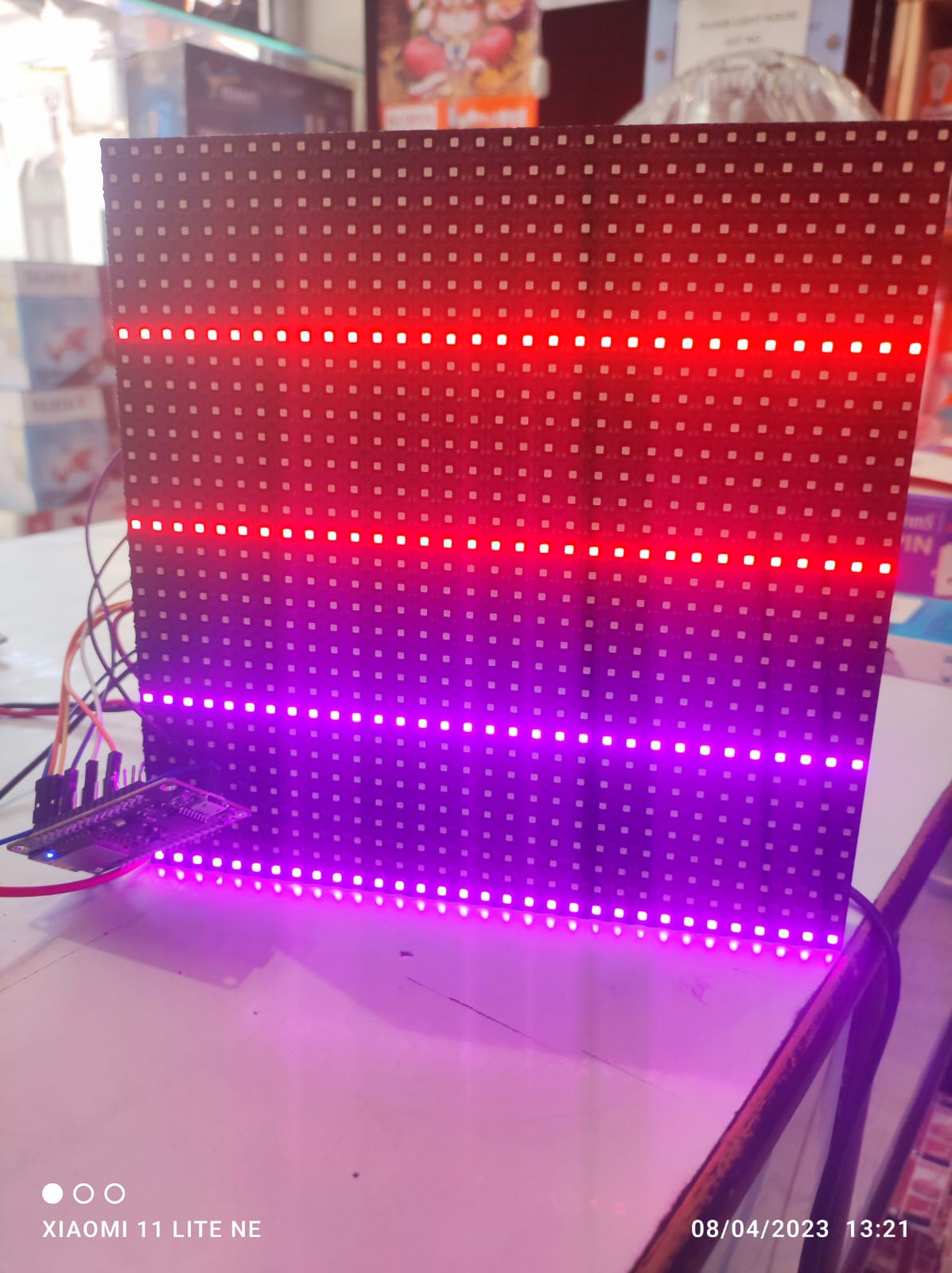
I dont understand. Please show your connections in full.

You should connect additionally at least R1
r1 to which pin
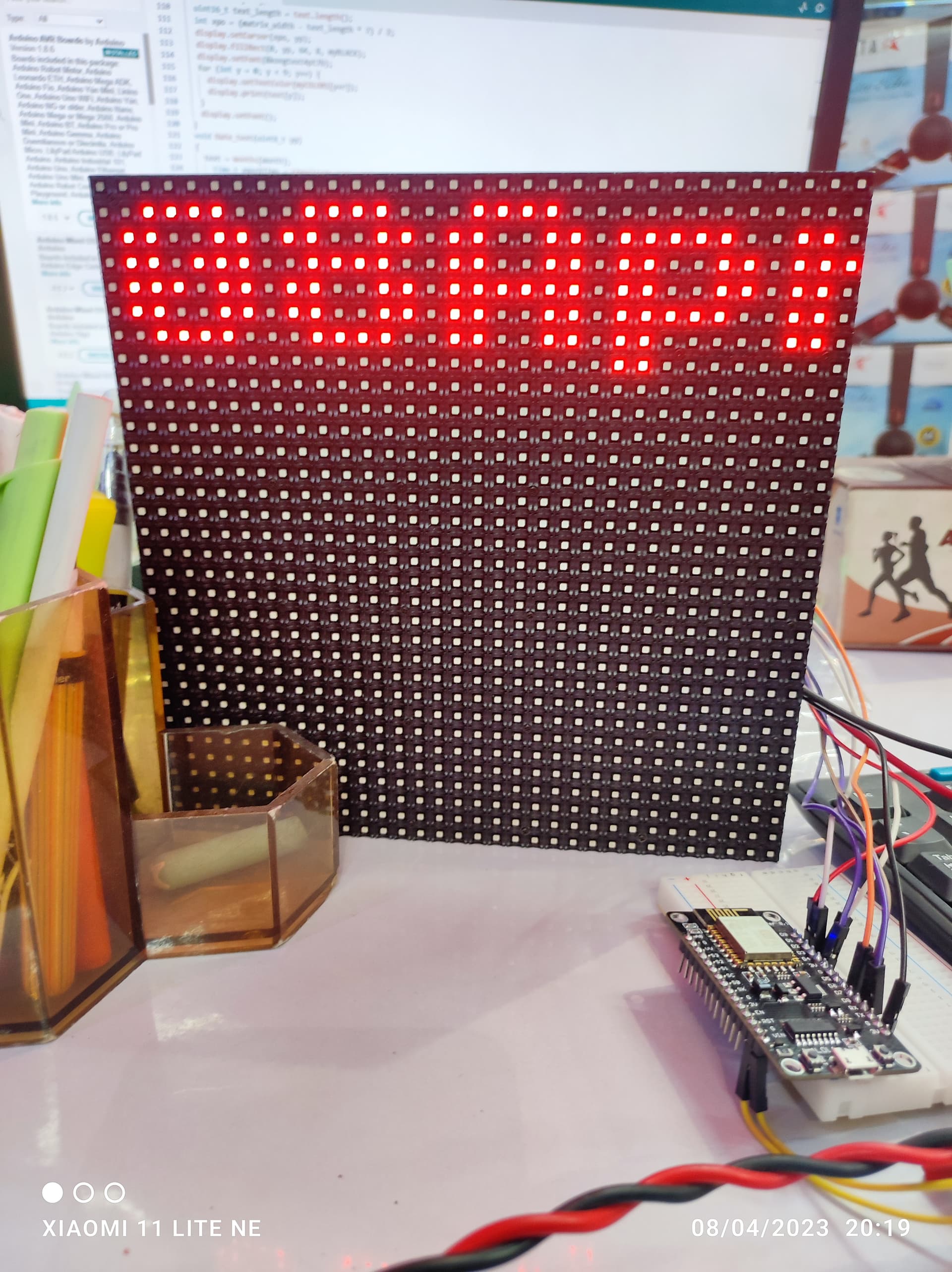
Great