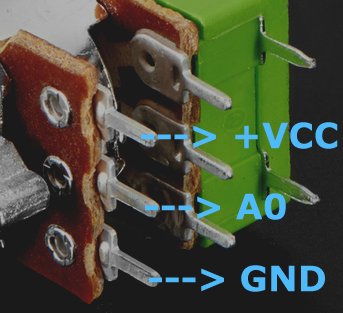
I'm trying to understand how to code a Panel Mount 10K Dual Linear Potentiometer w/ On-Off Switch. I find all kinds of examples of simple pots with no on/off switch. The pot I am using has six pins and then the two switch pins.
I understand how to wire up the G, V and center pin, but I don't know how to wire up the on/off pins and read their state in the serial window?
Does anyone know of any tutorials or example scripts using this kind of pot?
Your pot has two seperate tracks. The outer pins (1 & 3 on the datasheet) are the track ends, and the track wiper is the center pin (2). The green part is the switch.
I dont know your application, but to read all the values I suggest you connect Vcc to pin 3 for each pot track, and ground to both pin 1's AND one pin of the switch.
The wiper pins you connect to analog pins - say A3 &A4, and use analogRead() to get their values.
The remaining switch pin you connect to a digital pin set as input-pullup.
You get the switch stae by a digitalRead();
Erik_Baas:
Ha, found it: SDA and SCL. Didn't know they are connected to A4/A5 as well as 27/28!
That totally depends on which microcontroller you have. They are A4, A5 on a 328 on UNO, Nano, Pro Mini, but different on Mega, different again on Leonardo/ Pro Micro.
UPDATE: to clarify: for the switch function there are only two pins. I connect one to ground and the other to D7 pin on the board. Then in the serial monitor I read the switch values, which should be just 0 (off) or 1 (on) correct?
My code below always shows 0 in the monitor, as I turn the switch on and off.
/*
 * Created by ArduinoGetStarted.com
 *
 * This example code is in the public domain
 *
 * Tutorial page: https://arduinogetstarted.com/tutorials/arduino-potentiometer
 */

float floatMap(float x, float in_min, float in_max, float out_min, float out_max) {
  return (x - in_min) * (out_max - out_min) / (in_max - in_min) + out_min;
}

int ledPin = 13;  // LED connected to digital pin 13
int inPin = 7;    // pushbutton connected to digital pin 7
int val = 0;

// the setup routine runs once when you press reset:
void setup() {
  pinMode(inPin, INPUT);    // sets the digital pin 7 as input
  Serial.begin(9600);
}

// the loop routine runs over and over again forever:
void loop() {
  // read the input on analog pin A0:
  //int analogValue = analogRead(A0);
  // Rescale to potentiometer's voltage (from 0V to 5V):
  //float voltage = floatMap(analogValue, 0, 1023, 0, 5);

  val = digitalRead(inPin);   // read the input pin
  Serial.print(val);

  // print out the value you read:
  //Serial.print("Analog: ");
  //Serial.print(analogValue);
  //Serial.print(", Voltage: ");
  //Serial.println(voltage);
  delay(1000);
}
Ahhh yes I forgot to add the internal pullup. Now when the switch is on I see 0 and 1 when it's off.
I removed the commented lines for the analog and voltage values but those don't change in the monitor when I turn the pot knob? It used to work. I must have stepped on something getting the on/off switch to display in the monitor.
/*
 * Created by ArduinoGetStarted.com
 *
 * This example code is in the public domain
 *
 * Tutorial page: https://arduinogetstarted.com/tutorials/arduino-potentiometer
 */

float floatMap(float x, float in_min, float in_max, float out_min, float out_max) {
  return (x - in_min) * (out_max - out_min) / (in_max - in_min) + out_min;
}

//int ledPin = 13;  // LED connected to digital pin 13
int inPin = 7;    // pushbutton connected to digital pin 7
int val = 0;

// the setup routine runs once when you press reset:
void setup() {
  pinMode(inPin, INPUT);    // sets the digital pin 7 as input
  pinMode(inPin, INPUT_PULLUP);
  Serial.begin(9600);
}

// the loop routine runs over and over again forever:
void loop() {
  // read the input on analog pin A0:
  int analogValue = analogRead(A0);
  // Rescale to potentiometer's voltage (from 0V to 5V):
  float voltage = floatMap(analogValue, 0, 1023, 0, 5);

  val = digitalRead(inPin);   // read the input pin
  Serial.print("Switch: ");
  Serial.println(val);

  // print out the value you read:
  Serial.print("Analog: ");
  Serial.print(analogValue);
  Serial.print(", Voltage: ");
  Serial.println(voltage);
  delay(1000);
}
I commented out the on/off switch code and it is back to running the analog/voltage prints in the monitor. However, the values seem to change when I don't touch the pot knob.
Here is a snippet when I turned the shaft full on and then released the knob:
WHen you turn the knob against its stop then release it will spring back a little way. Thats why your readings change a bit.
Do they change as you turn the pot?
johnerrington:
WHen you turn the knob against its stop then release it will spring back a little way. Thats why your readings change a bit.
Do they change as you turn the pot?
Yes, the value changes as I turn the pot but there are more 0,0 displays than numbers. But yes, the values do change as I turn.