Buenos días, no creo que el error o la dificultad vaya por el código, pero bueno.
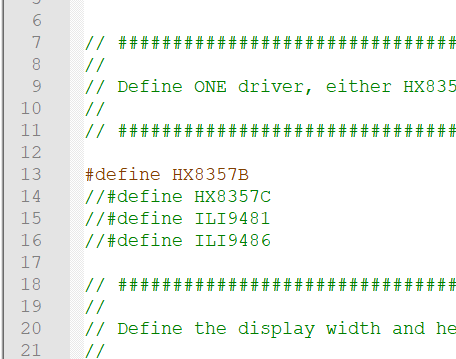
El código que utilizo para la conexión en paralelo es cualquiera de los ejemplos de la libraría TFT_HX8357 ej Graph.2 Por lo cual esto indicaría que la pantalla funciona.
#include <TFT_HX8357.h> // Hardware-specific library

#include "Free_Fonts.h" // Include the header file attached to this sketch

TFT_HX8357 tft = TFT_HX8357();       // Invoke custom library

unsigned long drawTime = 0;

void setup(void) {

  tft.begin();

  tft.setRotation(1);

}

void loop() {

  int xpos =  0;
  int ypos = 40;

  // >>>>>>>>>>>>>>>>>>>>>>>>>>>>>>>>>>>>>>>>>>>>>>>>>>>>>>>>>>>>>>>>>>>>>>>>>>>>>>>>>
  // Select different fonts to draw on screen using the print class
  // >>>>>>>>>>>>>>>>>>>>>>>>>>>>>>>>>>>>>>>>>>>>>>>>>>>>>>>>>>>>>>>>>>>>>>>>>>>>>>>>>

  tft.fillScreen(TFT_NAVY); // Clear screen to navy background

  header("Draw free fonts using print class");

  // For comaptibility with Adafruit_GFX library the text background is not plotted when using the print class
  // even if we specify it.
  tft.setTextColor(TFT_YELLOW, TFT_BLACK);
  tft.setCursor(xpos, ypos);    // Set cursor near top left corner of screen

  tft.setFreeFont(GLCD);     // Select the orginal small GLCD font by using NULL or GLCD
  tft.println();             // Move cursor down a line
  tft.print("Original GLCD font");    // Print the font name onto the TFT screen
  tft.println();
  tft.println();

  tft.setFreeFont(FSB9);   // Select Free Serif 9 point font, could use:
  // tft.setFreeFont(&FreeSerif9pt7b);
  tft.println();          // Free fonts plot with the baseline (imaginary line the letter A would sit on)
  // as the datum, so we must move the cursor down a line from the 0,0 position
  tft.print("Serif Bold 9pt");  // Print the font name onto the TFT screen

  tft.setFreeFont(FSB12);       // Select Free Serif 12 point font
  tft.println();                // Move cursor down a line
  tft.print("Serif Bold 12pt"); // Print the font name onto the TFT screen

  tft.setFreeFont(FSB18);       // Select Free Serif 12 point font
  tft.println();                // Move cursor down a line
  tft.print("Serif Bold 18pt"); // Print the font name onto the TFT screen

  tft.setFreeFont(FSB24);       // Select Free Serif 24 point font
  tft.println();                // Move cursor down a line
  tft.print("Serif Bold 24pt"); // Print the font name onto the TFT screen


  delay(4000);

  // >>>>>>>>>>>>>>>>>>>>>>>>>>>>>>>>>>>>>>>>>>>>>>>>>>>>>>>>>>>>>>>>>>>>>>>>>>>>>>>>>
  // Now use drawString() so we can set background colours and the datum
  // >>>>>>>>>>>>>>>>>>>>>>>>>>>>>>>>>>>>>>>>>>>>>>>>>>>>>>>>>>>>>>>>>>>>>>>>>>>>>>>>>

  tft.fillScreen(TFT_BLACK);

  header("Draw with background using drawString()");

  tft.setTextColor(TFT_WHITE, TFT_BLACK);

  tft.setTextDatum(TC_DATUM); // Centre text on x,y position

  xpos = tft.width() / 2; // Half the screen width
  ypos = 50;

  tft.setFreeFont(FSB9);                              // Select the font
  tft.drawString("Serif Bold 9pt", xpos, ypos, GFXFF);  // Draw the text string in the selected GFX free font
  ypos += tft.fontHeight(GFXFF);                      // Get the font height and move ypos down

  tft.setFreeFont(FSB12);
  tft.drawString("Serif Bold 12pt", xpos, ypos, GFXFF);
  ypos += tft.fontHeight(GFXFF);

  tft.setFreeFont(FSB18);
  tft.drawString("Serif Bold 18pt", xpos, ypos, GFXFF);
  ypos += tft.fontHeight(GFXFF);

  tft.setFreeFont(FSB24);
  tft.drawString("Serif Bold 24pt", xpos, ypos, GFXFF);
  ypos += tft.fontHeight(GFXFF);

  // Set text padding to 120 pixels wide area to over-write old values on screen
  tft.setTextPadding(120);
  for (int i = 0; i <= 20; i++) {
    tft.drawFloat(i / 10.0, 1, xpos, ypos, GFXFF);
    delay (200);
  }

  delay(4000);

  // >>>>>>>>>>>>>>>>>>>>>>>>>>>>>>>>>>>>>>>>>>>>>>>>>>>>>>>>>>>>>>>>>>>>>>>>>>>>>>>>>
  // Same again but with colours that show bounding boxes
  // >>>>>>>>>>>>>>>>>>>>>>>>>>>>>>>>>>>>>>>>>>>>>>>>>>>>>>>>>>>>>>>>>>>>>>>>>>>>>>>>>


  tft.fillScreen(TFT_DARKGREY);

  header("Show background filled bounding boxes");

  tft.setTextColor(TFT_YELLOW, TFT_BLACK);

  tft.setTextDatum(TC_DATUM); // Centre text on x,y position

  xpos = tft.width() / 2; // Half the screen width
  ypos = 50;

  tft.setFreeFont(FSB9);                              // Select the font
  tft.drawString("Serif Bold 9pt", xpos, ypos, GFXFF);  // Draw the text string in the selected GFX free font
  ypos += tft.fontHeight(GFXFF);                        // Get the font height and move ypos down

  tft.setFreeFont(FSB12);
  tft.drawString("Serif Bold 12pt", xpos, ypos, GFXFF);
  ypos += tft.fontHeight(GFXFF);

  tft.setFreeFont(FSB18);
  tft.drawString("Serif Bold 18pt", xpos, ypos, GFXFF);
  ypos += tft.fontHeight(GFXFF);

  tft.setFreeFont(FSBI24);
  tft.drawString("Serif Bold Italic 24pt", xpos, ypos, GFXFF);
  ypos += tft.fontHeight(GFXFF);

  // Set text padding to 120 pixels wide area to over-write old values on screen
  tft.setTextPadding(120);
  for (int i = 0; i <= 20; i++) {
    tft.drawFloat(i / 10.0, 1, xpos, ypos, GFXFF);
    delay (200);
  }

  delay(4000);

  // >>>>>>>>>>>>>>>>>>>>>>>>>>>>>>>>>>>>>>>>>>>>>>>>>>>>>>>>>>>>>>>>>>>>>>>>>>>>>>>>>
  // Now show setting the 12 datum positions works with free fonts
  // >>>>>>>>>>>>>>>>>>>>>>>>>>>>>>>>>>>>>>>>>>>>>>>>>>>>>>>>>>>>>>>>>>>>>>>>>>>>>>>>>

  // Numbers, floats and strings can be drawn relative to a datum
  tft.fillScreen(TFT_BLACK);
  header("Draw text relative to a datum");

  tft.setTextColor(TFT_DARKGREY, TFT_BLACK);
  tft.setFreeFont(FSS9);

  tft.setTextDatum(TL_DATUM);
  tft.drawString("[Top left}", 20, 60, GFXFF);
  drawDatum(20,60);

  tft.setTextDatum(TC_DATUM);
  tft.drawString("[Top centre]", 240, 60, GFXFF);
  drawDatum(240,60);

  tft.setTextDatum(TR_DATUM);
  tft.drawString("[Top right]", 460, 60, GFXFF);
  drawDatum(460,60);

  tft.setTextDatum(ML_DATUM);
  tft.drawString("[Middle left]", 20, 140, GFXFF);
  drawDatum(20,140);

  tft.setTextDatum(MC_DATUM);
  tft.drawString("[Middle centre]", 240, 140, GFXFF);
  drawDatum(240,140);

  tft.setTextDatum(MR_DATUM);
  tft.drawString("[Middle right]", 460, 140, GFXFF);
  drawDatum(460,140);

  tft.setTextDatum(BL_DATUM);
  tft.drawString("[Bottom Left]", 20, 220, GFXFF);
  drawDatum(20,220);

  tft.setTextDatum(BC_DATUM);
  tft.drawString("[Bottom centre]", 240, 220, GFXFF);
  drawDatum(240,220);

  tft.setTextDatum(BR_DATUM);
  tft.drawString("[Bottom right]", 460, 220, GFXFF);
  drawDatum(460,220);

  tft.setTextDatum(L_BASELINE);
  tft.drawString("[Left baseline]", 20, 300, GFXFF);
  drawDatum(20,300);

  tft.setTextDatum(C_BASELINE);
  tft.drawString("[Centre baseline]", 240, 300, GFXFF);
  drawDatum(240,300);

  tft.setTextDatum(R_BASELINE);
  tft.drawString("[Right baseline]", 460, 300, GFXFF);
  drawDatum(460,300);

  //while(1);
  delay(8000);

}

// Print the header for a display screen
void header(char *string)
{
  tft.setTextSize(1);
  tft.setTextColor(TFT_MAGENTA, TFT_BLUE);
  tft.fillRect(0, 0, 480, 30, TFT_BLUE);
  tft.setTextDatum(TC_DATUM);
  tft.drawString(string, 239, 2, 4); // Font 4 for fast drawing with background
}

// Draw a + mark centred on x,y
void drawDatum(int x, int y)
{
  tft.drawLine(x - 5, y, x + 5, y, TFT_GREEN);
  tft.drawLine(x, y - 5, x, y + 5, TFT_GREEN);
}


// There follows a crude way of flagging that this example sketch needs fonts which
// have not been enbabled in the User_Setup.h file inside the TFT_HX8357 library.
//
// These lines produce errors during compile time if settings in User_Setup are not correct
//
// The error will be "does not name a type" but ignore this and read the text between ''
// it will indicate which font or feature needs to be enabled
//
// Either delete all the following lines if you do not want warnings, or change the lines
// to suit your sketch modifications.

#ifndef LOAD_GLCD
//ERROR_Please_enable_LOAD_GLCD_in_User_Setup
#endif

#ifndef LOAD_FONT2
//ERROR_Please_enable_LOAD_FONT2_in_User_Setup!
#endif

#ifndef LOAD_FONT4
//ERROR_Please_enable_LOAD_FONT4_in_User_Setup!
#endif

#ifndef LOAD_FONT6
//ERROR_Please_enable_LOAD_FONT6_in_User_Setup!
#endif

#ifndef LOAD_FONT7
//ERROR_Please_enable_LOAD_FONT7_in_User_Setup!
#endif

#ifndef LOAD_FONT8
//ERROR_Please_enable_LOAD_FONT8_in_User_Setup!
#endif

#ifndef LOAD_GFXFF
ERROR_Please_enable_LOAD_GFXFF_in_User_Setup!
#endif
`
el código que utilizo para poder conectar en modo SPI es el siguiente: `
#include <SPI.h>

// Definición de pines para modo SPI
#define TFT_CS   53    // Chip Select
#define TFT_RST  49    // Reset
#define TFT_DC   48    // Data/Command (RS)
#define SD_CS    47    // SD Card Chip Select

void setup() {
  Serial.begin(9600);
  Serial.println("Iniciando prueba de pantalla TFT SPI");

  // Configurar pines
  pinMode(TFT_CS, OUTPUT);
  pinMode(TFT_RST, OUTPUT);
  pinMode(TFT_DC, OUTPUT);
  pinMode(SD_CS, OUTPUT);

  // Asegurar que SD está desactivado
  digitalWrite(SD_CS, HIGH);

  // Inicializar SPI
  SPI.begin();
  SPI.beginTransaction(SPISettings(8000000, MSBFIRST, SPI_MODE0));

  // Reset de la pantalla
  digitalWrite(TFT_RST, HIGH);
  delay(10);
  digitalWrite(TFT_RST, LOW);
  delay(10);
  digitalWrite(TFT_RST, HIGH);
  delay(150);

  // Prueba básica de comunicación
  testSPICommunication();
}

void testSPICommunication() {
  Serial.println("Probando comunicación SPI...");

  // Seleccionar pantalla
  digitalWrite(TFT_CS, LOW);

  // Enviar comando de lectura de ID (0x04)
  digitalWrite(TFT_DC, LOW);  // Comando
  SPI.transfer(0x04);

  digitalWrite(TFT_DC, HIGH);  // Datos
  // Leer 4 bytes de respuesta
  byte response[4];
  for(int i = 0; i < 4; i++) {
    response[i] = SPI.transfer(0x00);
  }

  digitalWrite(TFT_CS, HIGH);

  // Mostrar respuesta
  Serial.print("ID recibido: 0x");
  for(int i = 0; i < 4; i++) {
    if(response[i] < 0x10) Serial.print("0");
    Serial.print(response[i], HEX);
  }
  Serial.println();
}

void loop() {
  // Nada en el loop
}`
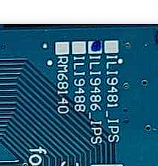
En mi ignorancia deduzco que estoy conectando mal o hay algo que tengo que tener en cuanta y que estoy obviando. La pantalla no funciona con conexión spi (cuando tiene los pines para ello) y más que de software es un tema de hardware (creería). Pero bueno, me dirán ustedes. Por lo pronto, muchas gracias