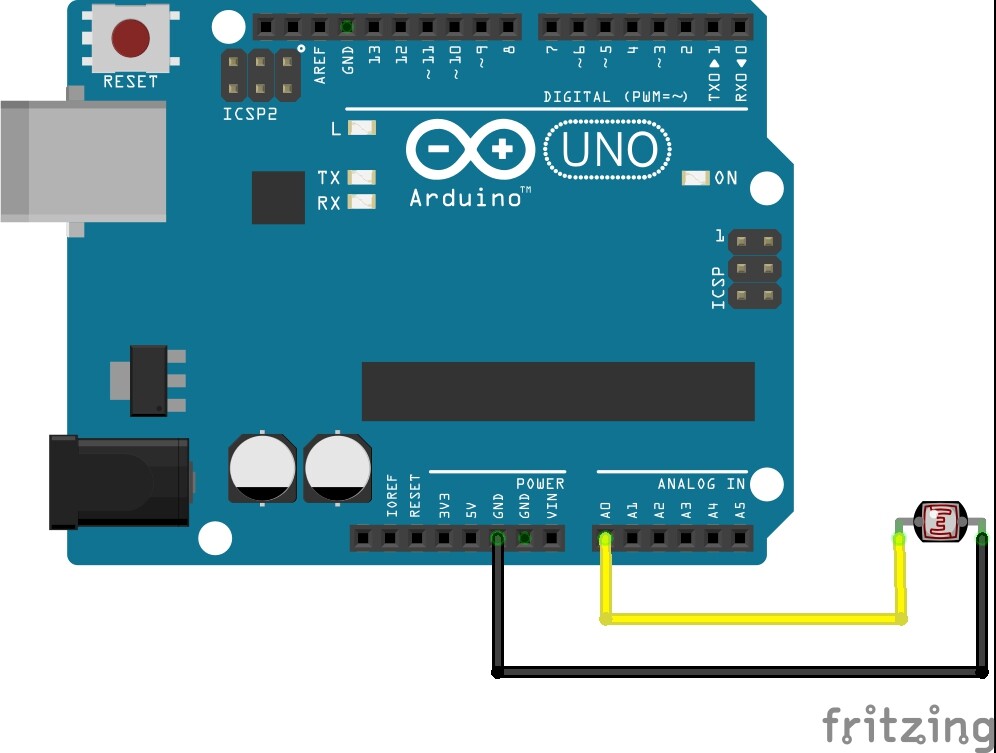
Hey all : )
i am working on a small arduino project with FastLed / WS2811. I hooked a photoresistor to A0 and when the drops unter a certain thresold the function »pride« (from the fast led library) should be played. I am a little bit lost at the moment because it works but not exactly as i wanted it to. Only if the photoresistor is completely darkened the function is not being played. If i am getting close to it the leds start to flicker. Thats not what i wanted to do. My Code:
#include "FastLED.h"
const int sensorPin = A0; // Photresistor Analog Pin 0
int lightCal;
int lightVal;

#define DATA_PIN    9 // led ring
#define LED_TYPE    WS2811
#define COLOR_ORDER GRB
#define NUM_LEDS    12
#define BRIGHTNESS  255

CRGB leds[NUM_LEDS];


void setup() {
  lightCal = analogRead(sensorPin); // read photoresistor
  delay(3000); // 3 second delay for recovery

  // tell FastLED about the LED strip configuration
  FastLED.addLeds<LED_TYPE, DATA_PIN, COLOR_ORDER>(leds, NUM_LEDS)
  .setCorrection(TypicalLEDStrip)
  .setDither(BRIGHTNESS < 155);

  // set master brightness control
  FastLED.setBrightness(BRIGHTNESS);
  // Serial.begin(9600);
}


void loop()
{
  lightVal = analogRead(sensorPin); // read sensor and store in lightval

  if (lightVal < 50)
  {
    FastLED.clear();  // clear all pixel data
    FastLED.show();
    Serial.println(lightVal);
  }
  else
  {
    Serial.println(lightVal);
    pride();
    FastLED.show();
  }
}

// This function draws rainbows with an ever-changing,
// widely-varying set of parameters.
void pride()
{
  static uint16_t sPseudotime = 0;
  static uint16_t sLastMillis = 0;
  static uint16_t sHue16 = 0;

  uint8_t sat8 = beatsin88( 87, 220, 250);
  uint8_t brightdepth = beatsin88( 341, 96, 224);
  uint16_t brightnessthetainc16 = beatsin88( 203, (25 * 256), (40 * 256));
  uint8_t msmultiplier = beatsin88(147, 23, 60);

  uint16_t hue16 = sHue16;//gHue * 256;
  uint16_t hueinc16 = beatsin88(113, 1, 3000);

  uint16_t ms = millis();
  uint16_t deltams = ms - sLastMillis ;
  sLastMillis  = ms;
  sPseudotime += deltams * msmultiplier;
  sHue16 += deltams * beatsin88( 400, 5, 9);
  uint16_t brightnesstheta16 = sPseudotime;

  for ( uint16_t i = 0 ; i < NUM_LEDS; i++) {
    hue16 += hueinc16;
    uint8_t hue8 = hue16 / 256;

    brightnesstheta16  += brightnessthetainc16;
    uint16_t b16 = sin16( brightnesstheta16  ) + 32768;

    uint16_t bri16 = (uint32_t)((uint32_t)b16 * (uint32_t)b16) / 65536;
    uint8_t bri8 = (uint32_t)(((uint32_t)bri16) * brightdepth) / 65536;
    bri8 += (255 - brightdepth);

    CRGB newcolor = CHSV( hue8, sat8, bri8);

    uint16_t pixelnumber = i;
    pixelnumber = (NUM_LEDS - 1) - pixelnumber;

    nblend( leds[pixelnumber], newcolor, 64);
  }
}
1K is very low for a LDR load resistor. I often just enable the internal pullup resistor (30K -50K) instead of using an external resistor. Connect the LDR to ground an a pin that is set to pinMode INPUT_PULLUP in setup(). If the internal pullupnis too high a value try a 10K.
You could. But if you want to control the light sensitivity more precisely, you should just choose a different external resistor value instead, for example 100k. Same wiring as you showed, or the alternate wiring that was suggested (however with the addition of the external resistor).
i started with removing the resistor completely in order to do it step by step. Serial monitor shows
something between 16 and 17 an no change. Setup now has
You have A0 tied to ground and the LDR going to Vcc. No surprise that it reads near 0 and does not change. That is not how it is in the schematic that I posted. Just put one side of the LDR to ground and the other to A0 and enable the pullup on A0. That's it.
sorry i still do not get it. Ok. the dotted line represents the internal pullup so i do not care for providing voltage, too? If i simply connect the ldr between a0 and gnd i get "878" as reading. If i completely cover the sensor it is between 877 and 878 ...
thanks for the patience
cannot say thank you enough for your effort. It worked and i understood. I do not know what i did wrong before but you solved it. Thanks! What i also did wrong: I was assuming that there will be values between 0 and 1024 but this was not the case since my environment was not lit up very well. Furthermore did not consider that there may be differences in measurement if the sensor is covered (by hand) and the environment is very bright or very dark. thank you so much!