#include <Servo.h>
#define PI 3.1415926535897932384626433832795
#define servoPin 10
#define dirPin 11
#define stepPin 13
#define motorInterfaceType 1
#define ena 12
Servo Servo1;

const int stepsPerRevolution = 905;
const float v_min = 0.1;     // RPM to set the starting speed for the acceleration
String readString;
int ind1;
int ind2;
float nb_step ;
float spd_max;
float acc = 0.4;
float spd0 = 10;
float vlm = -1;
float tm;
float slp = -1;
float itm = -1;
int motor_max_speed = 1000;

void setup() {
  pinMode(stepPin, OUTPUT);
  pinMode(dirPin, OUTPUT);
  pinMode(ena, OUTPUT);
  pinMode(4, OUTPUT);
  Servo1.attach(servoPin);
  Serial.begin(9600);
  Serial.println("Start");
  Servo1.write(80);
  delay(1000);
  Servo1.write(0);
  delay(1000);
  digitalWrite(dirPin, LOW);
  int fdc = digitalRead(4);
  while (fdc == 0) {
    f_step(motor_max_speed/10);
    fdc = int(digitalRead(4));
  }
}

void loop() {
  float t;
  instructions();
  Servo1.write(0);
  delay(400);
  digitalWrite(dirPin, HIGH);
  f_stepper();
  delay(1000*slp);
  digitalWrite(dirPin, LOW);
  f_stepper();

}


void f_stepper() {
  int counter = 0;
  float t = 0;
  float t1 = 0;
  float spd = 0;
  spd_max = (nb_step - acc*spd0 ) / (itm - acc);


  while (t < acc){
      spd = spd0 + (1 - cos(t * PI / acc) )* (spd_max - spd0) /2 ;
      f_step(spd);
      t+=1/spd;
      counter ++;
  }

  spd = spd_max ;


  while (t <= itm - acc) {
      f_step(spd);
      t+=1/spd;
      counter ++;
  }

  t1 = t ;

  while (t < itm) {
      spd = spd0 + (1 + cos((t-t1) * PI / acc) )* (spd_max - spd0) /2 ;
      f_step(spd);
      t+=1/spd;
      counter ++;
  }
}

void f_step(float spd) {
  digitalWrite(stepPin, HIGH);
  delayMicroseconds(1000000/(2*spd));
  digitalWrite(stepPin, LOW);
  delayMicroseconds(1000000/(2*spd));
}

void instructions() {
  vlm = -1;
  itm = -1;
  slp = -1;

  while (slp == -1) {
    if (Serial.available())  {
      char c = Serial.read();  //gets one byte from serial buffer
      if (c == ';') {
        Serial.println();
        Serial.print("captured String is : ");
        Serial.println(readString); //prints string to serial port out

        ind1 = readString.indexOf('T');  //finds location of first ,
        vlm = readString.substring(1, ind1).toFloat();   //captures first data String
        ind2 = readString.indexOf('S', ind1+1 );   //finds location of second ,
        itm = readString.substring(ind1+1, ind2).toFloat();   //captures second data String
        slp = readString.substring(ind2+1).toFloat(); //captures remain part of data after last ,

        Serial.print("vlm = ");
        Serial.println(vlm);
        Serial.print("itm = ");
        Serial.println(itm);
        Serial.print("slp = ");
        Serial.println(slp);

        readString=""; //clears variable for new input
    }
    else {
      readString += c; //makes the string readString
    }
    nb_step = 250*vlm;
  }
  }
}

Please follow the advice given in the link below when posting code, in particular the section entitled 'Posting code and common code problems'
Use code tags (the < CODE/ > icon above the compose window) to make it easier to read and copy for examination
1 Like
Hello somasekharjamalla
Do you have a broken keyboard?
Add "talking" variable names to the sketch.
Cryptic variable names are mega crap.
cannot understand sir ,i am beginner
Use Serial.print of critical variables and show on serial monitor to tell what is happening in the code.
Forum is no repair shop.
Your schematic shows ENA-, DIR- and PUL- not connected to Arduino GND.
Because we are not you, we guess
float vlm = -1;    // virtual line meter
float tm;          // temporary menu
float slp = -1;    // static license protocol
float itm = -1;    // independent temporal metric
Or you could spare just a few more of your lifetime supply of letter and numbers and use variable names that might be easier to see right away what you might be talking about.
   int numberOfDonuts = 12;    // start with a full box
   int gallonsOfCoffee = 1;    // for testing - change for the circumstances
   int totalCost;
Like that.
// comments don't have to hurt, either, just sayin'
a7
1 Like
What sensor is read on pin D4? Switch? Thermometer? PIR?
[edit]
This line:
pinMode(4, OUTPUT);
keeps Pin 4 at zero.
switch
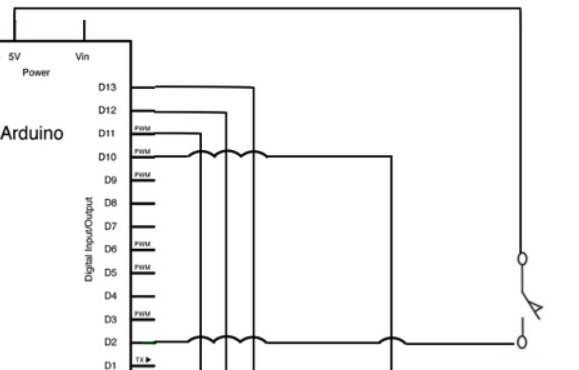
Is that how the switch is wired on pin 4? That is wrong. The switch is floating while it is open which means that its state is indeterminate (unknown).
A better way to wire the switch is to wire one side to ground and the other to an input (pin 4) set to pinMode INPUT_PULLUP. You will have to adjust the logic in your code to reflect that the pin will read HIGH when the switch is open and LOW when the switch is closed.

1 Like
slp
if the switch/D4 (I used a slide switch, because it needs to be on at 2 seconds) is allowed to go high, slp immediately is non-negative, so the introduction never occurs.
A Simulation oops... i lost my switch... fixing fixed.
i tested pin 4 to gnd using limit switch , but stepper rote one direction ,
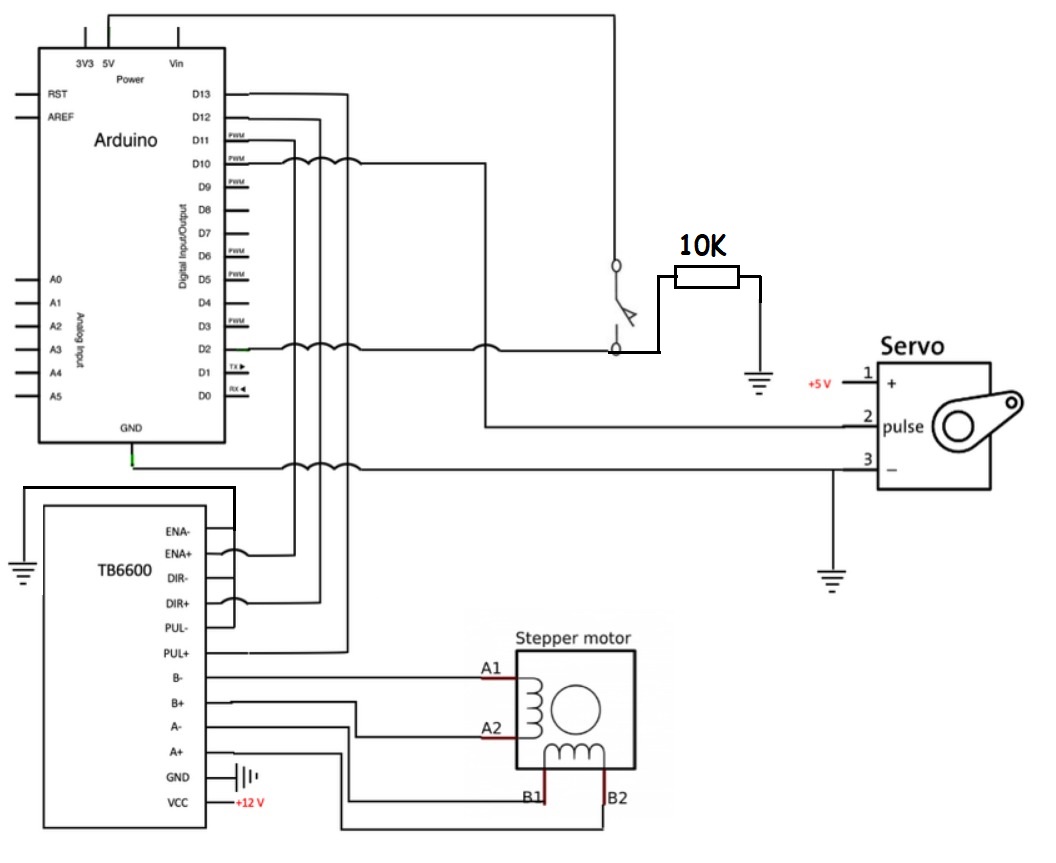


Your code changes the direction of the pin (dirPin HIGH) but then immediately changes the direction again (dirPin LOW)... and because this (backward and forward) is in void loop() the stepper just stands still.
  Servo1.write(0);
  delay(400);
  digitalWrite(dirPin, HIGH);
  f_stepper();
  delay(1000 * slp);
  digitalWrite(dirPin, LOW);
  f_stepper();
Should the dirPin be changed in any way?
(note: Pin 4 is not read in void loop())
1 Like
Hello, @TomGeorge - I think the button/switch is going to pin 4... the following was...
pinMode(4, OUTPUT);
In the simulation, the line is now...
pinMode(4, INPUT);
1 Like
@somasekharjamalla - I also noticed your were trying to print the captured serial input, but you were telling the Arduino to read one more time, which left the "capture" output empty.
      char c = Serial.read();  //gets one byte from serial buffer
      if (c == ';') {
        Serial.println();
        Serial.print("captured String is: ");
        Serial.println(c); //prints string to serial port out
        // Serial.println(readString); // this was not printing the captured character
I also think your stepper motor will not work "backwards" because your f_stepper() function is multiplying numbers that are probably zero (0*?=0).
Thanks sir , my problem fixed
This topic was automatically closed 180 days after the last reply. New replies are no longer allowed.