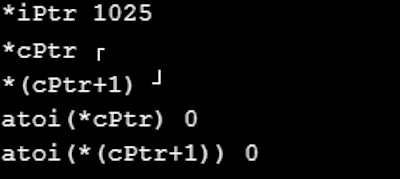
On playing with pointers I get results that I do not understand.
Perhaps you folks can understand the results. This is the code and
attached are the results. Thanks for looking.
#define print Serial.print
#define printf Serial.println
void setup()
{
  Serial.begin(9600);
}

void loop()
{
  int iValue = 1025; //  00000100 00000001
  int *iPtr = &iValue;
  char *cPtr;

  cPtr = (char*)iPtr;  //typecasting

  print(" *iPtr ");  printf(*iPtr); // should be 1025 - okay

  // expected 1 from first byte;  got inverted L
  print(" *cPtr "); printf(*cPtr);

  // expected 4 from second byte; got flipped L
  print(" *(cPtr+1) "); printf(*(cPtr+1));

  //what is the ascii value of those chacters?
  // should be ascii value of odd char 1 ?
  print(" atoi(*cPtr) ");  printf(atoi(*cPtr));

  // should be ascii value of odd char 2 ?
  print(" atoi(*(cPtr+1)) ");  printf(atoi(*(cPtr+1)));

  delay(1000);
}
Atoi necessitates a cString and remember the little endian format in memory
Which arduino are you using?
please, please never ever again post pictures of text... Not only they are not readable nor usable directly for copy&paste but they use up lots of storage and internet bandwidth which contributes to polluting the planet.
➜ do your part and do yourself a favour and please read How to get the best out of this forum and modify your post accordingly (including code tags and necessary documentation for your ask).
I tried your code and captured in HTerm. The expected 1 and expected 4 are there. They are printed as raw binary 0x01 and 0x04.
atoi() function converts the initial portion of the string pointed to by s to integer.
you should rather use itoa() to convert your binary 0x01 to string before sending out by uart
Make your cPtr be unsigned char and it will work. The atoi() part will still not work since you are not passing in ascii characters like "1" and "4" but rather values 1 and 4 which yield 0.
I tried copy and paste from notepad but screwed up pushing
to many buttons while pasting it. I deleted the code and repasted
it into code tags - not sure it worked -I give up.
I am using a mega2560 as all my UNOs are tied up in unfinished projects.
Using "unsigned char *cPtr works".
I need to lower my low standards further and learn more about strings,characters,etc.
I come from embedded programing (machine control).
Using a macro for trivial shortening is not a great idea, but this is worse, because printf has a specific meaning to someone familiar with C/C++, and it's not println
Here's a variation of the test that prints visible results, making it easier to see how things work
the number in decimal. Not that interesting, but you can paste that same number in the code, replacing its hex value, and nothing should change.
the char1 and the byte 49 decimal; the latter is 0x31 hex, which is the last byte of the integer value, stored little-endian. And also the ASCII code for 1
the ASCII codes for the ten digits range from 0x30 to 0x39. So now atoi works, whether starting at the pointer address, or "1 over", skipping the first digit.
the last digit in memory order is the high byte of the integer, 0x00, which is ASCII NUL and terminates every C-string. atoi actually stops on any non-digit (once it has started), but you shouldn't rely on this behavior.
atoi, like all C-string functions, expects a pointer: char *, whether const or not. When you try atoi(*cPtr), that's actually converting a char to a pointer. You would get a warning for that -- if you have warnings enabled, which you should, in Preferences (Setting on Mac) -- or an error.
In my experience the easiest way to tidy up the code and add the code tags is as follows
Start by tidying up your code by using Tools/Auto Format in the IDE to make it easier to read. Then use Edit/Copy for Forum and paste what was copied in a new reply. Code tags will have been added to the code to make it easy to read in the forum thus making it easier to provide help.
It is also helpful to post error messages in code tags as it makes it easier to scroll through them and copy them for examination
the ASCI char for 0x04 is EOT
both are non-printable
   1025  iValue
 0x0401  iValue
  0x8fa  iValue

  0x8fa  iPtr
   1025 *iPtr

  0x8fa  cPtr
   0x01 *cPtr
   0x04 *++cPtr
  0x8fb  cPtr

  0x184  name
  0x184  0x48 H name [0]
  0x185  0x61 a name [1]
  0x186  0x72 r name [2]
  0x187  0x72 r name [3]
  0x188  0x79 y name [4]
  0x189  0x57 W name [5]
  0x18a  0x41 A name [6]
  0x18b  0x00