Pointers often give beginning programmers problems, probably because of the way they view the data. In the discussion that follows, I'm going to take a few liberties to make things a little more clear. For example, I want you to pretend that the Arduino bootstrap loader is the operating system and is responsible for all of the duties an operating system like Linux or Windows assumes.
When you define a variable in your program with a simple statement like:
int val;
there are a whole lot of things going on behind your back. First, upon seeing the statement terminator (i.e., the semicolon), the compiler checks the statement for syntax errors. Finding none, it then needs to see if you have already defined a variable named val at the same scope level. To perform this check, it examines an internal data structure it uses called a symbol table. The purpose of a symbol table is to maintain the details about a data item so it can be used in the program. A simplified symbol table might look like:
ID Data Type Scope lvalue …
myData int 0 600
x float 0 610
It says the program has already defined two variables name myData and x. (The ellipsis, …, means there is a lot more information stored than we are showing.) The symbol table also saves information about each variable's type, scope, lvalue, and other data, too.
So, what's an lvalue? Any data item that is defined in a program has two things associated with it: 1) its lvalue, and 2) its rvalue. The
lvalue is the memory address where a data item is stored in memory.
From the symbol table we can see that if your code wants to do something with myData, the compiler must fetch 2 bytes (it's an int) from memory starting at address 600. If you need to access variable x, the compiler needs to fetch 4 bytes from memory starting at address 610. Because your code is trying to define a new variable named val, the compiler searches its symbol table and, not seeing an entry named val at the same scope level, it adds that variable's name (e.g., identifier) to the symbol table:
ID Data Type Scope lvalue …
myData int 0 600
x float 0 610
val int 0 ?
At this point, the lvalue column is not filled in, so we place question marks in that column. Now the compiler sends a request to the bootloader: “Hey, bootloader! My programmer wants 2 bytes of memory for a new int variable. Got 2 free bytes left?” The bootloader checks its free memory bank and says: “Hey, compiler! I found 2 bytes for you at memory address 650. You're welcome.” The symbol table is then changed to:
ID Data Type Scope lvalue …
myData int 0 600
x float 0 610
val int 0 650
Note that the lvalue is now filled in.
We can represent this information about val with a graph:
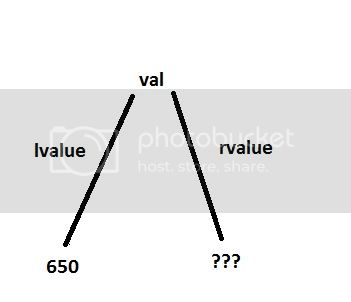
lvalue and rvalues
The term lvalue evolved from assembly language programming and represented the “location value” of a data item. That is, the lvalue was where the data item was located in memory. If the lvalue column for a variable is empty, that variable is not defined. (This is where so many programmers confuse the terms define and declare. A defined variable has an lvalue, a declared variable may not. They do not mean the same thing.)
The rvalue (i.e., register value) is what it stored in that variable. In other words, because val is an int data type, if we go to memory address 650 and fetch 2 bytes of memory, we will have the current value associated with variable val. Right now, we are showing the rvalue of val as unknown because we have not assigned anything to it.