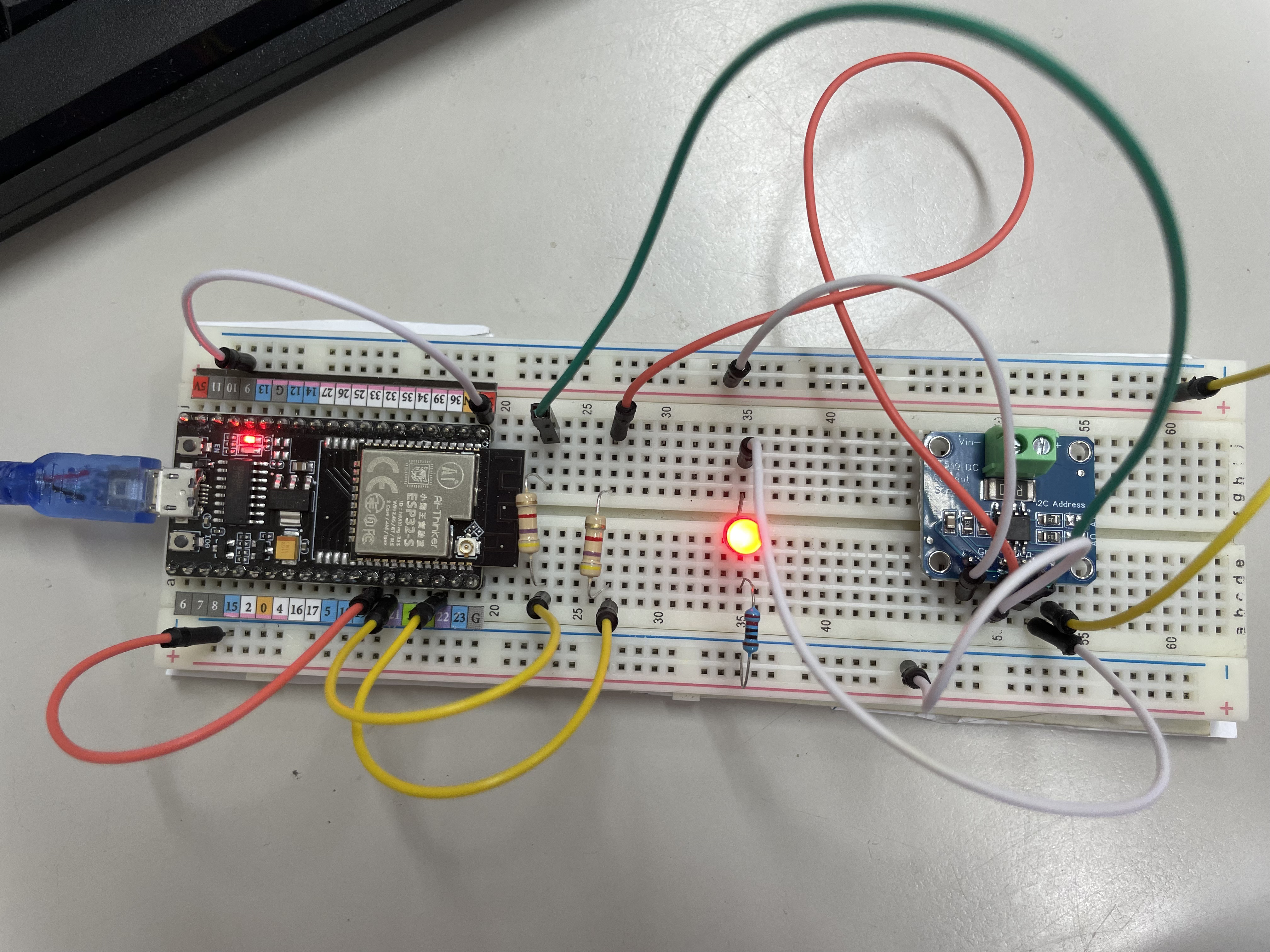
Hello everyone,
I've encountered an issue while trying to connect an INA219 sensor to my ESP32. The serial monitor is displaying the message "INA219 not connected," and I'm unsure where the problem lies. Below, I have attached my code and the circuit diagram for reference. Thank you all in advance!
/***************************************************************************
* Example sketch for the INA219_WE library
*
* This sketch shows how to use the INA219 module in continuous mode.
*
* Further information can be found on:
* https://wolles-elektronikkiste.de/ina219 (German)
* https://wolles-elektronikkiste.de/en/ina219-current-and-power-sensor (English)
*
***************************************************************************/
#include <Wire.h>
#include <INA219_WE.h>
#define I2C_ADDRESS 0x42
#define PIN_POWER_METER_SCL 22
#define PIN_POWER_METER_SDA 21

/* There are several ways to create your INA219 object:
 * INA219_WE ina219 = INA219_WE(); -> uses Wire / I2C Address = 0x40
 * INA219_WE ina219 = INA219_WE(I2C_ADDRESS); -> uses Wire / I2C_ADDRESS
 * INA219_WE ina219 = INA219_WE(&Wire); -> you can pass any TwoWire object
 * INA219_WE ina219 = INA219_WE(&Wire, I2C_ADDRESS); -> all together
 */
INA219_WE ina219 = INA219_WE(I2C_ADDRESS);

void setup() {
  Serial.begin(115200);
  Wire.begin(21,22);
  if(!ina219.init()){
    Serial.println("INA219 not connected!");
  }

  /* Set ADC Mode for Bus and ShuntVoltage
  * Mode *            * Res / Samples *       * Conversion Time *
  BIT_MODE_9        9 Bit Resolution             84 µs
  BIT_MODE_10       10 Bit Resolution            148 µs
  BIT_MODE_11       11 Bit Resolution            276 µs
  BIT_MODE_12       12 Bit Resolution            532 µs  (DEFAULT)
  SAMPLE_MODE_2     Mean Value 2 samples         1.06 ms
  SAMPLE_MODE_4     Mean Value 4 samples         2.13 ms
  SAMPLE_MODE_8     Mean Value 8 samples         4.26 ms
  SAMPLE_MODE_16    Mean Value 16 samples        8.51 ms
  SAMPLE_MODE_32    Mean Value 32 samples        17.02 ms
  SAMPLE_MODE_64    Mean Value 64 samples        34.05 ms
  SAMPLE_MODE_128   Mean Value 128 samples       68.10 ms
  */
  ina219.setADCMode( BIT_MODE_12); // choose mode and uncomment for change of default

  /* Set measure mode
  POWER_DOWN - INA219 switched off
  TRIGGERED  - measurement on demand
  ADC_OFF    - Analog/Digital Converter switched off
  CONTINUOUS  - Continuous measurements (DEFAULT)
  */
  ina219.setMeasureMode(CONTINUOUS); // choose mode and uncomment for change of default

  /* Set PGain
  * Gain *  * Shunt Voltage Range *   * Max Current (if shunt is 0.1 ohms) *
   PG_40       40 mV                    0.4 A
   PG_80       80 mV                    0.8 A
   PG_160      160 mV                   1.6 A
   PG_320      320 mV                   3.2 A (DEFAULT)
  */
  ina219.setPGain(PG_320); // choose gain and uncomment for change of default

  /* Set Bus Voltage Range
   BRNG_16   -> 16 V
   BRNG_32   -> 32 V (DEFAULT)
  */
  ina219.setBusRange(BRNG_16); // choose range and uncomment for change of default

  Serial.println("INA219 Current Sensor Example Sketch - Continuous");

  /* If the current values delivered by the INA219 differ by a constant factor
     from values obtained with calibrated equipment you can define a correction factor.
     Correction factor = current delivered from calibrated equipment / current delivered by INA219
  */
  // ina219.setCorrectionFactor(0.98); // insert your correction factor if necessary

  /* If you experience a shunt voltage offset, that means you detect a shunt voltage which is not
     zero, although the current should be zero, you can apply a correction. For this, uncomment the
     following function and apply the offset you have detected.
  */
  //ina219.setShuntVoltOffset_mV(0.5); // insert the shunt voltage (millivolts) you detect at zero current
}

void loop() {
  double shuntVoltage_mV = 0.0;
  double loadVoltage_V = 0.0;
  float busVoltage_V = 0.0;
  float current_mA = 0.0;
  float power_mW = 0.0;
  bool ina219_overflow = false;

  shuntVoltage_mV = ina219.getShuntVoltage_mV();
  busVoltage_V = ina219.getBusVoltage_V();
  current_mA = ina219.getCurrent_mA();
  power_mW = ina219.getBusPower();
  loadVoltage_V  = busVoltage_V + (shuntVoltage_mV/1000);
  ina219_overflow = ina219.getOverflow();

  Serial.print("Shunt Voltage [mV]: "); Serial.println(shuntVoltage_mV);
  Serial.print("Bus Voltage [V]: "); Serial.println(busVoltage_V);
  Serial.print("Load Voltage [V]: "); Serial.println(loadVoltage_V);
  Serial.print("Current[mA]: "); Serial.println(current_mA);
  Serial.print("Bus Power [mW]: "); Serial.println(power_mW);
  if(!ina219_overflow){
    Serial.println("Values OK - no overflow");
  }
  else{
    Serial.println("Overflow! Choose higher PGAIN");
  }
  Serial.println();

  delay(10000);
}


 thank you!