Hi all, hope my first post is well formatted to get help from you.
I was development a little project to send SMS instruction to arduino/sim900 using the library from GitHub - MarcoMartines/GSM-GPRS-GPS-Shield: GSM/GPRS & GPS Shield Library for modules using SIM900/SIM908 and get back a SMS with temperature and humidity using and arduino UNO with very good results. When i achived that i wanted to add more features to the project and noticed that almost 80% of the sdram was used(optimazed code did it). So i decided to change to an Arduino Mega to add more features to my project and i am stuck with a only feature, GET A SMS.
To guide help from you, i decide to post a simple sketch that is not working.
The folliwing code is the same that is working with UNO sending a welcome SMS and receiving SMS successfully, but with MEGA only send Sms is working, but not receiving.
To get works the library GSM-GPRS with arduino MEGA, i changed some lines in GSM.h and HWSerial.h as instructions.txt
#include "SIM900.h"
//#include <SoftwareSerial.h> // With MEGA, SERIAL1 is used.
#include "sms.h"
SMSGSM sms;

boolean started=false;
char sms_position;
char phone_number[20];
char sms_text[100];


void setup()
{
    Serial.begin(19200);

    if (gsm.begin(19200))
    {
        Serial.println("\nstatus=READY");
        started=true;
    }
    else
        Serial.println("\nstatus=IDLE");

    if(started)
    {
        if (sms.SendSMS("+56998728XXX", "Welcome Arduino SMS"))// Add you sim card number here with country code
        {
          Serial.println("\nSMS sent OK.");
        }
        else
        {
          Serial.println("\nError sending SMS.");
        }
    }
}

void loop()
{
    if(started)
    {
        sms_position=sms.IsSMSPresent(SMS_UNREAD); // SMS.cpp Method finds out if there is present at least one SMS with specified status
        if (sms_position)
        {
            Serial.print("SMS postion:");
            Serial.println(sms_position,DEC);
            sms.GetSMS(sms_position, phone_number, 11, sms_text, 100); //Arguments to GET SMS. See SMS.h line12:(byte position, char *phone_number,byte max_phone_len, char *SMS_text, byte max_SMS_len)
            Serial.println(phone_number);
            Serial.println(sms_text);
        }
        delay(5000);
    }
}
what is happening at serial monitor:
At Void Setup, SMS successfully sent:
At Void Loop, No SMS received.
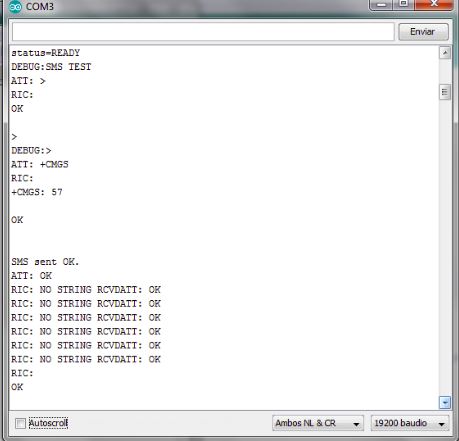

Hello you all had read my post
I think finally found my problem. I Don´t know how a Sms in a SIM chip works, but if you see the readme.txt library instructions in line 149:
char GetSMS(byte position, char *phone_number, char *SMS_text, byte max_SMS_len)
reads SMS from specified memory(SIM) position
parameters and return values:
position: SMS position <1..20>
phone_number: a pointer where the phone number string of received SMS will be placed
so the space for the phone number string must be reserved – see example
SMS_text : a pointer where SMS text will be placed
max_SMS_len: maximum length of SMS text excluding also string terminating 0×00 character
return:
ERROR ret. val:
—————
-1 – comm. line to the GSM module is not free
-2 – GSM module didn’t answer in timeout
-3 – specified position must be > 0
OK ret val:
see the position to call the function, is a range from 1 to 20. From this i thought that there was many sms from past trials and the new ones were in a higher position. So i inserted in Void Setup a for cycle with the fuction DeleteSMS(byte position), to delete all SMS.
Compiled, sent a sms to arduino and works! Also i tried sent many sms until 20th position and when the 21th sms was sent, the arduino didnt read it.
In order to get working uninterruptedly my arduino/shield what do you suggest. To delete every SMS sent inmediatly or check if 20th position is reached and delete all with a for cycle?
Thank you
Sketch
#include "SIM900.h"
//#include <SoftwareSerial.h> // With MEGA, SERIAL1 is used.
#include "sms.h"
SMSGSM sms;

boolean started=false;
char sms_position;
char phone_number[20];
char sms_text[100];
int i;


void setup()
{
    Serial.begin(19200);

    if (gsm.begin(19200))
    {
        Serial.println("\nstatus=READY");
        started=true;
    }
    else
        Serial.println("\nstatus=IDLE");

    if(started)
    {
      for (i=1;i<=20;i++)
      {
        sms.DeleteSMS(i);
      }
        if (sms.SendSMS("+56998728249", "Arduino SMS"))// Add you sim card number here with country code
        {
          Serial.println("\nSMS sent OK.");
        }
        else
        {
          Serial.println("\nError sending SMS.");
        }
    }
}

void loop()
{
    if(started)
    {
        sms_position=sms.IsSMSPresent(SMS_UNREAD); // SMS.cpp Method finds out if there is present at least one SMS with specified status
        Serial.print("SMS postion:");
        Serial.println(sms_position,DEC);

        if (sms_position)
        {
            Serial.print("SMS postion:");
            Serial.println(sms_position,DEC);
            sms.GetSMS(sms_position, phone_number, 11, sms_text, 100); //Arguments to GET SMS. See SMS.h line12:(byte position, char *phone_number,byte max_phone_len, char *SMS_text, byte max_SMS_len)
            Serial.println(phone_number);
            Serial.println(sms_text);
        }
        delay(5000);
    }
}
Hello my friend,
Did you mnage to run the code in the Mega? I cannot reproduce it. Can you give some more details on the wirring setup between the shield and the mega?
He probably didn't. You will note that the line in the code posted.
//#include <SoftwareSerial.h> // With MEGA, SERIAL1 is used.
which is actually a comment, and he doesn't use Serial1.
yes i did it, Did you solve your problem? Do you have connections problems?