Hello. I am trying to use two HW504 Joysticks to control multiple servos. The Arduino Mega 2560 can power all of the servos just fine but when I add the Joystick/s to the load, the Arduino light saying it's on fades out. This also happens when none of the servos are attached to the power and only the joysticks are.
Attached is a gif of me plugging the 5v and ground wires into the left side of the breadboard where the wires to the joystick are plugged in, then plugging it into the right side where the servo wires are and it working(based on the lights).
On the joystick, it reads 5v+ on one of the pins so I may need a higher voltage.
Delta_G:
I didn't watch your video, but what you describe sounds like there is a short through the joystick. What kind of joystick is it? Does it have any documentation?
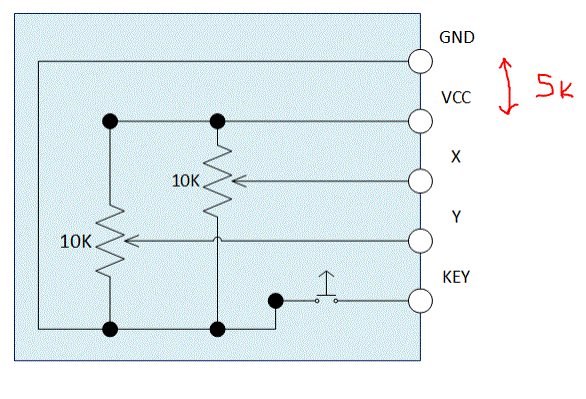
It's an HW504/PS2 Joystick, and this is some documentation I found on it.
Delta_G:
Well if you've got it connected like it is in the picture there then it shouldn't be a problem. Maybe you have a bad joystick.
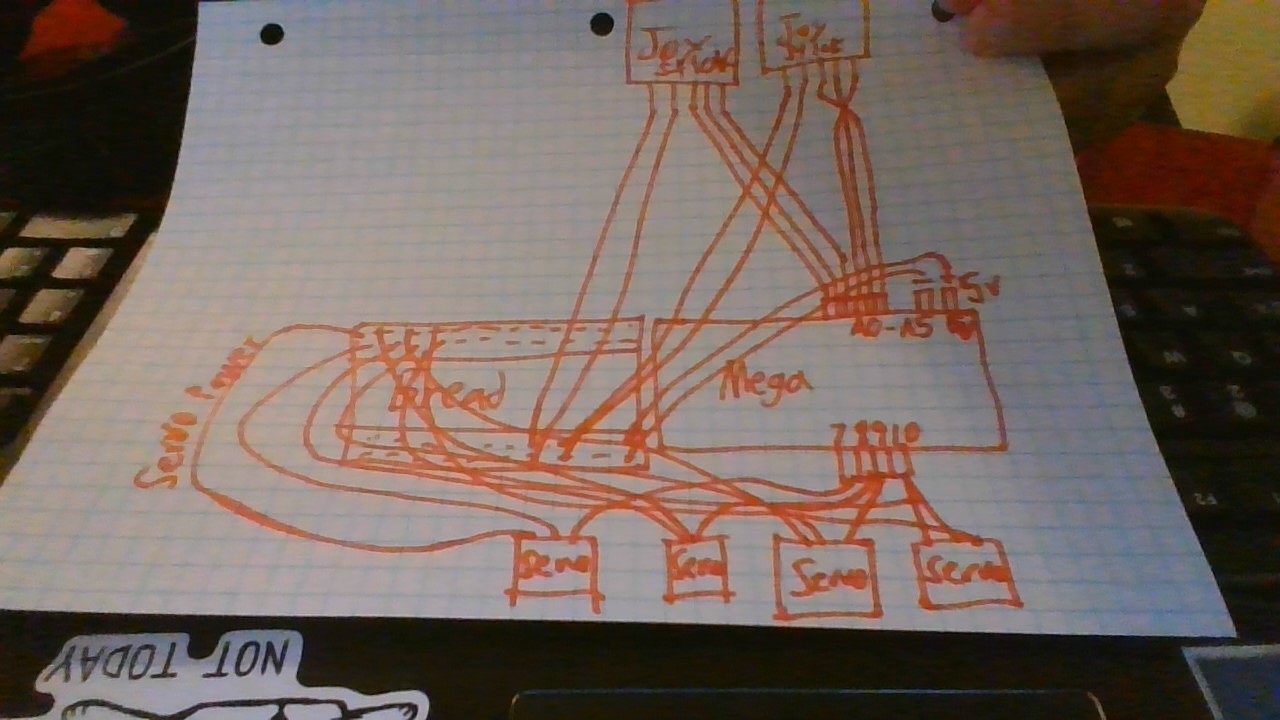
Can you provide a schematic of what you have? Hand drawn is fine. If you insist on one of those silly fritzing things then at least make sure it is accurate. Don't give it to me and then tell me that actually this is not the same or that but you couldn't find the part or whatever. Make it really what you have. Or really, just draw it out and attach a picture of it.
Here you go. Sorry if the picture is bad and sorry that the schematic I made is bad. But I hope it helps.
I have connected the servos to an alternate power source. But when joystick/s are connected to the power from the alternate source or the Arduino it shuts it off. So if I connect the joystick to the power source, the power source shuts off, the same happens with the Arduino
fierymoto:
Here you go. Sorry if the picture is bad and sorry that the schematic I made is bad. But I hope it helps.
Your presentation is a complete rats nest and impossible to follow.
Look up how circuit drawings are laid out.
There are millions of examples out there.
Then you might get some meaningful help.
bluejets:
Your presentation is a complete rats nest and impossible to follow.
Look up how circuit drawings are laid out.
There are millions of examples out there.
Then you might get some meaningful help.
Thank you Delta for helping me even if my drawing was a complete "rats nest" as bluejets kindly pointed out. I will try using another joystick and see if that works. Again thank you so much for putting up with my noob mistakes as I am still learning.
Delta_G:
All those servos are powered from the Arduino? That's your problem. You can't pull that kind of current through the 5V pin.
Although OP said in the opening post that the problem presented when joysticks were added to the servos on the 5v pin s/he then immediately said the problem was the same with the servos out of the mix.
OP when you measure the resistance across the pot's outer pin's, what is the value?
edit: let me re-phrase after looking at the schematic of the joystick in the linked datasheet. There are 2x 10k resistors in parallel across Vcc and Gnd, so you should read 5k.
Hi @fierymoto do you have a DMM to measure voltages around your project?
Can you tell us your electronics, programming, arduino, hardware experience?
Have you got some code that JUST uses the joysticks, NO servo code and NO servos connected?
Connect just your joysticks up and show us a picture of them connected, please post a jpg picture, NOT a gif.
Also take some time and draw a diagram, clearly, ie not with felt pen, and label ALL your connections, including the joystick.
Does the joystick have the pin labels printed on its board?
meltDown:
That's an unnecessary restriction. Why can't the diagram be done with a felt tip pen?
The previous drawing's (lack of) clarity had nothing to do with it being done with a felt tip pen as such.
Not wanting to enter into an argument.
Felt tipped pens usually need you to draw quickly without thinking, if you don't the lines and text blurs and looses resolution due to the paper soak.
A ball point pen or pencil allows you to TAKE YOUR time and think about what you are drawing.
This means more time to think about layout and giving you more room to put important information.
Tom...