Problem with connecting tpic6

Hi there,

I got a problem connecting my PCB with tpic6c595dr (shift register). To my raspberry pi. I couldnt find a rasp pi forum.

Ive got the code below very simple.

import RPi.GPIO as GPIO
import time
GPIO.setmode(GPIO.BCM)
 
datapin = 17 # serial pin
clockpin = 27 # srclk
latchpin = 22 # rclk
 
GPIO.setup(datapin, GPIO.OUT)
GPIO.setup(clockpin, GPIO.OUT)
GPIO.setup(latchpin, GPIO.OUT)
 
GPIO.output(latchpin, 0)
 
leds = "11111011"
 
for x in range(8):
GPIO.output(datapin, int(leds[x-1]))
time.sleep(0.01)
GPIO.output(clockpin, 1)
time.sleep(0.01)
GPIO.output(clockpin, 0)
time.sleep(0.01)
 
GPIO.output(latchpin, 1)

And i have the schematic attached as a pdf.

I cant control the lights.

I connected the serial pin to 17 srclk to 27 rclk to 22 and clr to 5V. The lights automatically all turn when powered which i dont understand. I cant control them individually do you guys have any idea what im doing wrong?

50c330af-fbaa-4f2e-88df-513023497461 (1) (cropped) (pdfresizer.com).pdf (231,5 KB)

The TPIC is a 5volt-only chip that expects 5volt logic signals.
A RPi is AFAIK 3.3volt logic.
Leo..

Oh i completely overlooked that ill try it with a arduino later today.

https://forums.raspberrypi.com/

Hi there i tried with a arduino mega today. Using the following code:

int serPin = 22;
int srclkPin = 24;
int rclkPin = 26;

void setup() {
  // put your setup code here, to run once:
  pinMode(serPin, OUTPUT);
  pinMode(srclkPin, OUTPUT);
  pinMode(rclkPin, OUTPUT);
}

String leds = "10101010";

void loop() {
  // put your main code here, to run repeatedly:
  digitalWrite(rclkPin, 0);
  delay(0.01);
  for(int i = 0; i < 8; i++){
    digitalWrite(serPin, leds[i]);
    delay(0.01);
    digitalWrite(srclkPin, 1);
    delay(0.01);
    digitalWrite(srclkPin, 0);
    delay(0.01);
  }
  delay(0.01);
  digitalWrite(rclkPin, 1);

  while (true){
    delay(1);
  }
}

But i still couldnt get it to work. What am i missing?

The leds are still always on.

  • Above is not a valid line of code, use unsigned integers or unsigned long.
   String leds = "10101010";
  • Use byte leds[] = {1, 0, 1, 0, 1, 0, 1, 0};

Thanks for the fast response. I changed the code to this:

int serPin = 22;
int srclkPin = 24;
int rclkPin = 26;

void setup() {
  // put your setup code here, to run once:
  pinMode(serPin, OUTPUT);
  pinMode(srclkPin, OUTPUT);
  pinMode(rclkPin, OUTPUT);
}

byte leds1[] = {1, 0, 1, 0, 1, 0, 1, 0};
byte leds2[] = {0, 1, 0, 1, 0, 1, 0, 1};


void loop() {
  // put your main code here, to run repeatedly:
  setLeds(leds1);
  delay(500);
  setLeds(leds2);
  delay(500);
}

void setLeds(byte newLeds[]) {
  digitalWrite(rclkPin, 0);
  delay(5);
  for(int i = 0; i < 8; i++){
    digitalWrite(serPin, newLeds[i]);
    delay(5);
    digitalWrite(srclkPin, 1);
    delay(5);
    digitalWrite(srclkPin, 0);
    delay(5);
  }
  delay(5);
  digitalWrite(rclkPin, 1);
}

This did change the behaviour. The LEDS are now rappidly blinking in random patterns not in 2 designated ones. Any more tips?

  • Show us good images of your actual wiring.

Why don't you use SPI to write to the shift register.
Leo..

rclkPin should have a pulse that goes LOW > HIGH > LOW, you are leaving it HIGH until you call the setLEDS() function again. I don't see that as really causing a problem though.
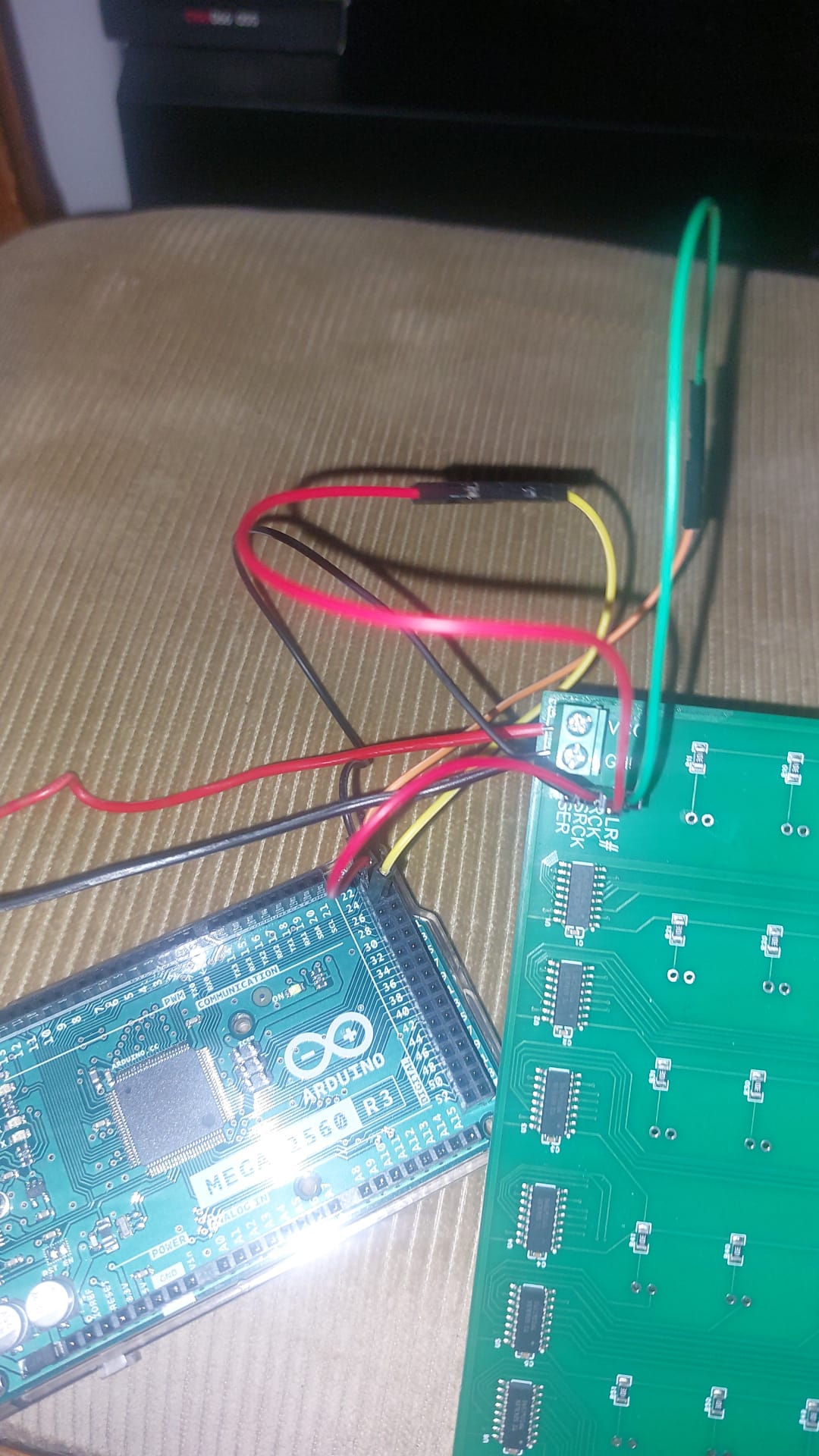
Sorry for the late reply i was on vacation.

This is a picture of the wiring connected to the pcb.

I changed the code so the rclkPin goes LOW>HIGH>LOW. But this did indeed not make a difference.