Hello there,
I'm new here at this forum and really beginner with Arduino coding.
My friend ask me for a favor and code custom-made driver for enabling/disabling external device on 230V AC.
The main idea of the driver is:
- Program in Standby mode, waiting for operators move,
- Program go into "heat" mode and count the time to finish or looking for operator move to interupt the mode,
- Program go to "cooldown" mode after first or second scenario in point 2. Counting down the time, then go back to standby mode.
Additional features:
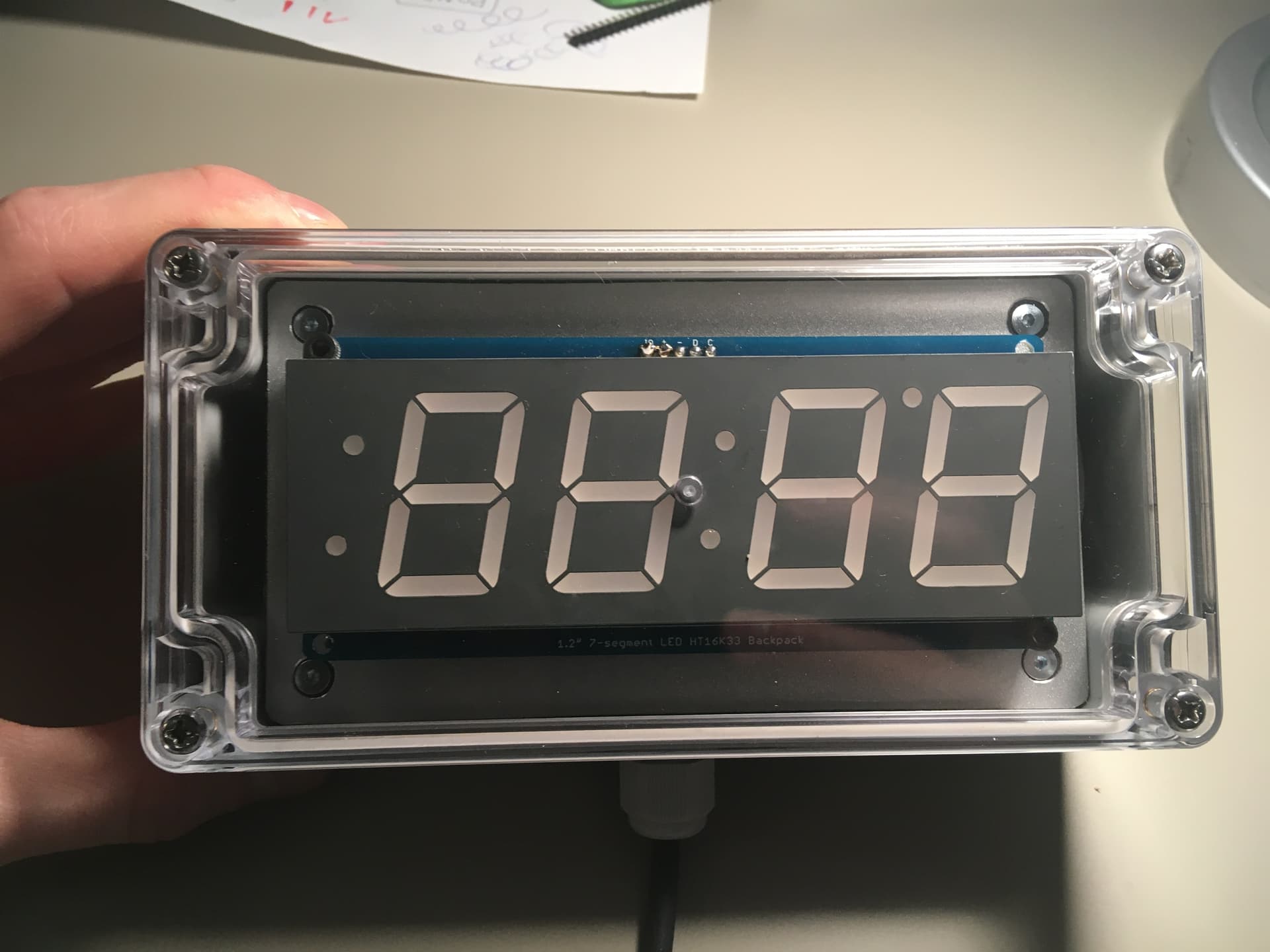
- Driver have external LCD display basing on 7-segment display with colon to display counting time. Display is based on Adafruit driver and connection is on I2C way.
- Standby - only colon is displayed, display brightness setting is able to change only in this mode,
- Cooldown counting cannot be interrupted by operator. Only the hardware reset can reset the all driver.
Where is the problem?
For some reason sometimes program freeze and not responding for any input. Only hardware reset helps.
Knowing that I add extra feature to reset the all board with connecting A3 as output to RESET pin. Then code a method to execute it with digitalWrite LOW level of signal.
To prevent some bad scenarios the program count 30s in Standby with no action and go with reset. Second way to reset the diver is after counting down the cooldown time.
Idk why the program freeze if all driver is reseting for every 30s of idle in Standby?
Also I with to make my code (this and future) much more better quality and wish to ask you for any advice with code review.
To make all case more clear I put my code below. I can also share a GIT folder with all history of this driver.
PS many parts of the program are in Polish but it could be easy to understand for any of You  If not, let me know to explain the code more precisely.
// 13.02.2023 Update:
// 1. Extra condition added to heat and cooldown mode, the "if" checks also the current mode
// 2. Extra program to reset the arduino software, method is called after cooldown time end
// 3. Error program implemented. Basing on current behaviour of driver, the method is called after calling the reset.
//    That provide extra info if driver is stucked and need to be reset manually by pressing the button.
// 4. Some of the lines are moved to correct (better) positions to be executed when it is necessary.
// 5. All commented and not used anymore lines - are deleted.

// 18.02.2023 Update:
// 1. Software reset is disabled
// 2. Hardware + software reset is setup, A0 Pin as output to reset the driver
// 3. Reset works on Standby for each 30sec without enabling the program
// 4. Reset function is enabled after the cooldown time is gone.

#include <Arduino.h>
#include <Wire.h>
#include "Adafruit_LEDBackpack.h"

#define LEDzielony 8
#define LEDczerwony 9
#define LEDniebieski 10
#define przekaznik 11
#define buttonPIN 12


Adafruit_7segment matrix = Adafruit_7segment();
int mode = 0;                         //mode(tryb) przyjmuje wartości: 0-dla standby, 1-dla heat, 2-dla cooldown
int time_to_calc;
int odczytADC;
int brightness = 0;
bool standbyON = false;
bool heatON = false;
bool cooldownON = false;
bool colon_status = true;
unsigned long defaultStandbyTime = 30000UL;     //domyślny czas dla standby, po jego zakończneiu następuje reset sterownika, 30.000ms (30sek)
unsigned long defaultHeatTime = 600000UL;        //domyślny czas dla grzania, finalnie wpisać 600.000ms
unsigned long defaultCooldownTime = 1800000UL;   //domyślny czas dla studzenia, finalnie wpisać 1.800.000ms
unsigned long previous_time = 0;
unsigned long start_standby = 0;
unsigned long start_heat = 0;
unsigned long start_cooldown = 0;


void setup()
{
  digitalWrite(A0, HIGH);             //ustawienie wyjścia na A0 w stan wysoki
  pinMode(A0, OUTPUT);                //ustawienie portu A0 jako wyjście
  pinMode(LEDzielony, OUTPUT);
  pinMode(LEDczerwony, OUTPUT);
  pinMode(LEDniebieski, OUTPUT);
  pinMode(przekaznik, OUTPUT);
  pinMode(buttonPIN, INPUT_PULLUP);
  pinMode(A3, INPUT_PULLUP);

  digitalWrite(LEDzielony, HIGH);
  digitalWrite(LEDczerwony, HIGH);    //dla RGB ze wspolną anodą (+), dla stanu HIGH diody nie świecą
  digitalWrite(LEDniebieski, HIGH);
  digitalWrite(przekaznik, HIGH);     //dla przekaźnika z załączaniem do GND, dla stanu HIGH przekaźnik jest wyłączony

  matrix.begin(0x70);                 // ustawienie adresu wyświetlacza, wartość domyślna 0x70
  matrix.blinkRate(0);                // ustawienie migania wyświetlacza, domyślnie 0 - brak migania

  mode = 0;
  digitalWrite(LEDczerwony, LOW);
  delay(500);
  digitalWrite(LEDczerwony, HIGH);
}

//metoda sygnalizująca błąd (brak) resetu programu. Konieczny reset ręczny
void error_mess ()
{
  bool LED_stat = LOW;
  for (;;)            // wywołanie pęlti nieskończoej. Wszystkie diody migają razem.
  {
    digitalWrite(LEDzielony, LED_stat);
    digitalWrite(LEDczerwony, LED_stat);
    digitalWrite(LEDniebieski, LED_stat);
    delay(500);
    LED_stat = !LED_stat;
  }
}

//metoda resetująca sterownik hardware'owo, podanie stanu LOW na pin RESET powoduje reset sterownika
void resetFunc()
{
  digitalWrite(LEDzielony, LOW);
  digitalWrite(LEDczerwony, LOW);
  digitalWrite(LEDniebieski, LOW);
  delay(2000);
  digitalWrite(A0, LOW);
  delay(50);
  error_mess();
}


bool butt()
{
  // bool buttonResult;
  while (digitalRead(buttonPIN) == LOW)
  { }
  delay(100);
  return true;
}

int display_time (int t1) {
  return int (t1 / 60 * 100 + t1 % 60);   // przeliczenie sekund na wartość do wyświetlenia na ekranie, minuty i sekundy
}

// wyświetlająca wartość na wyświetlaczu + zmiana stanu dwukropka
void count_the_time (int t3) {
  matrix.print(display_time(t3), DEC);
  colon_status = !colon_status;
  matrix.drawColon(colon_status);
  matrix.writeDisplay();
}

void standby()
{
  if ((standbyON == false) & (mode == 0))
  {
    digitalWrite(przekaznik, HIGH);     //profilaktyczne wyłączenie przekaźnika
    digitalWrite(LEDczerwony, HIGH);    //
    digitalWrite(LEDniebieski, HIGH);   //wyłączenie diodek czerwonej i niebieskiej
    digitalWrite(LEDzielony, LOW);      //załączenie diody zielonej
    colon_status = true;
    matrix.drawColon(colon_status);     // uruchomienie dwukropka
    matrix.writeDisplay();
    time_to_calc = defaultStandbyTime / 1000;  //przeliczenie czasu standby na sekundy
    start_standby = millis();
    previous_time = start_standby;
    standbyON = true;
    heatON = false;
    cooldownON = false;
    delay(2000);
  }
  odczytADC = analogRead(A3);         //odczyt wartości z portu A3 (analog) z potencjometru
  brightness = map(odczytADC, 5, 1020, 0, 15);
  matrix.setBrightness(brightness);
  matrix.drawColon(true);             // uruchomienie dwukropka
  matrix.writeDisplay();              // załączneie zmian w wyświetlaczu
  if ((millis() - start_standby) > defaultStandbyTime)
  {
    resetFunc();
  }
  if (digitalRead(buttonPIN) == LOW)
  {
    if (butt() == true)
    {
      standbyON = false;
      cooldownON = false;
      mode = 1;
    }
  }
}

void heat()
{
  if ((heatON == false) & (mode == 1))
  {
    digitalWrite(przekaznik, LOW);          //załączenie przekaźnika
    digitalWrite(LEDczerwony, LOW);         //załączenie diody czerwonej
    digitalWrite(LEDniebieski, HIGH);       //
    digitalWrite(LEDzielony, HIGH);         //wyłączenie diodek niebieskiej i zielonej
    time_to_calc = defaultHeatTime / 1000;  //przeliczenie czasu grzania na sekundy
    start_heat = millis();
    previous_time = start_heat;
    heatON = true;
    colon_status = false;
    delay(1000);
  }
  if ((heatON == true) & (mode == 1))
  {
    if ((start_heat + defaultHeatTime) > millis())   //sprawdzenie, czy upłynął już domyślny czas grzania
    {
      if (millis() - previous_time >= 1000UL)
      {
        previous_time = millis();
        time_to_calc -= 1;
        count_the_time(time_to_calc);
      }
      if (digitalRead(buttonPIN) == LOW)                  //jeżeli nie, możemy wywołać zakończenie programu oraz przejście
      {                                                   //do podprogramu studzenia
        if (butt() == true)                               //taki zabieg można zrobić tylko raz przed upływem domyślnego czasu grzania
        {
          heatON = false;
          mode = 2;
          matrix.print(0, DEC);
          matrix.writeDisplay();
        }
      }
    }
    else if ((start_heat + defaultHeatTime) <= millis())   //sprawdzenie, czy upłynął już domyślny czas grzania
    {
      heatON = false;
      mode = 2;                                           //jeżeli tak, przejdź od razu do podprogramu studzenia
      matrix.print(0, DEC);
      matrix.writeDisplay();
    }
  }
}

void cooldown()
{
  if ((cooldownON == false) & (mode == 2))              //sprawdzenie stanu dla podprogramu studzenia, domyślnie jest false
  {
    digitalWrite(przekaznik, HIGH);     //wyłączenie przekaźnika
    digitalWrite(LEDczerwony, HIGH);    //wyłączenie diody czerwonej
    digitalWrite(LEDniebieski, LOW);    //załączenie diody niebieskiej
    digitalWrite(LEDzielony, HIGH);     //wyłączenie diody zielonej
    start_cooldown = millis();
    previous_time = start_cooldown;
    cooldownON = true;                  //załączenie stanu studzenia na true
    colon_status = false;
    time_to_calc = defaultCooldownTime / 1000;  //przeliczenie czasu studzenia na sekundy
    matrix.print(display_time(time_to_calc), DEC);
    matrix.drawColon(colon_status);
    matrix.writeDisplay();
  }
  if ((cooldownON == true) & (mode == 2))
  {
    if ((start_cooldown + defaultCooldownTime) > millis())   //sprawdzenie, czy upłynął już domyślny czas studzenia
    {
      if (millis() - previous_time >= 1000UL)
      {
        previous_time = millis();
        time_to_calc -= 1;
        count_the_time(time_to_calc);
      }
      mode = 2;                                              //jeżeli nie minął, pozostań w trybie 2-cooldown
    }
    else if ((start_cooldown + defaultCooldownTime) <= millis())  //sprawdzenie, czy upłynął już domyślny czas studzenia
    {
      matrix.clear();
      matrix.writeDisplay();
      cooldownON = false;
      resetFunc();                                          // wywołaj funkcję resetu
      delay(2000);                                          // odczekaj 2s. Kod wykonywany, jeżeli reset nie przebiegnie pomyślnie
      error_mess();                                         // wywołanie podprogramu error_mess, gdy nie nastąpi reset. Pętla nieskończona
    }
  }
}

void loop() {
  if (mode == 0)
  {
    standby();
  }
  if (mode == 1)
  {
    heat();
  }
  if (mode == 2)
  {
    cooldown();
  }
}