Problem with NRF24L01 chip communication freezes after a while!!!

So I am having a problem with a project that I am developing.

So basically I am developing a car that is controlled with a remote control (which has 3 buttons, a Potentiometer and a joystick) which can shoot a nerf dart, use 2 wheels (controlled with DC motors) and lights. Also it is supposed to read an HC SR04 sensor and a light sensor, but that does not matter now.
I am using two NRF24L01 modules to communicate,

The code compiles, but after a while the communication simply freezes and I have to reset it.

By the way, I am using an arduino mega 2560 r3 for the car and a arduino uno r3 for the controller.

This is the code for the car

https://gist.github.com/ddmdavid/9b7d59a786ec570c1c5440f854dab2f1

This is the code for the controller.

https://gist.github.com/ddmdavid/424de0873eccbbcb7892f2edb51b7be9

This is what is printed in the serial monitor of the car:

0,0,0,0,505,495
0,0,0,0,505,495
0,0,0,0,505,495
0,0,0,0,506,495
0,0,0,0,506,495
0,0,0,0,505,495
0,0,0,0,506,495
0,0,0,0,505,495
0,0,0,0,505,495
0,0,0,0,505,495
0,0,0,0,506,495
0,0,0,0,506,495
0,0,0,0,505,495
0,0,0,0,505,495
0,0,0,0,506,495
0,0,0,0,506,495
0,0,0,0,505,495
0,0,0,0,506,495
0,0,0,0,506,495
0,0,0,0,505,495
0,0,0,0,505,495
0,0,0,0,506,495
0,0,0,0,506,495
0,0,0,0,505,495
0,0,0,0,505,495
0,0,0,0,505,495
0,0,0,0,506,495
0,0,0,0,505,495
0,0,0,0,506,495
0,0,0,0,505,495
0,0,0,0,505,495
0,0,0,0,505,495
0,0,0,0,505,495
0,0,0,0,506,495
0,0,0,0,505,495
0,0,0,0,505,495
0,0,0,0,505,495
0,0,0,0,505,495
0,0,0,0,505,495
0,0,0,0,505,495
0,0,0,0,506,495
0,0,0,0,505,495
0,0,0,0,505,495
0,0,0,0,506,495
0,0,0,0,506,495
0,0,0,0,505,495
0,0,0,0,505,495
0,0,0,0,506,495
0,0,0,0,506,495
0,0,0,0,506,495
0,0,0,0,506,495
0,0,0,0,505,495
0,0,0,0,506,495
0,0,0,0,505,495
0,0,0,0,505,495
0,0,0,0,505,495
0,0,0,0,505,495
0,0,0,0,505,495
0,0,0,0,505,495
0,0,0,0,505,438
0,0,0,0,506,4
0,0,0,0,505,3
0,0,0,0,506,3
0,0,0,0,505,4
0,0,0,0,506,4
0,0,0,0,506,4
0,0,0,0,506,4
0,0,0,0,506,4
0,0,0,0,506,4
0,0,0,0,505,4
0,0,0,0,506,3
0,0,0,0,506,495

PS. I am a newbie when it comes to programming, just to let you know.

codeForTheCommand.ino (2.91 KB)
I strongly suspect that the problem is caused by your use of the String class. It is not a good idea to use the String (capital S) class on an Arduino as it can cause memory corruption in the small memory on an Arduino. Just use cstrings - char arrays terminated with 0.

For an example using cstrings have a look at this Simple nRF24L01+ Tutorial

...R

One thing I noticed (probably not directly connected to your problem):

 radio.setDataRate(RF24_250KBPS) ;
  radio.enableDynamicPayloads();
  radio.enableAckPayload();
               
  radio.setRetries(0, 15);

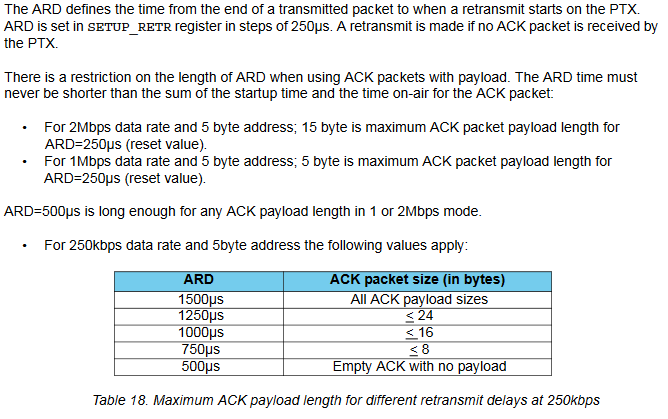
The timeout value is too low (0). See page 34 of the datasheet.

ARDNRF.png

You should not use a string representation of the data to be exchanged,
the NRF is perfectly capable of sending and receiving binary data.

The small packet size of 32 bytes calls for a compressed format IMHO.

Your send loop is absolutely unmoderated, if nobody answers, you directly send the next request.
Do you really want to do that hundreds of times a second?

Your very inefficient and unsensible permanent mode changes (startListing()/stopListening())
save you from absolutely flooding the channel,
but only leaves a very narrow window in which a packet could be received.

So basically what I have to do is change the way I send data and slow down the number of times the information is send by the NRF24L01?

Note: Can I send the integer array with the NRF24L01?

For a remote control, I would send the current state regulary (10+ times per second) in one structure,
setup an ackpayload in the car to pass back information without startListen / stopListen.

The passed back information could carry any information including a request 'stop commands, I have a problem'.
You have to keep in mind that the ackpayload data is always 'the response' of the previous packet.

ddmdavid01:
So basically what I have to do is change the way I send data and slow down the number of times the information is send by the NRF24L01?

Note: Can I send the integer array with the NRF24L01?

Yes and yes. The NRF can send any structure of 32 byte max.

You should not use String in an 8-bit-AVR, for the sake of stability.
There should be no delay() calls anywhere in your sketch.

The part that has a delay did not give me any problems. The part that has a delay what it does is shoot the dart, it has nothing to do with the communication, therefore it did not give to me any problems.
I am a big newbie when it comes to communication, specially when it comes to the NRF24L01 chips so certain concepts that are vital for the functionality of project are completely dismissed without even noticing :frowning: . One of the things is the control of the amount of times I send an information throw the chip. I still have a lot of difficulties.

No String, no delay() does not handle ackpayload data, but should send 10 packets a second.

#include <nRF24L01.h>
#include <printf.h>
#include <RF24.h>
#include <RF24_config.h>

const byte button1 = 2;
const byte button2 = 3;
const byte button3 = 4;

struct Packet {
  bool butt[3];
  int stick[3];
  void update() {
    butt[0] = digitalRead(button1);
    butt[1] = digitalRead(button2);
    butt[2] = digitalRead(button3);
    stick[0] = analogRead(A5);
    stick[1] = analogRead(A0);
    stick[2] = analogRead(A3);
  }
} myPack;

const uint64_t pipes[2] = {0xF0F0F0F0E1LL, 0xF0F0F0F0D2LL};

RF24 radio(7, 8);

void setup() {
  Serial.begin(9600);
  printf_begin();
  radio.begin();
  radio.openWritingPipe(pipes[1]);
  radio.openReadingPipe(1, pipes[0]);
  radio.setDataRate(RF24_250KBPS) ;
  radio.setPALevel( RF24_PA_MAX ) ;
  radio.setChannel(105);
  radio.enableDynamicPayloads();
  radio.enableAckPayload();
  radio.setRetries(5, 15);
  radio.setAutoAck( true );
  radio.printDetails();
  radio.startListening();
}

void loop() {
  unsigned long topLoop = millis();
  static unsigned long lastSend;

  if (topLoop - lastSend >= 100) {
    lastSend = topLoop;
    myPack.update();
    radio.write(&myPack, sizeof(myPack));
  }
}

You original code had a powerUp call in it, so I suspect it came from an outdated ManicBug sketch.
You should use the library http://tmrh20.github.io/RF24/classRF24.html which works better.

i learnt with an old video how to program the NRF24L01 chip which used the powerUp function.

Ok I have updated the library, but now the communication does not even happen.

Instead of using a string now I use the integer array directly.

This is in the controller.

void loop(){

        //reading the signal
         values[0] = digitalRead(6);
         values[1] = digitalRead(5);
         values[2] = digitalRead(4);
         values[3] = analogRead(A5);
         values[4] = analogRead(A0);
         values[5] = analogRead(A3);
      
      
      radio.stopListening();
      radio.write(&values, sizeof(values));
      radio.startListening();

And this is in the car

void loop() {
  radio.startListening();
  //trying to receive a signal and if so receive and process the info
  if (radio.available()) {
   radio.read(&values, sizeof(values));

   // radio.stopListening();
    //radio.powerDown();

    Serial.print(values[0]);
    Serial.print(",");
    Serial.print(values[1]);
    Serial.print(",");
    Serial.print(values[2]);
    Serial.print(",");
    Serial.print(values[3]);
    Serial.print(",");
    Serial.print(values[4]);
    Serial.print(",");
    Serial.print(values[5]);
    Serial.print("\n");

loop fragment:
Don't switch modes if not necessary.
Don't flood the channel, at least while testing.

car fragment:
Don't call startListening without a previous call to stopListening, don't switch modes if not necessary.

Don't post fragments, or should I start posting fragments of my answers?

Ok Here it is the car code

https://gist.github.com/ddmdavid/b78991e3e23ebdb6709478ece909bbda

And here it is the controller code

https://gist.github.com/ddmdavid/06146ba026d67d4ed662b178d677b1e3

Also this is the result in the Serial monitor

0,0,0,0,0,0

0,0,0,0,0,0

0,0,0,0,0,0

0,0,0,0,0,0

0,0,0,0,0,0

24911,9338,-27480,0,1927,8567

1927,8567,-15287,-16143,-31138,29471

-31138,29471,-16221,-17348,24911,9338

20303,20303,20303,20303,20303,20303

20303,20303,20303,20303,-25058,-24930

20303,20303,20303,20303,20303,20303

20303,20303,20303,20303,20303,20303

20303,20303,20303,20303,20303,20303

20303,20303,20303,20303,20303,20303

24111,8070,-23693,15552,10940,-30276

20318,31329,-22492,148,-27136,3102

20303,20303,20303,20303,20303,20303

20303,20303,20303,20303,20303,20303

20303,20303,20303,20303,20303,20303

24911,30315,-10055,21800,-31138,29471

-31138,29471,-16221,-17348,24911,9338

24911,9338,-27480,0,-22737,30805

-22737,30805,30840,27000,4864,24536

-22737,30805,30840,27000,4864,24536

Basically, I tried to change the data type to transmit. Instead of using a string or an array I used a structure with 6 int variables. For some reason, the "car" receives really weird numbers as it was presented before. I think it could be the address, I think it should be changed to a bye array or something

I feel you do not listen.

  radio.setRetries(0, 15);                

void loop(){
    dataSend dataSend1 = {digitalRead(6),digitalRead(5),digitalRead(4),analogRead(A5), analogRead(A0),analogRead(A3)};
      
      radio.stopListening();
      radio.write(&dataSend1, sizeof(dataSend1));
      radio.startListening();
 
}

Have you verified that this kind of initialization works as expected?

      else if(shotFired != 1){
        radio.stopListening();
        wheelControl(0, 26, 27); //rignt wheel
        wheelControl(0, 28, 29); //left wheel
        //start the engine
        pinMode(7,OUTPUT);
        digitalWrite(7,1);
        delay(3000);
        //TAKE THE SHOT DAMMIT, FINISH IT HAVE NO MERCY!!!
        pointer.write(0);
        delay(500);
        pointer.write(70);
        //stop the engine and start the communication
        digitalWrite(7,0);
        radio.startListening();
}

Three and a half second no receiving because of what?

I listened you it is just that I am quite confused. I didn't get what you wanted to say with the first fragment. The second fragment, yes it works as it is supposed to. The thing is that now that the "car" receives numbers that was not supposed to receive.

 radio.setRetries(0, 15);

What is the resulting retry timeout?
Is that a legal setting?

void loop(){
    dataSend dataSend1 = {digitalRead(6),digitalRead(5),digitalRead(4),analogRead(A5), analogRead(A0),analogRead(A3)};
     
      radio.stopListening();
      radio.write(&dataSend1, sizeof(dataSend1));
      radio.startListening();
 
}

Why is loop still unmoderated?

Why do you change mode twice each loop?

Why don't you care whether the packet made it?

ddmdavid01:
The second fragment, yes it works as it is supposed to.

That does not answer my question.

Again: Why do you switch off the receiver for 3500 ms?

Ok, so first question, I set that in the beginning in order to make a test and I didn't take it (thought that could be used in the future). For the question "Why is loop still unmoderated?" because I don't know how to. For the "Why do you change mode twice each loop?" because what I saw is that when you write an information it is supposed to stop listen and then listen again after the info is sent (and I put it listen, because after this part is done, the controller should receive the value of certain sensors and display it).
For the "Why do you switch off the receiver for 3500 ms?" it is because keeping the connection online meanwhile the process of shooting the dart was giving some problems and by doing that it fixed the problem.

ddmdavid01:
Ok, so first question, I set that in the beginning in order to make a test and I didn't take it (thought that could be used in the future).

I can not decode anything connected to my question in that answer.

So what will the resulting value be? Please answer with a number [µs].

ddmdavid01:
For the question "Why is loop still unmoderated?" because I don't know how to.

I posted an example for you, didn't I?

ddmdavid01:
For the "Why do you change mode twice each loop?" because what I saw is that when you write an information it is supposed to stop listen and then listen again after the info is sent (and I put it listen, because after this part is done, the controller should receive the value of certain sensors and display it).

Right now you do not care whether something was received,
nor will the gap between startListening and stopListening be long enough to receive a packet.

As I already mentioned, transfer the data back via ackpayload and do not switch modes at all.
That is done by the hardware already to receive the acknowledge.

ddmdavid01:
For the "Why do you switch off the receiver for 3500 ms?" it is because keeping the connection online meanwhile the process of shooting the dart was giving some problems and by doing that it fixed the problem.

That was coincidental IMHO. Remove it and verify that the error (which ever) occurs again.

Your whole program should not contain any delay() without a very good reason,
some delayMicoseconds() can be necessary, delay(3000) will break any sensible communication.

So I tried what you said in post 7 and here it is what happens:
It works fine
but when I control the wheels and press to go forward (for example) it freezes and (after +30 seconds) it goes back to normal and I gain control of the vehicle again.

I will update the github code

Updated links:
for the car
https://gist.github.com/ddmdavid/b78991e3e23ebdb6709478ece909bbda
for the command
https://gist.github.com/ddmdavid/06146ba026d67d4ed662b178d677b1e3

Note: in the part that shoots it is supposed to receive nothing and the 3 sec. delay is important and it did not give to me any problem.

I am sorry I did not update the code with the control of the loop I was quite nervous and didn't see the part of the code you posted

The part which says radio.setRetries(0, 15); does not have any purpose with code right now I just put it to make a test and thought it could be useful in the future.

Just one important thing. Some parts of the connection settings I do not fully understand, for example:
radio.enableDynamicPayloads();
radio.enableAckPayload();

And the "transfer the data back via ackpayload " I thought that it the chip did that by itself. I do not know how to do that.