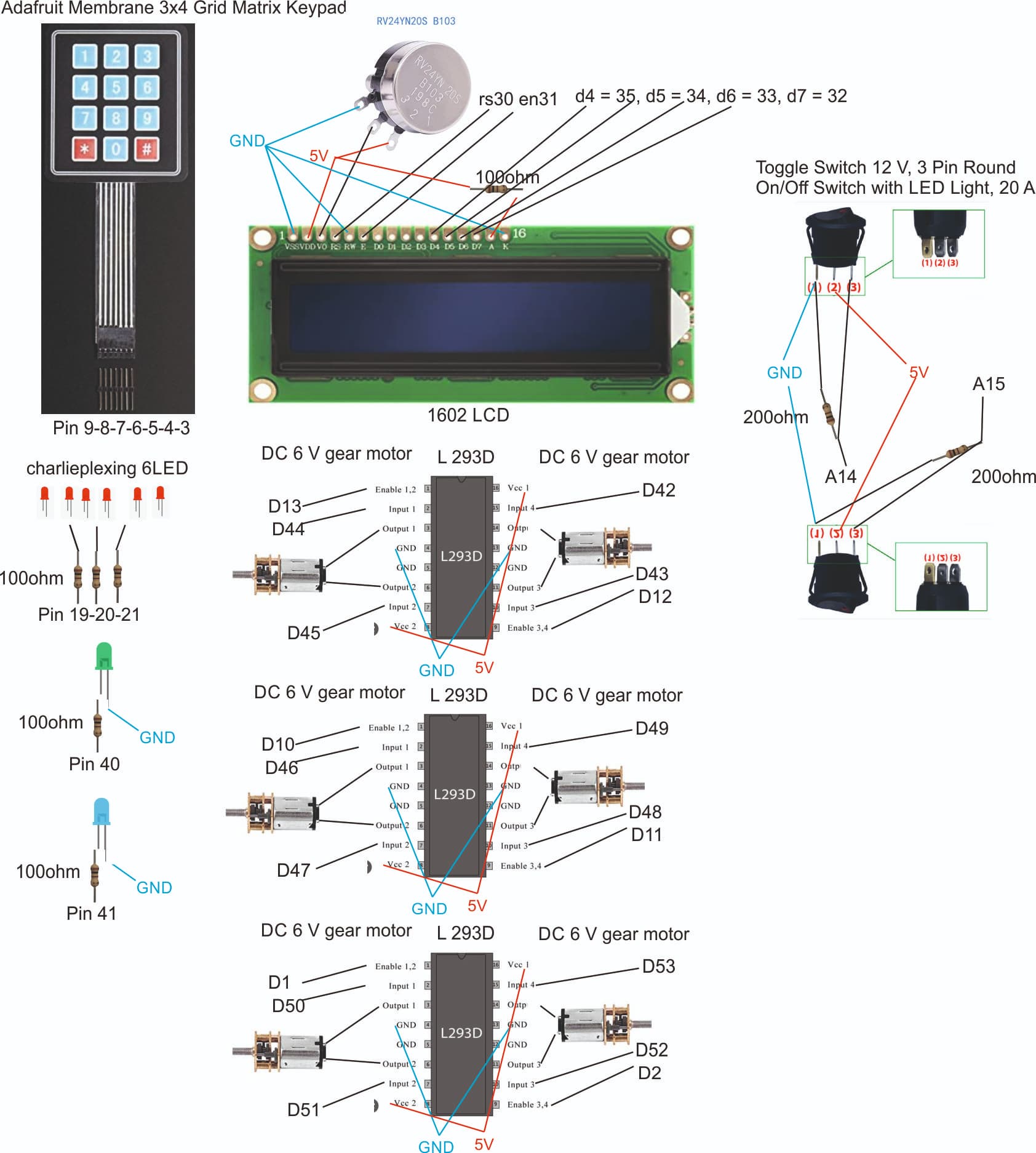
So, the various problem of button have been solved.
Still the code is not fully working. It seems that it can't really get out of the LED loop.
Here a video of the system now, with the code below:
https://1drv.ms/v/s!AmQCAddskXi4hJ4AZvogie8FmPeOSQ?e=s5oD3e
int var1 = 0;
const unsigned long Count200 = 100;
//full time for the actuator
const unsigned long ActuatorTime = 10000;


unsigned long pastLEDTicks = millis();
//use the Long for checking current Millis
unsigned long currentMillis;

//declare the two rockers
const int buttonPinOpen = A14;
const int buttonPinClose = A15;
//declare the LED states
int ledState = 0;
// include the library keypad & LiquidCrystal:
#include <LiquidCrystal.h>
#include <Keypad.h>
#include <SoftwareSerial.h>
#include <DFRobotDFPlayerMini.h>
//declare the speaker output
SoftwareSerial mySoftwareSerial(10, 11); // RX, TX
DFRobotDFPlayerMini myDFPlayer;
//Define constantn for the keypad
const int ROW_NUM = 4;
const int COLUMN_NUM = 3;
//Matrix for the Keypad
char keys[ROW_NUM][COLUMN_NUM] = {
  {'1', '2', '3'},
  {'4', '5', '6'},
  {'7', '8', '9'},
  {'*', '0', '#'}
};
//DEFINE pins for the keypad
byte pin_rows[ROW_NUM] = {9, 8, 7, 6}; //connect to the row pinouts of the keypad
byte pin_column[COLUMN_NUM] = {5, 4, 3}; //connect to the column pinouts of the keypad
Keypad keypad = Keypad( makeKeymap(keys), pin_rows, pin_column, ROW_NUM, COLUMN_NUM );
//DEFINE code for the keypad
const String password = "1234"; // password
String input_password;
//Define matrix for colors
const int LED_1 = 21;     //LED row 1
const int LED_2 = 20;     //LED row 2
const int LED_3 = 19;     //LED row 3
//Declare PIN for the green LEDS
const int LED_4 = 40;
//Declare PIN for the blue LEDS
const int LED_5 = 41;
// Declare pins for the LCD
const int rs = 30, en = 31, d4 = 35, d5 = 34, d6 = 33, d7 = 32;
LiquidCrystal lcd(rs, en, d4, d5, d6, d7);
//declare the LED
#define LED 41
// variables will change:
int buttonmotorStateOpen = 0;
int buttonmotorStateClose = 0;

// Declare constant for actuator A
const int ENA_PIN = 51; // the Arduino pin connected to the ENA pin L298N
const int IN1_PIN = 49; // the Arduino pin connected to the IN1 pin L298N
const int IN2_PIN = 50; // the Arduino pin connected to the IN2 pin L298N
// Declare constant for actuator B
const int ENB_PIN = 53; // the Arduino pin connected to the ENB pin L298N
const int IN3_PIN = 52; // the Arduino pin connected to the IN3 pin L298N
const int IN4_PIN = 48; // the Arduino pin connected to the IN4 pin L298N

void setup() {
  Serial.begin(9600);
  //introduce code for speakers
  mySoftwareSerial.begin(9600);
  if (!myDFPlayer.begin(mySoftwareSerial)) {  //Use softwareSerial to communicate with mp3.
    while(true);
  }
  myDFPlayer.setTimeOut(500); //Set serial communictaion time out 500ms
  myDFPlayer.volume(30);  //Set volume value (0~30).
  myDFPlayer.EQ(DFPLAYER_EQ_NORMAL);
  myDFPlayer.outputDevice(DFPLAYER_DEVICE_SD);

  input_password.reserve(32); // maximum input characters is 33, change if needed
  pinMode(14, INPUT_PULLUP);
  pinMode(15, INPUT_PULLUP);
  pinMode(LED, OUTPUT);
  // set up the LCD's number of columns and rows:
  lcd.begin(16, 2);
  // Initialize motorA
  pinMode(ENA_PIN, OUTPUT);
  pinMode(IN1_PIN, OUTPUT);
  pinMode(IN2_PIN, OUTPUT);
  digitalWrite(ENA_PIN, HIGH);
    // Initialize motorB
  pinMode(ENB_PIN, OUTPUT);
  pinMode(IN3_PIN, OUTPUT);
  pinMode(IN4_PIN, OUTPUT);
  digitalWrite(ENB_PIN, HIGH);
  //Initiate programm
  StartStatus();
}

void loop()
{
  Serial.println(var1);
  char key = keypad.getKey();
  if (key)
  {
    //int var1 = 0;
    if (digitalRead(A14) == LOW && digitalRead(A15) == LOW)
    {
      lcd.clear();
      lcd.print("Select button");
      myDFPlayer.playMp3Folder(1);
      input_password = "";
      delay(2000);
      lcd.clear();
      lcd.print("Welcome");
      lcd.setCursor(0, 1);
      lcd.print("Select button");
      lcd.setCursor(0, 0);
    }
    else if (digitalRead(A14) == HIGH && digitalRead(A15) == HIGH)
    {
      lcd.clear();
      lcd.print("Too many button");
      input_password = "";
      delay(2000);
      lcd.clear();
      lcd.print("Welcome");
      lcd.setCursor(0, 1);
      lcd.print("Select button");
      lcd.setCursor(0, 0);
    }
    else if (digitalRead(A15) == HIGH && digitalRead(A14) == LOW)
    {
      if(key == '*')
      {
        input_password = ""; // clear input password
      }
      else if (key == '#')
      {
        if (password == input_password)
        {
          lcd.clear();
          lcd.print("CORRECT");
          int var1 = 0;
          pinMode(LED_5, OUTPUT);
          digitalWrite(LED_5, LOW);
          pinMode(LED_4, OUTPUT);
          digitalWrite(LED_4, HIGH);
          delay(200);
          digitalWrite(LED_4, LOW);
          delay(200);
          digitalWrite(LED_4, HIGH);
          delay(200);
          digitalWrite(LED_4, LOW);
          delay(200);
          //while loop to have red lights
          while (var1 < 1)
          {
            ClosePiston();
            //ledloop();
          }
        }
        else
        {
          lcd.clear();
          lcd.print("INCORRECT");
        }
        input_password = ""; // clear input password
      }
      else
      {
        input_password += key; // append new character to input password string
        lcd.clear();
        lcd.print(input_password);
      }
    }
    else if (digitalRead(A15) == LOW && digitalRead(A14) == HIGH)
    {
      if(key == '*')
      {
        input_password = ""; // clear input password
      }
      else if (key == '#')
      {
        if (password == input_password)
        {
          lcd.clear();
          lcd.print("CORRECT");
          int var1 = 0;
          pinMode(LED_5, OUTPUT);
          digitalWrite(LED_5, LOW);
          pinMode(LED_4, OUTPUT);
          digitalWrite(LED_4, HIGH);
          delay(200);
          digitalWrite(LED_4, LOW);
          delay(200);
          digitalWrite(LED_4, HIGH);
          delay(200);
          digitalWrite(LED_4, LOW);
          delay(200);
          //while loop to have red lights
          while (var1 < 1)
          {
            //Print and say the message
            lcd.clear();
            lcd.print("Unlocking door");
            myDFPlayer.playMp3Folder(1);
            OpenPiston();
            //ledloop();
          };
        }
        else
        {
          lcd.clear();
          lcd.print("INCORRECT");
        }
        input_password = ""; // clear input password
      }
      else
      {
        input_password += key; // append new character to input password string
        lcd.clear();
        lcd.print(input_password);
      }
    }
  }
}

void StartStatus()//This should start the programm
{
  //light on the blue
  pinMode(LED_5, OUTPUT);
  digitalWrite(LED_5, HIGH);
  // Print a message to the LCD.
  lcd.print("Welcome");
  lcd.setCursor(0, 1);
  lcd.print("Select button");
  lcd.setCursor(0, 0);
  myDFPlayer.playMp3Folder(1); //Play sound
}

void ClosePiston()// This function closes the actuators
{
  //Print and say the message
  lcd.clear();
  lcd.print("Locking door");
  myDFPlayer.playMp3Folder(1);
  //leave the actuator to open for 10sec
  currentMillis = millis();
  while(millis()-currentMillis < ActuatorTime)
  {
    ledloop();
    digitalWrite(IN1_PIN, LOW);
    digitalWrite(IN2_PIN, HIGH);
    digitalWrite(IN3_PIN, LOW);
    digitalWrite(IN4_PIN, HIGH);
  }
  //stop the motor
  digitalWrite(IN1_PIN, LOW);
  digitalWrite(IN2_PIN, LOW);
  digitalWrite(IN3_PIN, LOW);
  digitalWrite(IN4_PIN, LOW);
  //change the LCD
  lcd.clear();
  lcd.print("All closed");
  lcd.setCursor(0, 1);
  lcd.print("stop button");
  lcd.setCursor(0, 0);
  //Update the LEDs
  pinMode(LED_1, OUTPUT);     //row 1
  digitalWrite(LED_1, LOW);
  pinMode(LED_2, OUTPUT);     //row 2
  digitalWrite(LED_2, LOW);
  pinMode(LED_3, INPUT);      //row 3
  digitalWrite(LED_3, LOW);
  pinMode(LED_4, OUTPUT);
  digitalWrite(LED_4, HIGH);
  //add some delay
  pinMode(LED_4, OUTPUT);
  digitalWrite(LED_4, LOW);
  lcd.clear();
  lcd.print("Welcome");
  lcd.setCursor(0, 1);
  lcd.print("Select button");
  lcd.setCursor(0, 0);
  pinMode(LED_5, OUTPUT);
  digitalWrite(LED_5, HIGH);
  var1++;
}
// This function opens the actuators
void OpenPiston()
{

  //leave the actuator to open for 10sec
  currentMillis = millis();
  while(millis()-currentMillis < ActuatorTime)
  {
    ledloop();
    digitalWrite(IN1_PIN, HIGH);
    digitalWrite(IN2_PIN, LOW);
    digitalWrite(IN3_PIN, HIGH);
    digitalWrite(IN4_PIN, LOW);
  }
  //stop the motor
  digitalWrite(IN1_PIN, LOW);
  digitalWrite(IN2_PIN, LOW);
  digitalWrite(IN3_PIN, LOW);
  digitalWrite(IN4_PIN, LOW);
  //change the LCD
  lcd.clear();
  lcd.print("All open");
  lcd.setCursor(0, 1);
  lcd.print("stop button");
  lcd.setCursor(0, 0);
  //Update the LEDs
  pinMode(LED_1, OUTPUT);     //row 1
  digitalWrite(LED_1, LOW);
  pinMode(LED_2, OUTPUT);     //row 2
  digitalWrite(LED_2, LOW);
  pinMode(LED_3, INPUT);      //row 3
  digitalWrite(LED_3, LOW);
  pinMode(LED_4, OUTPUT);
  digitalWrite(LED_4, HIGH);
  //add some delay
  pinMode(LED_4, OUTPUT);
  digitalWrite(LED_4, LOW);
  lcd.clear();
  lcd.print("Welcome");
  lcd.setCursor(0, 1);
  lcd.print("Select button");
  lcd.setCursor(0, 0);
  pinMode(LED_5, OUTPUT);
  digitalWrite(LED_5, HIGH);
  var1++;
}
void ledloop()
{
  switch ( ledState )
  {
    case 0:
      if ( (millis() - pastLEDTicks) >= Count200 ) {
        //turn on LED L1
        pinMode(LED_1, OUTPUT);     //row 1
        digitalWrite(LED_1, LOW);
        pinMode(LED_3, INPUT);     //row 2
        digitalWrite(LED_3, LOW);
        pinMode(LED_2, OUTPUT);      //row 3
        digitalWrite(LED_2, HIGH);
        pastLEDTicks = millis();
        ledState = 1;
      }
      break;
    case 1:
      if ( (millis() - pastLEDTicks) >= Count200 )
      {
        //turn on LED L2
        pinMode(LED_1, OUTPUT);     //row 1
        digitalWrite(LED_1, HIGH);
        pinMode(LED_2, OUTPUT);     //row 2
        digitalWrite(LED_2, LOW);
        pinMode(LED_3, INPUT);      //row 3
        digitalWrite(LED_3, LOW);
        pastLEDTicks = millis();
        ledState = 2;
      }
      break;
    case 2:
      if ( (millis() - pastLEDTicks) >= Count200 )
      {
        //turn on LED L3
        pinMode(LED_1, INPUT);      //row 1
        digitalWrite(LED_1, LOW);
        pinMode(LED_2, OUTPUT);     //row 2
        digitalWrite(LED_2, LOW);
        pinMode(LED_3, OUTPUT);     //row 3
        digitalWrite(LED_3, HIGH);
        pastLEDTicks = millis();
        ledState = 3;
      }
      break;
    case 3:
      if ( (millis() - pastLEDTicks) >= Count200 )
      {
        //turn on LED L4
        pinMode(LED_1, INPUT);     //row 1
        digitalWrite(LED_1, LOW);
        pinMode(LED_2, OUTPUT);    //row 2
        digitalWrite(LED_2, HIGH);
        pinMode(LED_3, OUTPUT);    //row 3
        digitalWrite(LED_3, LOW);
        pastLEDTicks = millis();
        ledState = 4;
      }
      break;
    case 4:
      if ( (millis() - pastLEDTicks) >= Count200 )
      {
        //turn on LED L5
        pinMode(LED_2, INPUT);    //row 1
        digitalWrite(LED_2, LOW);
        pinMode(LED_1, OUTPUT);     //row 2
        digitalWrite(LED_1, LOW);
        pinMode(LED_3, OUTPUT);    //row3
        digitalWrite(LED_3, HIGH);
        pastLEDTicks = millis();
        ledState = 5;
      }
      break;
    case 5:
      if ( (millis() - pastLEDTicks) >= Count200 )
      {
        //turn on LED L6
        pinMode(LED_1, OUTPUT);    //row 1
        digitalWrite(LED_1, HIGH);
        pinMode(LED_2, INPUT);    //row 2
        digitalWrite(LED_2, LOW);
        pinMode(LED_3, OUTPUT);   //row3
        digitalWrite(LED_3, LOW);
        pastLEDTicks = millis();
        ledState = 0;
      }
      break;
    default:
      ledState = 0;
      break;

  }
}
Again, a summary of the goal:
the general idea: I have:
-the LCD
-the speakers (so far I only created 0001, but depending on the action I would do other mp3 corresponding to the message to be said)
-the red LEDs in charlieplexing
-the blue LEDs
-the green LEDs
-the actuator A&B (that we run at the same time and have automated start stop)
-the keypad
-the button Open and Close
A1: When powering, LCD must show "welcome", and maybe speakers say 0001. LED blue is on.
A2: When touching keypad, LCD ask to set a button, and red LED blink 2x (using fast switch of 2ms for the whole code you made, this works), speakers tells to select a button (0002). Then after 5sec, it turns back to A1 again
A3: Button OPen and BUtton Close are now switched on, touching keypad triggers a LCD text that you have 2 buttons open, red LED blink 2x, speakers tells to close one button (0003), After 5 sec, it turns back to A1 again
A4: Button Open is on but Close is off, touching keypad triggers speaker to say "enter your code", and while you type, you see your code on the LCD. When you press "#", it checks if the code is right.
A4a: the code is wrong, the red LED blink 2x, the LCD says "incorrect", the speaker says "incorrect" (0004), it waits 2 sec and the LCD write "enter code again"
A4b: the code is right, the red lights starts turning around, while the Speaker says "opening the lock" (0005), and Motor A&B are opening. After 15sec, the LED green light on, the LCD says "door opened", the speaker "the door can be opened" (0005). It waits 5sec, LCD write "close button", speaker says "please close button", and it goes to A1 again.
And of course, A5 A5a and A5b would be same, with the close action.
From the hardware perspective, everything is working now. but not from the software then.
Any help ...