Probleme mit dem Arduino nano

Hallo zusammen,

ich wollte mal wieder ein Projekt mit dem nano realisieren und habe nachfolgenden Sketch
testen wollen:

const uint32_t SerialSpeed = 9600;                         // Baud Rate für Serial I/O


void setup()
{

  Serial.begin( SerialSpeed );                             // Baudrate einstellen

  while ( !Serial ) delay( 250 );
  delay( 5000 );

  Serial.println( F( "Setup startet==========" ) );
  Serial.println();


  // I²C SCL Pin
  Serial.print  ( F( "I²C SCL Pin     : " ) );
  Serial.println( SCL );

  // I²C SDA Pin
  Serial.print  ( F( "I²C SDA Pin     : " ) );
  Serial.println( SDA );

  Serial.println();

  // LED_BUILTIN Pin
  Serial.print  ( F( "LED_BUILTIN Pin : " ) );
  Serial.println( LED_BUILTIN );

  Serial.println();

  // F_CPU
  Serial.print  ( F( "Taktrate        : " ) );
  Serial.print  ( F_CPU/1000000 );
  Serial.println( F( " MHz" ) );

  Serial.println();

  Serial.println( F( "loop startet ==========" ) );

  pinMode( LED_BUILTIN, OUTPUT );

}


void loop()
{

  digitalWrite( LED_BUILTIN, LOW );
  delay( 250 );

  digitalWrite( LED_BUILTIN, HIGH );
  delay( 250 );

  digitalWrite( LED_BUILTIN, LOW );
  delay( 250 );

  digitalWrite( LED_BUILTIN, HIGH );
  delay( 250 );

  delay( 500 );

}

Soweit nicht so schwierig, sollte man denken.
Aber

Foto nano:

Ich habe diverse USB Kabel ausprobiert aber mit keinem ein anderes Ergebnis erhalten.
Mit dem Gerätemanager habe ich geprüft:

So richtig kann ich das nicht verstehen. Ich habe mit diesem W11 auf diesem Computer bereits nano Sketches erstellt und das hat gut funktioniert.
Aufgrund von Fehlern in der Vergangenheit habe ich meine IDE deinstalliert, neu geladen und installiert. Jetzt verwende ich die IDE 2.3.4

Was mache ich falsch?
Hat jemand eine Idee?

VG Thomas

Keine Ahnung...
Evtl. solltest du mal die Fehlermeldungen untersuchen.

Und wo genau liegt dein Problem?
Evtl. solltest du das mal beschreiben.

Kanste haben:
Der Sketch verwendet 2580 Bytes (8%) des Programmspeicherplatzes. Das Maximum sind 30720 Bytes.
Globale Variablen verwenden 188 Bytes (9%) des dynamischen Speichers, 1860 Bytes für lokale Variablen verbleiben. Das Maximum sind 2048 Bytes.
avrdude: stk500_getsync() attempt 1 of 10: not in sync: resp=0x00
avrdude: stk500_getsync() attempt 2 of 10: not in sync: resp=0x00
avrdude: stk500_getsync() attempt 3 of 10: not in sync: resp=0x00
avrdude: stk500_getsync() attempt 4 of 10: not in sync: resp=0x00
avrdude: stk500_getsync() attempt 5 of 10: not in sync: resp=0x00
avrdude: stk500_getsync() attempt 6 of 10: not in sync: resp=0x00
avrdude: stk500_getsync() attempt 7 of 10: not in sync: resp=0x00
avrdude: stk500_getsync() attempt 8 of 10: not in sync: resp=0x00
avrdude: stk500_getsync() attempt 9 of 10: not in sync: resp=0x00
avrdude: stk500_getsync() attempt 10 of 10: not in sync: resp=0x00
avrdude: ser_drain(): read error: Der E/A-Vorgang wurde wegen eines Threadendes oder einer Anwendungsanforderung abgebrochen.

Fehlgeschlagenes Hochladen: Hochladefehler: exit status 1

Stimmt habe vergessen es explizit zu erwähnen...
die Fehlermeldung kommt erst, wenn ich die USB Verbindung nach 5 Minuten
trenne!

Ach ja, sowas gehört in den Startpost.

Und welchen Com Port verwendest du ?
Mal einen anderrn probiert ?

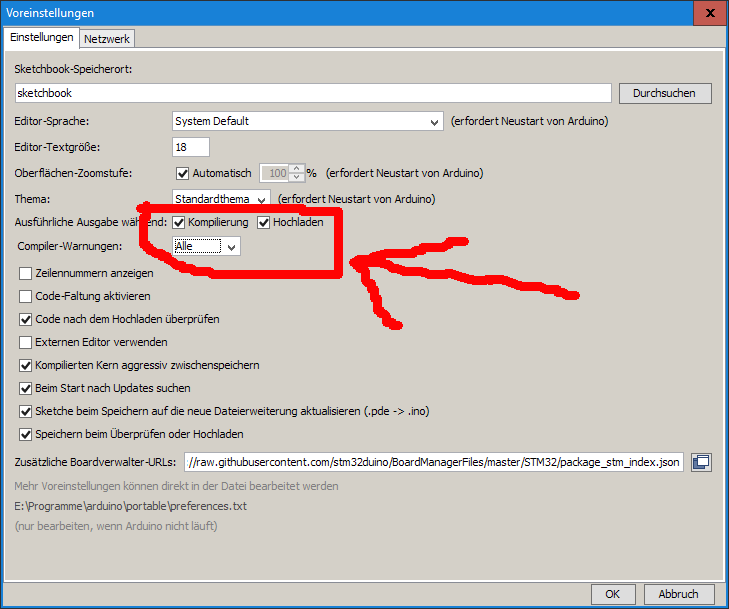
Die Meldungen sind nicht vollständig.
Ich würde auf falschen Treiber oder "Old Bootloader" tippen.

Kannst du mal alle anderen Arduinos abziehen? Das der Gerätemanager leer ist.

@HotSystems : ich habe alle USB-Ports ausprobiert, die vorhanden sind. Auch einen USB-Extender habe ich getestet.
Ergebnisse sind immer gleich!

@combie:

FQBN: arduino:avr:nano
Verwende das Board 'nano' von der Plattform im Ordner: C:\Users\Thomas\AppData\Local\Arduino15\packages\arduino\hardware\avr\1.8.6
Verwendung des Kerns 'arduino' von Platform im Ordner: C:\Users\Thomas\AppData\Local\Arduino15\packages\arduino\hardware\avr\1.8.6

Verwendete Bibliotheken erkennen ...
C:\Users\Thomas\AppData\Local\Arduino15\packages\arduino\tools\avr-gcc\7.3.0-atmel3.6.1-arduino7/bin/avr-g++ -c -g -Os -w -std=gnu++11 -fpermissive -fno-exceptions -ffunction-sections -fdata-sections -fno-threadsafe-statics -Wno-error=narrowing -flto -w -x c++ -E -CC -mmcu=atmega328p -DF_CPU=16000000L -DARDUINO=10607 -DARDUINO_AVR_NANO -DARDUINO_ARCH_AVR -IC:\Users\Thomas\AppData\Local\Arduino15\packages\arduino\hardware\avr\1.8.6\cores\arduino -IC:\Users\Thomas\AppData\Local\Arduino15\packages\arduino\hardware\avr\1.8.6\variants\eightanaloginputs C:\Users\Thomas\AppData\Local\arduino\sketches\E71F82232AC9FB55C5290C79AF40FC66\sketch\InterneVariablen.ino.cpp -o nul
Funktionsprototypen werden generiert ...
C:\Users\Thomas\AppData\Local\Arduino15\packages\arduino\tools\avr-gcc\7.3.0-atmel3.6.1-arduino7/bin/avr-g++ -c -g -Os -w -std=gnu++11 -fpermissive -fno-exceptions -ffunction-sections -fdata-sections -fno-threadsafe-statics -Wno-error=narrowing -flto -w -x c++ -E -CC -mmcu=atmega328p -DF_CPU=16000000L -DARDUINO=10607 -DARDUINO_AVR_NANO -DARDUINO_ARCH_AVR -IC:\Users\Thomas\AppData\Local\Arduino15\packages\arduino\hardware\avr\1.8.6\cores\arduino -IC:\Users\Thomas\AppData\Local\Arduino15\packages\arduino\hardware\avr\1.8.6\variants\eightanaloginputs C:\Users\Thomas\AppData\Local\arduino\sketches\E71F82232AC9FB55C5290C79AF40FC66\sketch\InterneVariablen.ino.cpp -o C:\Users\Thomas\AppData\Local\Temp\2427074498\sketch_merged.cpp
C:\Users\Thomas\AppData\Local\Arduino15\packages\builtin\tools\ctags\5.8-arduino11/ctags -u --language-force=c++ -f - --c++-kinds=svpf --fields=KSTtzns --line-directives C:\Users\Thomas\AppData\Local\Temp\2427074498\sketch_merged.cpp
Sketch wird kompiliert ...
"C:\Users\Thomas\AppData\Local\Arduino15\packages\arduino\tools\avr-gcc\7.3.0-atmel3.6.1-arduino7/bin/avr-g++" -c -g -Os -Wall -Wextra -std=gnu++11 -fpermissive -fno-exceptions -ffunction-sections -fdata-sections -fno-threadsafe-statics -Wno-error=narrowing -MMD -flto -mmcu=atmega328p -DF_CPU=16000000L -DARDUINO=10607 -DARDUINO_AVR_NANO -DARDUINO_ARCH_AVR "-IC:\Users\Thomas\AppData\Local\Arduino15\packages\arduino\hardware\avr\1.8.6\cores\arduino" "-IC:\Users\Thomas\AppData\Local\Arduino15\packages\arduino\hardware\avr\1.8.6\variants\eightanaloginputs" "C:\Users\Thomas\AppData\Local\arduino\sketches\E71F82232AC9FB55C5290C79AF40FC66\sketch\InterneVariablen.ino.cpp" -o "C:\Users\Thomas\AppData\Local\arduino\sketches\E71F82232AC9FB55C5290C79AF40FC66\sketch\InterneVariablen.ino.cpp.o"
Bibliotheken werden kompiliert ...
Kern wird kompiliert ...
Verwendung des vorkompilierten Kerns: C:\Users\Thomas\AppData\Local\arduino\cores\arduino_avr_nano_cpu_atmega328_7e9cbae03e0a53daf9d1c4bf5961f537\core.a
Alles zusammenlinken...
"C:\Users\Thomas\AppData\Local\Arduino15\packages\arduino\tools\avr-gcc\7.3.0-atmel3.6.1-arduino7/bin/avr-gcc" -Wall -Wextra -Os -g -flto -fuse-linker-plugin -Wl,--gc-sections -mmcu=atmega328p -o "C:\Users\Thomas\AppData\Local\arduino\sketches\E71F82232AC9FB55C5290C79AF40FC66/InterneVariablen.ino.elf" "C:\Users\Thomas\AppData\Local\arduino\sketches\E71F82232AC9FB55C5290C79AF40FC66\sketch\InterneVariablen.ino.cpp.o" "C:\Users\Thomas\AppData\Local\arduino\sketches\E71F82232AC9FB55C5290C79AF40FC66/..\..\cores\arduino_avr_nano_cpu_atmega328_7e9cbae03e0a53daf9d1c4bf5961f537\core.a" "-LC:\Users\Thomas\AppData\Local\arduino\sketches\E71F82232AC9FB55C5290C79AF40FC66" -lm
"C:\Users\Thomas\AppData\Local\Arduino15\packages\arduino\tools\avr-gcc\7.3.0-atmel3.6.1-arduino7/bin/avr-objcopy" -O ihex -j .eeprom --set-section-flags=.eeprom=alloc,load --no-change-warnings --change-section-lma .eeprom=0 "C:\Users\Thomas\AppData\Local\arduino\sketches\E71F82232AC9FB55C5290C79AF40FC66/InterneVariablen.ino.elf" "C:\Users\Thomas\AppData\Local\arduino\sketches\E71F82232AC9FB55C5290C79AF40FC66/InterneVariablen.ino.eep"
"C:\Users\Thomas\AppData\Local\Arduino15\packages\arduino\tools\avr-gcc\7.3.0-atmel3.6.1-arduino7/bin/avr-objcopy" -O ihex -R .eeprom "C:\Users\Thomas\AppData\Local\arduino\sketches\E71F82232AC9FB55C5290C79AF40FC66/InterneVariablen.ino.elf" "C:\Users\Thomas\AppData\Local\arduino\sketches\E71F82232AC9FB55C5290C79AF40FC66/InterneVariablen.ino.hex"

"C:\Users\Thomas\AppData\Local\Arduino15\packages\arduino\tools\avr-gcc\7.3.0-atmel3.6.1-arduino7/bin/avr-size" -A "C:\Users\Thomas\AppData\Local\arduino\sketches\E71F82232AC9FB55C5290C79AF40FC66/InterneVariablen.ino.elf"
Der Sketch verwendet 2580 Bytes (8%) des Programmspeicherplatzes. Das Maximum sind 30720 Bytes.
Globale Variablen verwenden 188 Bytes (9%) des dynamischen Speichers, 1860 Bytes für lokale Variablen verbleiben. Das Maximum sind 2048 Bytes.
"C:\Users\Thomas\AppData\Local\Arduino15\packages\arduino\tools\avrdude\6.3.0-arduino17/bin/avrdude" "-CC:\Users\Thomas\AppData\Local\Arduino15\packages\arduino\tools\avrdude\6.3.0-arduino17/etc/avrdude.conf" -v -V -patmega328p -carduino "-PCOM12" -b115200 -D "-Uflash:w:C:\Users\Thomas\AppData\Local\arduino\sketches\E71F82232AC9FB55C5290C79AF40FC66/InterneVariablen.ino.hex:i"

avrdude: Version 6.3-20190619
Copyright (c) 2000-2005 Brian Dean, http://www.bdmicro.com/
Copyright (c) 2007-2014 Joerg Wunsch

     System wide configuration file is "C:\Users\Thomas\AppData\Local\Arduino15\packages\arduino\tools\avrdude\6.3.0-arduino17/etc/avrdude.conf"

     Using Port                    : COM12
     Using Programmer              : arduino
     Overriding Baud Rate          : 115200

avrdude: stk500_getsync() attempt 1 of 10: not in sync: resp=0x00
avrdude: stk500_getsync() attempt 2 of 10: not in sync: resp=0x00
avrdude: stk500_getsync() attempt 3 of 10: not in sync: resp=0x00
avrdude: stk500_getsync() attempt 4 of 10: not in sync: resp=0x00
avrdude: stk500_getsync() attempt 5 of 10: not in sync: resp=0x00
avrdude: stk500_getsync() attempt 6 of 10: not in sync: resp=0x00
avrdude: stk500_getsync() attempt 7 of 10: not in sync: resp=0x00
avrdude: stk500_getsync() attempt 8 of 10: not in sync: resp=0x00
avrdude: stk500_getsync() attempt 9 of 10: not in sync: resp=0x00
avrdude: stk500_getsync() attempt 10 of 10: not in sync: resp=0x00

@wwerner: es sind keine weiteren Arduinos angeschlossen!

Und auch den richtigen in der IDE ausgewählt ?

Mach mal unter Ansicht den Haken bei "Ausgeblendete Geräte" weg.

Hast du den OLD-Bootloader mal gewählt?

Manchmal hat Win auch Probleme mit COM > 9. Dann mit USBDeview die unbenutzten < 10 löschen, so dass der Arduino auf COM < 10 kommt.

Gruß Tommy

Danke für eure Antworten!

Aber @combie : du hattest mal wieder den richtigen Riecher!
"old Bootloader" hat mein Problem gelöst!

Jetzt läuft alles wie es soll.
Nochmal herzlichen Dank!

Dieser Post kann geschlossen werden!

Das geht automatisch, aber du darfst beim entsprechenden Post den Haken für erledigt (Lösung) setzen.

This topic was automatically closed 180 days after the last reply. New replies are no longer allowed.