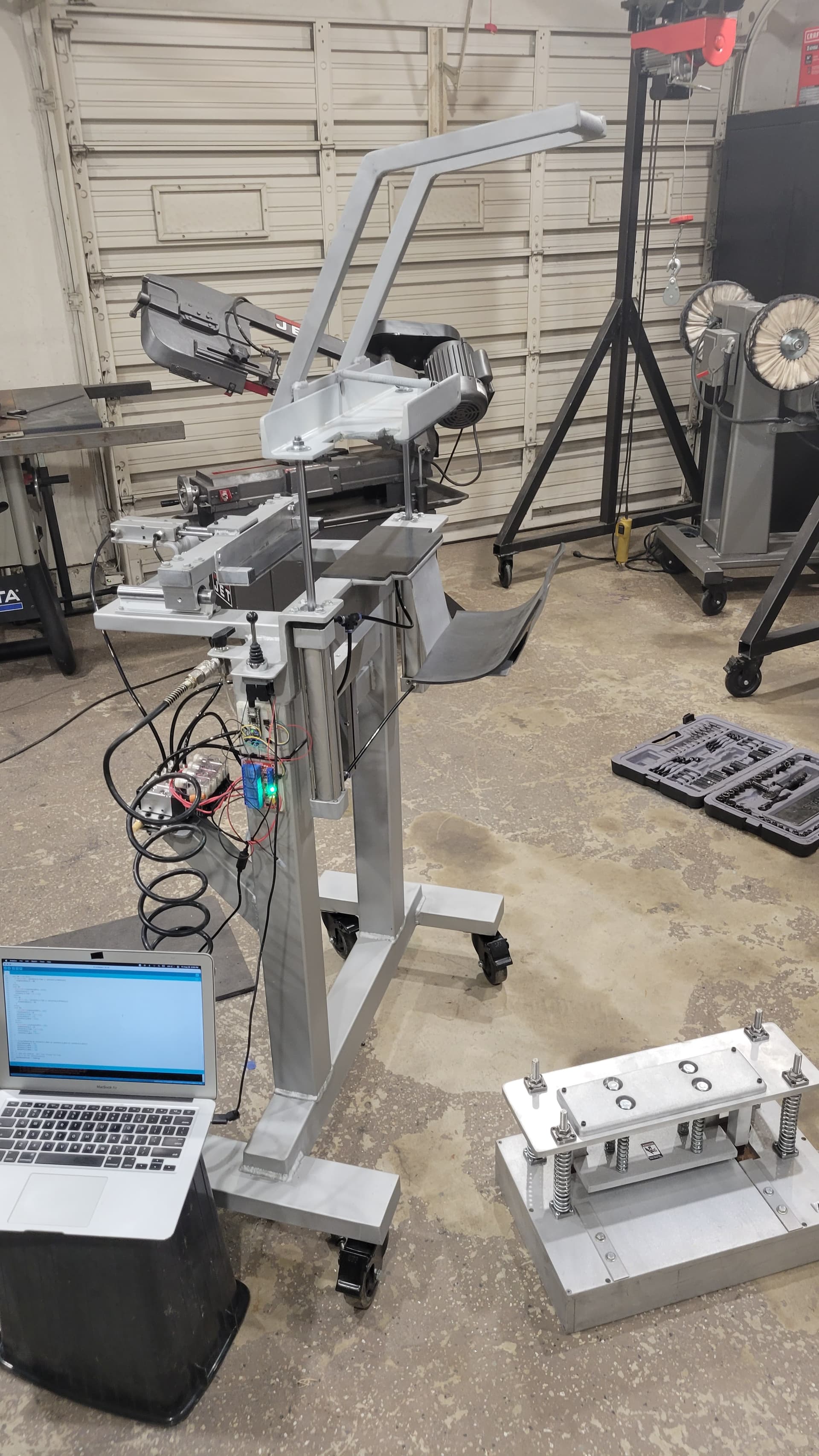
/*
 Solenoid cycle

  1) press momentary switch.
  2) solenoid #1 activates for 4 seconds then turns off.
  3) solenoid #2 waits 1 second after solenoid #1 activates, then it activates.
  4) solenoid #3 waits 5 seconds after solenoid #1 activates, then it activates for 1 second and turns off.

 The circuit:
 * pushbutton attached to the pin 2 and to the ground
 * solenoid #1 attached to pin 4
 * solenoid #2 attached to pin 5
 * solenoid #3 attached to pin 6


 */

// constants won't change. They're used here to
const unsigned long solenoid_1_OffDelay = 4000; //4 seconds
const unsigned long solenoid_2_OnDelay = 1000;  //1 second
const unsigned long solenoid_2_OffDelay = 5500; //1 second
const unsigned long solenoid_3_OnDelay = 5000;  //5 seconds
const unsigned long solenoid_3_OffDelay = 1000; //1 second
// set pin numbers:
const int buttonPin = 2;        // the number of the pushbutton pin
const int solenoid1Pin = 4;     // solenoid 1 pin
const int solenoid2Pin = 5;     // solenoid 2 pin
const int solenoid3Pin = 6;     // solenoid 3 pin


// Variables will change:
unsigned long solenoid_1_Time = 0;  //time for solenoid #1
unsigned long solenoid_2_Time = 0;  //time for solenoid #2
unsigned long solenoid_3_Time = 0;  //time for solenoid #3
int buttonState = HIGH;             //the current reading from the input pin
int lastButtonState = HIGH;         //the previous reading from the input pin
int isCycleRunning = LOW;           //state of the cycle
int runSolenoid_1 = LOW;            //activate solenoid #1
int runSolenoid_2 = LOW;            //activate solenoid #2
int runSolenoid_3 = LOW;            //activate solenoid #3
int stepSolenoid_1 = 0;             //steps of solenoid #1
int stepSolenoid_2 = 0;             //steps of solenoid #2
int stepSolenoid_3 = 0;             //steps of solenoid #3
int solenoid_1_done = LOW;
int solenoid_2_done = LOW;
int solenoid_3_done = LOW;

// the following variables are unsigned long's because the time, measured in miliseconds,
// will quickly become a bigger number than can be stored in an int.
unsigned long lastDebounceTime = 0;  // the last time the output pin was toggled
unsigned long debounceDelay = 50;    // the debounce time; increase if the output flickers

void setup() {
  pinMode(buttonPin, INPUT_PULLUP);
  pinMode(solenoid1Pin, OUTPUT);
  pinMode(solenoid2Pin, OUTPUT);
  pinMode(solenoid3Pin, OUTPUT);

  // set initial outputs state
  digitalWrite(solenoid1Pin, LOW);
  digitalWrite(solenoid2Pin, LOW);
  digitalWrite(solenoid3Pin, LOW);
}

void loop() {
  // read the state of the switch into a local variable:
  int reading = digitalRead(buttonPin);

  // check to see if you just pressed the button
  // (i.e. the input went from LOW to HIGH),  and you've waited
  // long enough since the last press to ignore any noise:

  // If the switch changed, due to noise or pressing:
  if (reading != lastButtonState) {
    // reset the debouncing timer
    lastDebounceTime = millis();
  }

  if ((millis() - lastDebounceTime) > debounceDelay) {
    // whatever the reading is at, it's been there for longer
    // than the debounce delay, so take it as the actual current state:

    // if the button state has changed:
    if (reading != buttonState) {
      buttonState = reading;

      // only toggle the bit if the new button state is LOW
      if (buttonState == LOW) {
        isCycleRunning = !isCycleRunning;
        runSolenoid_1 = HIGH;
      }
    }
  }

  if(!isCycleRunning){
    // reset outputs state
    digitalWrite(solenoid1Pin, LOW);
    digitalWrite(solenoid2Pin, LOW);
    digitalWrite(solenoid3Pin, LOW);
    //reset the cycle
    stepSolenoid_1 = 0;
    stepSolenoid_2 = 0;
    stepSolenoid_3 = 0;
    runSolenoid_2 = LOW;
    runSolenoid_3 = LOW;
    solenoid_1_done = LOW;
    solenoid_2_done = LOW;
    solenoid_3_done = LOW;
  }
  //solenoid #1
  switch(stepSolenoid_1) {
  case 0: //start when the button is pressed
    if (runSolenoid_1)
      stepSolenoid_1 = 10;
    break;
  case 10: //solenoid #1 activates
    digitalWrite(solenoid1Pin, HIGH);
    runSolenoid_2 = HIGH;
    runSolenoid_3 = HIGH;
    stepSolenoid_1 = 11;
    solenoid_1_Time = millis();
    break;
  case 11: //wait 4 seconds then turns solenoid #1 off
    if(millis() - solenoid_1_Time >= solenoid_1_OffDelay)
      stepSolenoid_1 = 99;
    break;
  case 99:
    digitalWrite(solenoid1Pin, LOW);
    runSolenoid_1 = LOW;
    stepSolenoid_1 = 0;
    solenoid_1_done = HIGH;
    break;
  default:
    digitalWrite(solenoid1Pin, LOW);
    runSolenoid_1 = LOW;
    stepSolenoid_1 = 0;
    solenoid_1_done = HIGH;
}

  //solenoid #2
  switch(stepSolenoid_2){
    case 0: //run solenoid #2 cycle
    if(runSolenoid_2){
      stepSolenoid_2 = 10;
      solenoid_2_Time = millis();
    }
    break;
    case 10: //on delay
      if (millis() - solenoid_2_Time >= solenoid_2_OnDelay){
        stepSolenoid_2 = 20;
      }
    break;
    case 20:
      digitalWrite(solenoid2Pin, HIGH);
      stepSolenoid_2 = 30;
      solenoid_2_Time = millis();
    break;
    case 30:
      if (millis() - solenoid_2_Time >= solenoid_2_OffDelay){
        stepSolenoid_2 = 99;
      }
    break;
    case 99:
      digitalWrite(solenoid2Pin, LOW);
      stepSolenoid_2 = 0;
      solenoid_2_Time = millis();
      runSolenoid_2 = LOW;
      solenoid_2_done = HIGH;
    break;
    default:
      digitalWrite(solenoid2Pin, LOW);
      stepSolenoid_2 = 0;
      solenoid_2_Time = millis();
      runSolenoid_2 = LOW;
      solenoid_2_done = HIGH;
  }

 //solenoid #3
  switch(stepSolenoid_3){
    case 0: //run solenoid #2 cycle
    if(runSolenoid_3){
      stepSolenoid_3 = 10;
      solenoid_3_Time = millis();
    }
    break;
    case 10: //on delay
      if (millis() - solenoid_3_Time >= solenoid_3_OnDelay){
        stepSolenoid_3 = 20;
      }
    break;
    case 20:
      digitalWrite(solenoid3Pin, HIGH);
      stepSolenoid_3 = 30;
      solenoid_3_Time = millis();
    break;
    case 30:
      if (millis() - solenoid_3_Time >= solenoid_3_OffDelay){
        stepSolenoid_3 = 99;
      }
    break;
    case 99:
      digitalWrite(solenoid3Pin, LOW);
      stepSolenoid_3 = 0;
      solenoid_3_Time = millis();
      runSolenoid_3 = LOW;
      solenoid_3_done = HIGH;
    break;
    default:
      digitalWrite(solenoid3Pin, LOW);
      stepSolenoid_3 = 0;
      solenoid_3_Time = millis();
      runSolenoid_3 = LOW;
      solenoid_3_done = HIGH;
  }


  if (isCycleRunning && solenoid_1_done && solenoid_2_done && solenoid_3_done){
    isCycleRunning = LOW;
    solenoid_1_done = LOW;
    solenoid_2_done = LOW;
    solenoid_3_done = LOW;
  }
  // save the reading.  Next time through the loop,
  // it'll be the lastButtonState:
  lastButtonState = reading;
}`Preformatted text`
Please clarify what's you meant on "loop this code"?
Part of the code in the loop() subroutine, according to it name, after reaching the end of the procedure, it starts from the beginning - that is, in a loop
You seem to have some confusion between "reading", "buttonState" and "lastButtonState". I think you are using "reading" as "buttonState" and half the time using "buttonState" as "lastButtonState".
I see.
After the joystick is pressed, I would like the entire code to repeat indefinitely.
This is my very first project and I'm still learning.
Thanks
I spent all day trying to paste your code into mine and keep getting all sorts of error messages, such as "reading was not declared in this scope" to a function-definition is not allowed here before '{' token.
I just uploaded the entire code and nothing happens when I press the joystick. Also, nothing happens when the joystick isn't pressed, not that it's supposed to.
I did on test on a breadboard using leds and on push button. The leds simulates relay of the solenoids and the push button is connect like +5 --- 1 K -- D2 - -- Button --- GND. Only the yellow led stay light up. ( solenoid 2 stay on )
Here the code.
/*1) press momentary switch.
  2) solenoid #1 activates for 4 seconds then turns off.
  3) solenoid #2 waits 1 second after solenoid #1 activates, then it activates.
  4) solenoid #3 waits 5 seconds after solenoid #1 activates, then it activates for 1 second
     and turns off.
  5. Stay in the main loop
*/
// Button pin
byte buttonpin = 2;

// Solenoids - simulate by LEDS.
// Solenoid 1 - Red led
byte redled = 3;
// Solenoid 2 - Yellow led
byte yellowled = 4;
// Solenoid 3 - Green Led
byte greenled = 5;

// Monitor led
byte monitor_led = 13;

void setup()
{
  pinMode(buttonpin, INPUT);
  pinMode(redled, OUTPUT);
  pinMode(yellowled, OUTPUT);
  pinMode(greenled, OUTPUT);
  pinMode(monitor_led, OUTPUT);

  // turn off the leds
  digitalWrite(redled, LOW);
  digitalWrite(yellowled, LOW);
  digitalWrite(greenled, LOW);
  digitalWrite(monitor_led, LOW);

  // Check for the button press
  // Depend on how it is hook up - Press ON - Turn the Selenoids in the proper secence.
  // In this case ... turn red first for 4 second,and turn off.  wait for 1 second after red is on than
  // yellow turn on. green wait for 5 second after red is on. green turn on for 1 second and turn off
  // Just the yellow is on.

  // check if the button is press
  while(digitalRead(buttonpin) == HIGH)
  {
    // Do nothing. Stay in this loop until the button is press
    digitalWrite(monitor_led, HIGH);
  }
  delay(100); // De-bounce delay
  digitalWrite(monitor_led, LOW);
  selenoids(); // go to the solenoids routine

}

void loop()
{
  // Will run nothing here...just a blink
  // Just turn the Arduino ON
  digitalWrite(monitor_led, HIGH);
  delay(500);
  digitalWrite(monitor_led, LOW);
  delay(500);
}

void selenoids()
{
   unsigned long red_delay = 4000;

   unsigned long yellow_delay = 1000;

   unsigned long red_diff_delay;

   unsigned long red_time;

   unsigned long measure_time;
   digitalWrite(redled, HIGH); // Turn solenoid 1
   red_time = millis();
   red_diff_delay = red_time;
   while( red_diff_delay < red_delay)
// Will turn off solenoid 1 after 4 second if red_diff_delay is more than 4000 - red_delay
// the 1 second after solenoid 1 is on is within the 4 second time frame
   {
      measure_time = millis();
      red_diff_delay = measure_time - red_time;
      if (red_diff_delay >= yellow_delay)
      // if the difference is more than 1000 than turn solenoid 2
      {
         digitalWrite(yellowled, HIGH);
      }
   }
   digitalWrite(redled, LOW);
   delay(1000); // after 5 second after solenoid 1 is turn off
// 4 second + 1 second = 5 second
   digitalWrite(greenled, HIGH); // turn on solenoid 3 for 1 second
   delay(1000);
   digitalWrite(greenled, LOW);

}
Sorry that I did not comment on the sequence section. Sorry for my bad spelling.
In order for the code to work, it got to be connected properly. Any bad connections can be an issue. So bear in mind the de-bounce is nasty. Just twick the delay. Anyway, you can connect a cap of 0.1 uF in parallel with the push button. I will give an extra protection against the de-bouncing issue.
The solenoids fires in an abnormal way. I appreciate everyone's help but I give up. I'll just use the original code and press the joystick every time I want the cycle to start over again.
I don't want to accidentally mess the machine up and will settle with what I have.
Sorry to hear that. My code work well with Leds connect on a breadboard.
If I have to build a system like that, I make sure the solenoids are connected properly and interface properly with an microcontroller. A simple blink program with a longer time can be use to test the solenoids if the interface with the microcontroller work propoerly. Sometime, the code may work fine, but the hardware may be have some issues that have to corrected.
Anyway, good luck I hope you will try to find the issues.
I am extremely grateful for your help. You shouldn't have to apologize for anything. I'm just scared of breaking something. Sure it would be nice if the machine was automated a bit more but making this thing loop is near impossible. I thought it would be a lot easier but boy was I wrong. Thank you for all of your time and effort. I appreciate it