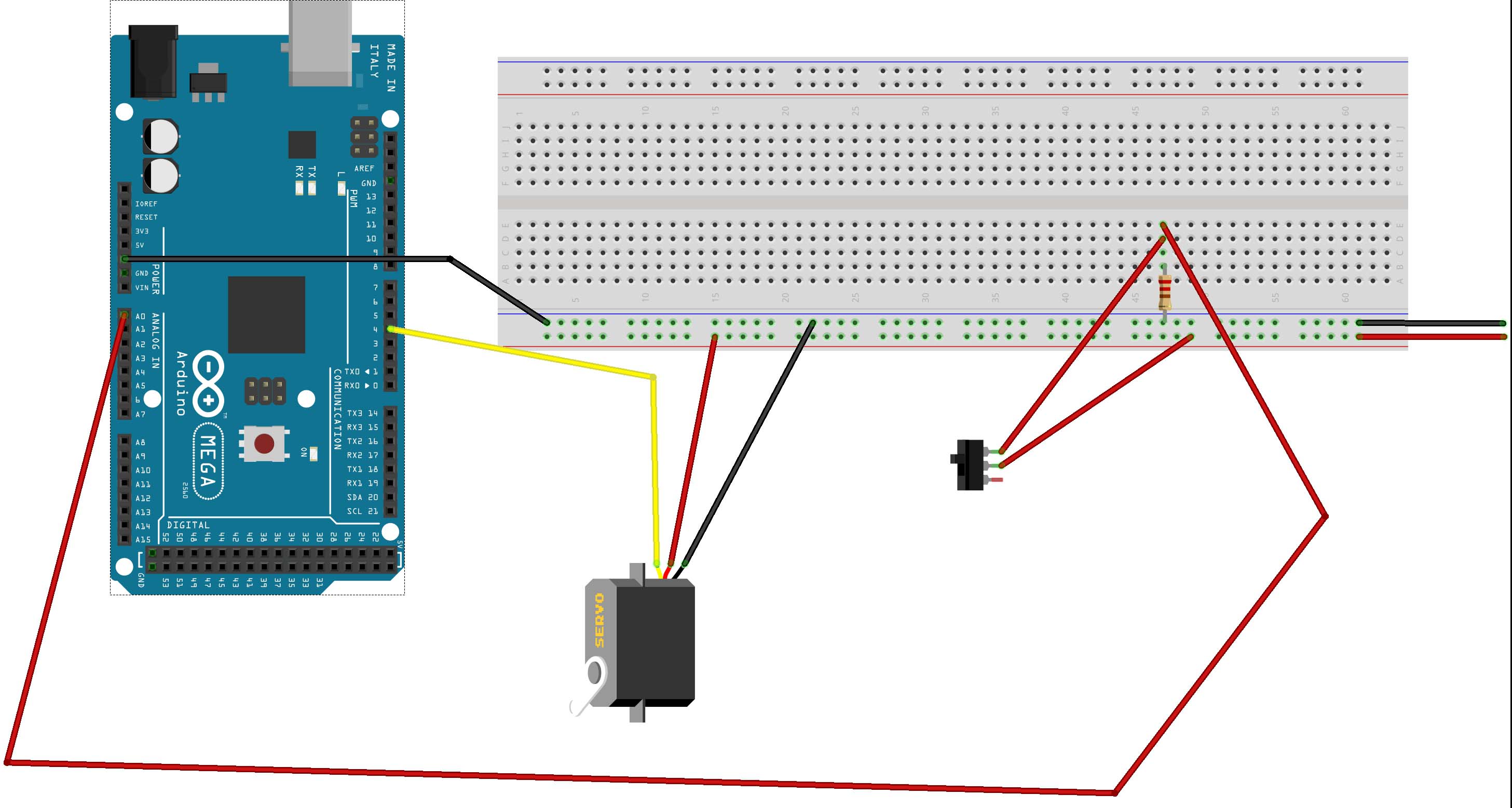
Robin2 thank you for the reply.
I have been using a seperate power supply for the Mega and a totally seperate supply for the servo. The breadboard's power runs down the entire rail so no problems there and I have used a common ground from the breadboard to the Mega.
The programme/sketch I have used was downloaded from the original post from Anders53 and it worked for roboz6. It is as follows,
*/

#include <VarSpeedServo.h>
#include <Bounce2.h>

// Constants to trim switch servo behaviour, mid = midpoint parameters
// Servo button nr             =    { 0,  1,  2,  3,  4,  5,  6,  7,mid}
const byte buttonPins[]        =    {A0, A1, A2, A3, A4, A5,  2,  3, 12};
const byte servoPins[]         =    { 4,  5,  6,  7,  8,  9, 10, 11, 13};
const byte rangeLow[]          =    {85, 85, 85, 85, 85, 85, 85, 85, 90};
const byte rangeHigh[]         =    {95, 95, 95, 95, 95, 95, 95, 95};
const byte travelSpeed[]       =    { 2,  2,  2,  2,  2,  2,  2,  2, 50};
const byte numberServos        =     8;                        // the total number of servos
const long detachTime          =     5000;                     // detach servo after 5 seconds
const long bounceDelay         =     10;                       // Button debouncing delay; increase if the servo sweeps

// Work variables
boolean holdReadVal            =     1;                        // Holds immidiate switch button read value
boolean midPointVal            =     1;                        // Holds immidiate midppoint setting button read value
boolean midState               =     0;                        // To remember if midpoint setting was traversed

// arrays holding work variables
VarSpeedServo             myServos[numberServos];              // Servo objects
Bounce               debouncer[numberServos + 1] = Bounce();   // Bounce objects
unsigned long         detachMillis[numberServos] = {0};        // Detach timer for each servo object
boolean                switchState[numberServos] = {0};        // Holds the status for each switch

void setup()
{
Serial.begin(9600);
for (byte i = 0; i < numberServos + 1; i++)
{
pinMode(servoPins[i], OUTPUT);                             // Define digital pin as output
pinMode(buttonPins[i], INPUT_PULLUP);                      // Define digital input pin with pull up resistor for noise reduction
debouncer[i].attach(buttonPins[i]);                        // Attach input pins to debouncer objects
debouncer[i].interval(bounceDelay);                        // Debouncing delay interval
}
readTrackLayout();                                           // Read the switch status from layout
}

void loop()                                                    // runs forever to detect control buttons and change switches accordingly
{
digitalWrite(servoPins[8], !digitalRead(servoPins[8]));      // Code activity LED, dimmed when code runs, dark or full light if code is trapped
if (!midPointVal) delay(500);                                // Slow down loop activity while midpoint is set, to blink LED at slow pace
bounceReadInput(8);                                          // ### Read the midpoint button input
if (!midPointVal)                                            // ### Is midpoint button active LOW ?
{
setMidpoint();                                             // ### Yes, midpoint button active, and servos not yet at midpoint, set at midpoint
}
if (midPointVal && midState)                                 // %%% Midpoint button is set inactive high (idle), and servos are at midpoint
{
readTrackLayout();                                         // %%% - then read the track layout buttons
}

if (midPointVal)                                             // Midpoint button is incative HIGH, control the servos
{
for (byte i = 0; i < numberServos; i++)
{
  bounceReadInput(i);                                      // *** Read the control button inputs
  if ((holdReadVal != switchState[i]))                     // *** Has the button state changed ?
  {
    controlSwitches(i);                                    // *** Yes, then set the switch to new position
  }                                                        // *** No, the button state has not changed, is it time to detach servo then ?
  if (myServos[i].attached() && ((millis() - detachMillis[i]) > detachTime))
  {
    myServos[i].detach();                                  // *** Yes, the time has elapsed, detach the switch servo for a more silent layout
  }
}
}
}

void bounceReadInput(byte i)                                   // Read debounced button inputs
{
debouncer[i].update();                                       // Update the Bounce instance
if (i < 8)
{
holdReadVal = debouncer[i].read();                         // Get the updated debounced button value
}
else
{
midPointVal = debouncer[i].read();                         // Get the updated midpoint button value
}
}

void setMidpoint()                                             // This function is called asynchronous to counter in the main loop
{                                                              // - because the midpoint button is set at random
for (byte i = 0; i < numberServos; i++)                      // A local counter must then be used to set all servos
{
myServos[i].slowmove(rangeLow[8], travelSpeed[8]);         // Set all servos at midpoint, index 8 in array
servoAttach(i);                                         // Only after pre-setting the position control, it's safe to attach the servo
}
midState = HIGH;                                             // Remember we were here to set midpoint, do not repeat it
}

void readTrackLayout()                                         // This function is called asynchronous to counter in the main loop
{                                                              // - because the midpoint button is set at random
for (byte i = 0; i < numberServos; i++)                      // A local counter must then be used to set all servos
{
switchState[i] = digitalRead(buttonPins[i]);               // Read the current switch state from the track layout
writeBeforeAttach(i);                                      // Write data before attaching servo
}
midState = LOW;                                              // Remember we were here to get layout, enable possibilty to set midpoint again
}

void controlSwitches(byte i)
{
switchState[i] = !switchState[i];                            // Save new switch state
writeBeforeAttach(i);                                        // Write data before attaching servo
}

void writeBeforeAttach(byte i)                                 // Write data before attaching servo
{
if (switchState[i])                                          // Is the new switch state high (greater than 0) ?
{
myServos[i].slowmove(rangeHigh[i], travelSpeed[i]);        // Yes, new switch state is high, move the switch accordingly
}
else
{
myServos[i].slowmove(rangeLow[i], travelSpeed[i]);         // No, new switch state is low, move the switch accordingly
}
servoAttach(i);                                        // Only after pre-setting the position control, it's safe to attach the servo
}

void servoAttach(byte i)                                 // Only after pre-setting the position control, it's safe to attach the servo
{
detachMillis[i] = millis();                                  // Initialise the detach timer
myServos[i].attach(servoPins[i]);                            // Attaches the servo on output pin to its servo object

}