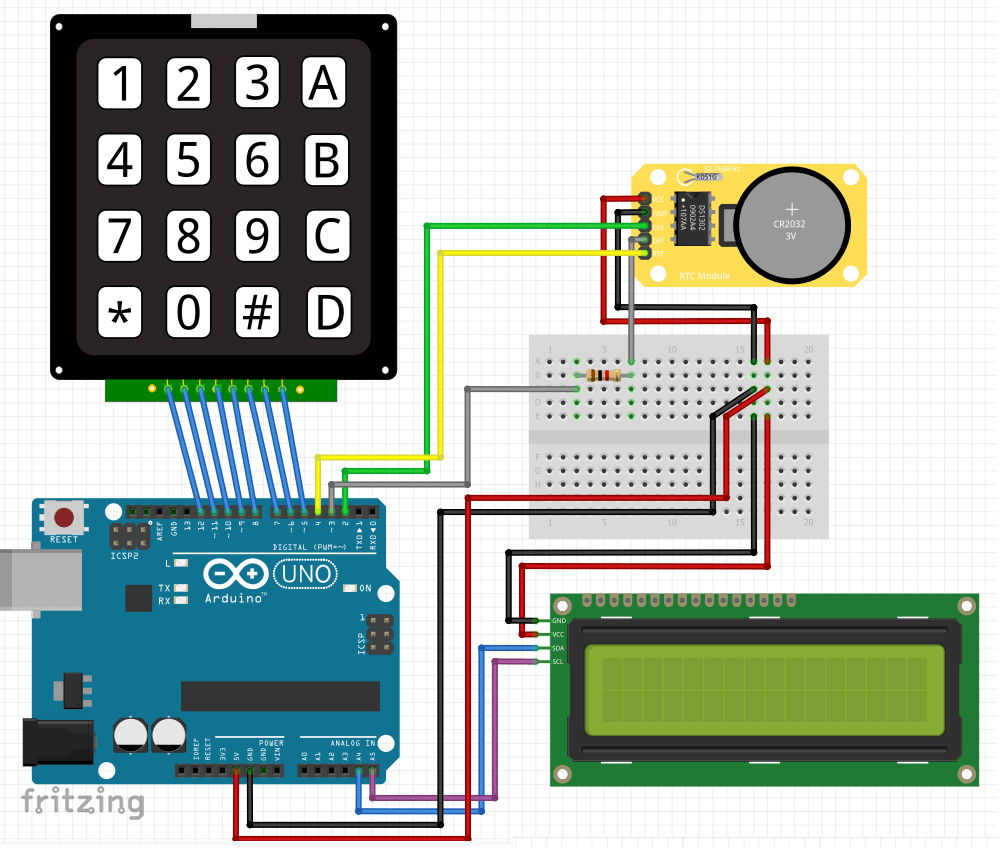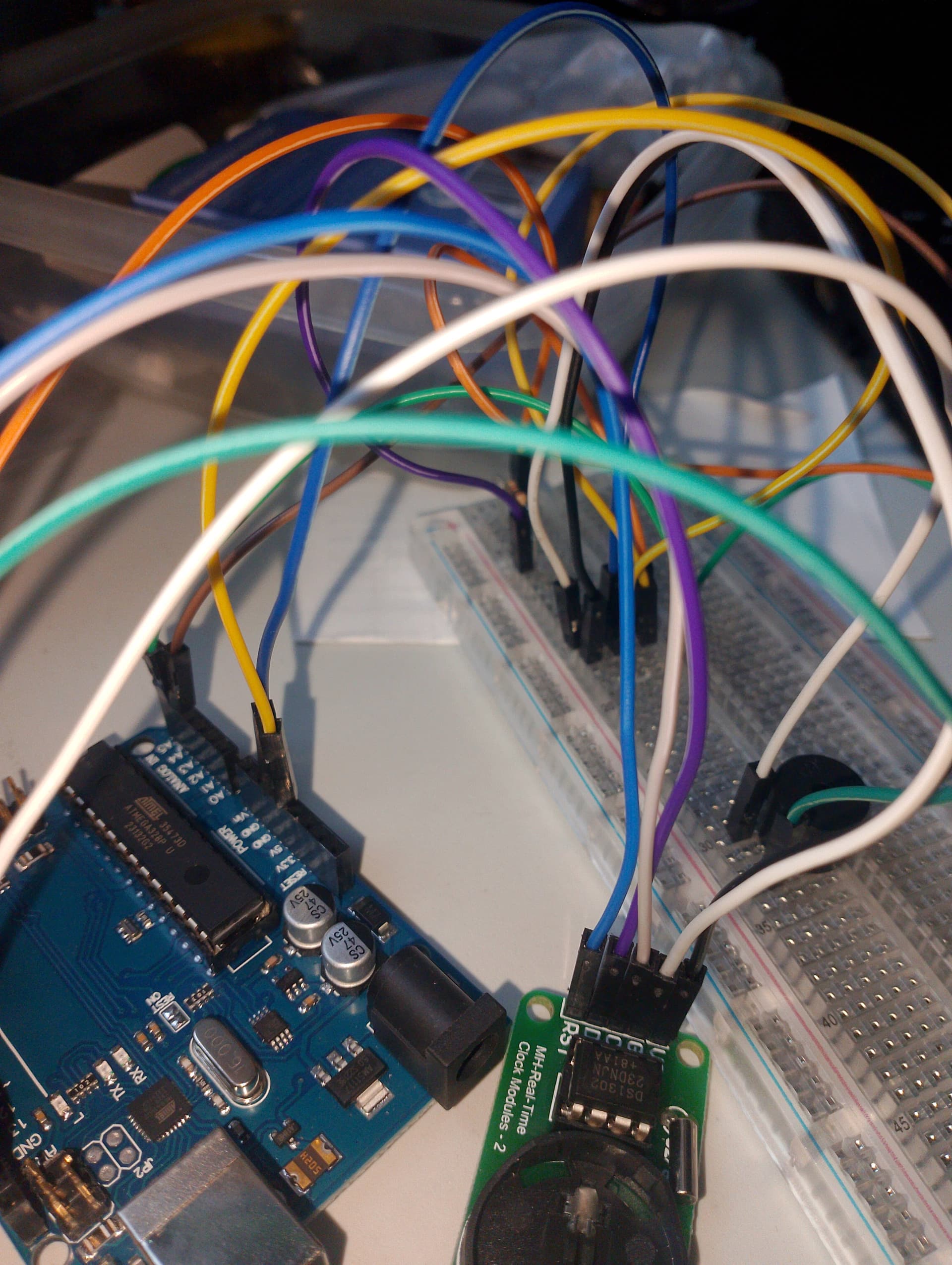

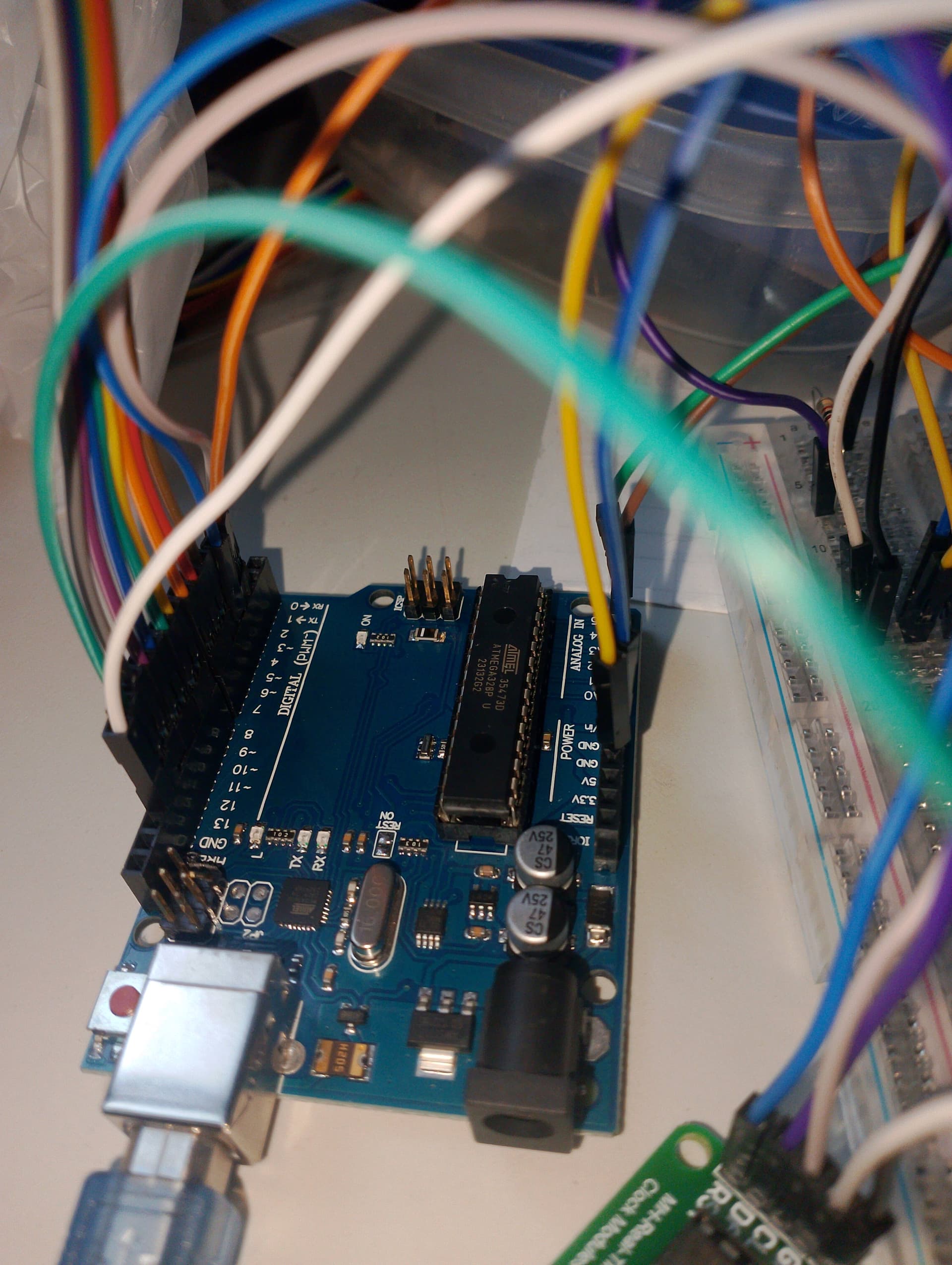
Hello it's not working, I followed the guide and I don't know how to make it work, my code is correct and not erroring
Here's the code
//This code is to use with DS1302 RTC module + 4*4 Keypad + LCD i2c + Arduino + Buzzer
//After wiring the modules, the LCD will show the default date and time or the one set before
//The objective of this project is that you can set the RTC module from the keypad, and sure it will stay stored
//Then show it on the screen and after you can set your alarm.
//Refer to https://www.surtrtech.com or SurtrTech youtube channel for more information

#include <Keypad.h> //Libraries needed
#include <virtuabotixRTC.h>
#include <LiquidCrystal_I2C.h>

#define I2C_ADDR 0x27 //LCD i2c stuff
#define BACKLIGHT_PIN 3
#define En_pin 2
#define Rw_pin 1
#define Rs_pin 0
#define D4_pin 4
#define D5_pin 5
#define D6_pin 6
#define D7_pin 7

LiquidCrystal_I2C lcd(I2C_ADDR,En_pin,Rw_pin,Rs_pin,D4_pin,D5_pin,D6_pin,D7_pin);


virtuabotixRTC myRTC(2, 3, 4); //Wiring of the RTC (CLK,DAT,RST)
                               //If you change the wiring change the pins here also


const byte numRows= 4; //number of rows on the keypad
const byte numCols= 4; //number of columns on the keypad

//keymap defines the key pressed according to the row and columns just as appears on the keypad
char keymap[numRows][numCols]=
{
{'1', '2', '3', 'A'},
{'4', '5', '6', 'B'},
{'7', '8', '9', 'C'},
{'*', '0', '#', 'D'}
};


byte rowPins[numRows] = {12,11,10,9}; //Rows 0 to 3 //if you modify your pins you should modify this too
byte colPins[numCols]= {8,7,6,5}; //Columns 0 to 3

int i1,i2,i3,i4;
char c1,c2,c3,c4;
char keypressed,keypressedx;

int A_hour=NULL;
int A_minute=NULL;
int AlarmIsActive=NULL;

int buzzer = 13;


Keypad myKeypad= Keypad(makeKeymap(keymap), rowPins, colPins, numRows, numCols);


void setup() {
  Serial.begin(9600);
  lcd.begin (16,2); //Initialize the LCD
  lcd.setBacklightPin(BACKLIGHT_PIN,POSITIVE);
  lcd.setBacklight(HIGH);
  lcd.home ();

}

void loop() {

  while(keypressed == NO_KEY){ //As long as no key is pressed we keep showing the date and time, I'm obliged to clear the screen everytime so the numbers don't get confused
                               //And I should add that little delay so the screen shows correctly otherwise it didn't work for me
  keypressed = myKeypad.getKey();
  lcd.clear(); //Here after clearing the LCD we take the time from the module and print it on the screen with usual LCD functions
  myRTC.updateTime();

  if(myRTC.hours==A_hour && myRTC.minutes==A_minute && AlarmIsActive==1 && myRTC.seconds >= 0 && myRTC.seconds <= 2){
    while(keypressedx == NO_KEY){
    tone(buzzer, 1000); //You can modify the tone or make your own sound
    delay(100);
    tone(buzzer, 2000);
    delay(100);
    lcd.clear();
    lcd.print("Wake up gorgeous"); //Message to show when the alarm is ringing
    keypressedx = myKeypad.getKey();
    }
  }
  keypressedx = NO_KEY;
  noTone(buzzer);
  lcd.setCursor(0,0);
  lcd.print(myRTC.);
  lcd.print("/");
  lcd.print(myRTC.month);
  lcd.print("/");
  lcd.print(myRTC.year);
  lcd.setCursor(0,1);
  lcd.print(myRTC.hours);
  lcd.print(":");
  lcd.print(myRTC.minutes);
  lcd.print(":");
  lcd.print(myRTC.seconds);
  delay(100);
  }


         if (keypressed == '*') //As we everytime check the key pressed we only proceed to setup if we press "*"
             {
              lcd.clear();
              lcd.print("     Setup");
             delay(1000);
              lcd.clear();
              lcd.print("Setup year");
              //So you can understand how this works, first it shows us "setup" then it prints "setup year" and now you can write your year normally (2-0-1-8)
              //It automatically passes to setting up the month...until it's finished
              //The keys from keypad are all considered chars (c) so we should convert them to int that's what I did then we store them (i)
              //We do some math and we get the year, month... as int so we can inject them to the RTC otherwise it will not be compiled
              //Months like April you should write 04, 03 for March... otherwise it will not pass to the next parameter
              //The RTC virtuabotix library is already set to not accept strange time and dates (45/17/1990) (58:90:70), and yes old dates are considered as errors
             char keypressed2 = myKeypad.waitForKey();
                    if (keypressed2 != NO_KEY && keypressed2 !='*' && keypressed2 !='#' && keypressed2 !='A' && keypressed2 !='B' && keypressed2 !='C' && keypressed2 !='D' )
                      {
                       c1 = keypressed2;
                       lcd.setCursor(0, 1);
                       lcd.print(c1);
                       }
                 char      keypressed3 = myKeypad.waitForKey();
                    if (keypressed3 != NO_KEY && keypressed3 !='*' && keypressed3 !='#' && keypressed3 !='A' && keypressed3 !='B' && keypressed3 !='C' && keypressed3 !='D' )
                      {
                       c2 = keypressed3;
                       lcd.setCursor(1, 1);
                       lcd.print(c2);
                       }
                   char  keypressed4 = myKeypad.waitForKey();
                   if (keypressed4 != NO_KEY && keypressed4 !='*' && keypressed4 !='#' && keypressed4 !='A' && keypressed4 !='B' && keypressed4 !='C' && keypressed4 !='D' )
                      {
                       c3 = keypressed4;
                       lcd.setCursor(2, 1);
                       lcd.print(c3);
                       }
                   char   keypressed5 = myKeypad.waitForKey();
                   if (keypressed5 != NO_KEY && keypressed5 !='*' && keypressed5 !='#' && keypressed5 !='A' && keypressed5 !='B' && keypressed5 !='C' && keypressed5 !='D' )
                      {
                       c4 = keypressed5;
                       lcd.setCursor(3, 1);
                       lcd.print(c4);
                       }

                     i1=(c1-48)*1000;        //the keys pressed are stored into chars I convert them to int then i did some multiplication to get the code as an int of xxxx
                     i2=(c2-48)*100;
                     i3=(c3-48)*10;
                     i4=c4-48;
                     int N_year=i1+i2+i3+i4;
                   delay(500);
                     lcd.clear();
                     lcd.print("Setup month");

////////////////////////////////////////////////////////////////
                     char keypressed6 = myKeypad.waitForKey();  // here all programs are stopped until you enter the four digits then it gets compared to the code above
                    if (keypressed6 != NO_KEY && keypressed6 !='*' && keypressed6 !='#' && keypressed6 !='A' && keypressed6 !='B' && keypressed6 !='C' && keypressed6 !='D' )
                      {
                       c1 = keypressed6;
                       lcd.setCursor(0, 1);
                       lcd.print(c1);
                       }
                    char   keypressed7 = myKeypad.waitForKey();
                    if (keypressed7 != NO_KEY && keypressed7 !='*' && keypressed7 !='#' && keypressed7 !='A' && keypressed7 !='B' && keypressed7 !='C' && keypressed7 !='D' )
                      {
                       c2 = keypressed7;
                       lcd.setCursor(1, 1);
                       lcd.print(c2);
                       }


                     i1=(c1-48)*10;
                     i2=c2-48;
                    int N_month=i1+i2;
                     delay(500);

                     lcd.clear();
                     lcd.print("Setup Day");

 ////////////////////////////////////////////////////////////////
                      char keypressed8 = myKeypad.waitForKey();  // here all programs are stopped until you enter the four digits then it gets compared to the code above
                    if (keypressed8 != NO_KEY && keypressed8 !='*' && keypressed8 !='#' && keypressed8 !='A' && keypressed8 !='B' && keypressed8 !='C' && keypressed8 !='D' )
                      {
                        c1 = keypressed8;
                       lcd.setCursor(0, 1);
                       lcd.print(c1);
                       }
                      char keypressed9 = myKeypad.waitForKey();
                    if (keypressed9 != NO_KEY && keypressed9 !='*' && keypressed9 !='#' && keypressed9 !='A' && keypressed9 !='B' && keypressed9 !='C' && keypressed9 !='D' )
                      {
                        c2 = keypressed9;
                       lcd.setCursor(1, 1);
                       lcd.print(c2);
                       }


                     i1=(c1-48)*10;
                     i2=c2-48;
                    int N_day=i1+i2;
                    delay(500);
                     lcd.clear();
                     lcd.print("Setup hour");
////////////////////////////////////////////////////////////////////////////////////:
                     char keypressed10 = myKeypad.waitForKey();  // here all programs are stopped until you enter the four digits then it gets compared to the code above
                    if (keypressed10 != NO_KEY && keypressed10 !='*' && keypressed10 !='#' && keypressed10 !='A' && keypressed10 !='B' && keypressed10 !='C' && keypressed10 !='D' )
                      {
                       c1 = keypressed10;
                       lcd.setCursor(0, 1);
                       lcd.print(c1);
                       }
                    char   keypressed11 = myKeypad.waitForKey();
                    if (keypressed11 != NO_KEY && keypressed11 !='*' && keypressed11 !='#' && keypressed11 !='A' && keypressed11 !='B' && keypressed11 !='C' && keypressed11 !='D' )
                      {
                        c2 = keypressed11;
                       lcd.setCursor(1, 1);
                       lcd.print(c2);
                       }


                     i1=(c1-48)*10;
                     i2=c2-48;
                    int N_hour=i1+i2;
                    delay(500);
                     lcd.clear();
                     lcd.print("Setup minutes");
////////////////////////////////////////////////////////////////////////////////////:
                    char keypressed12 = myKeypad.waitForKey();  // here all programs are stopped until you enter the four digits then it gets compared to the code above
                    if (keypressed12 != NO_KEY && keypressed12 !='*' && keypressed12 !='#' && keypressed12 !='A' && keypressed12 !='B' && keypressed12 !='C' && keypressed12 !='D' )
                      {
                        c1 = keypressed12;
                       lcd.setCursor(0, 1);
                       lcd.print(c1);
                       }
                   char    keypressed13 = myKeypad.waitForKey();
                    if (keypressed13 != NO_KEY && keypressed13 !='*' && keypressed13 !='#' && keypressed13 !='A' && keypressed13 !='B' && keypressed13 !='C' && keypressed13 !='D' )
                      {
                        c2 = keypressed13;
                       lcd.setCursor(1, 1);
                       lcd.print(c2);
                       }


                     i1=(c1-48)*10;
                     i2=c2-48;
                    int N_minutes=i1+i2;
                    delay(500);
                     lcd.clear();

                    myRTC.setDS1302Time(22, N_minutes, N_hour, 1, N_day, N_month, N_year); //once we're done setting the date and time we transfer to values to the RTC module
                                                                                           //the 22 stands for seconds you can add a setup for it too if you want
                                                                                           //the 1 stands for day of the week, as long I don't show it on the screen I don't change it
                    keypressed=NO_KEY; //the "*" key is stored in "keypressed" so I remove that value from it otherwise it will get me in the setup again
              }
/////////////////////////////////////////Alarme setup/////////////////////////////////

             if (keypressed == 'A'){
              lcd.clear();
              lcd.print("  Alarm setup  ");
              delay(1000);
              lcd.clear();
              lcd.print("Set alarm hour");

               char keypressed14 = myKeypad.waitForKey();  // here all programs are stopped until you enter the four digits then it gets compared to the code above
                    if (keypressed14 != NO_KEY && keypressed14 !='*' && keypressed14 !='#' && keypressed14 !='A' && keypressed14 !='B' && keypressed14 !='C' && keypressed14 !='D' )
                      {
                       c1 = keypressed14;
                       lcd.setCursor(0, 1);
                       lcd.print(c1);
                       }
                    char   keypressed15 = myKeypad.waitForKey();
                    if (keypressed15 != NO_KEY && keypressed15 !='*' && keypressed15 !='#' && keypressed15 !='A' && keypressed15 !='B' && keypressed15 !='C' && keypressed15 !='D' )
                      {
                        c2 = keypressed15;
                       lcd.setCursor(1, 1);
                       lcd.print(c2);
                       }


                     i1=(c1-48)*10;
                     i2=c2-48;
                     A_hour=i1+i2;
                    delay(500);
                     lcd.clear();
                     lcd.print("Set alarm minutes");
                      char keypressed16 = myKeypad.waitForKey();  // here all programs are stopped until you enter the four digits then it gets compared to the code above
                    if (keypressed16 != NO_KEY && keypressed16 !='*' && keypressed16 !='#' && keypressed16 !='A' && keypressed16 !='B' && keypressed16 !='C' && keypressed16 !='D' )
                      {
                       c1 = keypressed16;
                       lcd.setCursor(0, 1);
                       lcd.print(c1);
                       }
                    char   keypressed17 = myKeypad.waitForKey();
                    if (keypressed17 != NO_KEY && keypressed17 !='*' && keypressed17 !='#' && keypressed17 !='A' && keypressed17 !='B' && keypressed17 !='C' && keypressed17 !='D' )
                      {
                        c2 = keypressed17;
                       lcd.setCursor(1, 1);
                       lcd.print(c2);
                       }


                     i1=(c1-48)*10;
                     i2=c2-48;
                     A_minute=i1+i2;
                    delay(500);
                     lcd.clear();
                      AlarmIsActive=1;
                      keypressed=NO_KEY;
             }
             if (keypressed == 'B')
             {
              lcd.clear();
              lcd.print("Alarm deactivated");
              AlarmIsActive=0;
              keypressed=NO_KEY;
              delay(500);
             }
             else {
              myRTC.updateTime();
              keypressed=NO_KEY;
             }


}