Pull Up / Pull Down Resistor board

Hi everone - first post - Ive found everything else need, but iM looking for A Pull Up / Pull doen (PUD) resistor board.
My applications will use lots of push buttons and LEDs for mimics, all of which need a Pull-up or (occasionally and) pull-down resistor.
Asside from doing this my self using breadboard and solder I can't find anything off-the self anywhere that will save time and effort..
A 16 channel off-the-shelf PUD board would have (for each Audrino iinput/output).

  • input/output pin.
  • 2 pins for connector to I//O device and back.
  • A pin to join a channel to adjacent channel (some outputs have a pull-up and pullown combined for output or NOT output).
    -- Two holes to solder the resistor of my choice in - typically 1k ohmns (pushbutton) or 330 ohmns (3v LED) - though ohms law determined the exact values.
  • A set of 3 pins to host a 2 pin jumper on ( left = signal to ground, right = signal to VCC (typically + 5V.

But I cant find anything, NADA, not a sausage.
Has anybody found an off the self board that can do the job?

For switches you can set the pinMode to INPUT_PULLUP and wire the switch between the Arduino input pin and Gnd.
I'm not aware of any general purpose pull up / down resistor boards.
You can get prototype boards laid out like a breadboard:

The Arduino has built-in pull-up resistors that can be enabled.

(There are now lots of different Arduinos and I'm not sure if they all have it.)

Tell us, please - which Arduino?

I'm wanting to use the Nano. Not sure about what Arduino Dave is refering too though.

This is what I was thinking I woukd have to use.

Nano has them built in, check this doc'n. NOTE: There are some conditions where the built-in resistors may not work well, so then an external one would be used, BUT not in parallel.
https://docs.arduino.cc/language-reference/en/functions/digital-io/pinMode/

That narrows it down to about seven totally different ones.
Leo..

1 Like

R3 Arduino version.

Thanks for this - thats an option for Pull-ups.

Yep, that's all you need for switch types.

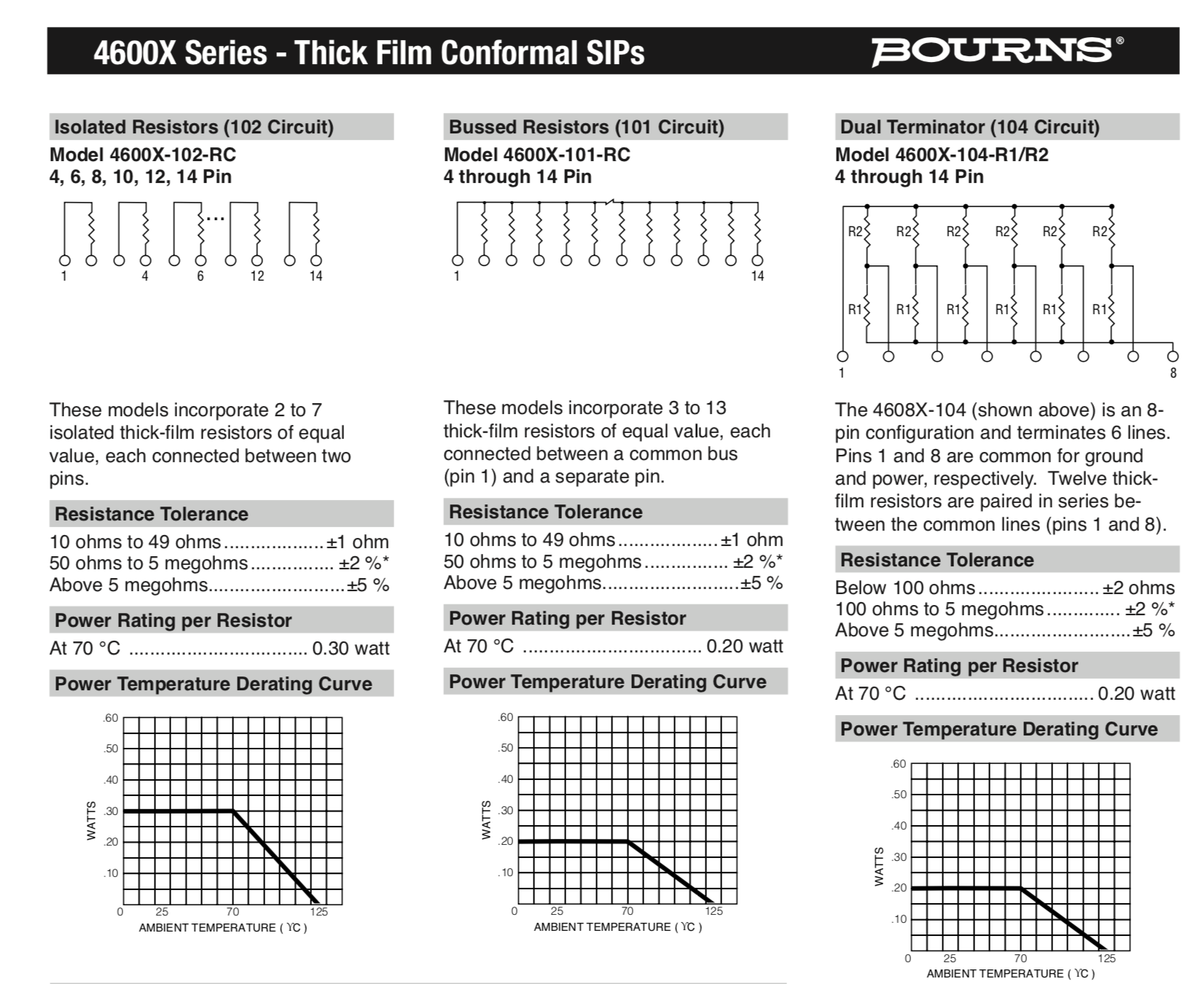
You can get a 9 pin resistor pack, where all the resistors have a common lead. Connect this lead high and all the resistors are pull up resistors. Connect it low and they all pull down.

See this page:-
https://uk.farnell.com/bourns/4609x-101-272lf/resistor-network-2k7/dp/9356959?iscrfnonsku=true

Note in the U.S. Farnell are known under the name Newark.

Other values of resistor are available.

Also other types of resistor configurations are available like the picture below:-

The type of resistors I posted a link to are of the 101 design.

1 Like

Thanks for this - simplifies things.

Internal pull-ups are, to my knowledge, standard on all boards. There are a number of boards that support internal pull-downs. Below is a search through the installed board packages on my system for input_pulldown.

"C:\Users\bugge\AppData\Local\Arduino15\packages\arduino\hardware\esp32\2.0.18-arduino.5\cores\esp32\esp32-hal-gpio.h"
"C:\Users\bugge\AppData\Local\Arduino15\packages\arduino\hardware\mbed_giga\4.2.4\cores\arduino\api\Common.h"
"C:\Users\bugge\AppData\Local\Arduino15\packages\arduino\hardware\mbed_giga\4.2.4\cores\arduino\as_mbed_library\pinmode_arduino.h"
"C:\Users\bugge\AppData\Local\Arduino15\packages\arduino\hardware\mbed_giga\4.2.4\variants\GENERIC_STM32H747_M4\pinmode_arduino.h"
"C:\Users\bugge\AppData\Local\Arduino15\packages\arduino\hardware\mbed_giga\4.2.4\variants\GIGA\pinmode_arduino.h"
"C:\Users\bugge\AppData\Local\Arduino15\packages\arduino\hardware\mbed_nano\4.2.4\cores\arduino\api\Common.h"
"Arduino15\packages\arduino\hardware\mbed_nano\4.2.4\cores\arduino\as_mbed_library\pinmode_arduino.h"
"Arduino15\packages\arduino\hardware\mbed_nano\4.2.4\variants\ARDUINO_NANO33BLE\pinmode_arduino.h"
"Arduino15\packages\arduino\hardware\mbed_nano\4.2.4\variants\NANO_RP2040_CONNECT\pinmode_arduino.h"
"Arduino15\packages\arduino\hardware\mbed_nicla\4.2.4\cores\arduino\api\Common.h"
"Arduino15\packages\arduino\hardware\mbed_nicla\4.2.4\cores\arduino\as_mbed_library\pinmode_arduino.h"
"Arduino15\packages\arduino\hardware\mbed_nicla\4.2.4\variants\GENERIC_STM32H747_M4\pinmode_arduino.h"
"Arduino15\packages\arduino\hardware\mbed_nicla\4.2.4\variants\NICLA\pinmode_arduino.h"
"Arduino15\packages\arduino\hardware\mbed_nicla\4.2.4\variants\NICLA_VISION\pinmode_arduino.h"
"Arduino15\packages\arduino\hardware\mbed_opta\4.2.4\cores\arduino\api\Common.h"
"Arduino15\packages\arduino\hardware\mbed_opta\4.2.4\cores\arduino\as_mbed_library\pinmode_arduino.h"
"Arduino15\packages\arduino\hardware\mbed_opta\4.2.4\variants\GENERIC_STM32H747_M4\pinmode_arduino.h"
"Arduino15\packages\arduino\hardware\mbed_opta\4.2.4\variants\OPTA\pinmode_arduino.h"
"Arduino15\packages\arduino\hardware\mbed_portenta\4.2.4\cores\arduino\api\Common.h"
"Arduino15\packages\arduino\hardware\mbed_portenta\4.2.4\cores\arduino\as_mbed_library\pinmode_arduino.h"
"Arduino15\packages\arduino\hardware\mbed_portenta\4.2.4\variants\GENERIC_STM32H747_M4\pinmode_arduino.h"
"Arduino15\packages\arduino\hardware\mbed_portenta\4.2.4\variants\PORTENTA_H7_M7\pinmode_arduino.h"
"Arduino15\packages\arduino\hardware\mbed_portenta\4.2.4\variants\PORTENTA_X8\pinmode_arduino.h"
"Arduino15\packages\arduino\hardware\megaavr\1.8.8\cores\arduino\api\Common.h"
"Arduino15\packages\arduino\hardware\renesas_uno\1.4.1\cores\arduino\api\Common.h"
"Arduino15\packages\arduino\hardware\samd\1.8.14\cores\arduino\api\Common.h"
"Arduino15\packages\CubeCell\hardware\CubeCell\1.5.0\cores\asr650x\Arduino.h"
"Arduino15\packages\CubeCell\hardware\CubeCell\1.5.0\cores\asr650x\cores\ASR_Arduino.h"
"Arduino15\packages\CubeCell\hardware\CubeCell\1.5.0\cores\asr6601\base\ASR_Arduino.h"
"Arduino15\packages\esp32\hardware\esp32\3.2.0\cores\esp32\esp32-hal-gpio.h"
"Arduino15\packages\esp32-bluepad32\hardware\esp32\4.1.0\cores\esp32\esp32-hal-gpio.h"
"Arduino15\packages\esp8266\hardware\esp8266\3.1.2\cores\esp8266\Arduino.h"
"Arduino15\packages\heltec-esp32\hardware\esp32\3.0.2\cores\esp32\esp32-hal-gpio.h"
"Arduino15\packages\m5stack\hardware\esp32\2.1.4\cores\esp32\esp32-hal-gpio.h"
"Arduino15\packages\MegaCoreX\hardware\megaavr\1.1.3\cores\coreX-corefiles\api\Common.h"
"Arduino15\packages\SparkFun\hardware\apollo3\2.2.1\cores\arduino\mbed-bridge\core-api\api\Common.h"
"Arduino15\packages\teensy\hardware\avr\1.59.0\cores\teensy3\core_pins.h"
"Arduino15\packages\teensy\hardware\avr\1.59.0\cores\teensy4\core_pins.h"
"Arduino15\packages\teensy\hardware\avr\1.59.0\libraries\RadioHead\RHutil_pigpio\RasPi.h"
"Arduino15\packages\teensy\hardware\avr\1.59.0\libraries\RadioHead\STM32ArduinoCompat\wirish.h"

You need some background knowledge to know to which boards this list applies.

Grumpy_Mike's resistor arrays is more universal :+1:

The classic Nano v3 has built-in pull up, even on the first six analogue pins.
There is no reason to use external resistors with switches.
Just enable the interal pullup in setup() with pinMode(pin, INPUT_PULLUP);
and wire the switch between pin and ground.
The pin now reads LOW when the button is pushed
Leo..

Great information Thanks.

This topic was automatically closed 180 days after the last reply. New replies are no longer allowed.