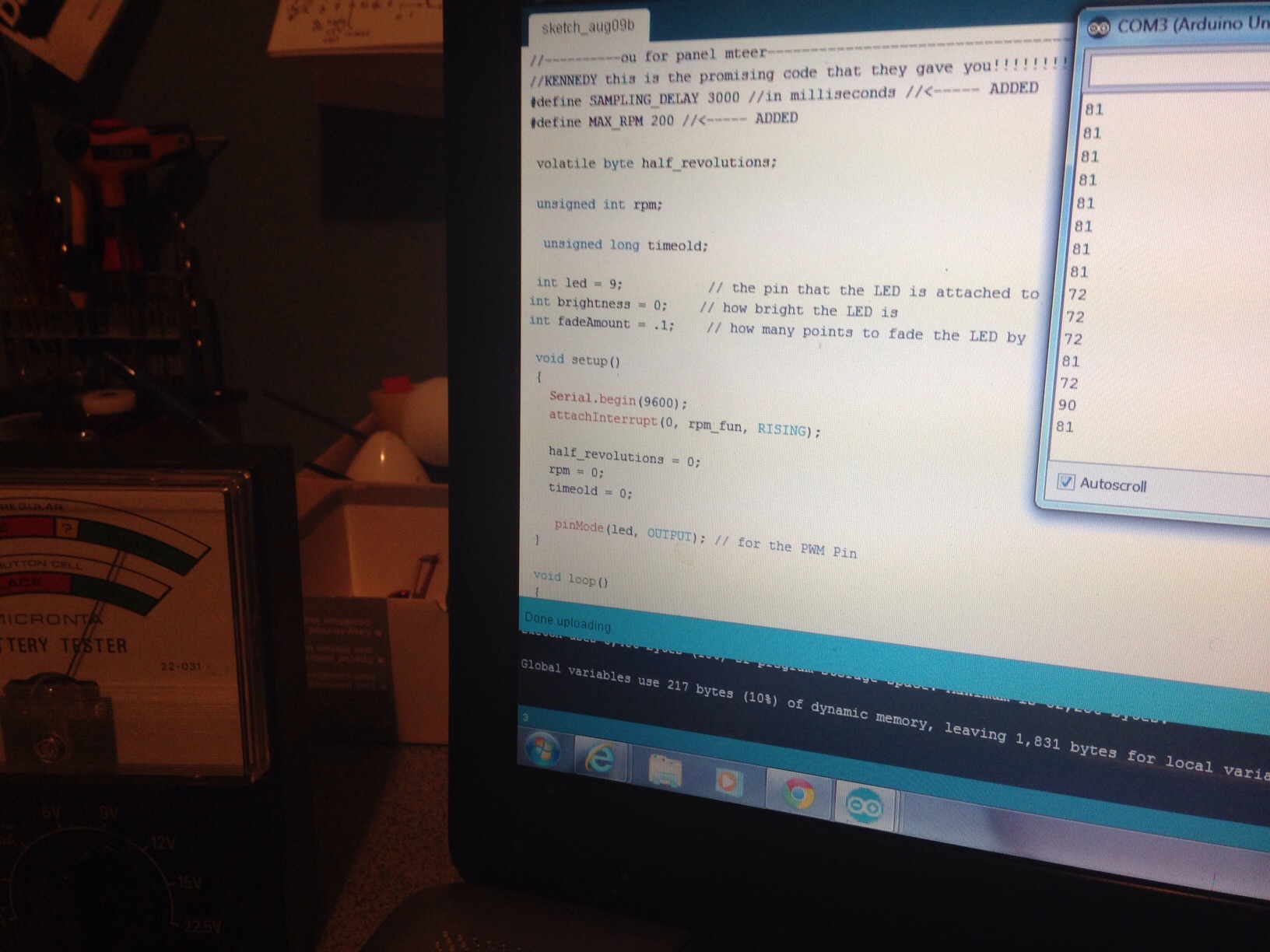
I built a homemade anemometer with 1 hall effect sensor mounted with 2 magnets rotating triggering the sensor. I am attempting to use both these example codes to drive a panel meter, eventually wind speed.
So far all it does is the meter is counting the pulses from the hall effect. once the meter is maxed out it counts back down. How can I camke the meter read the rpm and hold that position until a updated rpm change? Im really mentally stuck here.
Any help is much appreciated.
-Ken
//-----------------------------------------------

 volatile byte half_revolutions;

 unsigned int rpm;

 unsigned long timeold;

 int led = 9;           // the pin that the LED is attached to
int brightness = 0;    // how bright the LED is
int fadeAmount = 5;    // how many points to fade the LED by


 void setup()
 {
   Serial.begin(9600);
   attachInterrupt(0, rpm_fun, RISING);

   half_revolutions = 0;
   rpm = 0;
   timeold = 0;

    pinMode(led, OUTPUT); // for the PWM Pin
 }

 void loop()
 {
   if (half_revolutions >= 1) {
     //Update RPM every 20 counts, increase this for better RPM resolution,
     //decrease for faster update
     rpm = 30*1000/(millis() - timeold)*half_revolutions;
     timeold = millis();
     half_revolutions = 0;
     Serial.println(rpm,DEC);
//-----------------------------------------------------------------------------------------------------
      // set the brightness of pin 9:
  analogWrite(led, brightness);

  // change the brightness for next time through the loop:
  brightness = brightness + fadeAmount;

  // reverse the direction of the fading at the ends of the fade:
  if (brightness == 0 || brightness == 125) {
    fadeAmount = -fadeAmount ;
  }
  // wait for 30 milliseconds to see the dimming effect
  delay(100);
   }
 }
 //------------------------------------------------------------------------------------------------------
 void rpm_fun()
 {
   half_revolutions++;
   //Each rotation, this interrupt function is run twice
 }


//-----------------------------------------------
The problem is that when the meter is maxed out it counts back down?
Or do you want to keep a RPM value until the RPM changes?
Thats correct. I wish i could upload a video. Every pulse that the HE sensor gives off makes the meter count 1 pulse. I want the meter to hold a given position of rpm value. I can calibrate and adjust the position of the needle later.
For example, when i pull the serial monitor up it gives me updated rpm values each pulse. Im trying to figure out how to transfer that to the panel meter
Thank you
Ken
I think I understand now.
The panel meter is connected to the ANALOG PIN, and you convert the RPM processed into ANALOG OUTPUT. But as the half_revolutions is cleared, the RPM also is.
A solution is to calculate the RPM every one or two seconds.
Try this code (See the ADDED and MODIFIED line):
//-----------------------------------------------

#define SAMPLING_DELAY 1000 //in milliseconds //<----- ADDED

 volatile byte half_revolutions;

 unsigned int rpm;

  unsigned long timeold;

 int led = 9;           // the pin that the LED is attached to
int brightness = 0;    // how bright the LED is
int fadeAmount = 5;    // how many points to fade the LED by

 void setup()
 {
   Serial.begin(9600);
   attachInterrupt(0, rpm_fun, RISING);

   half_revolutions = 0;
   rpm = 0;
   timeold = 0;

    pinMode(led, OUTPUT); // for the PWM Pin
 }

 void loop()
 {
   if (millis()-timeold>SAMPLING_DELAY) { //<----- MODIFIED
     rpm = 30*1000/(millis() - timeold)*half_revolutions;
     timeold = millis();
     half_revolutions = 0;
     Serial.println(rpm,DEC);
//-----------------------------------------------------------------------------------------------------
      // set the brightness of pin 9:
  analogWrite(led, brightness);
   } // <---- MODIFIED (ADDED)

  // change the brightness for next time through the loop:
  brightness = brightness + fadeAmount;

  // reverse the direction of the fading at the ends of the fade:
  if (brightness == 0 || brightness == 125) {
    fadeAmount = -fadeAmount ;
  }
  // wait for 30 milliseconds to see the dimming effect
  delay(100);
  //} // <---- MODIFIED (DELETED)
 }
 //------------------------------------------------------------------------------------------------------
 void rpm_fun()
 {
   half_revolutions++;
   //Each rotation, this interrupt function is run twice
 }


//-----------------------------------------------
Edit: I just made a correction in the LED fade, maybe the fade doesn't work well.
Update RPM every 20 counts
I fail to see where this is done.
It seems you have two objectives. One is to track RPM and the other is to fade an LED in and out. The two appear to be independent of each other. Is this intentional?
The comments aren't in sync with code.
   if (half_revolutions >= 1) {
     //Update RPM every 20 counts, increase this for better RPM resolution,
     //decrease for faster update
It should be "every 1 count"
and
  // wait for 30 milliseconds to see the dimming effect
  delay(100);
Should be "wait for 100 milliseconds"
scottyjr:
Update RPM every 20 counts
I fail to see where this is done.
It seems you have two objectives. One is to track RPM and the other is to fade an LED in and out. The two appear to be independent of each other. Is this intentional?
It's good to know, right now I'm thinking that the
analogWrite(led, brightness);
Is where the info is sent to the Panel Meter.
govia014,
I tried the code and it makes the meter pulse like a clock every second. It does not recognize the sensor.
Scotty JR,
Im sorry, I changed the 20 to 1. so it updates every 1 RPM. I am using the Fade LED example coding to get a base of Pulse width modulation to run the panel meter. Am i correct with this direction? So instead of controlling the fade of an LED i would be controlling the Fade of the panel meter.
So my thought process was to track the Rpm and then send this to the Panel meter and control it with PWM.
thanks
Just to know, but the meter is the brightness variable?
thats correct. By playing around with the:
if (brightness == 0 || brightness == 125) {
"125" I can determine how far the meter runs across the panel, aka how "bright" the LED is. and I can mess with the delay to make slow it down.
Im still stuck on how to make it hold the current rpm value. Its still just counting pulses from the HE sensor.
Is the fade necessary or it's just a visual effect? I will take it out for a while.
The brigthness is related with the current RPM. It brights relative to the max RPM, because MAX_RPM = MAX_BRIGHT (which is 255). But I don't know the MAX_RPM, so define it.
//-----------------------------------------------

#define SAMPLING_DELAY 1000 //in milliseconds //<----- ADDED
#define MAX_RPM 200 //<----- ADDED

 volatile byte half_revolutions;

 unsigned int rpm;

  unsigned long timeold;

 int led = 9;           // the pin that the LED is attached to
int brightness = 0;    // how bright the LED is
int fadeAmount = 5;    // how many points to fade the LED by

 void setup()
 {
   Serial.begin(9600);
   attachInterrupt(0, rpm_fun, RISING);

   half_revolutions = 0;
   rpm = 0;
   timeold = 0;

    pinMode(led, OUTPUT); // for the PWM Pin
 }

 void loop()
 {
   if (millis()-timeold>SAMPLING_DELAY) { //<----- MODIFIED
     rpm = 30*1000/(millis() - timeold)*half_revolutions;
     timeold = millis();
     half_revolutions = 0;
     Serial.println(rpm,DEC);
//-----------------------------------------------------------------------------------------------------
      // set the brightness of pin 9:
  analogWrite(led, map(rpm,0,MAX_RPM,0,255));
   } // <---- MODIFIED (ADDED)
 }
 //------------------------------------------------------------------------------------------------------
 void rpm_fun()
 {
   half_revolutions++;
   //Each rotation, this interrupt function is run twice
 }


//-----------------------------------------------
Hey that's it! Im assuming theres no to post a video on these forums.
It holds its value and rises and falls with rpm.
Granted, this isnt a final product meter, i will order some nice ones and change the scales, but is there a way in the code i can adjust the amount the needle moves per rpm change. I assume it would be the:
int fadeAmount = ??;
I try to change this but i get no visual effect.
Thank you!
You get no visual effect because I removed it.
Yes, there is a way to fade in/out the needle step.
Let's continue tomorrow. See you.
Ahh gothcha,
Im gonna leave with this pic. Notice in the serial monitor the rpm drops from 81 to 72, then back again? The needle dropped about 1/2" then back up another 1/2". So it def works!
Yeah, to post a video, upload to youtube, publish there, and then post the link.
Test the code below for fading effect.
Don't forget to define the value of MAX_RPM.
#define SAMPLING_DELAY 1000 //in milliseconds
#define FADE_DELAY 100 //in milliseconds
#define MAX_RPM 200

static const int panelMeter = 9;    // the pin that the LED is attached to
static const int fadeAmount = 5;    // how many points to fade the LED by

volatile byte half_revolutions;

unsigned int targetRPM;
unsigned int RPM;

unsigned long sampleTimer;
unsigned long fadeTimer;

void setup()
{
	Serial.begin(9600);
	attachInterrupt(0, rpm_fun, RISING);

	pinMode(panelMeter, OUTPUT); // for the PWM Pin
}

void loop()
{
	if (millis()-sampleTimer>SAMPLING_DELAY) {
		targetRPM = 30*1000/(millis() - sampleTimer)*half_revolutions;
		sampleTimer = millis();
		half_revolutions = 0;
		Serial.println(RPM,DEC);
	}
	if(RPM!=targetRPM && millis()-fadeTimer>FADE_DELAY){
		if(RPM<targeRPM){
			RPM += fadeAmount;
			if(RPM>targetRPM)
				RPM = targetRPM;
		}
		else{
			if(RPM>=fadeAmount)
				RPM -= fadeAmount;
			else
				RPM = 0;

			if(RPM<targetRPM)
				RPM = targetRPM;
		}
		analogWrite(panelMeter, map(RPM,0,MAX_RPM,0,255));
		fadeTimer = millis();
	}
}

void rpm_fun()
{
	half_revolutions++;
	//Each rotation, this interrupt function is run twice
}
Thanks! It works perfect. I can control the distance the meter maxes out and smooth out the transitions.
I greatly appreciate the help.
Now off to my next project. A potentiometer wind vane. You may be seeing me again lol!
-Ken