HI All
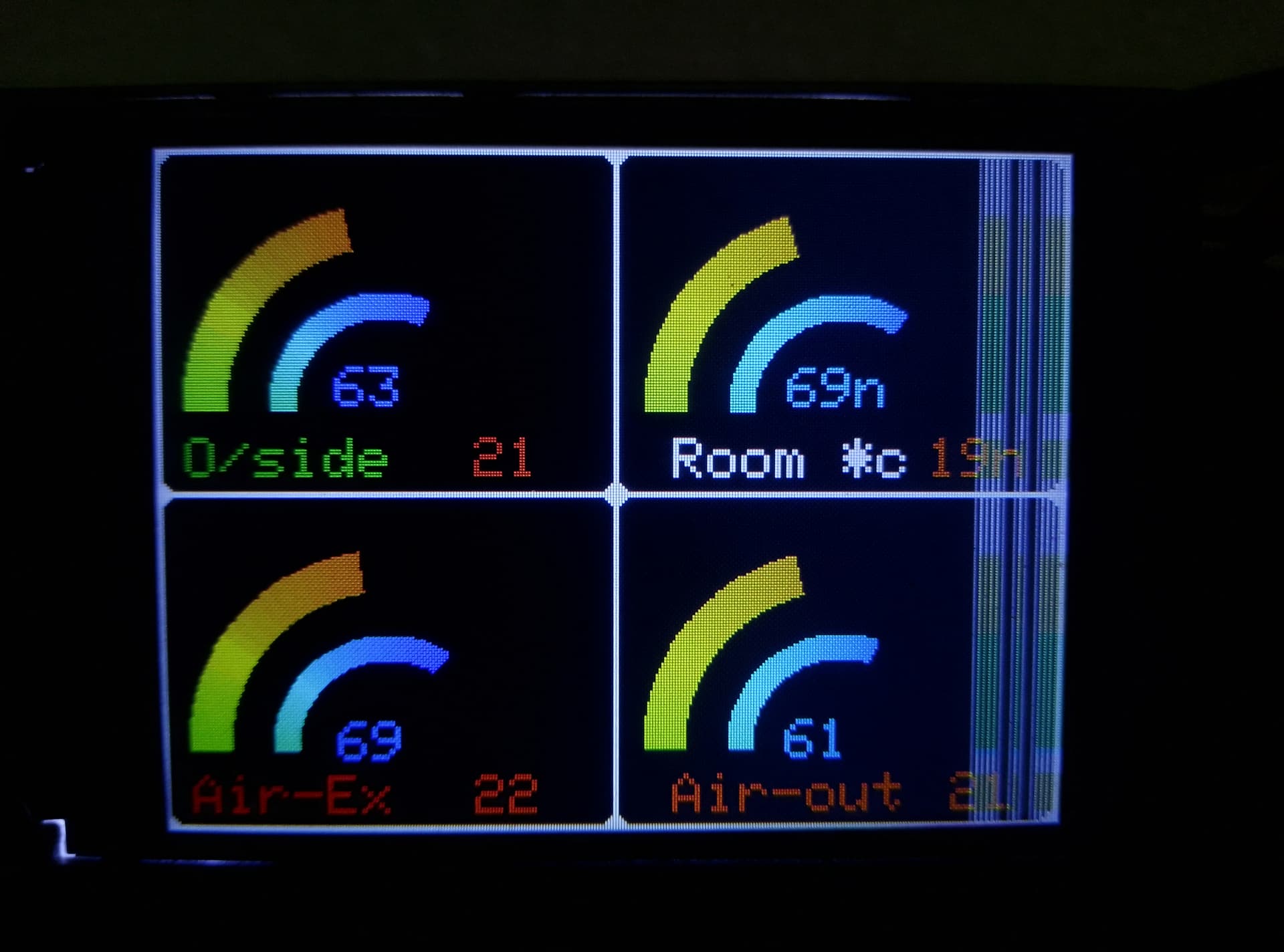
I have made a temperature and humidity monitor with 2.4" ST7789 TFT display, AdafruitGFX and DHT22 sensors
The temp and humid value are displayed as a 180* ( half circle ) ring meter with rainbow display colour gradient using Bodmers ring meter display Bodmer ring meter display
What I would like to do is have shaded background rectangles for each meter, vertically. I "could" do it with a rainbow bar graph, but would rather find a better method.
#include <Adafruit_ST7735.h>
#include <Adafruit_ST7789.h>
#include <Adafruit_ST7796S.h>
#include <Adafruit_ST77xx.h>
#include "DHT.h"
#include <SPI.h>
#include "Adafruit_GFX.h"
#include <Fonts/FreeSansBoldOblique9pt7b.h>
#include <Fonts/FreeSans9pt7b.h>
DHT dht1(2, DHT22);
DHT dht2(3, DHT22);
DHT dht3(4, DHT22);
DHT dht4(5, DHT22);

// xpos = dist from left edge, ypos = dist down from top, radius = size
// Meter colour schemes


#define TFT_CS 10
#define TFT_RST 9  // Or set to -1 and connect to Arduino RESET pin
#define TFT_DC 8
Adafruit_ST7789 tft = Adafruit_ST7789(TFT_CS, TFT_DC, TFT_RST);

#define ST77XX_BLACK 0x0000
#define ST77XX_GRAY 0x8410
#define ST77XX_WHITE 0xFFFF
#define ST77XX_RED 0xF800
#define ST77XX_ORANGE 0xFA60
#define ST77XX_YELLOW 0xFFE0
#define ST77XX_DENIM 0x03EE
#define ST77XX_GREEN 0x1781
#define ST77XX_DARKGREEN 0x2ce1
#define ST77XX_LIGHTGREEN 0xc781
#define ST77XX_CYAN 0x07FF
#define ST77XX_AQUA 0x04FF
#define ST77XX_BLUE 0x001F
#define ST77XX_MAGENTA 0xF81F
#define ST77XX_PINK 0xF8FF

#define WHITE2BLUE 0
#define GREEN2GREEN 1
#define BLUE2BLUE 2
#define BLUE2RED 3
#define GREEN2RED 4
#define RED2GREEN 5
#define YELLOW2RED 6
#define WHITE2BLUE 7
#define ST77XX_GREY 0x2104  // Dark grey 16 bit colour

float humidS1 = dht1.readHumidity();
float tempS1 = dht1.readTemperature();
float humidS2 = dht2.readHumidity();
float tempS2 = dht2.readTemperature();
float humidS3 = dht3.readHumidity();
float tempS3 = dht3.readTemperature();
float humidS4 = dht4.readHumidity();
float tempS4 = dht4.readTemperature();

void setup() {
  Serial.begin(9600);
  dht1.begin();
  dht2.begin();
  dht3.begin();
  dht4.begin();
  Serial.print(F("Hello! ST77xx TFT Test"));
  tft.init(240, 320);  // Init ST7789 240x320  // Use this initializer (uncomment) if using a 1.3" or 1.54" 240x240 240x320 TFT etc:
  tft.fillScreen(ST77XX_BLACK);
  tft.setRotation(1);
  tft.setCursor(80, 100);
  tft.setTextSize(4);
  tft.print("T.I.S.M");

  delay(2000);

  tft.fillScreen(ST77XX_WHITE);
  tft.invertDisplay(0);
  tft.fillRoundRect(2, 2, 157, 117, 5, ST77XX_GREY);
  tft.fillRoundRect(161,2, 156, 117, 5, ST77XX_GREY);
  tft.fillRoundRect(2,121 , 157,117, 5, ST77XX_GREY);
  tft.fillRoundRect(161,121, 156, 117, 5, ST77XX_GREY);
}


void loop() {
  float humidS1 = dht1.readHumidity();
  Serial.print("Humidity of Sensor   1: ");
  Serial.println(humidS1, 2);
  float tempS1 = dht1.readTemperature();
  Serial.print("Temp of Sensor        1: ");
  Serial.println(tempS1, 2);
  float humidS2 = dht2.readHumidity();
  Serial.print("Humidity of Sensor   2: ");
  Serial.println(humidS2, 2);
  float tempS2 = dht2.readTemperature();
  Serial.print("Temp of Sensor         2: ");
  Serial.println(tempS2, 2);
  float humidS3 = dht3.readHumidity();
  Serial.print("Humidity of Sensor   4: ");
  Serial.println(humidS2, 2);
  float tempS3 = dht3.readTemperature(0);
  Serial.print("Temp of Sensor         3: ");
  Serial.println(tempS3, 2);
  float humidS4 = dht4.readHumidity();
  Serial.print("Humidity of Sensor   3: ");
  Serial.println(humidS4, 2);
  float tempS4 = dht4.readTemperature();
  Serial.print("Temp of Sensor         4: ");
  Serial.println(tempS4, 2);

  {
tft.setTextSize(2);
//tft.setFont(&FreeSansBoldOblique9pt7b);
    //Display tempS1, humidS1

    tft.setCursor(62, 75);
    tft.setTextColor(ST77XX_AQUA, ST77XX_GREY);
    tft.print(humidS1, 0);
    tft.setCursor(110, 100);
    tft.setTextColor(ST77XX_ORANGE, ST77XX_GREY);
    tft.print(tempS1, 0);
    tft.setCursor(10, 100);
    tft.setTextColor(ST77XX_GREEN, ST77XX_GREY);
    tft.print("O/side");


    //Display tempS2
    tft.setCursor(220, 75);
    tft.setTextColor(ST77XX_AQUA, ST77XX_GREY);
    tft.print(humidS2, 0);
    tft.setCursor(270, 100);
    tft.setTextColor(ST77XX_ORANGE, ST77XX_GREY);
    tft.print(tempS2, 0);
    tft.setCursor(180, 100);
    tft.setTextColor(ST77XX_WHITE, ST77XX_GREY);
    tft.print("Room *c");

    //Display tempS3
    tft.setCursor(62,200);
    tft.setTextColor(ST77XX_AQUA, ST77XX_GREY);
    tft.print(humidS3, 0);
    tft.setCursor(110, 220);
    tft.setTextColor(ST77XX_ORANGE, ST77XX_GREY);
    tft.print(tempS3, 0);
    tft.setCursor(10, 220);
    tft.setTextColor(ST77XX_ORANGE, ST77XX_GREY);
    tft.print("Air-Ex");

    //Display tempS4
    tft.setCursor(220, 200);
    tft.setTextColor(ST77XX_AQUA, ST77XX_GREY);
    tft.print(humidS4, 0);
    tft.setCursor(280, 220);
    tft.setTextColor(ST77XX_ORANGE, ST77XX_GREY);
    tft.print(tempS4, 0);
    tft.setCursor(180, 220);
    tft.setTextColor(ST77XX_ORANGE, ST77XX_GREY);
    tft.print("Air-out");
  }

  // values for ((int) enginerpm/oil/boost/egt are derived from respective float values as displayed in texwrite, not from pin values
  //{
  // Set the the position, gap between meters, and inner radius of the meters
  int xpos = 0, ypos = 0, gap = 0, radius = 0;

  // Draw temp1
  xpos = 10, ypos = 20, gap = 50, radius = 70;                                 //sets size and position on screen
  xpos = gap + ringMeter1((int)tempS1, -10, 60, xpos, ypos, radius, 1, YELLOW2RED);  //0, 50 are range off meter ie 0-50 oilPSI

  //Draw hunid
  xpos = 40, ypos = 50, gap = 50, radius = 40;                                  //sets size and position on screen
  xpos = gap + ringMeter1((int)humidS1, 0, 100, xpos, ypos, radius, 1, WHITE2BLUE);  //0, 120 are range off meter ie 0-120*c

  // Draw temp2
  xpos = 170, ypos = 20, gap = 50, radius = 70;                                    //sets size and position on screen
  xpos = gap + ringMeter1((int)tempS2, -10, 60, xpos, ypos, radius, 1, YELLOW2RED);  //0, 120 are range off meter ie 0-120*c

  // Draw humid2
  xpos = 200, ypos = 50, gap = 50, radius = 40;                                     //sets size and position on screen
  xpos = gap + ringMeter1((int)humidS2, 0, 100, xpos, ypos, radius, 1, WHITE2BLUE);  //0, 120 are range off meter ie 0-120*c

  //Draw temp3
  xpos = 10, ypos = 140, gap = 50, radius = 70;                                 //sets size and position on screen
  xpos = gap + ringMeter1((int)tempS3, -10, 60, xpos, ypos, radius, 1, YELLOW2RED);  //0, 750 are range off meter ie 0-750*c EGT Temp

  //Draw hunid3
  xpos = 40, ypos = 170, gap = 50, radius = 40;                                     //sets size and position on screen
  xpos = gap + ringMeter1((int)humidS3, 0, 100, xpos, ypos, radius, 1, WHITE2BLUE);  //0, 120 are range off meter ie 0-120*c


  // Draw temp4
  xpos = 170, ypos = 140, gap = 50, radius = 70;                               //sets size and position on screen
  xpos = gap + ringMeter1((int)tempS4, -10, 60, xpos, ypos, radius, 1, YELLOW2RED);  //0, 30 are range off meter ie 0-30psi boost*c

  // Draw humid4
  xpos = 200, ypos = 170, gap = 50, radius = 40;                                    //sets size and position on screen
  xpos = gap + ringMeter1((int)humidS4, 0, 100, xpos, ypos, radius, 1, WHITE2BLUE);  //0, 120 are range off meter ie 0-120*c
}
// #########################################################################
//  Draw the meter on the screen, returns x coord of righthand side
// #########################################################################


int ringMeter1(int temp, int vmin, int vmax, int x, int y, int r, const char *units, byte scheme) {
  // Minimum value of r is about 52 before value text intrudes on ring
  // drawing the text first is an option

  x += r;
  y += r;  // Calculate coords of centre of ring

  int w = r / 5;  // Width of outer ring is. 4 = 1/4 of radius, smaller number gives fater ring

  int angle = 90;  // Half the sweep angle of meter (300 degrees) 90 gives a semi-circle, 180 = full-circle

  int text_colour = 0;  // To hold the text colour

  int v = map(temp, vmin, vmax, -angle, angle);  // Map the value to an angle v

  byte seg = 1;  // Segments are 5 degrees wide = 60 segments for 300 degrees
  byte inc = 1;  // Draw segments every 5 degrees, increase to 10 for segmented ring

  // Draw colour blocks every inc degrees
  for (int i = -angle; i < angle; i += inc) {

    // Choose colour from scheme
    int colour = 0;
    switch (scheme) {

      case 0: colour = ST77XX_RED; break;                               // Fixed colour
      case 1: colour = ST77XX_GREEN; break;                             // Fixed colour
      case 2: colour = ST77XX_BLUE; break;
      // BLUE 0=BLUE 63=GREEN 127=RED
      case 3: colour = rainbow(map(i, -angle, angle, 0, 127)); break;   // Full spectrum BLUE2RED 0=BLUE 63=GREEN 127=RED
      case 4: colour = rainbow(map(i, -angle, angle, 63, 127)); break;  // GREEN2RED
      case 5: colour = rainbow(map(i, -angle, angle, 127, 63)); break;  // RED2GREEN
      case 6: colour = rainbow(map(i, -angle, angle, 90, 127)); break;  // YELLOW2RED
      case 7: colour = rainbow(map(i, -angle, angle, 40, 0)); break;  // WHITE2BLUE
      default: colour = ST77XX_BLUE; break;  // Fixed colour
    }

    // Calculate pair of coordinates for segment start
    float sx = cos((i - 90) * 0.0174532925);
    float sy = sin((i - 90) * 0.0174532925);
    uint16_t x0 = sx * (r - w) + x;
    uint16_t y0 = sy * (r - w) + y;
    uint16_t x1 = sx * r + x;
    uint16_t y1 = sy * r + y;

    // Calculate pair of coordinates for segment end
    float sx2 = cos((i + seg - 90) * 0.0174532925);
    float sy2 = sin((i + seg - 90) * 0.0174532925);
    int x2 = sx2 * (r - w) + x;
    int y2 = sy2 * (r - w) + y;
    int x3 = sx2 * r + x;
    int y3 = sy2 * r + y;

    if (i < v) {  // Fill in coloured segments with 2 triangles
      tft.fillTriangle(x0, y0, x1, y1, x2, y2, colour);
      tft.fillTriangle(x1, y1, x2, y2, x3, y3, colour);
      text_colour = colour;  // Save the last colour drawn
    } else                   // Fill in blank segments
    {

      tft.fillTriangle(x0, y0, x1, y1, x2, y2, ST77XX_GREY);
      tft.fillTriangle(x1, y1, x2, y2, x3, y3, ST77XX_GREY);
    }
  }

  // Convert value to a string
  char buf[10];
  byte len = 4;
  if (temp > 999) len = 5;
  dtostrf(temp, len, 0, buf);
}
// #########################################################################
// Return a 16 bit rainbow colour
// #########################################################################
unsigned int rainbow(byte value) {
  // Value is expected to be in range 0-127
  // The value is converted to a spectrum colour from 0 = blue through to 127 = red

  byte red = 0;    // Red is the top 5 bits of a 16 bit colour value
  byte green = 0;  // Green is the middle 6 bits
  byte blue = 0;   // Blue is the bottom 5 bits

  byte quadrant = value / 32;

  if (quadrant == 0) {
    blue = 31;
    green = 2 * (value % 32);
    red = 0;
  }
  if (quadrant == 1) {
    blue = 31 - (value % 32);
    green = 63;
    red = 0;
  }
  if (quadrant == 2) {
    blue = 0;
    green = 63;
    red = value % 32;
  }
  if (quadrant == 3) {
    blue = 0;
    green = 63 - 2 * (value % 32);
    red = 31;
  }
  return (red << 11) + (green << 5) + blue;
}