Range not good with Semtech SX1278 Lora Module

Hi
I am trying to setup a basic LoRa communication between two Arduino UNO boards and SX1278, 433MHz modules, one as RX and other as TX. LoRA module and Arduino are connected using a 5V-3.3V level convertor. I have used 3dbi gain antennas both are TX and RX side. However, I am hardly getting a range of 200mts between transmitter and receiver.

when I place TX and RX close by, by about 10 cms, the RSSI on RX side reads -10dbm. The moment the range exceeds 2mts, RSSI on RX side goes down to -70dbm.

I see in various forums that LORA gives a range between 2kms and 10kms, depending on non-line of sight or line of sight. However, in my case, it is not exceeding 200mts.

What could be the reason..? The LoRA module has a total of 4 ground pins. Should I be connecting all ground pins of LoRA module to UNO board..? I have connected only one ground pin of LoRA module to GND pin of UNO board.

The wired settings are as follows

// LoRa-02 SX1278 module PINs:
// 3.3 V and ground : Connected to 3V3 and GND of Arduino UNO
// RST : Connected to PIN-9 of Arduino UNO, after level convertor
// NSS : Connected to PIN-10 of Arduino UNO, after level convertor
// MOSI : Connected to PIN-11 of Arduino UNO, after level convertor
// MISO : Connected to PIN-12 of Arduino UNO, after level convertor
// SCK : Connected to PIN-13 of Arduino UNO, after level convertor
// DIO0 : : Connected to PIN-2 of Arduino UNO, after level convertor

The connections are same for both RX and TX side.
I am using LoRa Library of Sandeep Mistry version 0.8.0 and used example programs LoRa Sender, which is as below

#include <SPI.h>
#include <LoRa.h>

int counter = 0;

void setup() {
Serial.begin(9600);
while (!Serial);

Serial.println("LoRa Sender");

if (!LoRa.begin(433E6)) {
Serial.println("Starting LoRa failed!");
while (1);
}
}

void loop() {
Serial.print("Sending packet: ");
Serial.println(counter);

// send packet
LoRa.beginPacket();
LoRa.print("hello ");
LoRa.print(counter);
LoRa.endPacket();

counter++;

delay(5000);
}

LoRA Receive:

#include <SPI.h>
#include <LoRa.h>

void setup() {
Serial.begin(9600);
while (!Serial);

Serial.println("LoRa Receiver");

if (!LoRa.begin(433E6)) {
Serial.println("Starting LoRa failed!");
while (1);
}
}

void loop() {
// try to parse packet
int packetSize = LoRa.parsePacket();
if (packetSize) {
// received a packet
Serial.print("Received packet '");

// read packet
while (LoRa.available()) {
  Serial.print((char)LoRa.read());
}

// print RSSI of packet
Serial.print("' with RSSI ");
Serial.println(LoRa.packetRssi());

}
}

Except for the frequency, I have not changed any thing in code.

The LoRa Module which I use reads on case as

RA-02
ISM: 410-525MHz
PA: +18dBm
LoRa/FSK/00k

Hi, please edit your post by selecting all the code, then click on <code> button. Thank you.

The range\distance also depends on the LoRa settings in use.

Setup the LoRa for long range settings and the line of sight range should be several hundred kilometres.

Read the documentation for the library you are using to see what LoRa settings are the default.

Extreme short range, such as 200m under line of sight conditions, suggests that the LoRa modules are damaged or the antennas are not connected properly.

Much of power combined with short distance often makes trouble.

the RF guy mantra: solve RF problems with antennas. 10 dollars spent on antennas does more good than $100 spent on amplifiers. show us your antennas.

I am using antenna purchased from here

https://robu.in/product/lora-antenna-433mhz/

https://robu.in/product/lora-antenna-433mhz/

The 3.3v output pin on the UNO might not be able to provide enough current to run the LoRa module in transmit mode.

those antennas need a circle of metal at least 3.5" at the base, connected to the outer shell of the connector. a ground plane. they appear to be 2.1 dbi dipoles, the simplest and most basic antenna. the ground plane is the other half of them.

Can you please help me with a reference pic or a recommended antenna..?

Or, is it to do with ground pins of LORA module..? The module has 4 ground pins. I have connected only 2.

Unlikely.

On every LoRa module I have come across all the GNDs are connected together. Easy enough for you to check with a multimeter.

Its always a good idea to ensure the GND near the antenna connection is connected, that might make a marginal differance.

But your problem is different, the range your getting, with the module and antenna your using is a mere fraction of what you should be getting, hence my comment in post #3.

A ground plane for the antenna does marginally improve range, but is not the cause of the massive reduction in range you are seeing.

I have recently done some line of sight tests with SX1262 LoRa devices over a local park. The SX1262 can be set at a TX power of -9dBm and spreading factor 5 (SF5) which reduces the range, making practical testing in say a large open field possible. An SX1278 by comparison normally has a minimum TX power of 2dBm and is used at SF7, resulting in much longer range.

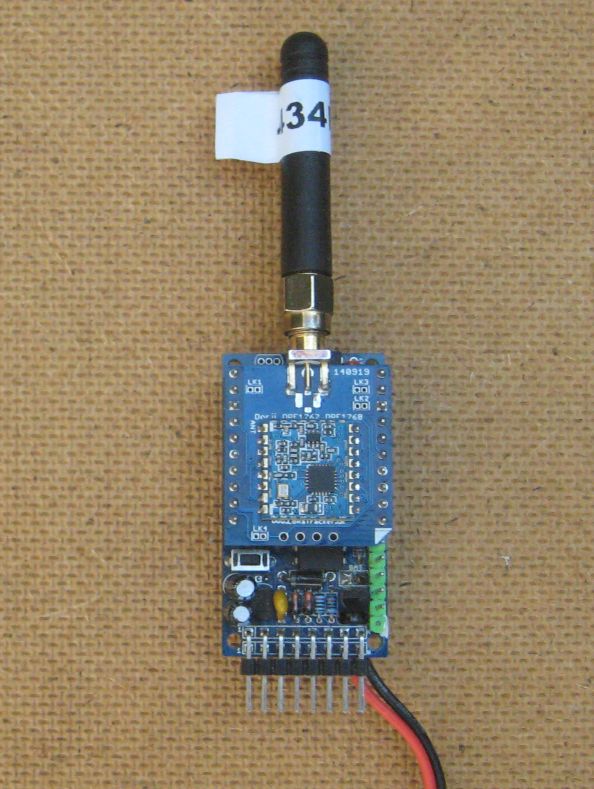
Using real simple transmitter and receiver setups, like those shown below;

(Note the very basic antenna and lack of ground plane)

The TX was on a 1.75M pole in the ground and the RX handheld on a stick.

I got a distance of 152m at SF5, bandwidth 500khz and a TX power of -9dBm.

Now the library in use by the OP uses as default SF7, bandwidth 125khz and a TX power of 17dBm.

The quoted sensitivity of the SX1262 at SF5, bandwidth 500khz, is -111dBm.

The quoted sensitivity of the SX1278 at SF7, bandwidth 125khz, is -123dBm.

So in terms of link budget, with just the LoRa settings above, the SX1278 has a link budget advantage of 12dBm. Then the is the link budget advantage of 17dBm power versus -9dBm, which is 26dBm.

Thus the SX1278, on its default library settings, would have a link budget advantage of 38dBm over the test I mention above which had a line of sight distance of 151m.

So with the code posted by the OP, you would expect the SX1278 to have a line of sight range of circa 12km.