React LED on sound with electret mic

Hello. First Happy New Year to you all.
I want LED that reacts on sound.
I have LED with red light 5050, IRF 630 N, Electret Microphone, 100K and 10K resistors, breadboard and wirings. Also I have Arduinos.
This is the video for what I bought led strip and mic. I have tried to create the same with helping this video , using breadboard, but I can not succeed in . The LED was just turning on and was not blinking and reacting on sounds.

I am interested in if it is possible to get success in doing this, with what I have also with helping Arduinos. If anyone have done project like this. Thank in advance.

Best Regards.

What we need to see is what you have done, that is your wiring. So please post a picture of it that shows clearly where things are.

However that circuit is what is known in the electronics trade as "piss poor". Bit of a technical phrase but it means it is very badly designed and that idiot only gets results because of the exact components he used along with a modicum of luck.

The LED was just turning on and was not blinking and reacting on sounds.

Yes, no surprise. This is because the circuit to use another technical term, is as poor as shit. It relies on the microphone having a low enough impedance to move the FET in and out of saturation. You could try increasing the value of the resistor. If you get it when it is always off, then decrease it again. You might reach a point where you get the same effect. Also careful control of the volume might get it flashing.

I am interested in if it is possible to get success in doing this, with what I have also with helping Arduinos.

No because that FET requires a voltage of 10V to turn it on. If you get a logic level FET then you can turn it on with an Arduino but not with a FET like that.

If anyone have done project like this.

Most people would be ashamed to have done a project like that.

Grumpy_Mike:
Most people would be ashamed to have done a project like that.

Thank you for your response. That made my day.

I use a Adafruit Electret Microphone Amplifier - MAX9814 with Auto Gain Control, and a DFRobot Audio Analyzer to build a sound reactive LED strip.

I use this code, part 1

#include "sdkconfig.h"
#include "esp32/ulp.h"
#include "driver/rtc_io.h"
#include "esp_system.h" //This inclusion configures the peripherals in the ESP system.
#include "freertos/FreeRTOS.h"
#include "freertos/task.h"
#include "freertos/timers.h"
#include "freertos/event_groups.h"
#include <Adafruit_NeoPixel.h>
#include "AudioAnalyzer.h"
////
/* define event group and event bits */
EventGroupHandle_t eg;
#define evtDo_AudioReadFreq       ( 1 << 0 ) // 1
////
TickType_t xTicksToWait0 = 0;
////
QueueHandle_t xQ_LED_Info;
////
const int NeoPixelPin = 26;
const int LED_COUNT = 24; //total number of leds in the strip
const int NOISE = 0; // noise that you want to chop off
const int SEG = 6; // how many parts you want to separate the led strip into
const int Priority4 = 4;
const int TaskStack40K = 40000;
const int TaskCore1  = 1;
const int TaskCore0 = 0;
const int AudioSampleSize = 6;
const int Brightness = 180;
const int A_D_ConversionBits = 4096; // arduino use 1024, ESP32 use 4096
const float LED0_Multiplier = 2.0;
////
Analyzer Audio = Analyzer( 5, 15, 36 );//Strobe pin ->15  RST pin ->2 Analog Pin ->36
// When we setup the NeoPixel library, we tell it how many pixels, and which pin to use to send signals.
Adafruit_NeoPixel leds = Adafruit_NeoPixel( LED_COUNT, NeoPixelPin, NEO_GRB + NEO_KHZ800 );
////
int FreqVal[7];//create an array to store the value of different freq
////
void ULP_BLINK_RUN(uint32_t us);
////
void setup()
{
  ULP_BLINK_RUN(100000);
  eg = xEventGroupCreate();
  Audio.Init(); // start the audio analyzer
  leds.begin(); // Call this to start up the LED strip.
  clearLEDs();  // This function, defined below, de-energizes all LEDs...
  leds.show();  // ...but the LEDs don't actually update until you call this.
  ////
  xQ_LED_Info = xQueueCreate ( 1, sizeof(FreqVal) );
  //////////////////////////////////////////////////////////////////////////////////////////////
  xTaskCreatePinnedToCore( fDo_AudioReadFreq, "fDo_ AudioReadFreq", TaskStack40K, NULL, Priority4, NULL, TaskCore1 ); //assigned to core
  xTaskCreatePinnedToCore( fDo_LEDs, "fDo_ LEDs", TaskStack40K, NULL, Priority4, NULL, TaskCore0 ); //assigned to core
  xEventGroupSetBits( eg, evtDo_AudioReadFreq );
} // setup()
////
void loop() {} // void loop
////
void fDo_LEDs( void *pvParameters )
{
  int iFreqVal[7];
  int j;
  leds.setBrightness( Brightness ); //  1 = min brightness (off), 255 = max brightness.
  for (;;)
  {
    if (xQueueReceive( xQ_LED_Info, &iFreqVal,  portMAX_DELAY) == pdTRUE)
    {
      j = 0;
      //assign different values for different parts of the led strip
      for (j = 0; j < LED_COUNT; j++)
      {
        if ( (0 <= j) && (j < (LED_COUNT / SEG)) )
        {
          set(j, iFreqVal[0]); // set the color of led
        }
        else if ( ((LED_COUNT / SEG) <= j) && (j < (LED_COUNT / SEG * 2)) )
        {
          set(j, iFreqVal[1]); //orginal code
        }
        else if ( ((LED_COUNT / SEG * 2) <= j) && (j < (LED_COUNT / SEG * 3)) )
        {
          set(j, iFreqVal[2]);
        }
        else if ( ((LED_COUNT / SEG * 3) <= j) && (j < (LED_COUNT / SEG * 4)) )
        {
          set(j, iFreqVal[3]);
        }
        else if ( ((LED_COUNT / SEG * 4) <= j) && (j < (LED_COUNT / SEG * 5)) )
        {
          set(j, iFreqVal[4]);
        }
        else
        {
          set(j, iFreqVal[5]);
        }
      }
      leds.show();
    }
    xEventGroupSetBits( eg, evtDo_AudioReadFreq );
  }
  vTaskDelete( NULL );
} // void fDo_ LEDs( void *pvParameters )
////
void fDo_AudioReadFreq( void *pvParameters )
{
  int64_t EndTime = esp_timer_get_time();
  int64_t StartTime = esp_timer_get_time(); //gets time in uSeconds like Arduino Micros
  for (;;)
  {
    xEventGroupWaitBits (eg, evtDo_AudioReadFreq, pdTRUE, pdTRUE, portMAX_DELAY);
    EndTime = esp_timer_get_time() - StartTime;
    // log_i( "TimeSpentOnTasks: %d", EndTime );
    Audio.ReadFreq(FreqVal);
    for (int i = 0; i < 7; i++)
    {
      FreqVal[i] = constrain( FreqVal[i], NOISE, A_D_ConversionBits );
      FreqVal[i] = map( FreqVal[i], NOISE, A_D_ConversionBits, 0, 255 );
      // log_i( "Freq %d Value: %d", i, FreqVal[i]);//used for debugging and Freq choosing
    }
    xQueueSend( xQ_LED_Info, ( void * ) &FreqVal, xTicksToWait0 );
    StartTime = esp_timer_get_time();
  }
  vTaskDelete( NULL );
} // fDo_ AudioReadFreq( void *pvParameters )
////
//the following function set the led color based on its position and freq value
//

part 2

void set(byte position, int value)
{
  // segment 0, red
  if ( (0 <= position) && (position < LED_COUNT / SEG) ) // segment 0 (bottom to top), red
  {
    if ( value == 0 )
    {
      leds.setPixelColor( position, 0, 0, 0 );
    } else {
      // increase light output of a low number
      // value += 10;
      // value = constrain( value, 0, 255 ); // keep raised value within limits
      if ( value <= 25 )
      {
        leds.setPixelColor( position, leds.Color( value , 0, 0) );
      } else {
        if ( (value * LED0_Multiplier) >= 255 )
        {
          leds.setPixelColor( position, leds.Color( 255 , 0, 0) );
        } else {
          leds.setPixelColor( position, leds.Color( (value * LED0_Multiplier) , 0, 0) );
        }
      }
    }
  }
  else if ( (LED_COUNT / SEG <= position) && (position < LED_COUNT / SEG * 2) ) // segment 1 yellow
  {
    if ( value == 0 )
    {
      leds.setPixelColor(position, leds.Color(0, 0, 0));
    }
    else
    {
      leds.setPixelColor(position, leds.Color( value, value, 0)); // works better to make yellow
    }
  }
  else if ( (LED_COUNT / SEG * 2 <= position) && (position < LED_COUNT / SEG * 3) ) // segment 2 pink
  {
    if ( value == 0 )
    {
      leds.setPixelColor(position, leds.Color(0, 0, 0));
    }
    else
    {
      leds.setPixelColor(position, leds.Color( value, 0, value * .91) ); // pink
    }
  }
  else if ( (LED_COUNT / SEG * 3 <= position) && (position < LED_COUNT / SEG * 4) ) // seg 3, green
  {
    if ( value == 0 )
    {
      leds.setPixelColor(position, leds.Color( 0, 0, 0));
    }
    else //
    {
      leds.setPixelColor( position, leds.Color( 0, value, 0) ); //
    }
  }
  else if ( (LED_COUNT / SEG * 4 <= position) && (position < LED_COUNT / SEG * 5) ) // segment 4, leds.color( R, G, B ), blue
  {
    if ( value == 0 )
    {
      leds.setPixelColor(position, leds.Color( 0, 0, 0));
    }
    else //
    {
      leds.setPixelColor(position, leds.Color( 0, 0, value) ); // blue
    }
  }
  else // segment 5
  {
    if ( value == 0 )
    {
      leds.setPixelColor(position, leds.Color( 0, 0, 0)); // only helps a little bit in turning the leds off
    }
    else
    {
      leds.setPixelColor( position, leds.Color( value, value * .3, 0) ); // orange
    }
  }
} // void set(byte position, int value)
////
void clearLEDs()
{
  for (int i = 0; i < LED_COUNT; i++)
  {
    leds.setPixelColor(i, 0);
  }
} // void clearLEDs()
//////////////////////////////////////////////
/*
  Each I_XXX preprocessor define translates into a single 32-bit instruction. So you can count instructions to learn which memory address are used and where the free mem space starts.
  To generate branch instructions, special M_ preprocessor defines are used. M_LABEL define can be used to define a branch target.
  Implementation note: these M_ preprocessor defines will be translated into two ulp_insn_t values: one is a token value which contains label number, and the other is the actual instruction.

*/
void ULP_BLINK_RUN(uint32_t us)
{
  size_t load_addr = 0;
  RTC_SLOW_MEM[12] = 0;
  ulp_set_wakeup_period(0, us);
  const ulp_insn_t  ulp_blink[] =
  {
    I_MOVI(R3, 12),                         // #12 -> R3
    I_LD(R0, R3, 0),                        // R0 = RTC_SLOW_MEM[R3(#12)]
    M_BL(1, 1),                             // GOTO M_LABEL(1) IF R0 < 1
    I_WR_REG(RTC_GPIO_OUT_REG, 26, 27, 1),  // RTC_GPIO2 = 1
    I_SUBI(R0, R0, 1),                      // R0 = R0 - 1, R0 = 1, R0 = 0
    I_ST(R0, R3, 0),                        // RTC_SLOW_MEM[R3(#12)] = R0
    M_BX(2),                                // GOTO M_LABEL(2)
    M_LABEL(1),                             // M_LABEL(1)
    I_WR_REG(RTC_GPIO_OUT_REG, 26, 27, 0),// RTC_GPIO2 = 0
    I_ADDI(R0, R0, 1),                    // R0 = R0 + 1, R0 = 0, R0 = 1
    I_ST(R0, R3, 0),                      // RTC_SLOW_MEM[R3(#12)] = R0
    M_LABEL(2),                             // M_LABEL(2)
    I_HALT()                                // HALT COPROCESSOR
  };
  const gpio_num_t led_gpios[] =
  {
    GPIO_NUM_2,
    // GPIO_NUM_0,
    // GPIO_NUM_4
  };
  for (size_t i = 0; i < sizeof(led_gpios) / sizeof(led_gpios[0]); ++i) {
    rtc_gpio_init(led_gpios[i]);
    rtc_gpio_set_direction(led_gpios[i], RTC_GPIO_MODE_OUTPUT_ONLY);
    rtc_gpio_set_level(led_gpios[i], 0);
  }
  size_t size = sizeof(ulp_blink) / sizeof(ulp_insn_t);
  ulp_process_macros_and_load( load_addr, ulp_blink, &size);
  ulp_run( load_addr );
} // void ULP_BLINK_RUN(uint32_t us)
//////////////////////////////////////////////

On an ESP32.

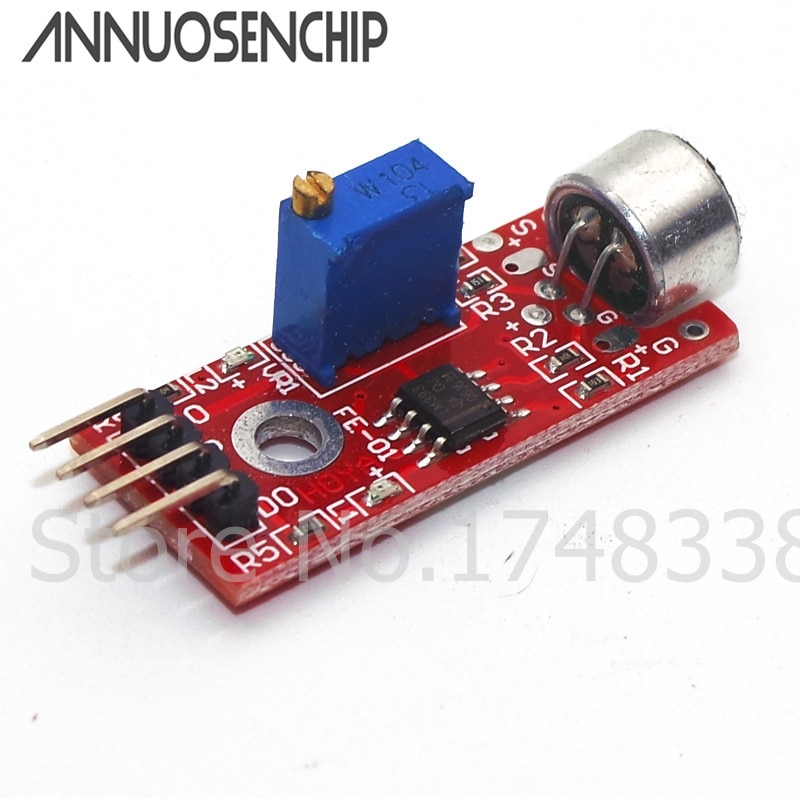
Not sure what you have been doing so far as YouTube reliably crashes the browser on this particular computer, but there are microphone modules with amplification which are designed (supposedly) to detect sound (but not anything specific) and switch a simple LED directly.

Aliexpress item

Not sure what you have been doing so far as YouTube reliably crashes the browser on this particular compute

The circuit was just a FET switching the led strip, non addressable, single colour. With a pull up resistor from gate to 12V and the microphone connected from gate to ground. So simply using the microphone as a variable resistor.

I haven’t done this since I FM modulated a 2 meter transmitter with a carbon microphone on the grid with the other end connected to the HT. But it was a carbon microphone, and it was 1973.

Grumpy_Mike:
But it was a carbon microphone, and it was 1973.

Did they not use carbon microphones to modulate spark transmitters some decades previous?

Yes they did. But this was a WW2 microphone which was part of a 19 Set. It was army surplus and so it was in brand new pristine condition. Bring on the nostalgia from old radio hams.

This topic was automatically closed 120 days after the last reply. New replies are no longer allowed.