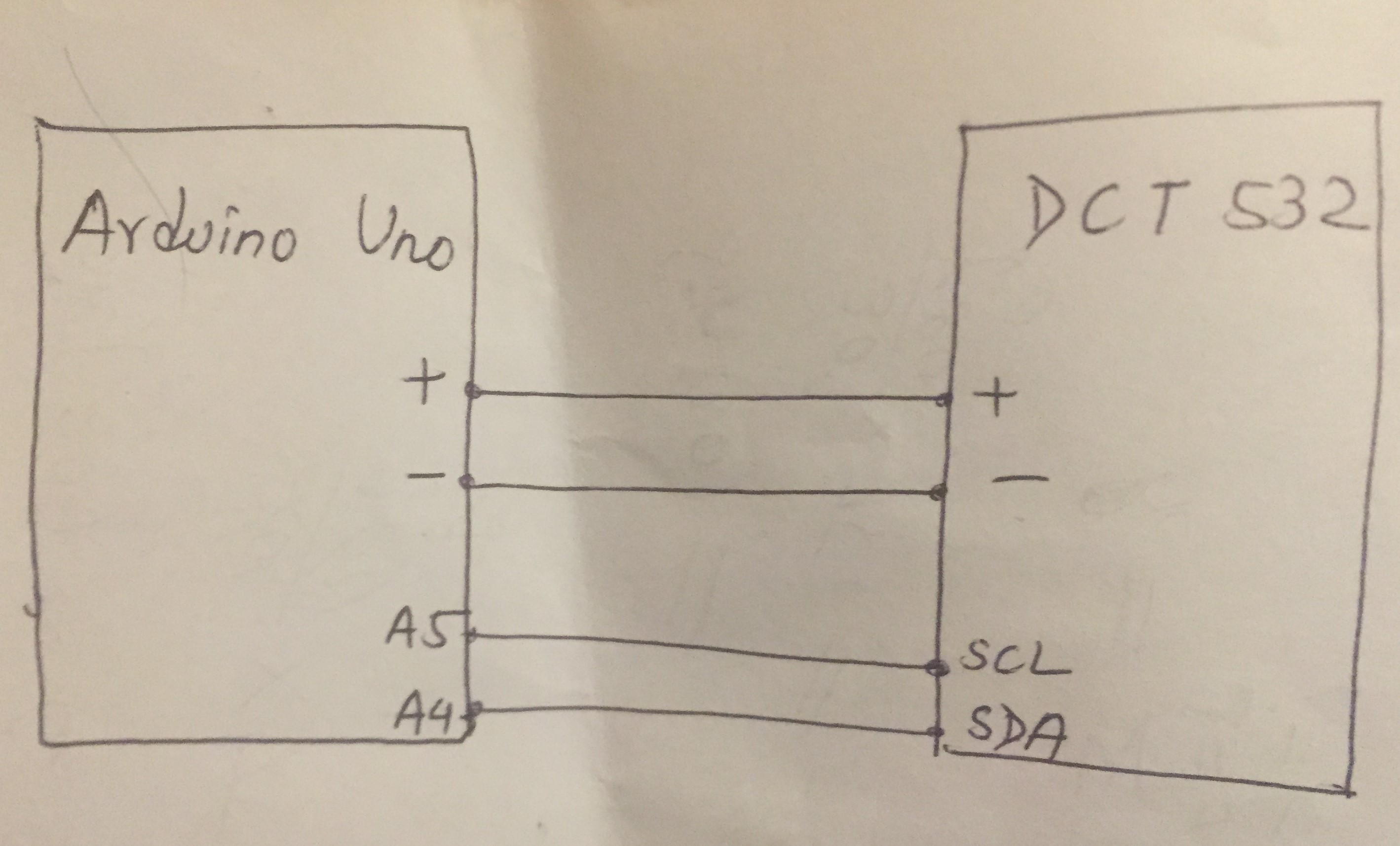
I have the pressure sensor DCT 532. I wanted to read the pressure value in atm from the internal register of the sensor DCT 532 using Arduino Uno using I2C bus configuration. The (DCT 532) slave address is =0*32 (hex) or =50 (decimal) (correct)
(Pull-Up resistors of 1.8K are used and working). The problem is I am unable to read the exact register address to get the pressure value. Also I am unable to read/write the number of bytes to request from the internal address.
Kindly do help me in telling the internal register, address and number of bytes to request to get the final pressure value.
Also do i need any of the mathematical conversion for getting the final value of pressure?
I also got a bit confusion on the shifting of the registers.
I have hereby attached the arduino UNO code and datasheet of the pressure sensor DCT 532.
//Arduino Code
#include<Wire.h>
int dct_532_press_address=50;

void setup()
 {
  Serial.begin(9600);
    Serial.print("initializing pressure");

      }

   void loop()
      {
         Wire.begin();
         Wire.beginTransmission(dct_532_press_address);
         Wire.write (0x01);
         Wire.endTransmission();
         delay(600);

      Wire.begin();
     Wire.requestFrom(dct_532_press_address,2);
      int LSB=Wire.read();
      int MSB=Wire.read();
      int combined=(int)MSB;
      combined=combined<<8;
      combined|=LSB;
      Wire.endTransmission();
      Serial.println(combined, DEC);
      Serial.println("pressvalue in atm");
      delay(600);
          }
First off what is the exact part number as this will determine if the device supplies float or int values, byte order and various other factory settings.
EDIT: A quick look at the datasheet and it seems you can alter the settings to specify what type of results you get etc so the question now is what do you want?
sandyboy123:
Well, I wanted to read the internal register address to get the value of pressure.
I realize that but before you have any hope of reading the values you need to either supply the exact part number so we can determine what the default readings are and what address the sensor is using
or
perform an I2C scan to ensure the sensor is at address 50 and then tell us what value ranges your hoping to read.
The sensor can be setup to return integer or floating point values, specify the number of decimal places for integer results, you can alter the byte order, you can return a value or nominal percentage, you can change the address & alter the pressure units used to calculate values. Without knowing what the sensor settings are by default or what settings you need/expect then no point in continuing.
The slave address of DCT 532 is 0x32 (hex) or 50 decimal. (checked through I2c scanner and is correct).
It is to be read and write by Arduino Uno.
I am unsure about the pressure range to read but wanted pressure value (could be in any unit given in datasheet). it is okay to just get the pressure readings.
The values I wanted can be integer (is okay). (It would be best if i can read in decimals too ).
I wanted the pressure value (not the nominal percentage).
I am unsure how to read and write the internal registers exactly.
I have written the code (posted above) but it is not working.
Please, carry out these steps carefully; when you have finished a step, place tick mark on it.
1. Make connection between Arduino UNO and PTS (Pressure/Temperature Sensor) using I2C Bus as per wiring diagram of Section-4.2 of PTS data sheets. It looks like that the PTS has pull-up resistors with the I2C Bus.
2. Upload the following sketch to check that the UNO finds the PTS at the given I2C address.
#include<Wire.h>

union
{
   byte tempArray[4];
   float tempC;
} myData;

union
{
   byte pressArray[4];
   float pressmBar;
} mypData;


void setup()
{
   Serial.begin(9600);
   Wire.beginTransmission(0x32); //PTS I2C address 0x32 = 50
   byte status = Wire.endTransmission();
   if(status != 0x00)
   {
      Serial.println("PTS is not found...!");
      while(1); //wait for ever
   }

void loop()
{

}
3. Upload the following sketch and check that the Serial Monitor shows the temperature and pressure readings of the PTS Sensor. Report the result. I could not test it due to lack of PTS.
#include<Wire.h>

void setup()
{
   Serial.begin(9600);
   Wire.beginTransmission(0x32); //PTS I2C address 0x32 = 50
   Wire.write(0x40);     //pointing configuration register
   Wire.write(0b00000000);   //value for config reg; 32-bit floating point format; lower byte first
   Wire.write(0x00);             //padding byte; value for reg with address 0x41
   Wire.write(0x00);             //padding byte; value for reg with address 0x42
   Wire.write(0x00);             //padding byte; value for reg with address 0x43
   Wire.write(0x08);               //value for Pressure Unit Register; pressure unit mbar

   for(int i= 0; i<0x0D; i++)
   {
      Wire.write(0x00);              //padding bytes for regs: 0x45, .., 0x4C
   }
   Wire.write(0x20);                //0x20 goes into Temp Unit regsiter (deg C)
   Wire.endTransmission();
   //-------------------------------------------------------------------
}


void loop()
{
   //----checking if new value in the registers---------

   Wire.beginTransmission(0x32);
   Wire.write(0x00);   //pointing Status Register
   Wire.endTransmission();

   do
   {
       Wire.requestFrom(0x32, 1);
   }
   while (bitRead(Wire.read(), 0) != HIGH);

   Wire,beginTransmission(0x32);
   Wire.write(0x01);   //pointing Pressure/Temperature Register
   Wire.endTransmission();

   Wire.requestFrom(0x32, 8);
   {
        for (int i=0; i<3; i++)
       {
          myData.tempArray[i] = Wire.read();
       }

       for (int i=0; i<3; i++)
       {
          mypData.pressArray[i] = Wire.read();
       }

    }

   Serial.print(myData.tempC, 2); //Serial Monitor shows: xx.xx deg C

   Serial.print(mypData.pressmBar, 2); //Serial Monitor shows: xx.xx in mbar

   delay(1000);   //sampling time 1-sec
}
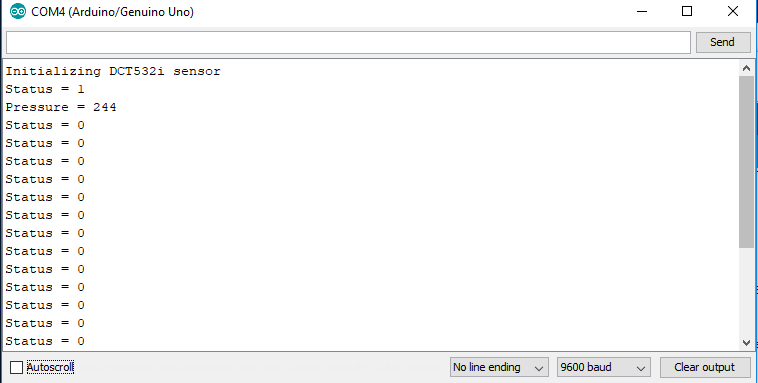
I tried running the program several times and worked out really hard. However I did not get the data to the serial monitor. I always get the values zeros.
I have hereby attached the output from the serial monitor after connecting with the sensor.
your coding seemed to work a little bit. I sometimes get the values of pressure only when the status is 1. However, everytime the sensor status becomes 0 and I cant get the value of pressure.
I believe that if we could make the value of sensor 1, we could get the output. I have attached the output in the serial monitor after uploading the code and connecting to the sensor value.
your coding seemed to work a little bit. I sometimes get the values of pressure only when the status is 1. However, everytime the sensor status becomes 0 and I cant get the value of pressure.
Status is just a reading of the status register and a 1 means bit 0 of the status register (READY) is set and a new pressure value is available. If you read the pressure when status bit zero = 0 then you will just get the previous pressure reading.
I have no idea if the sensor will performs periodic readings on its own or if you need to somehow kick it to get a new reading. (The datasheet is not very clear on this or I missed it)
Comment out the two lines below and then leave the code running for some time (maybe an hour or more) with the serial monitor open and see if you get more that the initial pressure reading.
 Serial.print("Status = ");
  Serial.println(status, BIN);              // Print status as binary