Receiving information with an ESP32 and an MCP2515

Hello, I'm working on a project with a 38-pin ESP32 and an MCP2515 to collect data from the CAN Bus line.
I'm connecting to the Savvycan program and can't receive any data.
Please, could anyone have successfully connected and received data from the vehicle?
Or maybe my IDE code is incorrect?

I'd really appreciate some advice.

Best regards.

which can library are you using?
I tend to use the MCP_CAN_lib library and run the File>Examples>mcp_can>CAN_loopback test program to check SPI connection is OK

which specific ESP32 are you using?
how have you connected the MCP2515 to the ESP32
upload your code (using code tags </>)

Hello! Thank you very much for your response.

This is the code we're using.

#include <SPI.h>
#include <mcp_can.h>

#define SPI_CS_PIN 5
#define CAN_INT_PIN 4

MCP_CAN CAN(SPI_CS_PIN);

void setup() {
  Serial.begin(115200);
  while (!Serial);

  // Inicializar MCP2515 a 500kbps
  if (CAN.begin(MCP_ANY, CAN_500KBPS, MCP_8MHZ) == CAN_OK) {
    Serial.println("MCP2515 Inicializado a 500kbps");
  } else {
    Serial.println("Error al inicializar MCP2515");
    while (1);
  }

  CAN.setMode(MCP_NORMAL); // Modo normal (no loopback)
  pinMode(CAN_INT_PIN, INPUT);
  Serial.println("Esperando tramas CAN...");
}

void loop() {
  if (!digitalRead(CAN_INT_PIN)) {
    long unsigned int rxId;
    unsigned char len = 0;
    unsigned char rxBuf[8];

    CAN.readMsgBuf(&rxId, &len, rxBuf);

    // Enviar trama estilo SLCAN a Serial
    Serial.print('t'); // Trama estándar (no extendida)
    Serial.print(rxId, HEX);
    Serial.print(len, HEX);
    for (int i = 0; i < len; i++) {
      if (rxBuf[i] < 0x10) Serial.print('0');
      Serial.print(rxBuf[i], HEX);
    }
    Serial.println();
  }
}

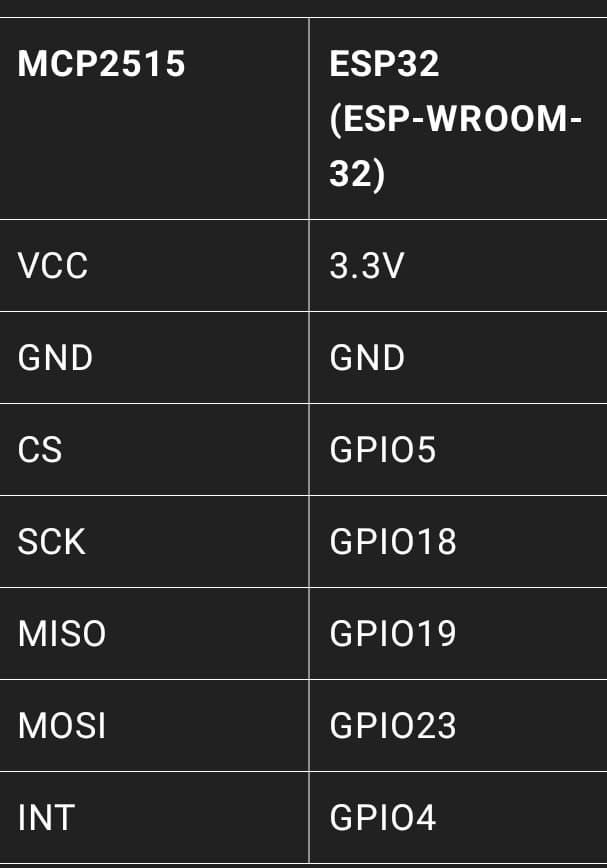
The pin connections are:

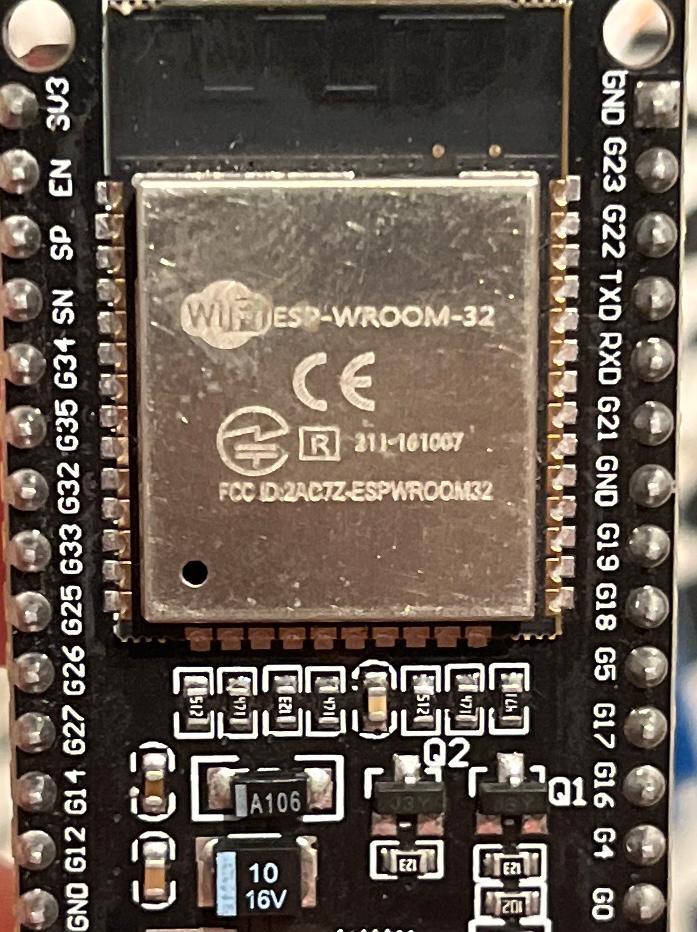
And the ESP32 module is:

We also updated the ESP32 with the ESP32RET Firmware Updater (updated August 2, 2023 - Version 618).
The latest ESP32RET.
Communication between the ESP32 and the Savvycan is via Lawicel (I don't know if it's as stable or if all the data can be retrieved).

Greetings and thank you very much.

your pin connections ESP32 to MCP2515 similar to what I use, e.g.

// ESP32 connections
// MCP2515 INT to ESP32 GPIO22
// MCP2515 SCK to ESP32 GPIO18 CLK
// MCP2515  SI to ESP32 GPIO23 MOSI
// MCP2515  SO to ESP32 GPIO19 MISO
// MCP2515  CS to ESP32 GPIO5  CS
// MCP2515 GND to ESP32 GND
// MCP2515 VCC to ESP32 3.3V

if you run CAN_loopback does it work OK
mine displays

ESP32 MCP2515 MCP-CAN loopback test
Entering Configuration Mode Successful!
Setting Baudrate Successful!
MCP2515 Initialized Successfully!
MCP2515 Library Loopback Example...
Message Sent Successfully!
Standard ID: 0x100       DLC: 8  Data: 0xAA 0x55 0x01 0x10 0xFF 0x12 0x34 0x56
Message Sent Successfully!
Standard ID: 0x100       DLC: 8  Data: 0xAB 0x55 0x01 0x10 0xFF 0x12 0x34 0x56
Message Sent Successfully!
Standard ID: 0x100       DLC: 8  Data: 0xAC 0x55 0x01 0x10 0xFF 0x12 0x34 0x56
Message Sent Successfully!
Standard ID: 0x100       DLC: 8  Data: 0xAD 0x55 0x01 0x10 0xFF 0x12 0x34 0x56
Message Sent Successfully!
Standard ID: 0x100       DLC: 8  Data: 0xAE 0x55 0x01 0x10 0xFF 0x12 0x34 0x56
Message Sent Successfully!
Standard ID: 0x100       DLC: 8  Data: 0xAF 0x55 0x01 0x10 0xFF 0x12 0x34 0x56

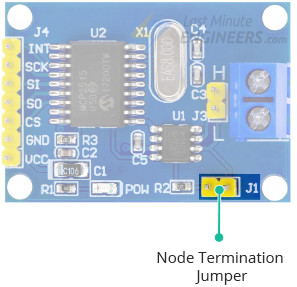
if that works can you connect the ESP32/MCP2515 to a PC via the LAWICEL USB-CAN module?

remember the 120ohm termination resistors

EDIT: check the crystal is 8MHz - some modules use 16MHz

Hello, we have some questions.

  1. What program can you use to retrieve the CAN_loopback data you're showing us? And why does it only show one piece of data and keep repeating?
  2. Do you use a jumper to connect the 120 Ohm resistor to the MCP2515?
  3. The MCP2515 crystal is actually 8 MHz.
  4. How can we configure the Savvycan?
  5. Could you share your code with us?

Best regards, and thank you very much.

the program is part of the mcp_can library referenmced in post 2
File>Examples>mcp_can>CAN_loopback

e.g.

// ESP32 MCP2515_CAN loopback example 

// File>Examples>mcp_can>CAN_loopback

/* CAN Loopback Example
 * This example sends a message once a second and receives that message
 *   no CAN bus is required.  This example will test the functionality 
 *   of the protocol controller, and connections to it.
 *   
 *   Written By: Cory J. Fowler - October 5th 2016
 */

// ESP32 connections
// MCP2515 INT to ESP32 GPIO22
// MCP2515 SCK to ESP32 GPIO18 CLK
// MCP2515  SI to ESP32 GPIO23 MOSI
// MCP2515  SO to ESP32 GPIO19 MISO
// MCP2515  CS to ESP32 GPIO5  CS
// MCP2515 GND to ESP32 GND
// MCP2515 VCC to ESP32 3.3V

#include <mcp_can.h>
#include <SPI.h>

// CAN TX Variables
unsigned long prevTX = 0;                                        // Variable to store last execution time
const unsigned int invlTX = 1000;                                // One second interval constant
byte data[] = {0xAA, 0x55, 0x01, 0x10, 0xFF, 0x12, 0x34, 0x56};  // Generic CAN data to send

// CAN RX Variables
long unsigned int rxId;
unsigned char len;
unsigned char rxBuf[8];

// Serial Output String Buffer
char msgString[128];

// CAN0 INT and CS
#define CAN0_INT 22                              // Set INT to pin 22
MCP_CAN CAN0(5);                               // Set CS to pin 5


void setup()
{
  Serial.begin(115200);  // CAN is running at 500,000BPS; 115,200BPS is SLOW, not FAST, thus 9600 is crippling.
  delay(5000);
  Serial.println("\n\nESP32 MCP2515 MCP-CAN loopback test");
  // Initialize MCP2515 running at 16MHz with a baudrate of 500kb/s and the masks and filters disabled.
  if(CAN0.begin(MCP_ANY, CAN_500KBPS, MCP_16MHZ) == CAN_OK)
    Serial.println("MCP2515 Initialized Successfully!");
  else
    Serial.println("Error Initializing MCP2515...");
  
  // Since we do not set NORMAL mode, we are in loopback mode by default.
  //CAN0.setMode(MCP_NORMAL);

  pinMode(CAN0_INT, INPUT);                           // Configuring pin for /INT input
  
  Serial.println("MCP2515 Library Loopback Example...");
}

void loop()
{
  if(!digitalRead(CAN0_INT))                          // If CAN0_INT pin is low, read receive buffer
  {
    CAN0.readMsgBuf(&rxId, &len, rxBuf);              // Read data: len = data length, buf = data byte(s)
    
    if((rxId & 0x80000000) == 0x80000000)             // Determine if ID is standard (11 bits) or extended (29 bits)
      sprintf(msgString, "Extended ID: 0x%.8lX  DLC: %1d  Data:", (rxId & 0x1FFFFFFF), len);
    else
      sprintf(msgString, "Standard ID: 0x%.3lX       DLC: %1d  Data:", rxId, len);
  
    Serial.print(msgString);
  
    if((rxId & 0x40000000) == 0x40000000){            // Determine if message is a remote request frame.
      sprintf(msgString, " REMOTE REQUEST FRAME");
      Serial.print(msgString);
    } else {
      for(byte i = 0; i<len; i++){
        sprintf(msgString, " 0x%.2X", rxBuf[i]);
        Serial.print(msgString);
      }
    }
        
    Serial.println();
  }
  
  if(millis() - prevTX >= invlTX){                    // Send this at a one second interval. 
    prevTX = millis();
    byte sndStat = CAN0.sendMsgBuf(0x100, 8, data);
    
    if(sndStat == CAN_OK)
      Serial.println("Message Sent Successfully!");
    else
      Serial.println("Error Sending Message...");
    data[0]++;
  }
}

/*********************************************************************************************************
  END FILE
*********************************************************************************************************/

the test data transmitted is an array of 8 bytes with the first value incrementing

Message Sent Successfully!
Standard ID: 0x100       DLC: 8  Data: 0xAC 0x55 0x01 0x10 0xFF 0x12 0x34 0x56
Message Sent Successfully!
Standard ID: 0x100       DLC: 8  Data: 0xAD 0x55 0x01 0x10 0xFF 0x12 0x34 0x56

you require a 120ohm termination resistor at each end of bus
there is usually a 120ohm termination resistor on the PCB, e.g. from mcp2515-can-module-arduino-tutorial use jumper J1 to include/exclude it

no idea how to configure Savvycan
How do you read the data sent by the car from the Arduino IDE program and interpret the values ​​it sends (hexadecimal)?

I use canbus in industry - know nothing about cars

worth noting that the ESP32 has the onboard Two-Wire Automotive Interface (TWAI) can interface - see ESP32-TWAI-CAN library

just require a cjmcu-1051 (or similar) CAN transceiver