Hello all!!!
It has been years since I used Arduino and most of it is vanished from my brain.
I moved to PLCs and programmable HMIs but I need to come back to Arduino for this. Or even maybe Raspberry if you think it will be more suitable? Even tough I never touched it before.
I need to mimic display from certain machine. Display is damaged beyond repair. Having custom made glass and LCD there is no replacement to be found.
I have 2 parts of the project.
- Decode information coming from the machine.
Machine processor sends bursts of 96 bit clock and data pulses to LCD Chip OKI M5219B which was driving damaged LCD. I plan to decode this information and send it to new display.
- Display information on 7 inch display.
I need to mimic graphics from original display and send decoded info to it. It has few numbers to be displayed (7 segment), few bar graphs and few icons that get highlighted or turn on and off.
For starters, I'd need reccomendation for the following:
Which Arduino is best to use for this? Remember that I did all my Arduino work at the time when only uno was available.
Which 7 inch colour display is easiest to interface with Arduino, via shield possibly. I need to be able to have graphics designed. No touch required, just display.
I found couple of candidates maybe?
- DWIN 7 Inch 800*480 HMI Intelligent TN TFT LCD Display Module UART Commercial Grade DMG80480C070_03W
- 7 inch TFT SSD1963
As far as decoding part goes, each bit represents one icon, one segment of bar graph or segment of 7 segment number. I will have to trace down all 96 of them what is what. If somebody did something similar, maybe send me a copy of the code?
I can still do modifications of the existing code no problem, but to write one from zero after all these years and probably heaps of new libraries, that will be quite a challenge for me. So please, send something similar if you have. Or at least give me an idea how would you go about it.
Thnaks for you patience!!!
Hoping to hear from someone soon!!!
If the display is built into the machine the supplier would be the first to ask.
Without technical information it is very hard to tell.
If you can reliably and repeatably get those data bits assigned to a table of your icons, then you’re about 25% of the way there.
You can work on the data processing and the display independently.
What is the timing and length of the clock and data pulses? This will help inform a decision on the speed you need for the Arduino.
Which 7 inch colour display is easiest to interface with Arduino, via shield possibly. I need to be able to have graphics designed. No touch required, just display.
I found couple of candidates maybe?
- DWIN 7 Inch 800*480 HMI Intelligent TN TFT LCD Display Module UART Commercial Grade DMG80480C070_03W
- 7 inch TFT SSD1963
I would add a Nextion to your list of possibles, and if you use that display which has its own processor and a simple serial interface I think that the display portion of your project will the more simple piece. You could an Arduino like the NanoEvery or the Mega, which have additional hardware serial ports for communication with the Nextion.
Well, supplier only wants to sell new machine. Not interested in anything else. Parts obsolete they say.
That will be most painstaking part. But it has to be done all one by one. I'm kinda looking forward to that. haven't done something like that in ages.
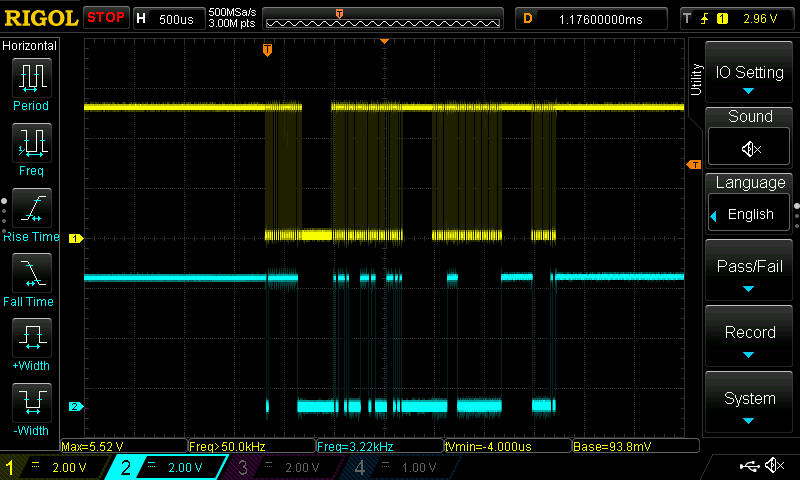
Each clock pulse is 8 microseconds with pause of 13 microseconds. 96 pulses per burst. Burst is over in just short of 3 miliseconds. Pause between bursts is 85 milisconds. There are short pauses within each burst. They are random in length and quantity 2-3-4. But pulse count is always the same.
Which Arduino can hadnle this with ease?
From what I can see, all these screens have their own processors and graphics. Looking for most simple one to interface with Arduino. Maybe something with shield and good known library.
Less serious sellers are like that. Preserving customer long time trust is an unknown value. It's like car sellers. 25 years of driving their cars don't effect them.
I see You get constructive advice in the replies.
Good luck!
By the way, what kind of machine is it?
That's a valuable observation. Can You post a picture of it?
Are there "pauses" in the clock pulses, or are you referring to the data pulses where there must be ones and zeros, and consecutive 0's could be seen as pauses in the data pulses. Are the data pulses timed from the rising or falling edge of the clock pulse?
As @Railroader suggests, a drawing of the clock and data pulses for a known output on the display if possible would be helpful.
Here are couple of scheenshots.
Stone cutting and engraving.
Aj, no inside knowledge from stone cutting but some from CNC.
How do You command the machine? Maybe commanding it from an Arduino would make You know where it is?
Could that be a possible approach from a very different angle?
To be honest I don't know how it is controlled exactly. It has lot of older type buttons and dials, and some modules that were upgraded at some stage. But lot of custom made parts and PCBs. I'm not doing this for profit, so I don't want to spend lot of time on it. It is more my own curiosity that is driving me to do this. It belongs to a friend that bought it recently, so I guess I will have to dive into control parts at some stage as it starts breaking down. But for now, it is just indicating display.
When I look at this data sheet for the M5219B it talks about 48 pulses and not 96.
https://www.mikrocontroller.net/attachment/46524/M5219B.pdf
It's not very clear to me what you have going on, and the breaks in the clock pulses are very confusing. I am not very optimistic about your success in decoding the signals from the machine to the display.
Does the situation make any more sense if you look at the output of the M5219B and not the input to it?
I just realised that I forgot to mention, there is 2 ICs driving the display. Hence the 96 pulses.
My main concern is to get skeleton of the program right. Libraries, comms with screen, how screen works with tags or some other way etc. That is why I was asking for example of similar code. Once I have that all set up I'm confident that
I will manage to decode it. I've done something similar before with REDLION HMI, bit catching, converting information in double word bytes and passing it on. Given that this was 15 years ago, I need to find that piece of the code if it exists anywhere.
Again, I recommend a Nextion, and using Seithan's EasyNextionLibrary on an Arduino with a second hardware serial port(like the Nano Every or Mega) as the most simple way to integrate a screen which is fairly easy to program using the Nextion Editor.
Alternatively you can use the methods with out a library.
If you can figure out what you want to send to the screen I'm certain you will find help in this forum to get it presented on whatever screen you choose.