Okay, REFRESH is held low and connected to PE5 (as it should, afaik).
I give up...
Is there a schematic for the cart reader?
I have all the parts except PCB (Shipping will take a while for PCB).
Would like to try wiring up the SNES portion using a large breadboard
I bought one of these a while ago. Ended up getting 10 classic nes games in the mail today and it occurred to me that I could probably dump them with the retro port adapter and the cart reader. Anyone else tried this? I'd try it but it's buried in an unlabeled box somewhere in the closet.
EDIT.
Well, I went digging. Gave it a try and either I'm not doing it right or it doesn't work.
Is it the iNES Mapper I'm looking for to dump it?

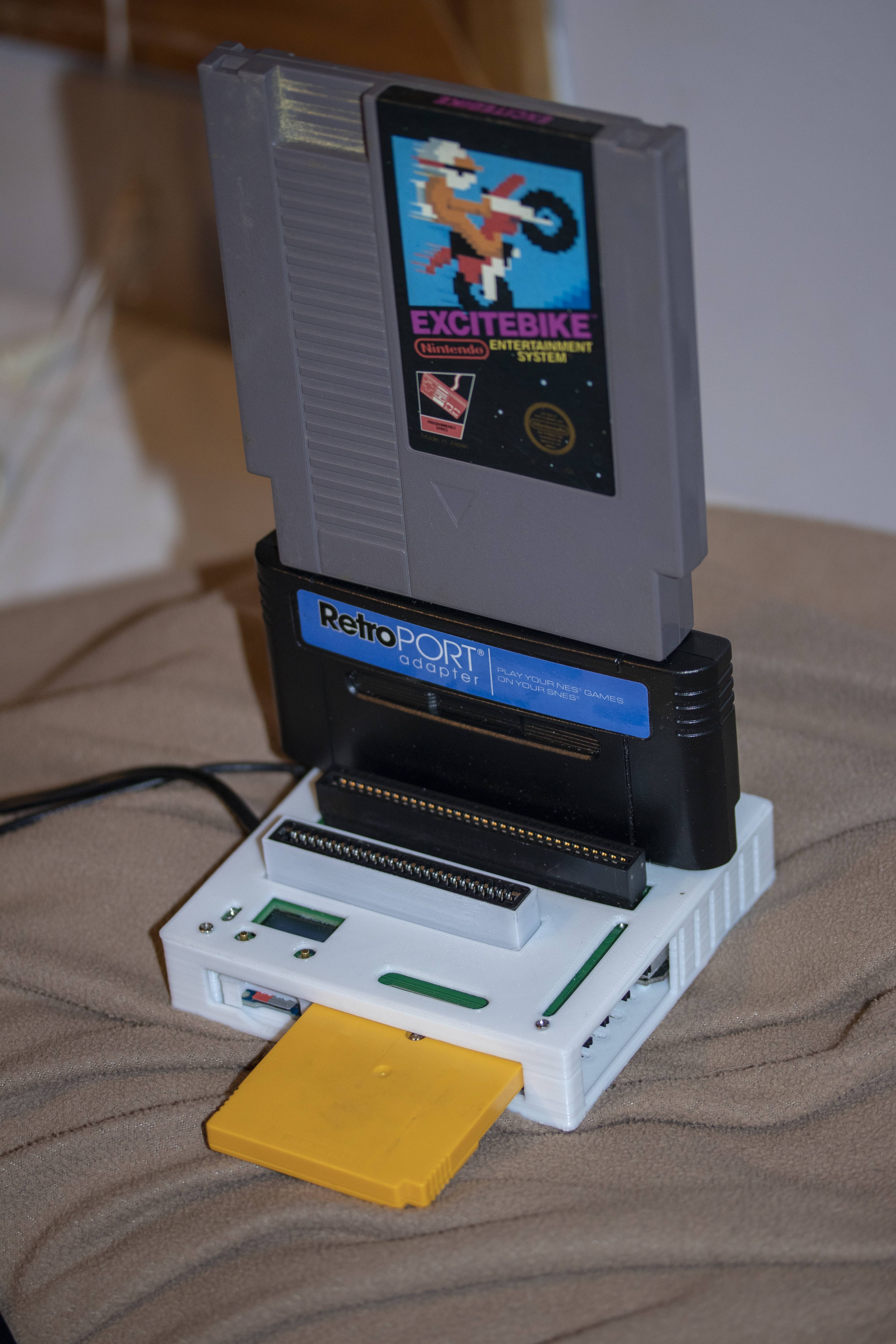
You can't use such an adapter since it will have a completely different pinout than the adapter I designed and most likely will not expose all the NES pins to the SNES.
It's probably just an NES-on-a-chip design that only gets power and controller inputs from the SNES slot.
sanni:
You can't use such an adapter since it will have a completely different pinout than the adapter I designed and most likely will not expose all the NES pins to the SNES.
It's probably just an NES-on-a-chip design that only gets power and controller inputs from the SNES slot.
I figured that might be the case. So is it the iNES Mapper code you want to grab from the database (if you have a correct PCB)?
Hello, I'm wondering if anybody's selling completed boards? This is an amazing project but my skills and equipment don't go far enough to soldering and desoldering surface mount parts. Just looking at the instructions is giving me anxiety. I really need to dump a save from a very sentimental NES cart so that I can attempt to replace the battery with some peace of mind and time is running out.
I've looked all over the net of a way to do so; The INLretro dumper can only dump NES game roms (no saves) and do little else as it seems as nobody's contributing to firmware/software dev. Retrode 2 bizzarely has no NES adapter and last time I looked they said it was impossible. A guy in Poland is selling his clone of Kazzo on eBay for $70 which can only rip Famicom games and is making a killing, BennVenn had something that could rip NES games but he only made 8 then stopped. The board you have to take apart a NES for to dump looks insanely overcomplicated even if it was still being made but it's not. So this is the only thing that can backup NES saves among all the other consoles it can do. I'm baffled as to why this project isn't being promoted more and 'mass produced' as it seems so handy!
Beatchef:
Hello, I'm wondering if anybody's selling completed boards? This is an amazing project but my skills and equipment don't go far enough to soldering and desoldering surface mount parts. Just looking at the instructions is giving me anxiety. I really need to dump a save from a very sentimental NES cart so that I can attempt to replace the battery with some peace of mind and time is running out.I've looked all over the net of a way to do so; The INLretro dumper can only dump NES game roms (no saves) and do little else as it seems as nobody's contributing to firmware/software dev. Retrode 2 bizzarely has no NES adapter and last time I looked they said it was impossible. A guy in Poland is selling his clone of Kazzo on eBay for $70 which can only rip Famicom games and is making a killing, BennVenn had something that could rip NES games but he only made 8 then stopped. The board you have to take apart a NES for to dump looks insanely overcomplicated even if it was still being made but it's not. So this is the only thing that can backup NES saves among all the other consoles it can do. I'm baffled as to why this project isn't being promoted more and 'mass produced' as it seems so handy!
I would actually do this for you for free provided I had an NES(or Famicom) to SNES adapter PCB. All I would ask is shipping to and from. But alas, I do not. Although I do want to.
Beatchef:
Hello, I'm wondering if anybody's selling completed boards? This is an amazing project but my skills and equipment don't go far enough to soldering and desoldering surface mount parts. Just looking at the instructions is giving me anxiety. I really need to dump a save from a very sentimental NES cart so that I can attempt to replace the battery with some peace of mind and time is running out.I've looked all over the net of a way to do so; The INLretro dumper can only dump NES game roms (no saves) and do little else as it seems as nobody's contributing to firmware/software dev. Retrode 2 bizzarely has no NES adapter and last time I looked they said it was impossible. A guy in Poland is selling his clone of Kazzo on eBay for $70 which can only rip Famicom games and is making a killing, BennVenn had something that could rip NES games but he only made 8 then stopped. The board you have to take apart a NES for to dump looks insanely overcomplicated even if it was still being made but it's not. So this is the only thing that can backup NES saves among all the other consoles it can do. I'm baffled as to why this project isn't being promoted more and 'mass produced' as it seems so handy!
My father built a reader for me as a Christmas present and he made an extra just because because he already had most of the parts due to minimum quantities. I can ask if he wants to sell the extra.
androxilogin:
I would actually do this for you for free provided I had an NES(or Famicom) to SNES adapter PCB. All I would ask is shipping to and from. But alas, I do not. Although I do want to.
Thank you for the offer though! I am in the UK and I probably wouldn't feel comfortable posting it out of the country.
LHCGreg:
My father built a reader for me as a Christmas present and he made an extra just because because he already had most of the parts due to minimum quantities. I can ask if he wants to sell the extra.
That's great, I would certainly buy one if you have one available. Where are you based?
Sorry Beatchef, he doesn't feel confident enough about it, especially the adapter board, to sell and support. He only tested reading ROMs with some games I lent him for testing, did not test reading RAM. Also, I'm in the US so shipping wouldn't be cheap.
Good luck with getting your save backed up.
No problem, thanks anyway!
I saw that it looks like you can have that pcb company put surface mount components on for you, that way I'd only need to solder the easy things like the slots and only worry to death about the screen.
Hello everyone! I finally got the parts for the NES to SNES adapter! I am trying to dump the NEW Tetris cartridge, but I am not sure if I am doing it right (see attached images). I believe the yellow box shows the PRG size, the red one shows the CHR size, and the orange one the mapping number, correct? Where would I find the RAM size?


That's how I would see it too. And Ram is 0 because both WRAM and VRAM are listed as 0KB.
sanni:
That's how I would see it too. And Ram is 0 because both WRAM and VRAM are listed as 0KB.
Thanks, Sanni! I don't see it in the instructions, but I am wondering if I am doing something wrong. When I am done I get a .nes file and two bin files. I try to play the .nes file and it says invalid format. Do I need to take any other steps after I get the files?
Check the CRCs against BootGod's NESCartDB.
The cart reader only outputs the data that is on the cart.
If you're using an emulator, then you're probably missing the iNES header.
wildBcat:
Hello everyone! I finally got the parts for the NES to SNES adapter! I am trying to dump the NEW Tetris cartridge, but I am not sure if I am doing it right (see attached images). I believe the yellow box shows the PRG size, the red one shows the CHR size, and the orange one the mapping number, correct? Where would I find the RAM size?
The RAM size prompt only refers to battery backed RAM used for saving games. Some games have volatile work RAM that should not be counted for that prompt and VRAM is something else entirely. To get the nonvolatile RAM size you can look at the chip info for a chip that has a battery icon.
wildBcat:
Thanks, Sanni! I don't see it in the instructions, but I am wondering if I am doing something wrong. When I am done I get a .nes file and two bin files. I try to play the .nes file and it says invalid format. Do I need to take any other steps after I get the files?
How are you trying to play it? An emulator? A flash cart? Some emulators require NES ROMs to have a 16-byte header called an iNES header that tells it how to emulate the game. One important piece of information in the header is the size of the PRG and CHR data, which are separate chips on the cartridge board. Other emulators rely on an internal database of known games mapping ROM checksum to the metadata that a header provides. And others use a hybrid approach, using a header if present, otherwise it looks in the internal database.
The current cartreader code outputs the combined PRG+CHR file with a .nes extension, which is misleading because .nes implies the presence of the header. There are desktop utilities for adding/editing the header and I know the Mesen emulator has a built in tool for working with the header as well.
The fields can be tricky to work out. Here's what the values for Tetris would be as you would enter them in Mesen's header editor:
Mapper: 1. You already found this on bootgod's site.
PRG ROM: 32 KB. You already found this on bootgod's site.
CHR ROM: 16 KB. You already found this on bootgod's site.
Submapper: 5. Go to the nesdev wiki's submapper page and look for the mapper of the game. For mapper 1, the wiki says the submapper should be 0 except if the board is SEROM, SHROM, or SH1ROM, in which case it should be 5. bootgod's site says Tetris is NES-SEROM, so submapper is 5.
Mirroring type: Horizontal. According to the NES 2.0 spec, "mapper controlled" is the same as horizontal as far as the header is concerned.
Frame timing: NTSC for American or Japanese releases, PAL for Europe
System: NES/Famicom/Dendy
Input Type: Standard controllers. This is just a hint to the emulator.
Work RAM: None. Look at the chip info and WRAM on bootgod's site to figure this out. Don't count battery backed RAM towards this.
Save RAM: None. This is the same value you enter in the cartreader. Well, in most cases. The nesdev wiki points out an exception with games that use mapper 19, all of which are Japanese Namco games.
CHR RAM: None. This is "VRAM" on bootgod's site.
CHR Save RAM: None. This is extremely rare, apparently only used by 1 licensed game and 1 unauthorized port of a Princess Maker game.
Battery: No
Trainer: No. Dumps should never have a trainer.
There are 2 header formats, iNES and NES 2.0. NES 2.0 is newer and provides more information. It's backwards compatible with the iNES format, so anything that understands iNES can read NES 2.0, but won't be able to use the extra information it provides to disambiguate certain uncommon cases. So I recommend using NES 2.0.
By the way, make sure to check the CRC32s that the cart reader displays when dumping against the CRC32s on bootgod's site. If it doesn't match, either the dump was bad (wrong mapper/size info, the cartridge's connectors are dirty, or there wasn't good contact between the game and adapter or adapter and SNES slot), there are multiple revisions of the game (check under "More Profiles" on the game's page on bootgod's site), or you have a revision that hasn't been dumped before or bootgod's dump is bad (unlikely, especially for popular games). I've dumped about 25 of my NES games so far and I've had to try multiple times to get a good dump for some, and there's one (Bad Dudes) that I haven't been able to a good dump at all even after trying a couple dozen times. I'm using an NES adapter that's 1.6mm instead of the 1.2mm recommended by the wiki. The 1.2mm adapter is a very loose fit and moves around too much.
Speaking of NES headers...I've been working on adding an option to the cart reader for outputting NES carts with the header. I think I'm at a point now where I can make it available for testing. I don't know how sanni builds the releases, and I'm continuing to fix bugs and make usability tweaks, so for now you can get it from the ines branch of my fork at GitHub - LHCGreg/cartreader at ines. Use the "Read Cart w/header" option. You still have to enter all the information required by the header of course, minus information that's already there from entering the mapper, PRG, CHR, and RAM sizes.
I made a number of changes behind the scenes as part of this work and have currently only fully updated the NES code to work with those changes and have commented out the code for all other systems so it can compile. Selecting anything other than NES on the menu will do nothing.
Those changes include:
- Changes to menu code including support for more than 7 choices using a menu that can scroll up and down.
- Created SD functions that do error checking and display an error and halt if there is an SD error.
- File browser no longer crashes if there are too many files in a directory and is no longer tightly coupled with the menu code.
- Removed use of global mutable variables from NES code (aside from SD buffer).
- Support for building with Visual Studio Code with the PlatformIO extension.
@LHCGreg Amazing work! And thank you for the detailed explanation! I will be excited about the possible addition of your branch into the car reader. That will make reading NES games much easier. I found that your suggestion to run it through the Mesen emulator worked like a charm. I saved it with the 2.0 header and now the file runs in the other emulators. Thank you again!
I'm excited to build this. I feel this is going to be great! Does anyone know for sure that the GBA/GBC slot is correct on the needed parts page? Needed Parts · sanni/cartreader Wiki · GitHub
It looks like it has the GBA notch thus rendering it unusable for GBC. Can anyone else confirm? Possibly offer an alternative?