Yes, I did that. This was at least something I already know  I will test it in the next minutes I will update here.
Thats right. I activate that because I want to see if there is a change (so every time I get a message I get a new line) 
I just changed the software. Like that:
#include <ModbusMaster.h>


// instantiate ModbusMaster object
ModbusMaster node;

#define RxPin 18
#define TxPin 17

void setup()
{
  // use Serial (port 1); initialize Modbus communication baud rate
  Serial1.begin(9600, SERIAL_8N1, RxPin, TxPin);

  // communicate with Modbus slave ID 2 over Serial (port 2)
  node.begin(2, Serial1);
}


void loop()
{
  static uint32_t i;
  uint8_t j, result;
  uint16_t data[6];

  i++;

  // set word 0 of TX buffer to least-significant word of counter (bits 15..0)
  node.setTransmitBuffer(0, lowWord(i));

  // set word 1 of TX buffer to most-significant word of counter (bits 31..16)
  node.setTransmitBuffer(1, highWord(i));

  // slave: write TX buffer to (2) 16-bit registers starting at register 0
  result = node.writeMultipleRegisters(0, 2);

  // slave: read (6) 16-bit registers starting at register 2 to RX buffer
  result = node.readHoldingRegisters(2, 6);

  // do something with data if read is successful
  if (result == node.ku8MBSuccess)
  {
    for (j = 0; j < 6; j++)
    {
      data[j] = node.getResponseBuffer(j);
      Serial.print("Result:");
      Serial.println(data[j]);
    }
  }
}
But no output:

After a little bit I saw that the pins that you said are 17 and 18 that are here:

So I changed it but no difference (no Output). The only thing I now get is that the Rx and Tx LEDs on my RS485 Isolation Board light up every now and then (I would say about 2-3sek).
I hope my Serial output is programmed correctly? Not that I did something wrong there and thats why I dont get any information over the Serial monitor.
You also have to have serial.begin for your usb-serial (serial monitor)
Now I changed it and yes I forgot it 
#include <ModbusMaster.h>


// instantiate ModbusMaster object
ModbusMaster node;

#define RxPin 18
#define TxPin 17

void setup()
{
  //Serial communication for the output of the Serial Monitor
  Serial.begin(9600);

  // use Serial (port 1); initialize Modbus communication baud rate
  Serial1.begin(9600, SERIAL_8N1, RxPin, TxPin);

  // communicate with Modbus slave ID 2 over Serial (port 2)
  node.begin(2, Serial1);
}


void loop()
{
  static uint32_t i;
  uint8_t j, result;
  uint16_t data[6];

  i++;

  // set word 0 of TX buffer to least-significant word of counter (bits 15..0)
  node.setTransmitBuffer(0, lowWord(i));

  // set word 1 of TX buffer to most-significant word of counter (bits 31..16)
  node.setTransmitBuffer(1, highWord(i));

  // slave: write TX buffer to (2) 16-bit registers starting at register 0
  result = node.writeMultipleRegisters(0, 2);

  // slave: read (6) 16-bit registers starting at register 2 to RX buffer
  result = node.readHoldingRegisters(2, 6);

  // do something with data if read is successful
  if (result == node.ku8MBSuccess)
  {
    for (j = 0; j < 6; j++)
    {
      data[j] = node.getResponseBuffer(j);
      Serial.print("Result: ");
      Serial.println(data[j]);
    }
  }
}
But I only get this result:
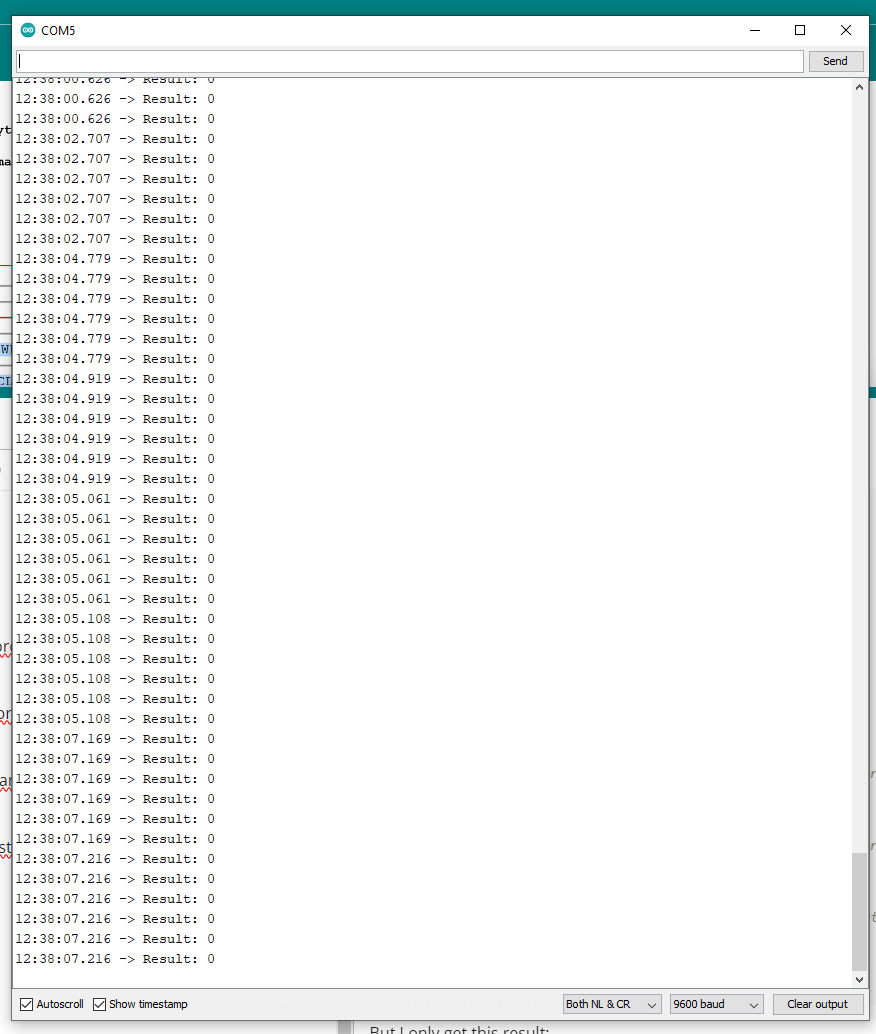
Try with this, and set your baudrate to 115200 in serial monitor
#include <ModbusMaster.h>

ModbusMaster node;

void setup()
{
  Serial.begin(115200);

  Serial1.begin(9600, SERIAL_8N1, 18, 17);

  node.begin(2, Serial1);

}
//Setup ends here

void loop()
{

  uint8_t result = node.readHoldingRegisters(0, 4);
  Serial.print("result = ");
  Serial.println(result);

  delay (1000);

  if (result == node.ku8MBSuccess)
  {
    Serial.print("1. register: ");
    Serial.println(node.getResponseBuffer(0));
    Serial.print("2. register: ");
    Serial.println(node.getResponseBuffer(1));
    Serial.print("3. register: ");
    Serial.println(node.getResponseBuffer(2));
    Serial.print("4. register: ");
    Serial.println(node.getResponseBuffer(3));

  }

  Serial.print("\n");
  delay(1000);
}
That doesnt work.
exit status 1
'preTransmission' was not declared in this scope
yep i already removed those two lines from code, but you were quicker. sorrry!
try again
Oh okay, I als wanted to ask what those two lines do?
I use RS485 converter that has no automatic direction control

I have antoher question because it a bus it should work to implement a second user on that bus with a different id?
Yes, I don't even understand why you set yours as 2.
I removed the 2 empty registers, you only have 2 available (I haven't seen your register map)
#include <ModbusMaster.h>

ModbusMaster node;

void setup()
{
  Serial.begin(115200);

  Serial1.begin(9600, SERIAL_8N1, 18, 17);

  node.begin(2, Serial1);

}
//Setup ends here

void loop()
{

  uint8_t result = node.readHoldingRegisters(0, 2);
  Serial.print("result = ");


  delay (1000);

  if (result == node.ku8MBSuccess)
  {
    Serial.print("1. register: ");
    Serial.println(node.getResponseBuffer(0));
    Serial.print("2. register: ");
    Serial.println(node.getResponseBuffer(1));

  }

  Serial.print("\n");
  delay(1000);
}
What exactly do you mean with register map? Sorry that I have to ask that I never did something with RS485 and I am also not great in programming. But I think you mean a matrix with all registers set accordingly (for my application).
Some complex device can have hundreds of registers. Yours probably only 2.
Did you expect to have other outputs?
Not really. The outputs correspond to a different humidity sensor and temperature sensor that I have.
You might have some calibration registers, but if your output is good, better not to mess with them.
How could I change those registers if I would need to?
I don't even know if they built some calibration functionality. Read your manual.
No it doesnt have a register for that.