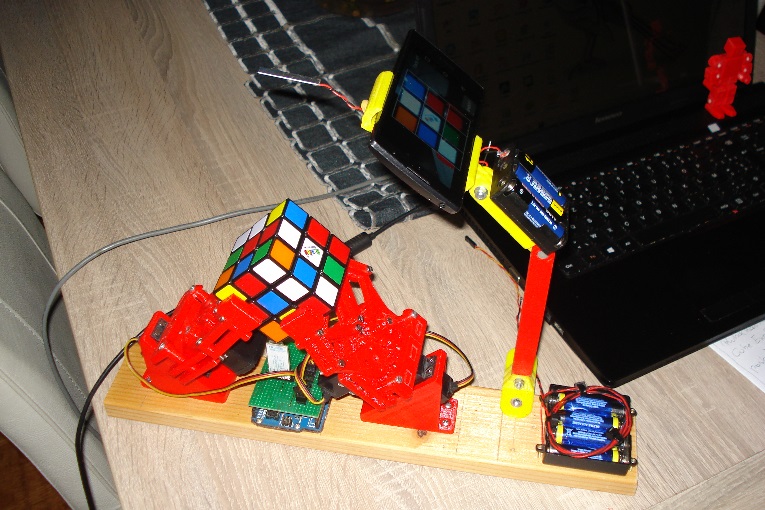
together with my assistant
looks like you have good assistant.
together with my assistant
looks like you have good assistant.
I made one use PC version^_^

Kas, thank you so much.
Nice implementation
Thanks for sharing 
I made a robot for the Rubik's Cube.
On Python works.
ON THE ANDROID no
I read both forums completely.
The problem in the phone and arduino connection.
The phone passes the test - AndroTest_V20_POSTED_DEBUG,AndroTest_V20_POSTED- OK.
BUT - CubeMover13_posted NO, Will help?
https://forum.arduino.cc/index.php?topic=271827.0
https://forum.arduino.cc/index.php?topic=173246.0
Based on this long and fruitful discussion I decided to make my own robot. It is running stand-alone without any external Computer or smart-phone. I'm using a Raspberry pi - therefore most SW discussion cannot be applied.
Teaser:

Please find the construction on Thingiverse:
SW is on Github:
Hai Kas,
Fantastic project, in a week I saw YOUR project on the internet and was sold, I immediately started building with my Prusa i3 printer
I want to build the smartfpone version as you can see, I have already installed the app and arduino code
Now adjust and try, I hope it works
Thanks for sharing it with us
I cannot comment to your smart phone SW. But if you are interested in an Raspberry pi implementation you can use HW and SW as described above.
Sembot:
Because nobody reacts,i think this project is closed
A test setup with discarded 3D printer parts
I think my standard servos are too weak
A fantastic project and well explained
Does your Android app work well? Make a video. My projec https://drive.google.com/open?id=1EF3Kzz5-JrnfIpN-sHqgFmOifzmdUdcj
Sembot:
Hai Kas,Fantastic project, in a week I saw YOUR project on the internet and was sold, I immediately started building with my Prusa i3 printer
I want to build the smartfpone version as you can see, I have already installed the app and arduino code
Now adjust and try, I hope it worksThanks for sharing it with us
I can help you. Make a video of how the android application works. Does the phone determine color correctly?
The color application is not correct for me, but how do you.
hi there
im a 13 yr old who is new to arduino
I wanna build a rubiks cube solver but I don't have access to wood and 3d printers and stuff so I plan to make it out of lego and tape lol
I have 12 servos and I wanna make an interface where you type in the scramble .
Instead of arduino I use something called sstuino which my school alumni made and designed after arduino uno. it has shield and code compatibility.
hope it works!
Notice for the android version only
The nova server from Polytechnique Montreal is offline since last november, please look here for more info
Don't dump your beloved robot yet , just build a local server on your personal computer
The easy way:
Download Cube Explorer 5.14 from Kociemba, uncompress
Cube Explorer is a stand alone application (no install), in its own folder
Open folder, delete cube514qtm.exe (not used), launch cube514htm.exe
At first run only, the program will create some additional files within its folder
Go to Option/Web Server and check 'Enable Web Server'
You'r all set
Now open your favorite Web browser and copy/paste this URL:
http://localhost:8081/?uufuurfddbfllrrlffulllfflffbuuddddddbbrllubbudrrbbbrrr
Response: F U F D' as expected
You may just clic the above query and see for yourself
For seasoned users:
Install your own Raspberry Py server using Kociemba Python code
Now... the current android App (V1.23) has a burnt in query header (http://nova.polymtl.ca/~simark/solverB/query.php?)
I just modified the App and added an option for entering a specific server URL
The (free) App is currently on test and will be available within a few days
To get V2.0, just leave me a PM including your email address
The free Android App Rubik's Cube Solver V2.07 is now available
Just contact me via PM
hello everyone
first of all thanks kas for this great topic
I have just finished printing all parts and the hardware is done.
but I have problem with the exe interface because I can't send any data to the arduino board no matter I tried
any help please?Is there any guide for the interface?
thanks
and about the power supply can I use 2 18650 3.7v batteries?
can i get the files for the parts which holds the servos down like in the picture