Hello, I have Matlab code for controlling instruments through a GUI that we wrote and I want to run it on a Arduino Portenta Machine Control [AKX00032], which is not supported by Matlab.
Is there a workaround that you can recommend? Like exporting my matlab code to another language or using some kind of wrapper to call my matlab code from another programming environment on the arduino?
I have received the following answer from Matlab tech support:
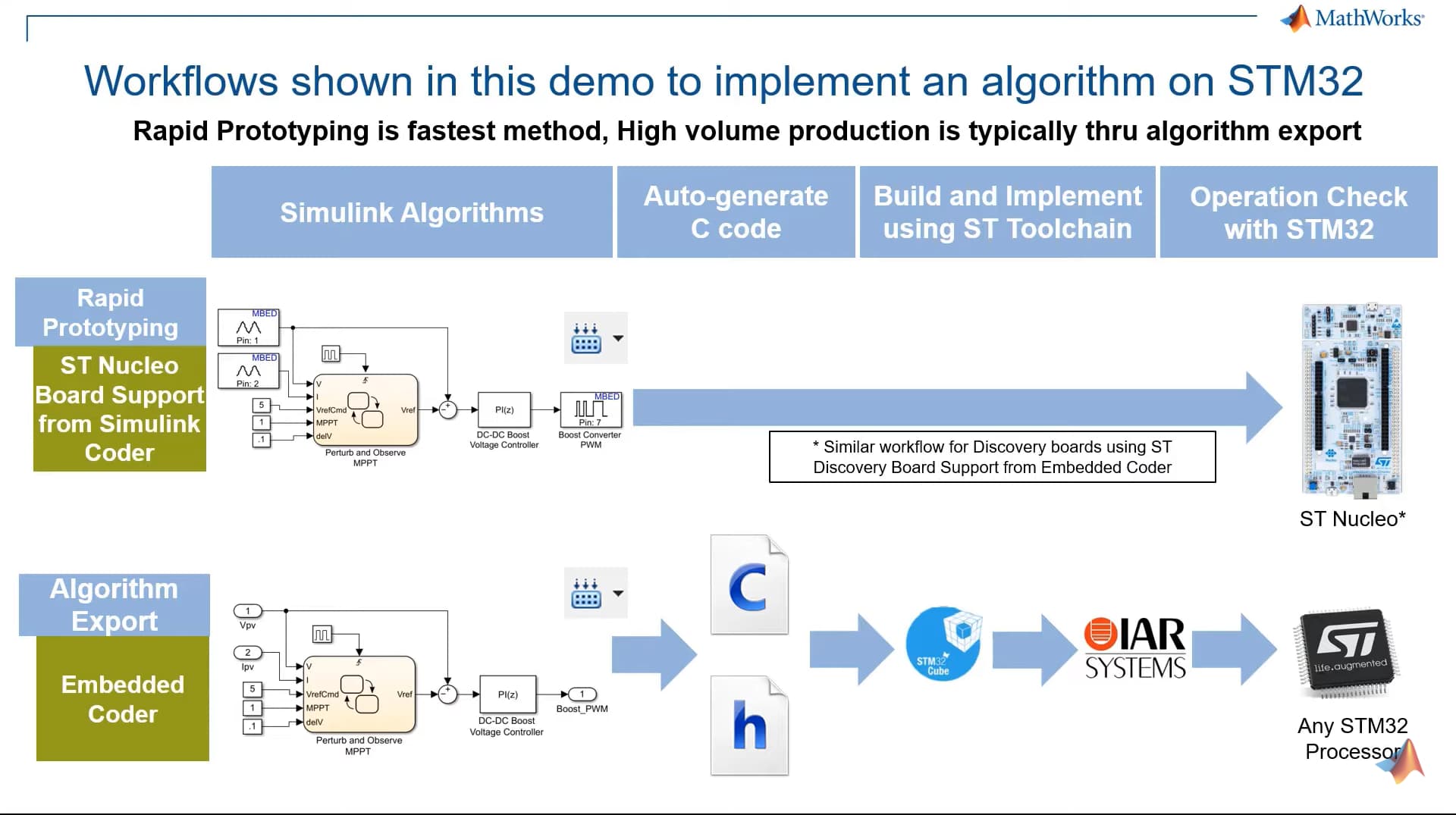
"Currently, there are no confirmed workarounds I can suggest for this. But this may be possible similar to what you are thinking by creating a shared C++ library from your application using MATLAB Compiler SDK. You can then use C++ interact directly with your Arduino board and import the shared library to run the application.
It is important to note that this is not guaranteed to work as there could be limitations with MATLAB Compiler SDK however this could be a possible workaround in which case it will require some code refactoring to create a shared library."
But I am wondering whether anyone has experience with something similar.
If you do a comparising between a desktop-computer "PC" and the Arduino Potenta
clock
PC 2 GHz 64 bit Potenta: 0,48 GHz 32bit
RAM
PC 4 GB to 32 GB Potenta: 0.001 GB (you are reading right the 1 of a thousand_th of a Gigabyte)
My estimation is it will be a hundred times easier to use some kind of micro-PC running windows 10 than getting an Arduino Potenta to run MATLAB-code.
Depending on what you are really doing another solution might be to rewrite the functionality from scratch in whatever language.
Therefore you have to provide what your MATLAB-code is doing.
MAT-LAB is best at very complex calculations solving differential equations with High complex matrix-calculations with complex-numbers or something like that.
Doing some "trivial" stuff like summarise measuring values calculate average can be quickly coded in another language.
So if you describe what your code is really doing suggestions can be made.
best regards Stefan
Hi Stefan, you are probably right. We originally wrote a GUI for the instrument control in Matlab. We can run it from a PC sending signals to the Arduino Potenta, but the serial communication is too slow for the equipment (originally we were using the modbus communication protocol with a Wago PLC, but the Arduino uses serial instead of modbus..).
So, we have since found the LVGL (https://lvgl.io/) library for building GUIs, but then encountered the problem that Arduino only works with tiny screens (too small for our GUI)... Frustrating.
I guess the questions now become: 1) Is faster than serial communication possible with the Arduino Potenta? and 2) Is it possible to use something like a PC monitor with the Arduino somehow? Sorry for deviating from the topic of the thread, and thanks for your input.
What baudrate did you use for the serial communication?
I can hardly believe that a baudrate of 115200 baud or even 1MBaud should be too slow for giving some commands or to adjust parameters in a GUI. Except you want to refresh 720x480 pixel 30 times per second over this serial connection.
For a high-resolution GUI I would use a raspberry Pi
Is your project a secret?
It will become much easier to make good sugestions if you give an overview about your project.
Without knowing what you want to do in detail in your project I can just guess into the fog.
I assume your GUI is used to adjust some parameters, press start and stop button and to show some results. This requieres a short data"stream" of maybe 10 to 200 bytes.
Would be a piece of cake even at 9600 baud.
But you are writing that the serial connection is too slow. So what is the data that must be transferred through the serial connection?
Hi I’m working for Iomega15. The matlab gui has a slider which sends over the current value at the postion of the slider. Also the data being sent over is floating point so that the portenta analog Chanel can be set. I’ll appreciate any insight into how to send over the data over optimally, or what kind of data connection to. Thank you for your time!
Just comments.
Let me split into:
a) UART communication
b) running MATLAB generated code on STM boards
a) When it is a Portenta H7 board - it has a VCP UART. Not a real UART involved: the USB-C provides a VCP UART with potentially up to 15 Mbps baudate. On the real VCP UART (no UART involved, just a direct USB "virtual" UART) - the UART speed can be any (even no need to configure in a terminal - any works).
So, on Portenta H7 with VCP UART via USB-C should not be an issue.
b) I know, MATLAB can generate code for MCU, e.g. STM boards.
But I would assume, this code is very dependent what the HW platform is (just the supported boards). Even you would let MATLAB generate code to run on "any" STM MCU: I would argue: the needed resources are not configured by the MCU board, the code is not compatible to run on this particular board (Portenta H7 when trying to run code generated for another board).
So, b) would not work if MATLAB does not have a code generator for it.
a) should work, the UART should work. Just a question which counterpart runs on Portenta H7 MCU (for UART) and if understands/supports the same protocol.
Potentially, the user has to provide a proper UART "handler" on Portenta H7 board to support the MATLAB protocol.
After generating Code from Simulink you can use the command: packNGo(buildInfo,{'packType','flat','filename','testCode'})
to gather all necessary files and change the filename from 'testCode' to you specific name.
In the IDE include the files:
rtwtypes.h, "filename".c, "filename".h
In Setup you need to execute:
"filename"_initialize();
In loop you need to execute:
"filename"_step();
If your sampletime in Simulink is 1 ms you need to execute "filename"_step(); every 1 ms (1 kHz) in your loop with a RTOS task or timer interrupt.