The solution is to add the Python installation folder to your system PATH. That will allow the Arduino build system to use it.
The official installer gives the option to do that:
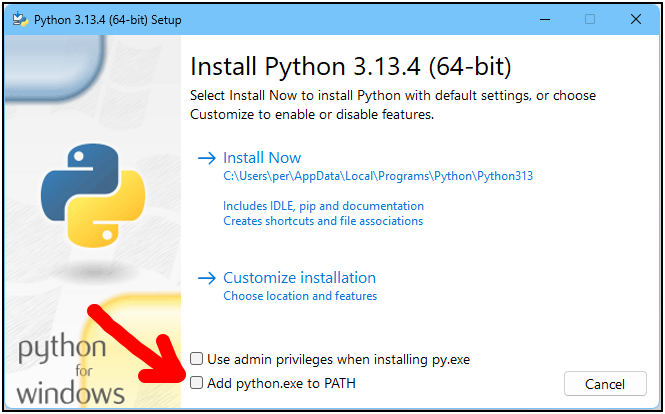
So I think the easiest way to fix the problem will be to uninstall Python and then reinstall it, this time making sure to check that "Add python.exe to PATH" checkbox.
I don't know about Microsoft Store, but it is not an issue when using the official installer. The problem is that, depending on how you install Python on a Linux (and I think macOS as well) computer, the Python interpreter executable might be named python3 instead of python. They did that to differentiate the Python version 3.x installation from the Python 2.x installation that might have also been needed years ago when quite a bit of Python code was not compatible with Python 3.x.
When you using the official installer to install Python, the interpreter executable is named python, so this will not be a problem if you install it that way.
This might raise the concern over whether the "Seeed nRF52 Boards" platform's uf2_wrap.py script is compatible with Python 3.x. The answer is that it is compatible with Python 3.x so you don't need to worry about that.