I have a piece of equipment which we use hyperterminal to communicate with using the command
*SP (return) and we get an "OK" response.
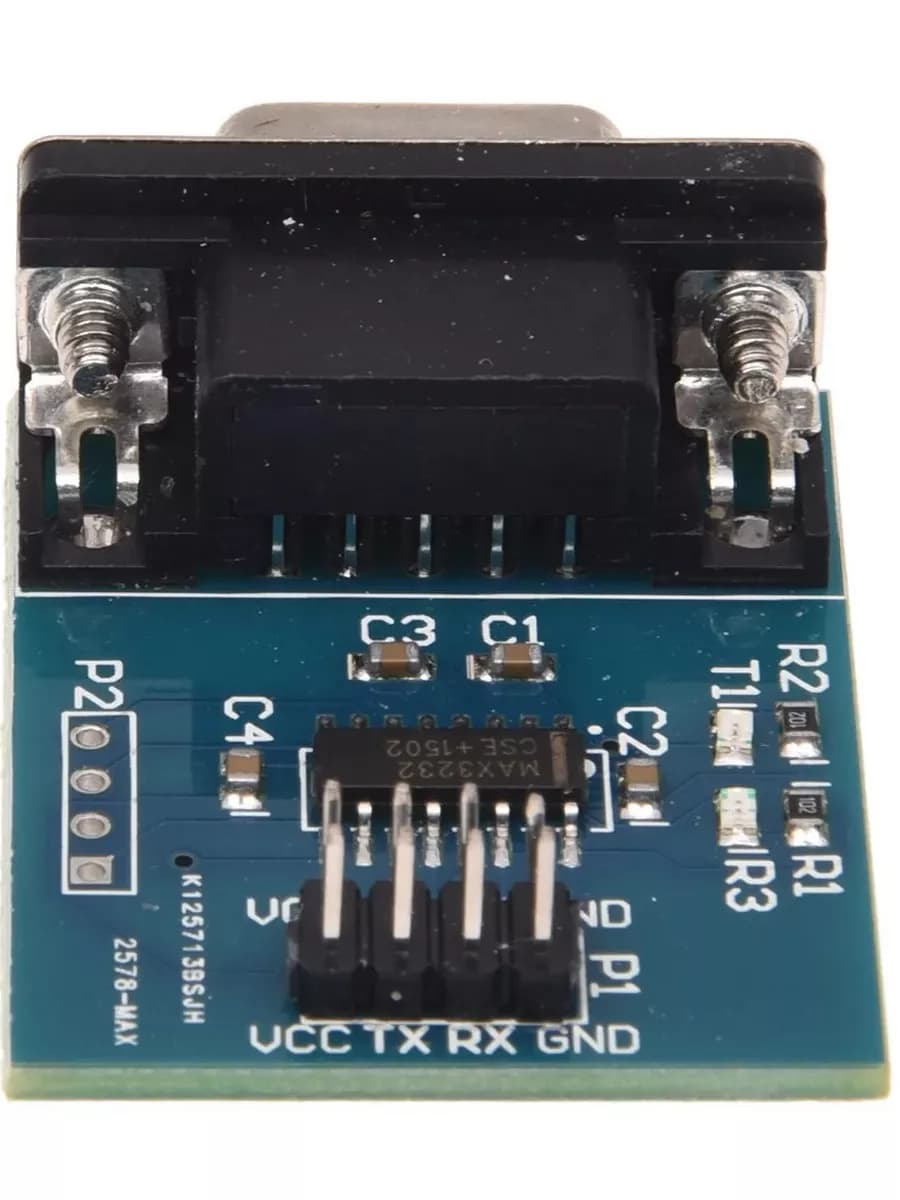
I'm trying to automate this via a ESP8266 + rs232 pcb.
I have tried all variants of the code below to send this command but i get no response.
The device has paralleled up serial ports so I can monitor the data and it seems identical to when we type the keystrokes from a laptop running hyperterm.
Note
The piece of equipment sends data constantly which I can read with different code, that works, I just cant send data to it.
When using Hyperterm we do have to set XON/XOFF, how do I set that in code?
Is there a possibility its a voltage level issue of the RS232 data?
I tried installing a PORT SNIFFER application and can see the hex data when I type *SP return is 2a 53 50 0d and this also what my bit of code generates!
// ESP8266 EspSoftware Serial test

// At boot, Serial uses UART0, which is mapped to pins GPIO1 (TX) and GPIO3 (RX).

// using library manager download and instal EspSoftwareSerial or instal ZIP
// https://github.com/plerup/espsoftwareserial

#include <SoftwareSerial.h>

// pins Rx GPIO14 (D5) and Tx GPIO 12 (D6)
 SoftwareSerial swSer(14, 12);

 // for loopback test connect pin D5 to pin D6

// for RS232 shield connect
// ESP8266 pin D6 TXD to TTL/RS232 Tx
// ESP8266 pin D5 RXD to TTL/RS232 Rx
// for loopback test connect 9-pin D_type connector pins 2 Tx to 3 Rx (pin 5 is GND)
// connect GND pins together and VCC to 5V

void setup() {
  Serial.begin(115200);   //Initialize hardware serial with baudrate of 115200
  swSer.begin(9600);      //Initialize software serial with baudrate of 9600
  Serial.println("\nESP8266 Software serial test started");
  Serial.println("-  for loopback test connect pin D5 to pin D6\n");
 }

void loop() {
  while (swSer.available() > 0) {  //wait for data at software serial
    Serial.write(swSer.read()); //Send data recived from software serial to hardware serial
  }
  while (Serial.available() > 0) { //wait for data at hardware serial
    swSer.write(Serial.read());     //send data recived from hardware serial to software serial
  }
}
first test using loopback - connect D5 to D6 - text entered on serial monitor should echo back to display
to connect the ESP8266 to the device RS232 you will require a TTL to RS232 module to convert the ERSP8266 3.3V logic levels to RS232 levels (typically -8V to +8V)
connect the ESP8266 to the TTL/RS232 module so
// ESP8266 pin D6 TXD to TTL/RS232 Tx
// ESP8266 pin D5 RXD to TTL/RS232 Rx
if you connect the RS232 9pin D-type connector pins 2 and 3 you can do a loopback test
if that works connect the TTL/RS232 module to the device - you may require a crossover cable
do you have information of the equipment's RS232 connector?
The device under test does has have 3 ports (I assume they are parralelled up) but I only plugged into those to try to monitor and debug, normally its just like above.
Can you post a datasheet link, because Google didn't turn up anything on this.
Providing 9v to the ESP and then tapping from the 3.3v pin is using the 3.3v onboard regulator to power this ?1 Down from 9v you should get some heat from the board. It is not recommended.
ok, if this where we are, you need to reflash the ESP with a simple feedthrough / loopback program so you can ‘see’ the raw serial data is actually. being sent & received.
Ignore the parsing and packeting, just catch and display the stream content.
you can see the cross-over connection between the RS232 D-Type connectors yellow and orange wires (cross over pin 2 to pin 3 pin 5 is GND)
running the code of post 5 transmitting AT commands to the modem the Serial monitor displays
ESP8266 Software serial test started
-  for loopback test connect pin D5 to pin D6

RDY
at
OK
at+cgmi
Quectel
OK
at+cgmm
EC21
OK
at+csq
+CSQ: 17,99
OK
at+cimi
+CME ERROR: 3
it is an error message which comes over RS232 from the EC21 modem in response to the at_cimi (returns the current used IMSI) command
the Quectel Mini PCIe EVB Kit modem evaluation kit did not have a SIM card installed during this particular test
if I install a SIM card I can connect to the network and use TCP and UDP, MQTT, etc
RS232 can be looked at like a point to point connection rather then a multi drop bus. You must connect Tx (transmit) to Rx (Receive). Two Rx lines alone cannot communicate as neither can transmit.