Hello, I have been trying to make an esp8266 module give the value of a variable to an arduino mega2560 through serial communication, but in the arduino I only receive -1, I add the code and thank you very much in advance if someone can help me.
Code to esp8266
int a=5;

void setup() {
  Serial.begin(9600);
}

void loop() {
 // Serial.print(a);
  Serial.write(a);
}
Code to ArduinoMega2560
void setup() {
  Serial.begin(9600);
  Serial2.begin(9600);
}

void loop() {
  if(Serial2.available()>0){
    int com =Serial.read();
    Serial.print(com);
  }
}
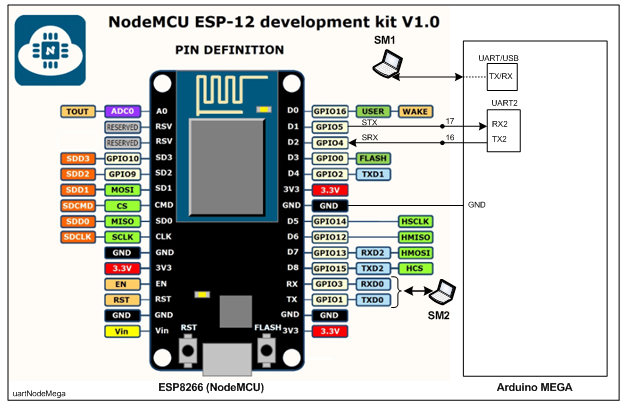
1. Connect NodeMCU/ESP8266 and MEGA as per Fig-1; where, NodeMCU uses Software UART Port (Hardware UART Port is engaed with IDE/PC/SM).
2. Upload the following sketch (your one with some additions) into NodeMCU.
#include <SoftwareSerial.h>
SoftwareSerial SUART(D2, D1); //SRX = D2 = GPIO-4; STX = D1 = GPIO-5
int a = 5;

void setup()
{
  Serial.begin(9600);
  SUART.begin(9600);
}

void loop()
{
  SUART.write(a);
  delay(1000);     //test interval
}
3. Upload your sketch in MEGA having done correction as pointed in post #2 @anon73444976 .
4. Check that MEGA's Serial Monitor shows:
5
5
5
5
5
Thank you very much for the help, now I have communication between the two devices thanks to your help, but it only throws random numbers.
This is the code.
ESP8266
#include <SoftwareSerial.h>
SoftwareSerial SUART(D2, D1);

int a=5;

void setup() {
  Serial.begin(9600);
  SUART.begin(9600);
}

void loop() {
  SUART.write(a);
  delay(1000);
}
Arduino MEGA2560
void setup() {
  Serial.begin(9600);
  Serial2.begin(9600);
}

void loop() {
  if(Serial2.available()>0){
    int com =Serial2.read();
    Serial.print(com);
  }
}
I'm using the connections showed in the @GolamMostafa 's image
fernandomuniz:
Serial.print(com);
That would be better as a "println", IMO
You must use logic level converters to connect the 3.3V ESP8266 and the 5V Mega I/O pins, otherwise you are very likely to damage one or both boards.
Practically. NodeMCU's IO pins are 5V tolerant and there are numerous references in the net.
fernandomuniz:
Serial.print(com);
===> Serial.println(com)
As a result, received data bytes will appear line-after-line in the Serial Monitor and it will be easier to see what is being arrived.
system
January 14, 2023, 5:22am
11
This topic was automatically closed 180 days after the last reply. New replies are no longer allowed.