system
September 6, 2014, 6:51pm
1
I just uploaded this code:
void setup()
{
  pinMode(5, INPUT_PULLUP);

  Serial.begin(9600);
  Keyboard.begin();
}

void loop()
{
    if(digitalRead(5)==LOW){
    Keyboard.press('d');
    Serial.print(5);
      delay(80);}
    if(digitalRead(5)!=LOW){
      Keyboard.release('d');
      delay(80);}

}
to my teensy 2.0
When I press my pushbutton, d is pressed ,
Did I break my board or is something wrong with my arduino?
You have to wait for Serial to become available on the Leonardo:
 //Initialize serial and wait for port to open:
  Serial.begin(9600);
  while (!Serial) {
    ; // wait for serial port to connect. Needed for Leonardo only
  }
system
September 7, 2014, 11:50am
3
You have to wait for Serial to become available on the Leonardo:
 //Initialize serial and wait for port to open:
  Serial.begin(9600);
  while (!Serial) {
    ; // wait for serial port to connect. Needed for Leonardo only
  }
I use a teensy though.
If I add this to my code, nothing works anymore.
system
September 7, 2014, 1:23pm
4
When you print the value 5, what do you expect to see? 5 is NOT a printable character. '5' IS.
system
September 7, 2014, 1:34pm
5
PaulS:
The Arduino programming language Reference, organized into Functions, Variable and Constant, and Structure keywords.
Serial.print(78) gives "78"
I'll give a shot anyway
EDIT: As expected, the Serial Monitor still doesn't show anything.
system
September 7, 2014, 1:53pm
6
If you comment out the Keyboard calls, do you see serial output?
What do you get if you serial.print a message in setup right after serial.begin?
zoomkat
September 7, 2014, 3:38pm
9
When I press my pushbutton, d is pressed ,
Did I break my board or is something wrong with my arduino?
How do you have a keyboard wired to your arduino?
Robin2
September 7, 2014, 5:38pm
10
Go back to basics when there is a problem.
Write a short program which does nothing except print a message on the Serial Monitor.
...R
system
September 7, 2014, 6:07pm
11
Robin2:
Write a short program which does nothing except print a message on the Serial Monitor.
...R
Tried that as well, nothing shows up.
I'll just order a new board.
Robin2
September 7, 2014, 7:16pm
12
excd:
That seems a bit drastic.
Post your simple test code.
Do you have another Arduino that works properly?
Have you tried uninstalling and reinstalling the Arduino IDE?
Have you tried to see if Serial.print() will work with another terminal program on your PC - puTTY or Realterm, for example?
Can I assume you do know how to open the Serial Monitor window?
...R
system
September 7, 2014, 8:19pm
13
Robin2:
excd:
That seems a bit drastic.
Post your simple test code.
Do you have another Arduino that works properly?
No.
Have you tried uninstalling and reinstalling the Arduino IDE?
Yes.
Have you tried to see if Serial.print() will work with another terminal program on your PC - puTTY or Realterm, for example?
No.
Can I assume you do know how to open the Serial Monitor window?
Yes.
I really appreciate your effort but I'll just order a new board, they are not that expensive.
excd:
Ah, relevant details emerge. So it's not an Arduino.
The Teensy, as I recall, needs its own IDE installed. Did you install it?
Have you tested something simple, like uploading a Blink sketch? Does it upload? Does it blink? If you vary the blink rate does the new rate appear?
There are special steps for uploading to the Teensy.
https://www.pjrc.com/teensy/loader.html
They have a support forum:
http://forum.pjrc.com/forum.php
Not being able to upload something trivial seems to be an issue to take to their forum, especially if you are planning to toss it away and get another one.
system
September 7, 2014, 9:02pm
15
excd:
Ah, relevant details emerge. So it's not an Arduino.
The Teensy, as I recall, needs its own IDE installed. Did you install it?
Have you tested something simple, like uploading a Blink sketch? Does it upload? Does it blink? If you vary the blink rate does the new rate appear?
There are special steps for uploading to the Teensy.
Teensy Loader Application - available for Windows, Linux and Macintosh systems
They have a support forum:
http://forum.pjrc.com/forum.php
Not being able to upload something trivial seems to be an issue to take to their forum, especially if you are planning to toss it away and get another one.
I stated that I'm using a teensy 2.0 in the OP.
They won't even let you upload it if you don't install the IDE.
The keypress works, as stated in the OP.
Oops, missed that line.
Can you post your amended sketch?
Also if you believe you have a faulty Teensy (which it sounds you do) you should discuss it on their forum.
system
September 7, 2014, 9:49pm
17
void setup()
{
  pinMode(5, INPUT_PULLUP);
  pinMode(6, OUTPUT);

  Serial.begin(9600);
  Keyboard.begin();
}

void loop()
{
    if(digitalRead(5)==LOW){
    Keyboard.press('d');
    Serial.print(5);
    digitalWrite(6, HIGH);
      delay(80);}
    if(digitalRead(5)!=LOW){
      Keyboard.release('d');
      digitalWrite(6, LOW);
      delay(80);}

}
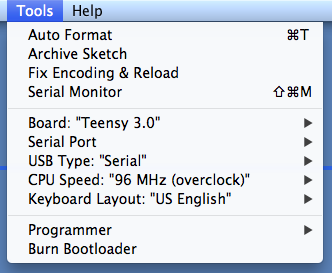
On my Teensy 3.0 I got their HelloSerialMonitor sketch to work. However one trick was that you have to select the serial port from the Tools -> Serial Port menu after the sketch starts. Did you do that?
system
September 7, 2014, 10:43pm
19
The Teensy, as I recall, needs its own IDE installed. Did you install it?
The Teensy needs an addin to the Arduino IDE installed, not a separate IDE.
When I installed it, it changed so much stuff that I mentally earmarked that as a "new" IDE, renamed it, and got my old one back for normal development.
Compare the Tools menu:
Normal:
Teensy: