hi.
i have a question guys.
i want to save a word in rfid tag.
so i should get it from serial monitor and save it in a byte variable.
but i have 2 question here.
at first how i can save a word that i got it from serial.read and save it to byte variabale.
second is how i show and serial.print that word in serial monitor.
my code is this:
byte incomingByte [16] = {" "}; // for incoming serial data

void setup() {
  Serial.begin(9600); // opens serial port, sets data rate to 9600 bps
  Serial.println("hi. pls write a word :");
}

void loop() {
  // send data only when you receive data:
  if (Serial.available() > 0) {
    // read the incoming byte:
    incomingByte [16] = Serial.read();

    // say what you got:
    Serial.println("I received: ");
    Serial.println(incomingByte [16]);
  }
}
it convert word to decimal then show the decimal.
i attach the result.
The serial input basics tutorial shows how to receive serial data.
The posted code reads one byte but puts the byte into memory out of the bounds of the incomingByte array. The incomingByte array has 16 elements, numbered 0 to 15. The incomingByte[16] does not exist.
hadimargo:
at first how i can save a word that i got it from serial.read and save it to byte variabale.
second is how i show and serial.print that word in serial monitor.
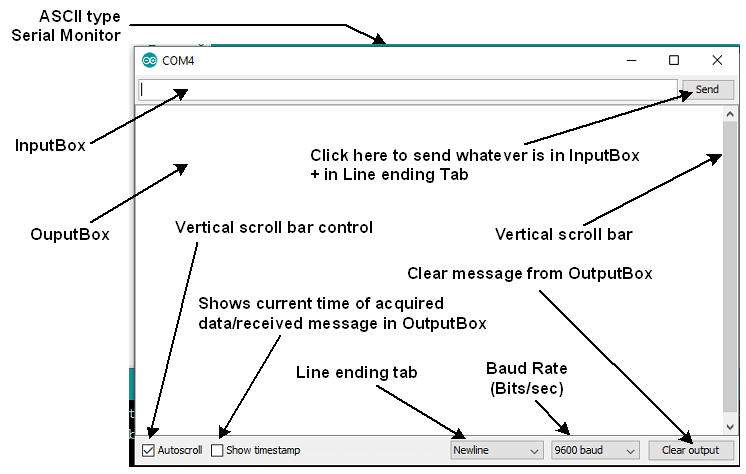
Let us assume that we will receive this word: Forum from the InputBox of Serial Monitor (Fig-1), save it in an array named 'char incomingByte[]' and then show it on the OutputBox of the Serial Monitor. Note that we select 'Newline' option in the 'Line ending tab' of the Serial Monitor.
Figure-1:
Sketch (your sketch with slight modification):
char incomingByte [16] = "";

void setup()
{
  Serial.begin(9600); // opens serial port, sets data rate to 9600 bps
  Serial.println("hi. pls write a word :");
}

void loop()
{
  byte n = Serial.available();
  if( n !=0)
  {
    byte m = Serial.readBytesUntil('\n', incomingByte, 16);
    incomingByte[m] = '\0'; //add  null character
    Serial.println(incomingByte);
  }
}
Figure-2: