A couple of months later, and few trees planted I realized that., apparently, in my house no Arduinos are allowed to write on a SD card.
Fat16lib, I've got the "Micro SD Storage Board Mciro SD TF Card Memory Shield Module SPI For Arduino D9" as recommended, with no result other than much, much frustration.
Tried to format the card using SDformatter4, tried to format using Arduino, tried shamanic and tribal rites with no success.
What could be, for instance, the issue related to:
SD error: c,ff
upon formatting a microSD using the very standard SdFormatter provided with SdFat library?
Thanks in advance...
Edited:
This following is SdInfo printout, I might suspect the microSD to be defective.
Quite strange though, as it's apparently functional for my daily basis needs. I might invest $10 for a new one.
Quite strange though, as it's apparently functional for my daily basis needs.
This is can happen. SD cards function in two entirely different modes. , SPI mode and SDIO mode. 1-bit SPI mode uses a different protocol than 4-bit SDIO mode. Few people use cards in SPI mode and a few cards just don't work correctly in SPI mode.
You problem is not a formatting problem. SD error: c,ff is at the lowest SPI protocol level.
Thank you fat16lib, you're precious as always. Really.
Now I believe is just a matter of buying some other cards and test them all.
By any chance, don't you have any brand/model to recommend? (you know... just to make sure I won't go buying clueless, as I am...)
To make things clear, I'd rather plant a tree other than playing with these tiny cards but, being the nowaday world quite techie, I have to face the inevitable and deal with these matters time to time :~
Uh fat16lib, thank you!
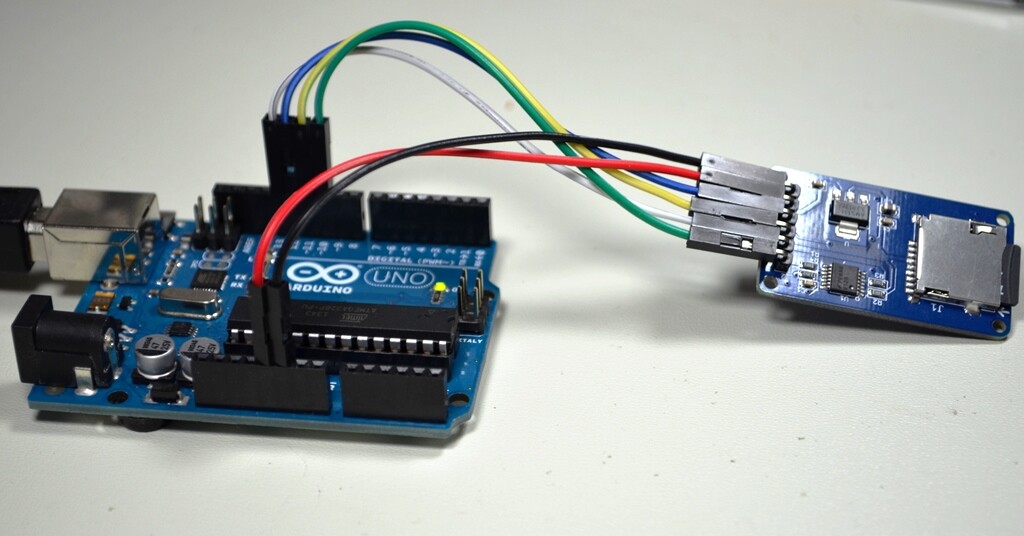
First at all, congratulations for the picture, very well taken. You're probably an enthusiast photographer as well.
As for my setup, while at first failing on the pin 10 connection (WAS mistakenly wired to pin number 4) is NOW perfectly resembling your* and, not surprisingly, it finally works!
(*) Except for colors, but Arduino works on a 10bit basis, and I assume it will see on gray levels anyway
So, shame on me but good to be reported for further references, and to make sure no one will be stressed on the same point.
Card readers have to be buffered. Don't ask me why, but make sure there's a little extra component between an Arduino port and the microSD card whatsoever. Spare much frustration and get that reader.
IF you connect your microSD board straight onto Arduino, pin have to be 10-11-12-13 while some examples specifically set pin 4 as chipSelect (ReadWriteSdFat is among those). Forget pin number 4, that's apparently to be used with some other shields on the way; make sure to connect 10~13, set up the code properly and off you go.

 but, being the nowaday world quite techie, I have to face the inevitable and deal with these matters time to time :~