Sketch to send via WiFi IMU/AHRS data from a RP2040 Connect to an iPad

I'm not a programmer. I was trying to modify the Arduino WiFi Sketch example that turns on the LED's on the RP2040 from an iPad. I desire to send IMU/AHARS data (via WiFi) from the RP2040 Connect to my iPad for observation. The Arduino WiFi Sketch example requires that RP2040 Connect be connected to a computer and the serial monitor activated. I was not able to intuitively modify the code to negate this requirement. Note: The RP2040 Connect is mounted in a flying control line model airplane.

Larry

Nobody else can tell you either, we need to see ALL the code. Make sure you first do in the IDE a Tools/Auto Format, then Edit/Copy for Forum and paste in a reply here.

Arduino WiFi LED Sketch:[code]

#include <SPI.h>
#include <WiFiNINA.h>

char ssid[] = "RP2040"; // your network SSID (name)
char pass[] = "pasword"; // your network password (use for WPA, or use as key for WEP)
int keyIndex = 0; // your network key index number (needed only for WEP)

//int status = WL_IDLE_STATUS;
WiFiServer server(80);

void setup() {
//Initialize serial and wait for port to open:
// Serial.begin(9600);
//while (!Serial) {
// ; // wait for serial port to connect. Needed for native USB port only
//}

Serial.println("Access Point Web Server");

pinMode(LEDR, OUTPUT);
pinMode(LEDG, OUTPUT);
pinMode(LEDB, OUTPUT);
}
// check for the WiFi module:
// if (WiFi.status() == WL_NO_MODULE) {
// Serial.println("Communication with WiFi module failed!");
// don't continue
// while (true);
// }

// String fv = WiFi.firmwareVersion();
// if (fv < WIFI_FIRMWARE_LATEST_VERSION) {
// Serial.println("Please upgrade the firmware");
// }

// by default the local IP address will be 192.168.4.1
// you can override it with the following:
// WiFi.config(IPAddress(10, 0, 0, 1));

//print the network name (SSID);
// Serial.print("Creating access point named: ");
// Serial.println(ssid);

// Create open network. Change this line if you want to create an WEP network:

//status = WiFi.beginAP(ssid, pass);
// if (status != WL_AP_LISTENING) {
// Serial.println("Creating access point failed");
// don't continue
// while (true);
//}

// wait 10 seconds for connection:
// delay(10000);

// start the web server on port 80
// server.begin();

// you're connected now, so print out the status
// printWiFiStatus();
//}

void loop() {
// compare the previous status to the current status
// if (status != WiFi.status()) {
// it has changed update the variable
// status = WiFi.status();

// if (status == WL_AP_CONNECTED) {
// a device has connected to the AP
// Serial.println("Device connected to AP");
// } else {
// a device has disconnected from the AP, and we are back in listening mode
// Serial.println("Device disconnected from AP");
// }
//}

WiFiClient client = server.available(); // listen for incoming clients

if (client) { // if you get a client,
Serial.println("new client"); // print a message out the serial port
String currentLine = ""; // make a String to hold incoming data from the client
while (client.connected()) { // loop while the client's connected
if (client.available()) { // if there's bytes to read from the client,
char c = client.read(); // read a byte, then
Serial.write(c); // print it out the serial monitor
if (c == '\n') { // if the byte is a newline character

      // if the current line is blank, you got two newline characters in a row.
      // that's the end of the client HTTP request, so send a response:
      if (currentLine.length() == 0) {
        // HTTP headers always start with a response code (e.g. HTTP/1.1 200 OK)
        // and a content-type so the client knows what's coming, then a blank line:
        client.println("HTTP/1.1 200 OK");
        client.println("Content-type:text/html");
        client.println();

        // the content of the HTTP response follows the header:
        client.print("<style>");
        client.print(".container {margin: 0 auto; text-align: center; margin-top: 100px;}");
        client.print("button {color: white; width: 100px; height: 100px;");
        client.print("border-radius: 50%; margin: 20px; border: none; font-size: 20px; outline: none; transition: all 0.2s;}");
        client.print(".red{background-color: rgb(196, 39, 39);}");
        client.print(".green{background-color: rgb(39, 121, 39);}");
        client.print(".blue {background-color: rgb(5, 87, 180);}");
        client.print(".off{background-color: grey;}");
        client.print("button:hover{cursor: pointer; opacity: 0.7;}");
        client.print("</style>");
        client.print("<div class='container'>");
        client.print("<button class='red' type='submit' onmousedown='location.href=\"/RH\"'>YES</button>");
        client.print("<button class='off' type='submit' onmousedown='location.href=\"/RL\"'>OFF</button><br>");
        client.print("<button class='green' type='submit' onmousedown='location.href=\"/GH\"'>ON</button>");
        client.print("<button class='off' type='submit' onmousedown='location.href=\"/GL\"'>OFF</button><br>");
        client.print("<button class='blue' type='submit' onmousedown='location.href=\"/BH\"'>ON</button>");
        client.print("<button class='off' type='submit' onmousedown='location.href=\"/BL\"'>OFF</button>");
        client.print("</div>");

        // The HTTP response ends with another blank line:
        client.println();
        // break out of the while loop:
        break;
      } else {    // if you got a newline, then clear currentLine:
        currentLine = "";
      }
    } else if (c != '\r') {  // if you got anything else but a carriage return character,
      currentLine += c;      // add it to the end of the currentLine
    }

    // Check to see if the client request was /X
    if (currentLine.endsWith("GET /RH")) {
      digitalWrite(LEDR, HIGH);
    }
    if (currentLine.endsWith("GET /RL")) {
      digitalWrite(LEDR, LOW);              
    }
    if (currentLine.endsWith("GET /GH")) {
      digitalWrite(LEDG, HIGH);              
    }
    if (currentLine.endsWith("GET /GL")) {
      digitalWrite(LEDG, LOW);           
    }
    if (currentLine.endsWith("GET /BH")) {
      digitalWrite(LEDB, HIGH);              
    }
    if (currentLine.endsWith("GET /BL")) {
      digitalWrite(LEDB, LOW);             
    }
  }
}
// close the connection:
client.stop();
Serial.println("client disconnected");

}
}

void printWiFiStatus() {
// print the SSID of the network you're attached to:
Serial.print("SSID: ");
Serial.println(WiFi.SSID());

// print your WiFi shield's IP address:
IPAddress ip = WiFi.localIP();
Serial.print("IP Address: ");
Serial.println(ip);

// print where to go in a browser:
Serial.print("To see this page in action, open a browser to http://");
Serial.println(ip);

}
[/code]

Sorry, I did not sent the original baseline code:`

Use code tags to format code for the forum`

#include <SPI.h>
#include <WiFiNINA.h>

///////please enter your sensitive data in the Secret tab/arduino_secrets.h
char ssid[] = "";        // your network SSID (name)
char pass[] = "";    // your network password (use for WPA, or use as key for WEP)
int keyIndex = 0;                 // your network key index number (needed only for WEP)

int status = WL_IDLE_STATUS;
WiFiServer server(80);

void setup() {
  pinMode(LEDR, OUTPUT);
  pinMode(LEDG, OUTPUT);
  pinMode(LEDB, OUTPUT);
  Serial.begin(9600);      // initialize serial communication

  // check for the WiFi module:
  if (WiFi.status() == WL_NO_MODULE) {
    Serial.println("Communication with WiFi module failed!");
    // don't continue
    while (true);
  }

  String fv = WiFi.firmwareVersion();
  if (fv < WIFI_FIRMWARE_LATEST_VERSION) {
    Serial.println("Please upgrade the firmware");
  }

  // attempt to connect to WiFi network:
  while (status != WL_CONNECTED) {
    Serial.print("Attempting to connect to Network named: ");
    Serial.println(ssid);                   // print the network name (SSID);

    // Connect to WPA/WPA2 network. Change this line if using open or WEP network:
    status = WiFi.begin(ssid, pass);
    // wait 10 seconds for connection:
    delay(10000);
  }
  server.begin();                           // start the web server on port 80
  printWifiStatus();                        // you're connected now, so print out the status
}


void loop() {
  WiFiClient client = server.available();   // listen for incoming clients

  if (client) {                             // if you get a client,
    Serial.println("new client");           // print a message out the serial port
    String currentLine = "";                // make a String to hold incoming data from the client
    while (client.connected()) {            // loop while the client's connected
      if (client.available()) {             // if there's bytes to read from the client,
        char c = client.read();             // read a byte, then
        Serial.write(c);                    // print it out the serial monitor
        if (c == '\n') {                    // if the byte is a newline character

          // if the current line is blank, you got two newline characters in a row.
          // that's the end of the client HTTP request, so send a response:
          if (currentLine.length() == 0) {
            // HTTP headers always start with a response code (e.g. HTTP/1.1 200 OK)
            // and a content-type so the client knows what's coming, then a blank line:
            client.println("HTTP/1.1 200 OK");
            client.println("Content-type:text/html");
            client.println();

            // the content of the HTTP response follows the header:
            client.print("<style>");
            client.print(".container {margin: 0 auto; text-align: center; margin-top: 100px;}");
            client.print("button {color: white; width: 100px; height: 100px;");
            client.print("border-radius: 50%; margin: 20px; border: none; font-size: 20px; outline: none; transition: all 0.2s;}");
            client.print(".red{background-color: rgb(196, 39, 39);}");
            client.print(".green{background-color: rgb(39, 121, 39);}");
            client.print(".blue {background-color: rgb(5, 87, 180);}");
            client.print(".off{background-color: grey;}");
            client.print("button:hover{cursor: pointer; opacity: 0.7;}");
            client.print("</style>");
            client.print("<div class='container'>");
            client.print("<button class='red' type='submit' onmousedown='location.href=\"/RH\"'>ON</button>");
            client.print("<button class='off' type='submit' onmousedown='location.href=\"/RL\"'>OFF</button><br>");
            client.print("<button class='green' type='submit' onmousedown='location.href=\"/GH\"'>ON</button>");
            client.print("<button class='off' type='submit' onmousedown='location.href=\"/GL\"'>OFF</button><br>");
            client.print("<button class='blue' type='submit' onmousedown='location.href=\"/BH\"'>ON</button>");
            client.print("<button class='off' type='submit' onmousedown='location.href=\"/BL\"'>OFF</button>");
            client.print("</div>");

            // The HTTP response ends with another blank line:
            client.println();
            // break out of the while loop:
            break;
          } else {    // if you got a newline, then clear currentLine:
            currentLine = "";
          }
        } else if (c != '\r') {  // if you got anything else but a carriage return character,
          currentLine += c;      // add it to the end of the currentLine
        }

        // Check to see if the client request was /X
        if (currentLine.endsWith("GET /RH")) {
          digitalWrite(LEDR, HIGH);
        }
        if (currentLine.endsWith("GET /RL")) {
          digitalWrite(LEDR, LOW);              
        }
        if (currentLine.endsWith("GET /GH")) {
          digitalWrite(LEDG, HIGH);              
        }
        if (currentLine.endsWith("GET /GL")) {
          digitalWrite(LEDG, LOW);           
        }
        if (currentLine.endsWith("GET /BH")) {
          digitalWrite(LEDB, HIGH);              
        }
        if (currentLine.endsWith("GET /BL")) {
          digitalWrite(LEDB, LOW);             
        }
      }
    }
    // close the connection:
    client.stop();
    Serial.println("client disconnected");
  }
}

void printWifiStatus() {
  // print the SSID of the network you're attached to:
  Serial.print("SSID: ");
  Serial.println(WiFi.SSID());

  // print your board's IP address:
  IPAddress ip = WiFi.localIP();
  Serial.print("IP Address: ");
  Serial.println(ip);

  // print the received signal strength:
  long rssi = WiFi.RSSI();
  Serial.print("signal strength (RSSI):");
  Serial.print(rssi);
  Serial.println(" dBm");
  // print where to go in a browser:
  Serial.print("To see this page in action, open a browser to http://");
  Serial.println(ip);
}`

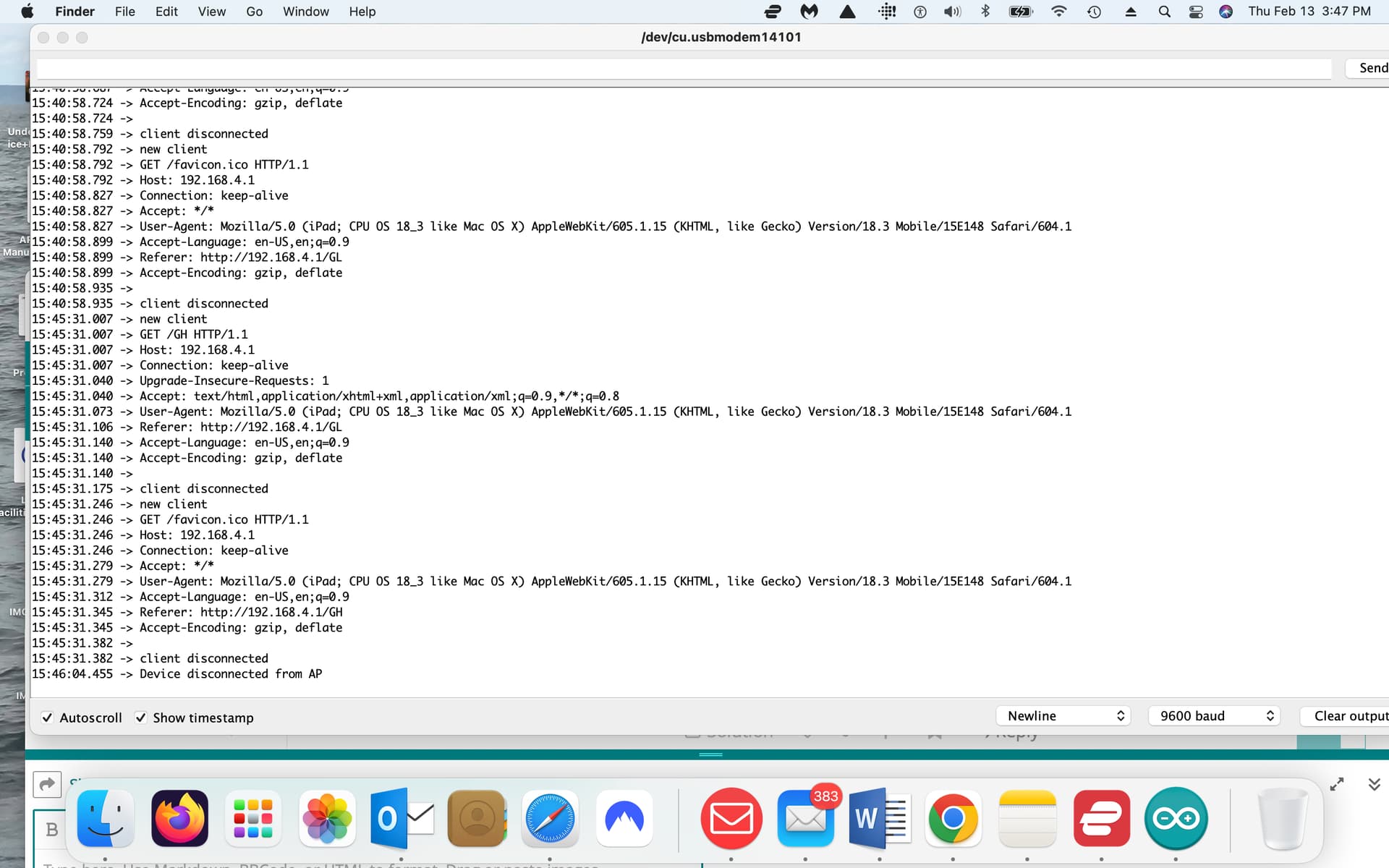
what does the serial monitor display? e.g. does it connect to your network?
copy the serial monitor output, select < CODE/ > and paste the text where it says “type or paste code here”

You connect your computer/iPad to the network created by the RP2040. From your browser you enter 192.168.4.1 and the following page appears. Selecting the buttons turns on/off the LED's on the RP2040.

Larry

Screen shot of serial monitor.

Larry

Solved. I eliminated all “serial” code.

Larry

You need to read your
bild

This topic was automatically closed 180 days after the last reply. New replies are no longer allowed.