Good morning.
I am experimenting with the SNMP.h library
What I want to do, is from the Dude and the Observium, monitor an Arduino Mega + Shield Ethernet. I am tested with the "Agent" example test.
I don't quite understand how it all works. With the program I am attaching, from a Linux I can poll the Arduino Mega:
root@Mkb:/home/administrator# snmpget -v 2c -c public 172.20.20.153 1.3.6.1.2.1.1.5.0
Resposta -> iso.3.6.1.2.1.1.5.0 = STRING: "Nucleo F767ZI"
it is "OK"
But from the Dude and Observium, it doesn't detect it.
Could it be that I need to schedule other IODs?
Object OID
system 1.3.6.1.2.1.1
Object OID
sysDescr 1.3.6.1.2.1.1.1.0
sysObjectID 1.3.6.1.2.1.1.2.0
sysUpTime 1.3.6.1.2.1.1.3.0
sysContact 1.3.6.1.2.1.1.4.0
sysName 1.3.6.1.2.1.1.5.0
sysLocation 1.3.6.1.2.1.1.6.0
sysServices 1.3.6.1.2.1.1.7.0
sysORLastChange 1.3.6.1.2.1.1.8.0
sysORTable 1.3.6.1.2.1.1.9.0
I don't really understand how this all works.
What do I need to do for the Dude and Observium to detect the Mega?
I'm attaching the code I'm using, which is the library example.
Thanks.
#include <Ethernet.h>

#include <SNMP.h>

EthernetUDP udp;
SNMP::Agent snmp;

// snmpget -v 2c -c public 172.20.20.153 1.3.6.1.2.1.1.5.0

const char *SYSNAME_OID = "1.3.6.1.2.1.1.5.0";
//const char *SYSNAME_OID = "1.3.6.1.2.1.2.2.1.6";
//const char *SYSNAME_VALUE = "Nucleo F767ZI"; // Name of the board. Replace if needed.
const char *SYSNAME_VALUE = "Arduino Mega_XX"; // Name of the board. Replace if needed.

// Use some SNMP classes
using SNMP::OctetStringBER;
using SNMP::VarBind;
using SNMP::VarBindList;

// Event handler to process SNMP messages
void onMessage(const SNMP::Message *message, const IPAddress remote, const uint16_t port) {
    // Get the variable binding list from the message.
    VarBindList *varbindlist = message->getVarBindList();
    for (unsigned int index = 0; index < varbindlist->count(); ++index) {
        // Each variable binding is a sequence of 2 objects:
        // - First one is and ObjectIdentifierBER. It holds the OID
        // - Second is the value of any type
        VarBind *varbind = (*varbindlist)[index];
        // There is a convenient function to get the OID as a const char*
        const char *name = varbind->getName();
        if (strcmp(SYSNAME_OID, name) == 0) {
            // System name is requested. We have to send a response.
            // Create an SNMP message for response
            SNMP::Message *response = new SNMP::Message(SNMP::VERSION2C, "public", SNMP::TYPE_GETRESPONSE);
            // The response must have the same request-id as the request
            response->setRequestID(message->getRequestID());
            // SYSNAME
            // Create an OctetStringBER to hold the variable binding value
            OctetStringBER* value = new OctetStringBER(SYSNAME_VALUE);
            // Add the variable binding to the message
            response->add(SYSNAME_OID, value);
            // Send the response to remote IP and port
            snmp.send(response, remote, port);
            // Avoid memory leak
            delete response;
       }
    }
}

void setup() {
	// Serial

  Serial.begin(9600);

	byte mac[] = { 0xDE, 0xAD, 0xBE, 0xEF, 0xFE, 0xED };
	Ethernet.begin(mac, IPAddress(172, 20, 20, 153));

  // print your local IP address:
  Serial.print("My IP address: ");
  Serial.println(Ethernet.localIP());

  // SNMP
  snmp.begin(&udp);
  snmp.onMessage(onMessage);
}

void loop()
  {
  // Agent loop function must be called to process incoming messages
  snmp.loop();
  snmp.onMessage(onMessage);
  Serial.println("Hola");
  delay(1000);
  }
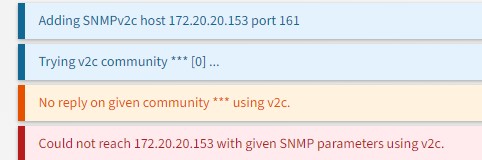
But, both on Dude and Observiun, I register the Mega (172.20.20.153) with version v2-public, as I have done with other devices, PCs, Servers, etc... and the MEGA does not detect it. In the case of the Observium, it tells me what I show you in the attached image.
"both Dude and Observer"
Both fail. Only Linux responds to me with instructions.
I am not an expert in the field. The servers, Sw, PC,... that I'm monitoring on both Dude and Observaun are working fine for me. On each device at the time I activated the services and it worked fine for me.
With the *SYSNAME VALUE" I have been trying. Now I have it like this: *SYSNAME_VALUE = "Nucleo F767ZI" and it doesn't work for me.
const char *SYSNAME_OID = "1.3.6.1.2.1.1.5.0";
//const char *SYSNAME_OID = "1.3.6.1.4.1.11.2.13.2.5";
const char *SYSNAME_VALUE = "Nucleo F767ZI"; // Name of the board. Replace if needed.
//const char *SYSNAME_VALUE = "Arduino Mega_XX"; // Name of the board. Replace if needed.
//const char *SYSNAME_VALUE = "2.0.0"; // Name of the board. Replace if needed.
With the MEGA, I'm missing something, but it can't be found.
Thanks for your help.
I just wanted to confirm with you before moving the topic. No Arduino command line tool so it was the wrong category end hence your topic has been moved to a more suitable location on the forum.
I use both programs to monitor equipment. If a team crashes let me know. I can also see it graphically. Observium, they give me a lot of information about the servers, temperature, load,... they are very useful.
 )
)