im using software serial for my nano and esp32 to communicate and send some data, for some reason i get 0 when checking for available bytes in the serial and i dont why that could be happening..
esp32 code
#define BUFFER_SIZE 32

#include "BluetoothSerial.h"
#include "SoftwareSerial.h"
#include "soc/soc.h"
#include "soc/rtc_cntl_reg.h"

#if !defined(CONFIG_BT_ENABLED) || !defined(CONFIG_BLUEDROID_ENABLED)
#error Bluetooth is not enabled! Please run make menuconfig to and enable it
#endif

const byte numChars = 32;
char receivedChars[numChars];   // an array to store the received data

boolean newData = false;
SoftwareSerial shieldSerial(12, 13);// Rx then TX pins
BluetoothSerial SerialBT;

void setup() {
  WRITE_PERI_REG(RTC_CNTL_BROWN_OUT_REG, 0);
  Serial.begin(115200);
  shieldSerial.begin(9600);
  SerialBT.begin("Gesture2Speech");
}

void loop() {
  String data = "";
  recvWithEndMarker();
  showNewData();
  delay(500);
}

void recvWithEndMarker() {
    static byte ndx = 0;
    char endMarker = '\n';
    char rc;
    Serial.println(shieldSerial.available() > 0);
    while (shieldSerial.available() > 0 && newData == false) {
        rc = shieldSerial.read();
        if (rc != endMarker) {
            receivedChars[ndx] = rc;
            ndx++;
            if (ndx >= numChars) {
                ndx = numChars - 1;
            }
        }
        else {
            receivedChars[ndx] = '\0'; // terminate the string
            ndx = 0;
            newData = true;
        }
    }
}

void showNewData() {
    if (newData == true) {
        Serial.print("This just in ... ");
        Serial.println(receivedChars);
        newData = false;
        if (receivedChars != "") {
          SerialBT.println(receivedChars);
        }
    }
}
nano code
#include <SoftwareSerial.h>

SoftwareSerial SUART(2,3);

void setup() {
  Serial.begin(9600);
  SUART.begin(9600);
  pinMode(A0,INPUT_PULLUP);
}

void loop() {
  int _1 = map(analogRead(A0),0,1023,0,255);
  Serial.println(_1);
  SUART.print(String(_1));
  delay(100);
}
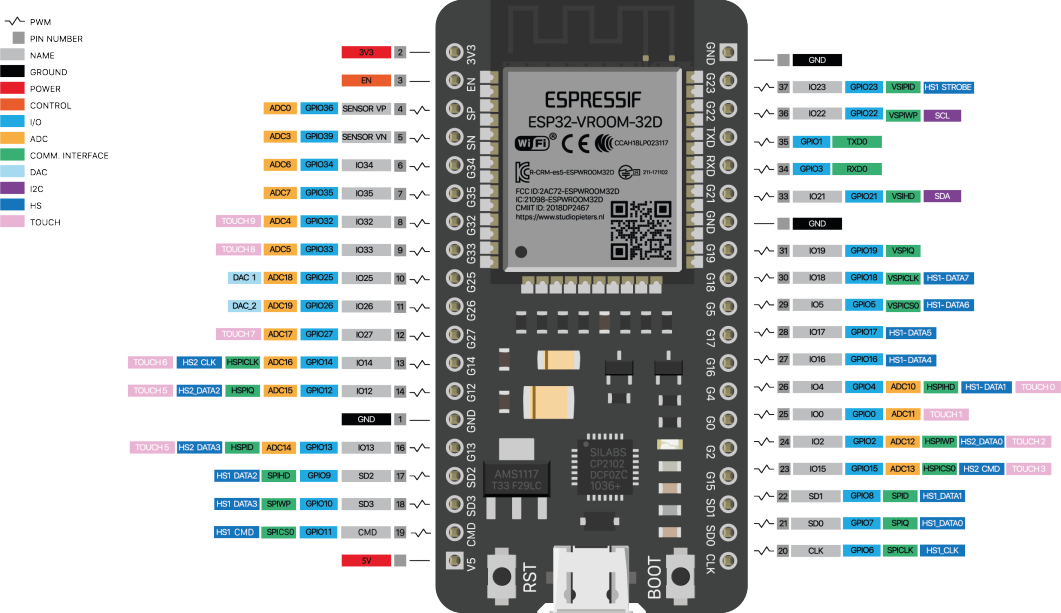
and heres the pin diagram of the esp32 im using, when i print out the data being recieved in the esp i get 0

 , thats why i didnt use the built-in UART's