I Am Trying To Run IDE On My Laptop (Lenovo Idea Pad 1 11GL05) But When I Do, It Says "This App Can't Run On Your PC". Can Anyone Help?
(I'm Downloading It Onto My Removable But Always In SD XC Card)
UPDATE: I have just switched to Linux for a forearm mounted laptop (cyberdeck), and I installed Arduino with Pi-Apps. Thanks for all the help (when I wrote this, I was such a noob!) Sorry for any trouble caused!
Adding to @UKHeliBob
And which operating system are you using.
I am Using The Installable Version
I Had A Few Errors And Had To Delete And Redownload A Few Times
At First I Installed It To My SD XC Card But Now I Am Installing It Into My C: Drive
I Think I Need The 32 Bit Version Because The Version I Am Downloading Is 64 Bit While My Os Is Windows 10 32 Bit I Think
You can't use the new version of IDE, it's only 64bit.
Don't think, check it.
One way to find it:
In Windows explorer, right click this PC and select properties from the context menu. Mine is a 64bit version and shows under Device specifications -> System type.
You did not answer the question which version of the IDE you're using; or better said, are trying to install.
Other question is from where did you download it? This is the official download page: https://www.arduino.cc/en/software.

You can download the zip version first to try. Advantage is that you can simply extract it and run the IDE after that; if you want to get rid of it, just delete the directory where you installed it.
If you want the a more "normal" install, any of the other two should work.
Im Using The Not Zipped One
I Downloaded It Off Of The Official Page
I Will Try The Zipped Version Now 
And we still don't know which version you're trying to use 
Ok Update
I Have Managed To Run Arduino Using The Zipped Download, But The Homescreen Pops up For A Second, Then It Goes Onto "sketch_oct29a" And It is a blank screen with the file, Edit E.c.t Icons available
Do I Need To Download Drivers for It To Work?
New Update: It Was Showing This:
It Stopped Doing That Output Download Thing And Is Now Doing This:
Yeah, After A Cleanup It Was Running Ok For A bit. Randomly Closes Itself But I Hope It Will Work With My Digispark When It Arrives Tonight. ll Reply If I Have More issues. Thank You very Much For Your Help!
Oops
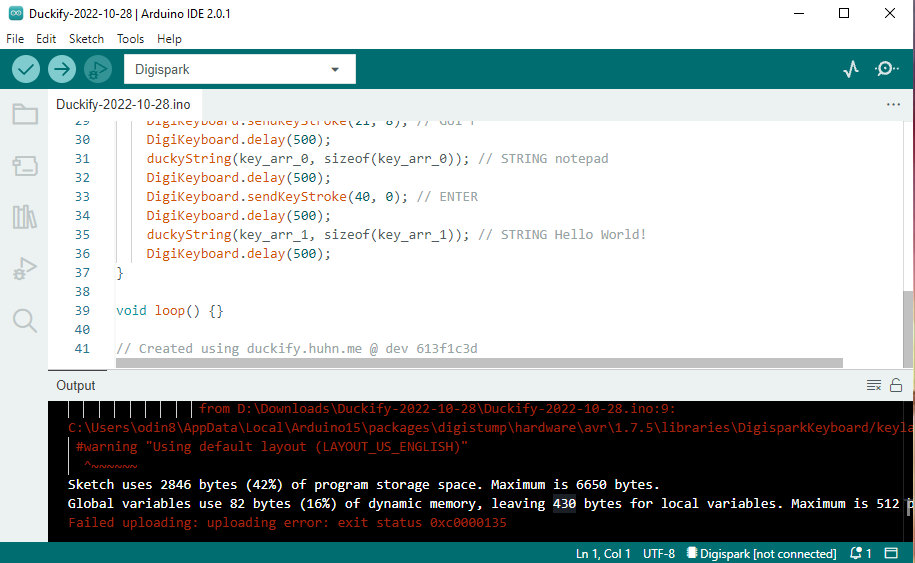
We Have An Error While Uploading:
Failed uploading: uploading error: exit status 0xc0000135
You will have to select a port from tools -> ports in the IDE. To determine which port is the correct one:
- Check the ports shown in the IDE (tools->ports) without the board connected.
- Connect the board and check again. The port for your board should now show as an additional port.
- Select that "new" port.
In my experience, the IDE is quite bad in cleaning up so you might run out of diskspace again quite quickly. This might be an antivirus issue, not sure; I regularly clean out what is mentioned below; you can / might have to that daily.
Keep an eye on C:\Users\yourUsername\AppData\Local\Temp
- directories starting with
.arduinoIDE-unsaved
- directories with numeric names like
5577006791947779410392547560 containing the files
index.gz
index.json
index.json.sig
This excludes directories with names like 25491F55-F836-4B0A-ADB0-D4F7BAFB61FB
- directories starting with
arduino-ide
- directories starting with
arduino-language-server
- directories starting with
arduino-sketch
- files starting with
system-includes and the extension clangd, e.g. system-includes-2f0e9a.clangd
- log files starting with
dd_updateconfiguration
That covers most of the temporary files
Also keep an eye on C:\Users\yourUsername\.arduinoIDE\logs
Be carefull with what you delete, you do that obviously on your own risk.