SPI Master on Arduino Nano
I'm having problems to get the SPI commnication to work on an Arduino Nano. The final project shall connect an RaspPi (master at 3.3V) with an Arduino Nano (slave at 5V) via SPI to send test data from the Nano to the RaspPi. I wasn't successful, so I thought to first test the Arduino in master mode with no slave connected (MISO floating). The nano is powered by USB and I'm using the serial monitor.
The Error
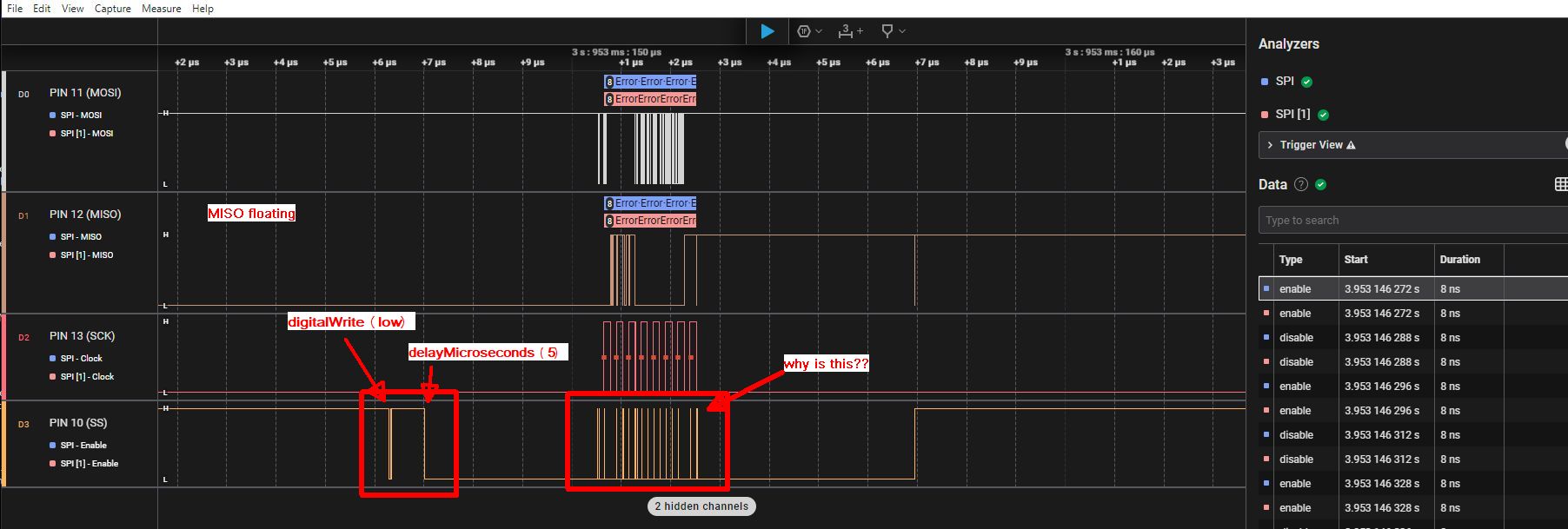
a logic analyzer monitors the voltage levels on the 4 pins. When I drive the SS low (pin 10 as Output) i expected the voltage level to go down and up only once when requested by the code, but instead the voltage level jumps between high/low randomly causing the SPI transmission to fail. I cannot figure out what the problem is. I can overcome the unstability at the beginning when SS goes low by adding a delay of 50 microsec, but during the SPI transmission the SS pin is jumping up and down.
The logic analyzer is connected straight to the Arduino pins using the same single ground pin on the POWER connector of the Arduino for all 4 channels.
Master Code
#include <SPI.h>

void setup (void)
{
  Serial.begin (115200);

  // pinMode(SS, OUTPUT);
  // digitalWrite(SS, HIGH);

  SPI.begin ();   // setting SS as OUTPUT and set to HIGH

  Serial.println ("start...");
}  // end of setup

void loop (void)
{
  byte a;

  delay(5000);  // give time to start analyzer

  digitalWrite(SS, LOW);
  delayMicroseconds(5);  // give some time to settle

  byte a = SPI.transfer ('a');  // send ASCII a
  delayMicroseconds(20);

  digitalWrite(SS, HIGH);

while(1){};  // don't loop, wait for reset

}  // end of loop
I have tried all different variations of the delay and also setting the register (PORTB) istead of the function digitalWrite Voltage levels look always similar.
If you don't set pin 10 as OUTPUT, then it's in input mode, when you set it HIGH it enable pullup resistor but when you set it LOW it stays at high impedance.
As a result, you get noise and only God knows what happens to communication.
Thanks for the respond. I thought SPI.begin() does all that. However I added the pinMode
#include <SPI.h>

void setup (void)
{
  Serial.begin (115200);

  pinMode(SS, OUTPUT);      // get GPIO control over pin10 (SS)
  digitalWrite(SS, HIGH);   // set to high for now
  SPI.begin ();

  Serial.println ("start...");

}  // end of setup

void loop (void)
{
  delay(5000);  // give time to start analyzer

  digitalWrite(SS, LOW);        // select slave
  delayMicroseconds(5);      // give time to settle

  byte a = SPI.transfer ('a');
  delayMicroseconds (20);   // give time to slave to respond

  digitalWrite(SS, HIGH);    // disable Slave Select

  //------------------
  while(1){};   // don't loop, wait for reset

}  // end of loop
and here the screenshot, exactly the same behavior during the SPI transfer:
another check with all SPI pins cofigured. also send low command to SS twice, with the effect that only the first command shows jumps between high/low. Strange: MOSI is set high by Arduino and I cannot get it low with digitalWrite(MOSI, LOW); It seems that something is taking control in the background. Not sure if the logic analyzer has an influence.
#include <SPI.h>

void setup (void)
{
  pinMode(SS, OUTPUT);      // get GPIO control
  pinMode(MOSI, OUTPUT);    // get GPIO control
  pinMode(MISO, INPUT);     // give GPIO control to slave
  pinMode(SCK, OUTPUT);     // get GPIO control

  digitalWrite(SS, HIGH);   // set to high for now
  digitalWrite(MOSI, LOW);   // set to high for now
  digitalWrite(SCK, LOW);   // set to high for now

  SPI.begin ();

}  // end of setup


void loop (void)
{
  delay(5000);  // give time to start analyzer

  digitalWrite(MOSI, LOW);        // make sure MOSI is low
  delayMicroseconds(20);         // give time to settle

  digitalWrite(SS, LOW);            // select slave
  delayMicroseconds(20);        // give time to settle
  digitalWrite(SS, HIGH);           // de-select slave
  delayMicroseconds(20);        // give time to settle
  digitalWrite(SS, LOW);
  delayMicroseconds(20);

  byte a = SPI.transfer ('a');
  delayMicroseconds (20);       // give time to slave to respond

  digitalWrite(SS, HIGH);       // disable Slave Select

  //------------------
  while(1){};                           // don't loop, wait for reset

}  // end of loop
hi Jim, i'm using the classic Nano. the channels of the analyzer were and still are connected to the Nano ground next to the Reset pin. in the meantime I have connected all available Nano GRD pins together to a rail and then to the analyzer. The result is shown above in the screenshots
no USB connected this improved the jitter on MOSI, MISO, SCK, but not SS
external power source (12V)
no SPI enabled,
pure GPIO usage (pin10)
no use of function digitalWrite(), pure register bit setting
no timer interrupt
check both: from HIGH to LOW and visa-versa the jitter always occurs on the High>Low edge, the L>H edge is fine
void setup (void)
{

  DDRB |= B00000100;        // set pin10 as output
  cli();                    // stop all interrupts
  TIMSK0 &= ~(1 << TOIE0);  // set bit TOIE0 in the TIMSK0 register to zero to disable timer0 interrupt
  sei();                    // allow interrupts
  //PORTB |= B00000100;       // pin 10(SS) to high

}  // end of setup

void loop (void)
{

 //digitalWrite(SS, HIGH);
 PORTB |= B00000100;        // pin 10(SS) to high
 delayMicroseconds (50);    // length of the low signal

 //digitalWrite(10; LOW);
 PORTB &= B11111011;        // pin 10(SS) to low
 delayMicroseconds (50);    // length of the low signal

}  // end of loop
Please, add another NANO or UNO as a SPI-Slave with your SPI-Master and keep executing the sketch of post #1. I am sure you will see the Serial Monitor of Slave is pronting 'a' at 1-sec interval.
#include <SPI.h>

void setup (void)
{
  Serial.begin (115200);
  SPI.begin ();   // setting SS as OUTPUT and set to HIGH
  digitalWrite(SS, LOW);
  Serial.println ("start...");
}  // end of setup

void loop (void)
{
  byte y = SPI.transfer ('a');  // send ASCII a
  delayMicroseconds(20);
  digitalWrite(SS, HIGH);

  delay(1000);//while(1){};  // don't loop, wait for reset

}  // end of loop
Slave Sketch:
#include<SPI.h>
char ch;

void setup()
{
  Serial.begin(9600);
  pinMode(SS, INPUT_PULLUP);
  pinMode(MISO, OUTPUT);
  bitClear(SPCR, MSTR);  //UNO-2 is Slave
  bitSet(SPCR, SPE);  //SPI Port is created
  SPI.attachInterrupt();  //LIE, GIE are active
}

void loop()
{
    if(flag == true)
   {
       Serial.println(ch);
       flag = false;
   }
}

ISR(SPI_STC_vect)
{
     ch = SPDR;
     flag = true;
}
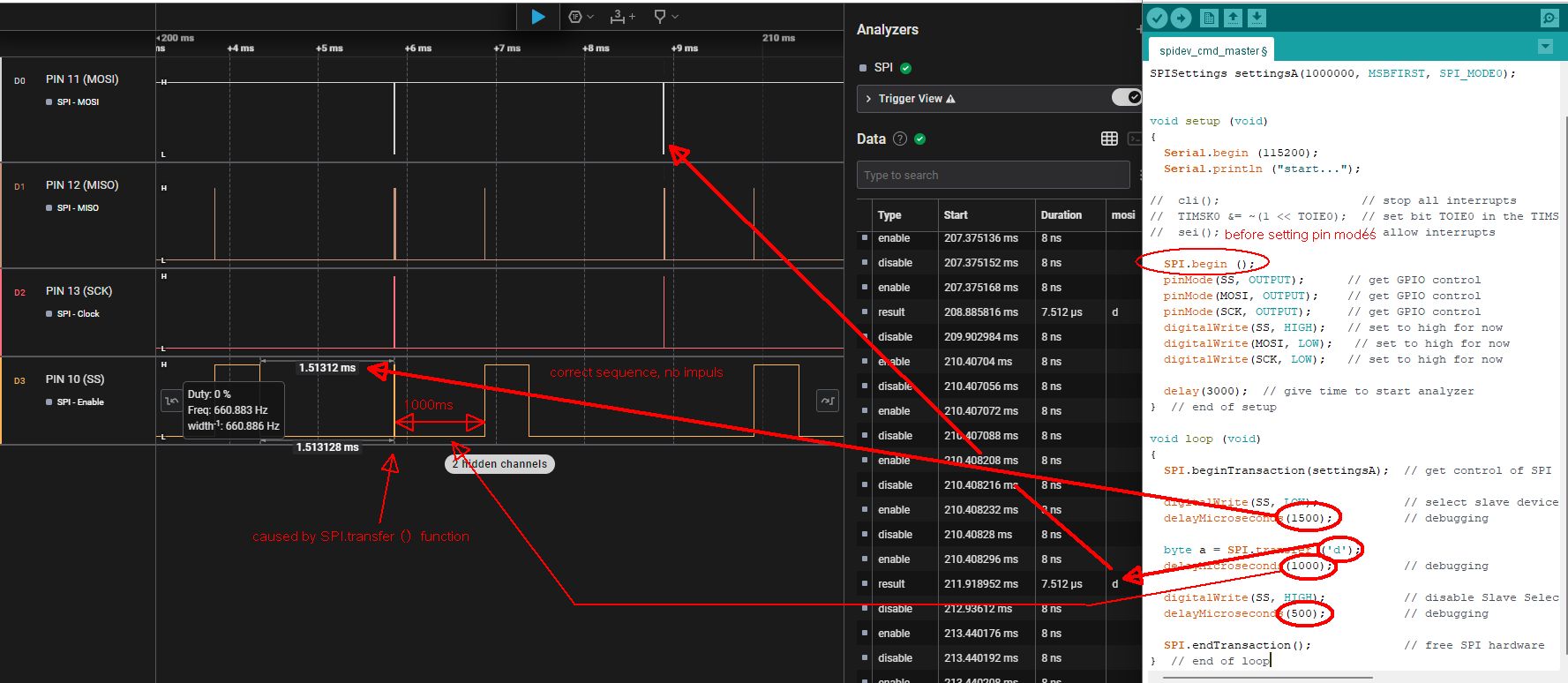
yes I tried with a brand new Arduino Nano. Same effect. I managed some sort of success where the communication was good and in the next sequence corrupted again. The corruption was casued by the high pulses on SS during SPI.transfer(). I have programmed a delay before and after the transfer (1500ms before and 1000 after). I can see these delays and in between the pulse. Somethimes no pulse and the delay adds up to 2500ms, this is when communication goes through correctly. here the sreenshot:
I think, i will give up. that's too frustrating. I have a spare Adafruit FeatherM4 board. Maybe this gives more satisfaction I will post.
Many thanks so far, ralf
Yes, I agree. I just reloaded one of the first sketches with "Hello, world!" transfer. And it is received by the slave (UNO) and shown on the serial monitor. I set the lowest speed on the the Nano-Master at 250kHz. Still the analyzer's SPI interpreter shows totally different characters and many faulty transfers. So yes , I agree: the analyzer itself or the driver seems to have issues. So, frustrating, but well some kind of success to get further Many thanks, really appreciated.
A Saleae 8 channel. I bought couple of years ago. I had to update the driver to the latest version of software. Maybe that is causing a problem. It was a major software change according to Saleae, even the former configuration files won't open in the new version. So, I guess that may be an issue.
Never the less, there was an interessting discussion back in 2012 around pulses on SS pin due to SPI.begin() mentioned in the SPI source files. But that couldn't be the issue in my case ... and actually it wasn't.




 I will post.