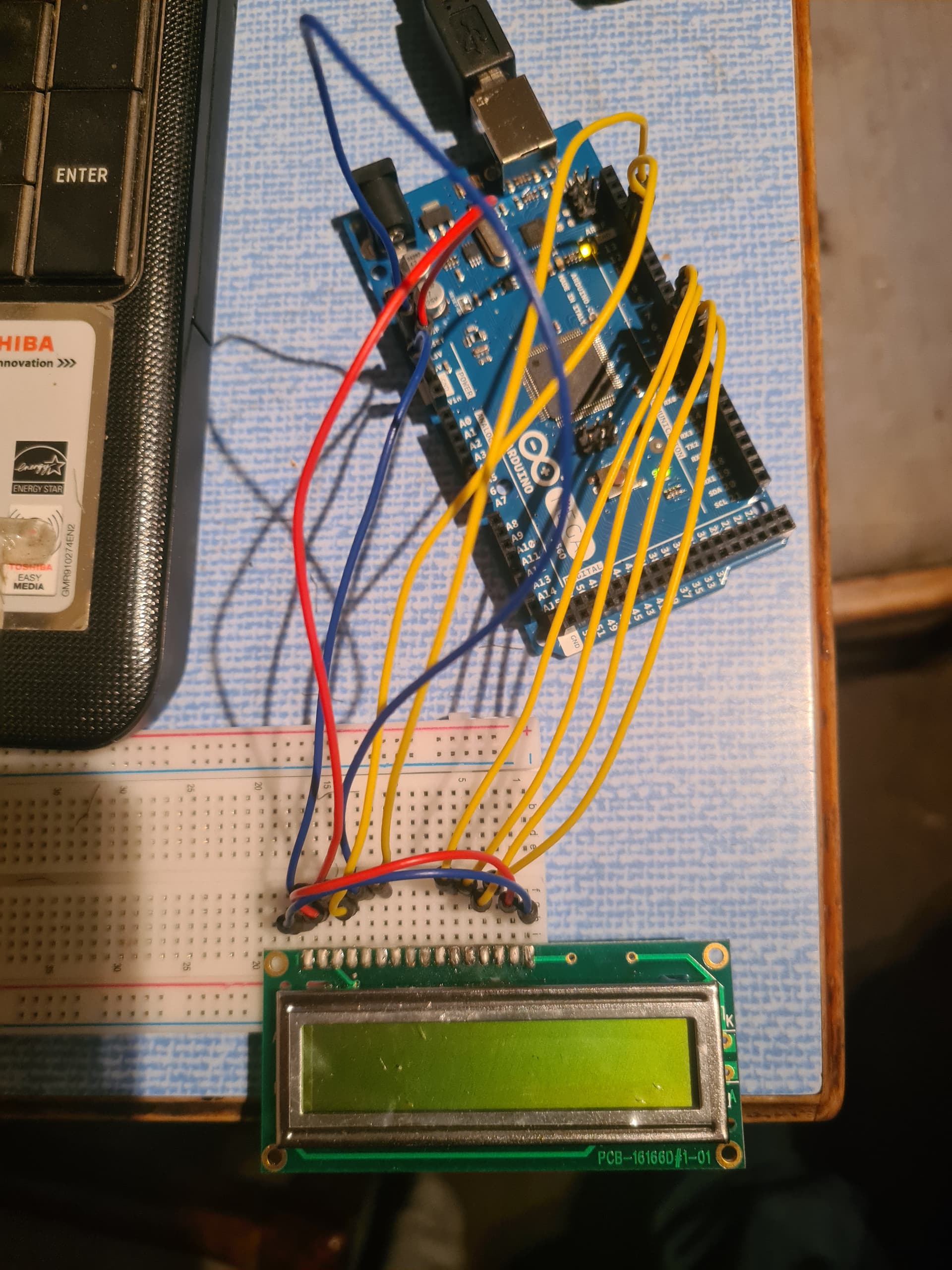
Thank you - its very much appreciated
1 Like
It used to be EAGLE (many of the arduino product schematics and pcbs are done in EAGLE) but they got bought and sold a couple of times, and things aren’t looking so good.
KICAD is heir apparent. Free!
These days there are several packages with free “limited” versions that are ok for small schematics, and online versions from some pcb manufacturers. “Diptrace” gets mentioned fairly often.
So out of interest can i have separate windows in sketch or is it just one big file lol
Can you open the main code in a separate text editor such as Textpad and write the code in there?
Thank you...
Ok can't get any code to work lol
Checked libraries folder and its empty...
Where would the board setup files be located?
Basically nothing appears to be happening, as if the gpio pins have not been correctly assigned or i have mistakenly picked up the wrong pins on the board.
I expected to find an lcd.h or LiquidCrystal.h library etc
Code compiles and uploads ok to the board.
Trying to get the lcd working


Just searched all files on C drive and there are no files with the file extension .h
Looks like i'm all the setup files missing
Although it says running windows 10 was originally a windows 7 machine...
Code compiles and uploads ok to the board.
Do you have the "Hidden items" box checked?

Just reinstalled the package from a fresh download and got the file's now...
So using the basic demo code unable to get the lcd to work...
Must be using the wrong pins...
Has to be something silly...
You know (or should) the drill: code and schematic, please, if you srsly asking for help.
At least a pointer to where you are getting this example from, and certainly make sure we know which of several hundred LCD libraries you've chosen, and exactly what kind of LCD device you are working with.
Even if you said earlier. It is easier for you to repeat yourself for whatever that costs than to send us all each and every one reading the thread to see if you've already done.
Ppl get LCDs to function alla time, using an example sketch is a Very Good Idea as it always is. We'll get there.
a7
Post your code and am image of how it's connected. Give us something to work with.
It's usually something simple.
Code is the Arduino LCD "hello world"
LCD is a 16x1 so tweaked code from 16x2 to 16x1
Pin out as per schematic and code layout, rs en r/w to gnd - pins D4 to D7 used - very basic
Tried the Serial code routine with a 10k pot on A0 - get a value of what looks like 687 streaming with no delay so unable to see if value is changing.
Has to be something very stupid im doing.
Whilst im walking my through the basics and understanding the board i am only using the example code
Please a link. Or post the code and schematic. There are too many ways to go wrong following your text instructions as to how we can see what you have in front of you.
Like applying some tweak you thought was going to help. Without seeing it, it does sound plausible. Since you have not yet the joy of getting this to work, we need to see if you've inadvertently bungled something.
If you srsly asking for our help.
a7
Struggling as computer is so slow to use online - so using phone - ill try again tomorrow.
Code is only a few lines found in the example basics hello world
Basically this is what i am following...
Cannot see how i can this wrong unless the LCD is faulty...
So tomorrow will get the scope out and check whats happening
Until i get a decent computer after Christmas when i start my new job the one im using isnt powerful enough to run basic schematic software
A photo of a schematic drawn with pencil on paper will do.
As well, remember, for multiple identical inputs and outputs, there shouldn't be a problem with a single circuit drawn for each type, with a note about which pins are wired which way. Save a lot of pain if you're wiring 54 LEDs on a Mega!