Stepper motor managed by HC05 using App Inventor

Background:
Hi, everyone. I would like to control the number of steps that my Stepper motor Nema 17 is going to do with HC 05 Bluetooth device. The data is sent through an App created in App Inventor. Basically, I'm going to send the number of steps from App to Arduino and the Nema would do it.

Problem:
I have sent the data from the App inventor to Arduino but data received were these: "22:40:47.198 -> entrada: x⸮⸮x" or "22:31:11.631 -> x 22:31:11.631 -> ⸮" When the data type read it is Chart or String and "120 128 128 120" when the data type read it is Int. For both cases, I used "1" (one) as the input data in the TextBox1.

Coments
I have used Serial.print and Serial.println to control data which I have been receiving constantly from the Bluetooth device.

I thank your help. If you need an extra explanation, please, ask me.

App Inventor Blocks

image

App Inventor Design

image

Arduino Code

#include <SoftwareSerial.h>

#define STEP 4
#define DIR 5

SoftwareSerial myBT(10, 11);

void setup() {
  pinMode(STEP, OUTPUT);
  pinMode(DIR, OUTPUT);
  Serial.begin(9600);
  Serial.println("Ready");
  myBT.begin(38400);
}

void loop() {
  if (myBT.available()) {
     // Read the data
     int entrada = myBT.read();

    // Print the received number
    Serial.print("entrada: ");
    Serial.println(entrada);
    
    // Perform any actions based on the received number
    // For example, controlling stepper motor
    if (entrada >= 0)
    digitalWrite(DIR, LOW);

    if (entrada < 0)
    digitalWrite(DIR, HIGH);
    
for (int i = 0; i < entrada; i++) {
       Serial.print("i: ");
       Serial.println(i);
      digitalWrite(STEP, HIGH);
      delay(10);
      digitalWrite(STEP, LOW);
      delay(10);
    }
  }
}

I would suggest that you follow a sequential development process.

  1. Get the program working as you want with Serial input from the monitor.

  2. Get the program working as you want with Bluetooth input from a commonly used app like Kai Morich's Serial Bluetooth Terminal.

  3. Write the app inventor code to replace the Terminal app.

Thanks for your comments.

I've done the first and third steps but I haven't done the second.

I will post what I get.

Can you post the code for Serial Input from the monitor?

I don't see how you can enter a number like -200 and read it with this
int entrada = Serial.read();

Sure, but I read with int entrada = Serial.parseInt(); as follow:

#include <SoftwareSerial.h>
#define STEP 4
#define DIR 5
int i = 0;

SoftwareSerial myBT(10, 11);

void setup() {
  pinMode(STEP, OUTPUT);
  pinMode(DIR, OUTPUT);
  Serial.begin(9600);
  Serial.println("Listo");
  myBT.begin(38400);

}

void loop() {
    if (Serial.available()>0){
      // Steps   
      int entrada = Serial.parseInt();    
      Serial.print("entrada: ");
      Serial.println(entrada);
      // Spin direction: LOW = counterclockwise y HIGH = clockwise
      if (entrada >= 0)
      digitalWrite(DIR, LOW);
      if (entrada < 0)
      digitalWrite(DIR, HIGH);
      // Spins   
      for (i = 1; i<=abs(entrada);i++){
          Serial.print("i: ");
          Serial.println(i);
          digitalWrite(STEP, HIGH);
          delay(10);
          digitalWrite(STEP, LOW);
          delay(10);            
      }      
      }      
}

This is the output in the Serial monitor:

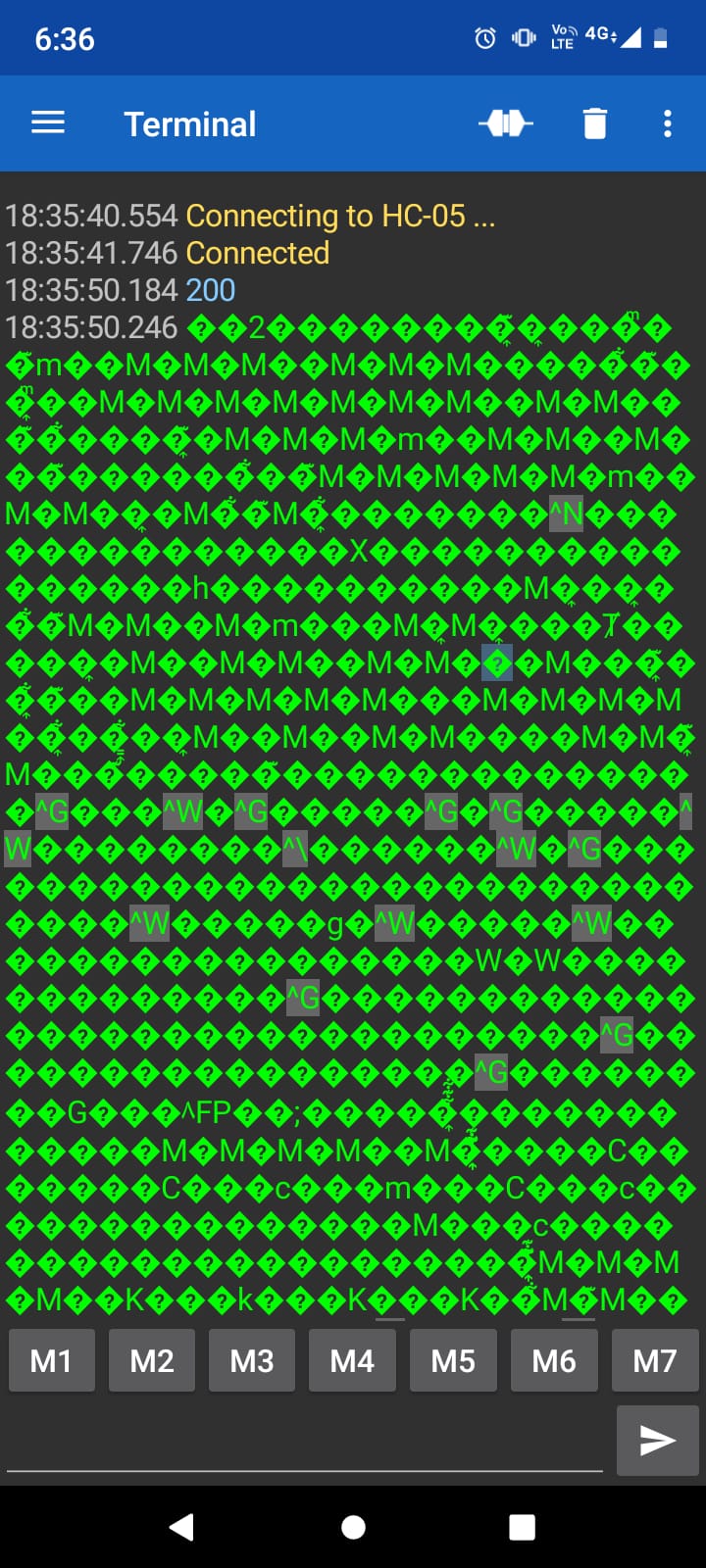
I have tried the Kai Morich's Serial Bluetooth Terminal with this code:

#include <SoftwareSerial.h>
#define STEP 4
#define DIR 5
int i = 0;

SoftwareSerial myBT(10, 11);

void setup() {
  pinMode(STEP, OUTPUT);
  pinMode(DIR, OUTPUT);
  Serial.begin(9600);
  Serial.println("Listo");
  myBT.begin(38400);

}

void loop() {
    if (myBT.available()>0){
      // Steps   
      int entrada = myBT.parseInt();    
      myBT.print("entrada: ");
      myBT.println(entrada);
      // Spin direction: LOW = counterclockwise y HIGH = clockwise
      if (entrada >= 0)
      digitalWrite(DIR, LOW);
      if (entrada < 0)
      digitalWrite(DIR, HIGH);
      // Spins   
      for (i = 1; i<=abs(entrada);i++){
          myBT.print("i: ");
          myBT.println(i);
          digitalWrite(STEP, HIGH);
          delay(10);
          digitalWrite(STEP, LOW);
          delay(10);            
      }      
      }      
}

and it happened when I wrote a number:

But, changing int entrada = myBT.parseInt(); by int entrada = myBT.read(); as follow:

#include <SoftwareSerial.h>
#define STEP 4
#define DIR 5
int i = 0;

SoftwareSerial myBT(10, 11);

void setup() {
  pinMode(STEP, OUTPUT);
  pinMode(DIR, OUTPUT);
  Serial.begin(9600);
  Serial.println("Listo");
  myBT.begin(38400);

}

void loop() {
    if (myBT.available()>0){
      // Steps   
      int entrada = myBT.read();    
      myBT.print("entrada: ");
      myBT.println(entrada);
      // Spin direction: LOW = counterclockwise y HIGH = clockwise
      if (entrada >= 0)
      digitalWrite(DIR, LOW);
      if (entrada < 0)
      digitalWrite(DIR, HIGH);
      // Spins   
      for (i = 1; i<=abs(entrada);i++){
          myBT.print("i: ");
          myBT.println(i);
          digitalWrite(STEP, HIGH);
          delay(10);
          digitalWrite(STEP, LOW);
          delay(10);            
      }      
      }      
}

This happens:

//myBT.begin(38400);
myBT.begin(9600);

Software serial is not reliable at 38400 baud.

When I change the baud rate to 9600, the sketch works correctly with
int entrada = myBT.parseInt();

EDIT: If you indeed need higher baud rates between the Arduino and the HC05, you can connect it to the hardware serial pins 0 and 1 after the program loaded on the Arduino. It must be disconnected for program loading. If the module is connected to the hardware serial pins, input can only come from the module but the output will be available on the monitor and the android program.

This topic was automatically closed 180 days after the last reply. New replies are no longer allowed.